

What is a Web API?
A Web API (Application Programming Interface) is a set of HTTP-based endpoints that allow systems, applications, or devices to communicate over the web.
Examples
Retrieving weather data from a weather API.
Sending payments using the Stripe API.
Fetching user data from your own backend for a mobile app.
Key features
Communicates using HTTP(S)
Returns structured data (JSON, XML, etc.)
Follows REST, GraphQL, or gRPC conventions
Enables machine-to-machine communication
Types of Web APIs
| Type | Description | Example |
|---|---|---|
| REST API | Resource-based, uses HTTP verbs (GET, POST, PUT, DELETE) | Twitter API, Shopify API |
| SOAP API | XML-based, strict contract using WSDL | Legacy banking systems |
| GraphQL API | Flexible querying, client decides what data to fetch | GitHub GraphQL API |
| gRPC API | High-performance, uses Protocol Buffers, ideal for microservices | Kubernetes API server |
| Webhooks | Event-driven callbacks sent to a URL | Stripe sends payment success event |
Core Concepts of RESTful Web API
Resources → Represented by URLs (e.g.,
/products/123)HTTP Verbs →
GET= ReadPOST= CreatePUT/PATCH= UpdateDELETE= Remove
HTTP Status Codes
200 OK,201 Created,400 Bad Request,401 Unauthorized,404 Not Found
Statelessness → Each request is independent, no server-side session
JSON Format → Most common response payload
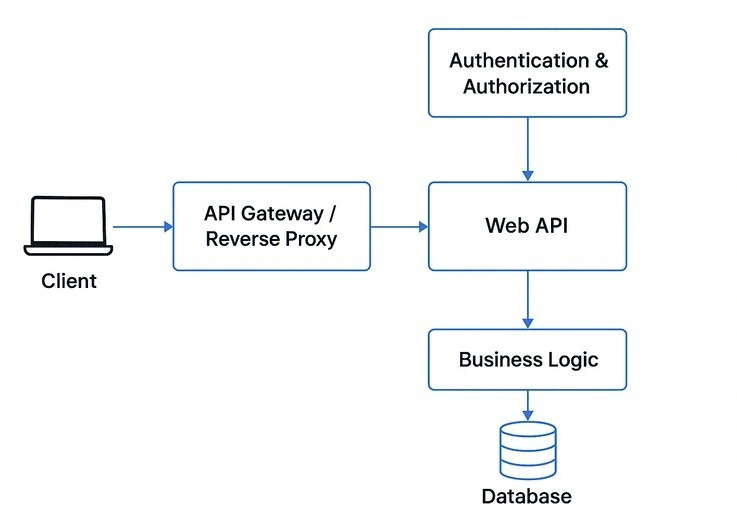
Web API Architecture
A typical Web API architecture includes:
Client (browser, mobile app, other service)
API Gateway / Reverse Proxy (optional, for routing & security)
Web API Layer (controllers, endpoints)
Business Logic Layer (services)
Data Access Layer (database / external APIs)
Persistence (SQL, NoSQL)
Authentication & Authorization (JWT, OAuth2)
Building a Web API (Step-by-Step)
Example: .NET Web API
Create a Project
dotnet new webapi -n ProductApiDefine Model
public class Product {
    public int Id { get; set; }
    public string Name { get; set; }
    public decimal Price { get; set; }
}
Create Controller
[ApiController]
[Route("api/[controller]")]
public class ProductsController : ControllerBase {
    private static List<Product> _products = new();

    [HttpGet]
    public IActionResult GetAll() => Ok(_products);

    [HttpPost]
    public IActionResult Create(Product product) {
        product.Id = _products.Count + 1;
        _products.Add(product);
        return CreatedAtAction(nameof(GetAll), product);
    }
}
Run & Test
Use Swagger (built into .NET Web API template)
Test with Postman or
curl
Best Practices for Web APIs
✅ Use Versioning – api/v1/products
✅ Return Proper HTTP Codes – 404 for not found, 400 for bad input
✅ Validation & Error Handling – Always return meaningful errors
✅ Pagination, Filtering, Sorting – For large datasets
✅ Rate Limiting & Throttling – Prevent abuse
✅ Caching – ETag, HTTP cache headers for performance
✅ OpenAPI/Swagger Docs – Self-documenting APIs
Security Considerations
HTTPS Only – Encrypt all traffic
Authentication
JWT (JSON Web Token)
OAuth2 (for third-party integrations)
API Keys (for internal systems)
Authorization – Role-based access (RBAC)
Input Sanitization – Prevent injection attacks
CORS Policy – Restrict allowed origins
Rate Limiting – Protect against DDoS
Testing & Monitoring
Unit Tests – Test services and controllers
Integration Tests – Test API endpoints with mock database
Postman/Newman – Manual and automated testing
Load Testing – JMeter, k6 for performance testing
Logging & Tracing – Serilog, OpenTelemetry
API Monitoring – New Relic, Datadog, Prometheus + Grafana
API Analytics
Track key metrics:
Request Volume (per endpoint)
Latency & Response Time
Error Rate
Top Consumers (API keys, users)
Revenue (if monetized)
Real-World Use Cases
E-commerce → Product catalog APIs, order APIs
Banking → Payment APIs, transaction APIs
Social Media → Post, comment, like APIs
IoT → Device telemetry APIs
SaaS → Integrations with external CRMs, ERPs
Join the conversation! Your thoughts help the community grow.