
Introduction
Sometime application need to perform long
running tasks and yet it should be responsive. Or we need to execute multiple
task simultaneously to boost the performance of the application. In window
application <strong>BackgroundWorker</strong> provide straightforward solution.
<strong>System.Threading</strong> class provides all tools we need to develop
good multi-threaded application. Here I will implement Event-Base Asynchronous
pattern in the class which will support Asynchronous version of method.
Event-Based Asynchronous Pattern(EAP)
The class that supports EAP will have Asynchronous version of method. Class will
have more one or more methods named <em>MethodName</em>Async. It will also may
have MethodNameCompleted event which will be raised when the asynchronous method
complete processing. There can be corresponding cancel method <em> MethodName </em> Cancel
to cancel the process in middle. This is an standard pattern which hide the
complexity of asynchronous execution of any method. EAP will allow us to :
- Perform time-consuming task; downloads and database operations "background", without interrupting our application.
- Execute multiple operations simultaneously, receiving notification when each completes. It also allow same operation to run multiple time simultaneously.
- Wait for resources to become available without hanging the application.
- Communicate with Asynchronous operation using ever
- MethodNameCompleted is a type of MethodNameCompletedEventHandler
event, that except MethodNameCompletedEventArgs which is inherits AsyncCompletedEventArgs
Implementing EAP in a class
Class will have Synchronous(<strong>Method1</strong>) method and two overloaded
Asynchronous(<strong>Method1Async</strong>) methods. Why two overloaded
Asynchronous methods? If we need to call method multiple times for different
values and there is only one aysnc method Method1Async( string message ), we
can't call method second time until first asynchronous call completes. Otherwise
it will throw InvalidOperationException. To avoid this situation we will create
overloaded method which will except one more parameter calls Method1Async(string
message, object userState). This method can be call multiple time with unique
userState method and every call run asynchronously and independent to each
other.
Create Completed Event Handler Delegate
First we have to create public Method1CompletedEventHandler delegate
<strong>outside of the class</strong> in same name space. This will except
Method1CompletedEventArgs as one event argument paramete
public delegate void Method1CompletedEventHandler( object sender, Method1CompletedEventArgs e );
public class Method1CompletedEventArgs : AsyncCompletedEventArgs
{
public Method1CompletedEventArgs(Exception ex, bool canceled, object userState)
: base(ex, canceled, userState)
{
}
As Method1CompletedEventArgs is inherited from AsynchCompletedEventArgs ,
constructor must have three minimum parameters
- Error (Exception): Any exception occurred during the operation.
- Canceled (boolean): Whether the operation canceled before it complete.
- userState (object): Any user object ( may be sum result expected from the method ).
It can have many other parameter as per requirement.
Creating Class
public class MyAsyncDemo
{
//delegate will execute main worker method asynchronously
private delegate void WorkerEventHandler(string message, AsyncOperation asyncOp);
//This delegate raise the event post completing the async operation.
private SendOrPostCallback onCompletedDelegate;
//To allow async method to call multiple time, We need to store tasks in the list
//so we can send back the proper value back to main thread
private HybridDictionary tasks = new HybridDictionary();
//Event will we captured by the main thread.
public event Method1CompletedEventHandler Method1Completed;
public MyAsyncDemo()
{
onCompletedDelegate = new SendOrPostCallback(CompletedDelegateFunc);
}
/// <summary>
/// This function will be called by SendOrPostCallback to raise Method1Completed Event
/// </summary>
/// <param name="operationState">Method1CompletedEventArgs object</param>
private void CompletedDelegateFunc(object operationState)
{
Method1CompletedEventArgs e = operationState as Method1CompletedEventArgs ;
if (Method1Completed != null)
{
Method1Completed(this, e);
}
}
/// <summary>
/// Synchrnous version of the method
/// </summary>
/// <param name="message">just simple message to display</param>
public void Method1(string message)
{
for (int i = 0; i < 10; i++)
{
Thread.Sleep(3000);
Console.WriteLine(message + " " + i.ToString());
//Do some time consuming process
}
}
/// <summary>
/// Asynchoronous version of the method
/// </summary>
/// <param name="message">just simple message to display</param>
/// <param name="userState">Unique value to maintain the task</param>
public void Method1Async(string message, object userState)
{
AsyncOperation asyncOp = AsyncOperationManager.CreateOperation(userState);
//Multiple threads will access the task dictionary, so it must be locked to serialze access
lock (tasks.SyncRoot)
{
if (tasks.Contains(userState))
{
throw new ArgumentException("User state parameter must be unique", "userState");
}
tasks[userState] = asyncOp;
}
WorkerEventHandler worker = new WorkerEventHandler(Method1Worker);
//Execute process Asynchronously
worker.BeginInvoke(message, asyncOp, null, null);
}
/// <summary>
/// This method does the actual work
/// </summary>
/// <param name="message"></param>
/// <param name="asyncOp"></param>
private void Method1Worker(string message, AsyncOperation asyncOp)
{
for (int i = 0; i < 10; i++)
{
Thread.Sleep(3000);
Console.WriteLine(message + " " + i.ToString());
//Do some time consuming process
}
lock (tasks.SyncRoot)
{
tasks.Remove(asyncOp.UserSuppliedState);
}
Method1CompletedEventArgs e = new Method1CompletedEventArgs(null, false, asyncOp.UserSuppliedState);
asyncOp.PostOperationCompleted(onCompletedDelegate, e);
}
}
Each time Method1Async will be called with unique userState value, method
creates an object of AsyncOperation class. AsyncOperation use to track the
lifetime of asynchronous operation. It provides a way to track and report the
progress of the task. To indicated asynchronous task has completed or canceled
or error occurred , AsyncOperation provide a method PostOperationCompleted
method which we use to raise Method1Completed event.
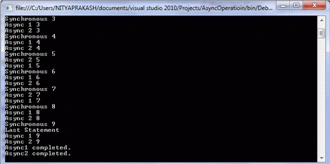
When u run the code it will show result as below.; Result will be vary machine
to machine. But you see, all methods are being executed simultaneously.
Output
Wrapping Up
Executing long running operation asynchronously not only improve the performance
of the operation, it also make the UI responsive. User don't need to sit idle
until the operation completed. This is not the only way to implement
asynchronous mechanism. There are several ways to accomplish to this. EAP is
very use full If you are waiting for all operation completion need to be
notified. You can implement Method1ProgressChangedEventHandler similar way which
can report the progress. It is very helpful for download or upload operations.
Instead of raising event, you can create method by passing call back method
which will execute when operation completes.
Jae Hyuk JangPosted Jul 24, 2015, 1:59 AM
thanks, this a lot help to me.
Monika AroraPosted Dec 20, 2011, 12:28 AM
Hi Nitya.Nice article.
Arjun PanwarPosted Dec 19, 2011, 11:55 PM
Nice presentation
Sonakshi SinghPosted Dec 19, 2011, 11:53 PM
So m i.... so thanks from my side as well..
Alok PandeyPosted Dec 19, 2011, 11:53 PM
Nice article.
Akash AhlawatPosted Dec 19, 2011, 11:51 PM
I am looking for this type of article... Thanks Nitya