

ERROR_LINE Function
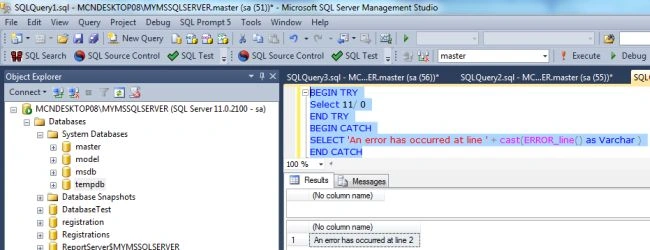
The Error_Line function returns the error Line number from code. This function does not accept any parameters. The Error_Line() function is used to determine the error line which occurred in a try block. The following query returns the line number where the error occurred:
BEGIN TRY
Select 11/ 0
END TRY
BEGIN CATCH
SELECT 'An error has occurred at line ' + Cast(ERROR_line() as Varchar )
END CATCH
Output
ERROR_NUMBER Function
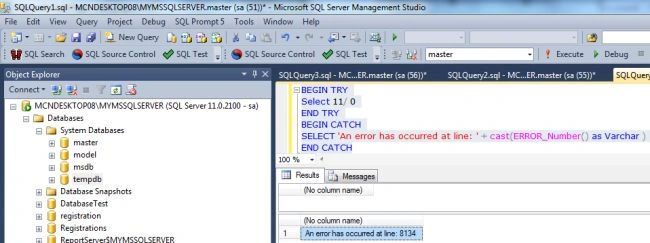
The ERROR_NUMBER function returns the number of the error which caused the CATCH block of TRY or CATCH logic to execute. The following query returns the number where the error occurred:
Example
BEGIN TRY
Select 11/ 0
END TRY
BEGIN CATCH
SELECT 'An error has occurred at line: ' + Cast(ERROR_Number() as Varchar )
END CATCH
Output
ERROR_STATE Function
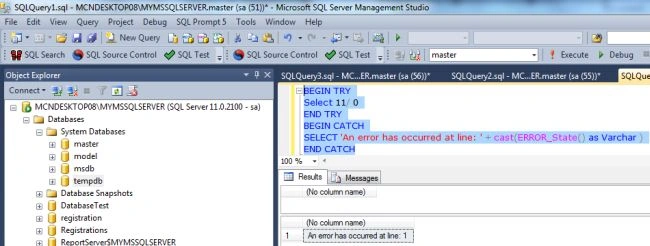
The ERROR_STATE function returns the state of the error which caused the CATCH block of TRY or CATCH logic to execute. The following query returns the State where the error occurred:
Example
BEGIN TRY
Select 11/ 0
END TRY
BEGIN CATCH
SELECT 'An error has occurred at line: ' + Cast(ERROR_State() as Varchar )
END CATCH
Output
ERROR_SEVERITY Function
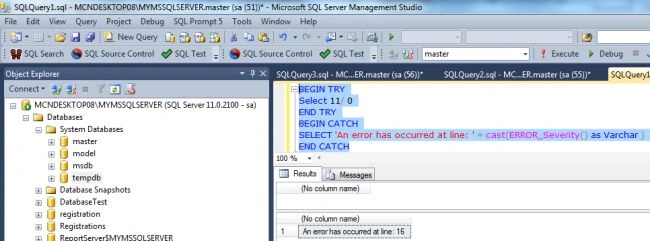
The ERROR_SEVERITY function returns the severity of the error which caused the CATCH block of TRY or CATCH logic to execute. The following query returns the severity where the error occurred:
Example
BEGIN TRY
Select 11/ 0
END TRY
BEGIN CATCH
SELECT 'An error has occurred at line: ' + Cast(ERROR_Severity() as Varchar )
END CATCH
Output
THROW Statement
In SQL Server 2005/2008
In SQL Server 2005/2008, if you want to re-throw an error in a catch block of a TRY CATCH statement, you have to use RAISERROR with ERROR_MESSAGE() and ERROR_SEVERITY(). But in SQL Server 2012 you can use only a THROW statement to re-throw an error in a catch block of a TRY CATCH statement.
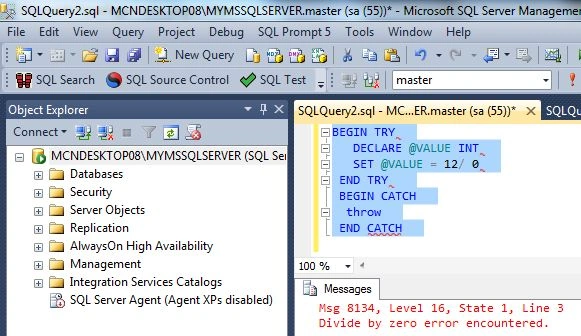
We divide a number by zero. A THROW statement is used to raise exceptions; see:
BEGIN TRY
DECLARE @VALUE INT
SET @VALUE = 12/ 0
END TRY
BEGIN CATCH
throw
END CATCH
Now press F5 to execute it; the results will be:
Join the conversation! Your thoughts help the community grow.