

Introduction
In this lesson, we will briefly discuss about the below points with an example.
- What is Python?
- Python features
- Environment setup
- My first application using Python
- Python keywords
So, let’s start with point number #1.
Python is an Object Oriented, interactive, interrupted and high-level programming language.
It’s like Perl, the Python source code available under the GNU General Public License.
Overview
It is designed to be highly readable and let’s discuss about the syntactical constructions compared with other languages.
- Object Oriented - Python supports Object Oriented Programming that encapsulates code within objects
- Interpreted - Python is executed at runtime interpreter. We must compile the program before executing the application. It’s same as PERL and PHP.
- Interactive - Python prompt can communicate with interpreter with your application or program.
Python futures
We have lot of futures in Python programming. It has keywords, structures and defined syntax in Python code.
The futures are,
- Easy to 1earn
- Easy to read
- Broad Standard Library
- East to Maintain
- Portable
- Extendable
- Broad Standard Library
- GUI Programming
- Scalable
Environment Setup
Here, we will discuss a step by step process to configure Python environment setup.
Step 1
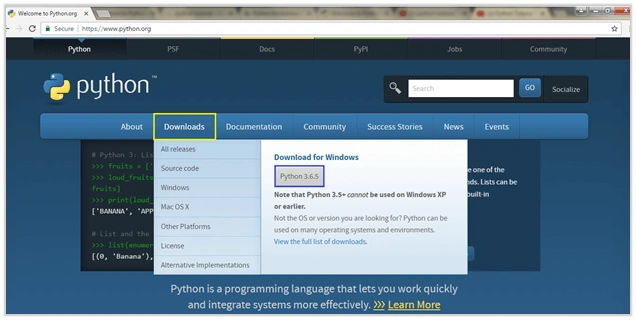
- Go to https://www.python.org site to install the software.
- Click on Download menu and select the “Python 3.6.5” version. You can see that in the below screenshot.
Step 2
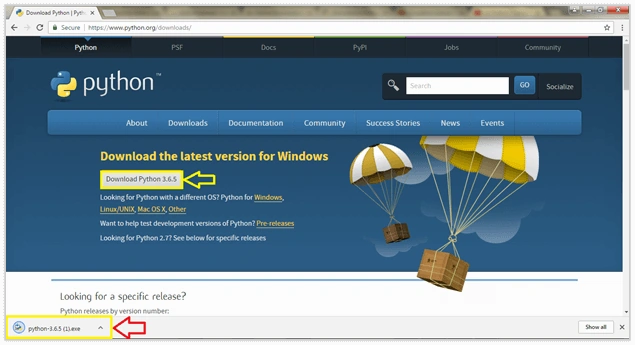
Click on the “Download Python 3.6.5” button. Then it will generate the .exe (executable) file on the browser window.
Step 3
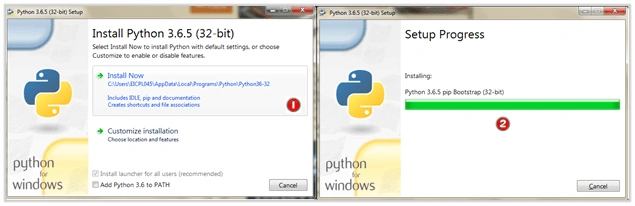
- Click the .exe file. You will get into the Python installation page
- So, you can directly hit the “Install Now” or if you want to customize the changes go with “Customization installation”
- Here, I selected “Install Now” option - find the point #1
- Screen #2 - Setup is processing.
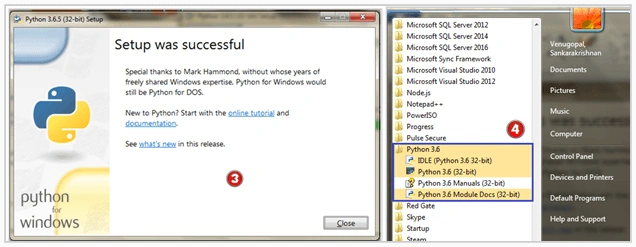
- Screen #3 - The Setup has been completed
- Screen #4 - You can see the Python command line and module documents on “Start - All Programs”.
My first application using Python
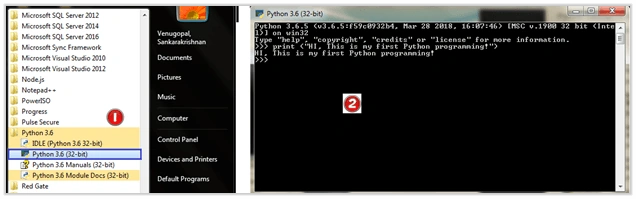
Go to Start - All Programs - Click on “Python 3.6”. You will see the comment prompt on the window.
Here, we are going to display the plain text on command prompt
Syntax
Print - It is a keyword used to display the text on window/prompt
And you enter the text in between open (“and close “)”
Example
Print (“Hello World”)
Enter the text on command prompt and hit enter. You can see result on the prompt.
Find the screenshot.
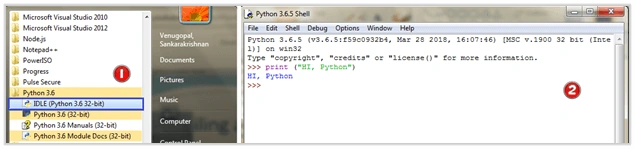
This is another way to execute the command lines on prompt. This windows looks like “White background”.
Error Message
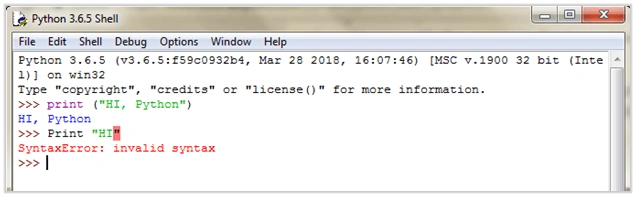
If you have not followed the syntax, you will get an error message on command prompt.
Find the above screenshot, we have forgotten to enter the open (and closing ) brace.
Make sure you are following the syntax.
Python Keywords
| Keywords | ||
| and | exec | not |
| assert | finally | or |
| break | for | pass |
| class | from | |
| continue | global | raise |
| def | if | return |
| del | import | try |
| elif | in | while |
| else | is | with |
| except | lambda | yield |
These are all the keywords we are using in the Python language.
I will briefly discuss about the Variables, Basic Operators, Conditions and Loops in my next session.
Please let me know if you any queries.
Join the conversation! Your thoughts help the community grow.