

Introduction
So, in 2008, Microsoft first introduced a technology called Entity Framework along with Asp.Net 3.5 Service Pack1 which basically automates the entire process of database connection and data retrieval steps. But in spite of that release, Entity Framework became the main topic of discussion in 2011 when Microsoft introduced Entity Framework along with the Code First Approach in the Asp.Net 4.1 version. The code first approach is mainly useful when we follow the Domain Driven Design or Development. In the process, we mainly focus on the domain structure of the application and start creating the classes or models for our domain entity rather than designing the database or its tables first. The entity classes or models which we create for designing the domain application will be mapped with the table objects of the database. The below image demonstrates the code first approach.

- Create or Modify the Entity Class
- Configure these class using Data Annotations or Fluent API
- Create the Database or Tables using Migration Command
- Design the Views on the basis of Model Class
Below the diagrams demonstrate the workflow of the Code First Approach.

So, in the Asp.net Core or Entity Framework Core, we can also perform the same code first approach for developing our applications. Basically, Entity Framework or Entity Framework core is an Open Source based Framework which totally depends on the Object Relational Mapping or ORM Model. This framework basically reduced the developer’s effort for establishing the database connection or save data to the database or retrieve data from the database. So, in this article, we will discuss how we can create a CRUD based operation in Asp.Net Core using Entity Framework Core in Code First Approach.
Perquisite- Visual Studio 2017 (Any Edition – Community / Professional / Enterprise)
- Microsoft SQL Server 2008 or above.
- .Net Core 2.1 SDK or Later Version
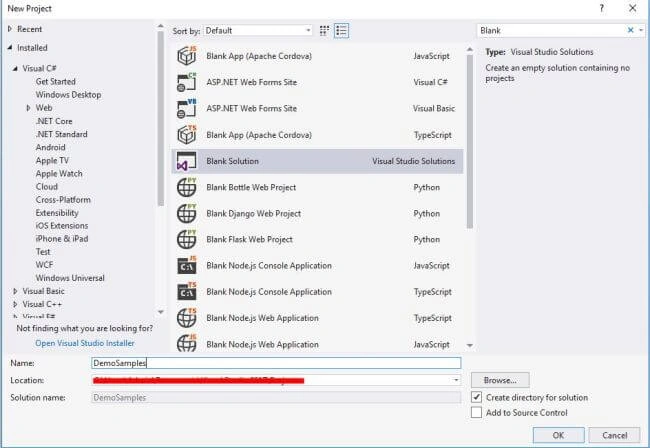
Step 2
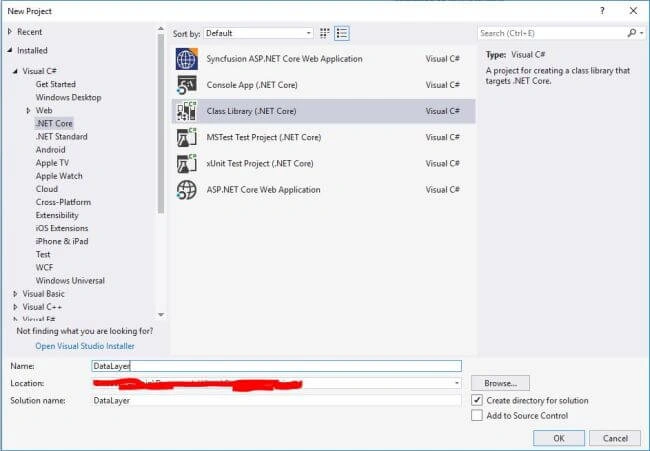
Step 3
- Microsoft.EntityFrameworkCore
- Microsoft.EntityFrameworkCore.SqlServer
- Microsoft.EntityFrameworkCore.Tools
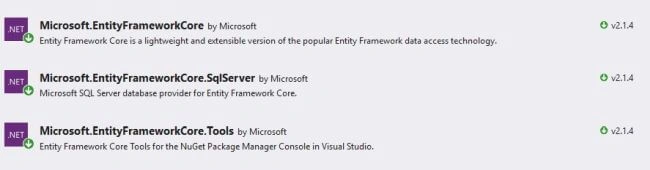
Step 4
- using System.ComponentModel.DataAnnotations;
- using System.ComponentModel.DataAnnotations.Schema;
- namespace DataContextLayer.Models
- {
- public class Department
- {
- public int DepartmentId { get; set; }
- public string DepartmentCode { get; set; }
- public string DepartmentName { get; set; }
- public string Description { get; set; }
- }
- }
- using System.ComponentModel.DataAnnotations;
- using System.ComponentModel.DataAnnotations.Schema;
- namespace DataContextLayer.Models
- {
- public class Designation
- {
- public int DesignationId { get; set; }
- public string DesignationCode { get; set; }
- public string DesignationName { get; set; }
- public int DepartmentId { get; set; }
- public string DepartmentName { get; set; }
- }
- }
Step 1
- using System.ComponentModel.DataAnnotations;
- using System.ComponentModel.DataAnnotations.Schema;
- namespace DataContextLayer.Models
- {
- [Table("Department", Schema = "dbo")]
- public class Department
- {
- [Key]
- [DatabaseGenerated(DatabaseGeneratedOption.Identity)]
- [Display(Name = "Department Id")]
- public int DepartmentId { get; set; }
- [Required]
- [Column(TypeName = "varchar(20)")]
- [Display(Name = "Department Code")]
- public string DepartmentCode { get; set; }
- [Required]
- [Column(TypeName = "varchar(100)")]
- [Display(Name = "Department Description")]
- public string DepartmentName { get; set; }
- [Column(TypeName = "varchar(100)")]
- public string Description { get; set; }
- }
- }
Step 2
- using System.ComponentModel.DataAnnotations;
- using System.ComponentModel.DataAnnotations.Schema;
- namespace DataContextLayer.Models
- {
- [Table("Designation", Schema = "dbo")]
- public class Designation
- {
- [Key]
- [DatabaseGenerated(DatabaseGeneratedOption.Identity)]
- public int DesignationId { get; set; }
- [Required]
- [Column(TypeName = "varchar(20)")]
- [Display(Name = "Designation Code")]
- public string DesignationCode { get; set; }
- [Required]
- [Column(TypeName = "varchar(100)")]
- [Display(Name = "Designation Name")]
- public string DesignationName { get; set; }
- [ForeignKey("DepartmentInfo")]
- [Required]
- public int DepartmentId { get; set; }
- [NotMapped]
- public string DepartmentName { get; set; }
- public virtual Department DepartmentInfo { get; set; }
- }
- }
Step 3
Step 4
- using DataContextLayer.Models;
- using Microsoft.EntityFrameworkCore;
- using System;
- using System.Collections.Generic;
- using System.Data.SqlClient;
- using System.Linq;
- using System.Text;
- using System.Threading.Tasks;
- namespace DataContextLayer.DataContext
- {
- public class EFDataContext : DbContext
- {
- public DbSet<Department> Departments { get; set; }
- public DbSet<Designation> Designations { get; set; }
- protected override void OnConfiguring(DbContextOptionsBuilder optionsBuilder)
- {
- optionsBuilder.UseSqlServer(@"data source=serverName; initial catalog=TestDB;persist security info=True;user id=sa");
- }
- }
- }
Step 1
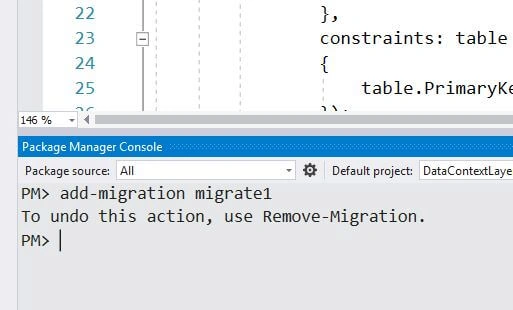
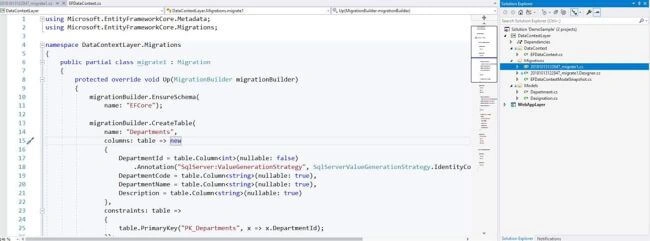
For creating or updating the database, run the command Update-Database in the console and then check the SQL server for the database and tables objects.
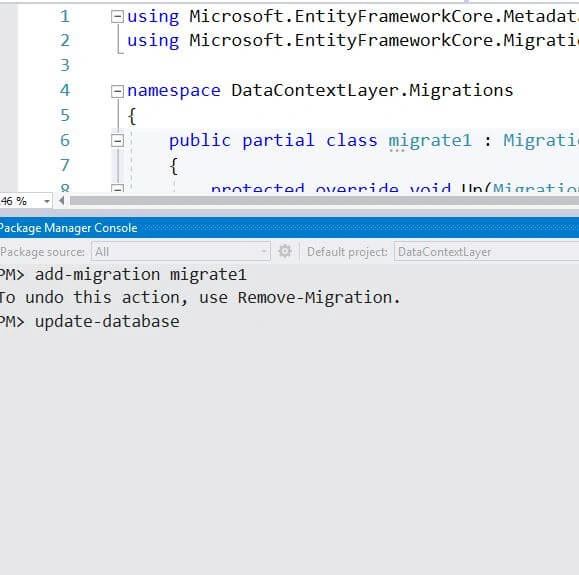
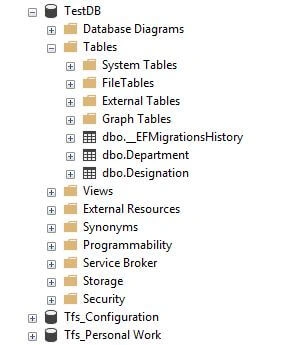
Now check the database Object Explorer,
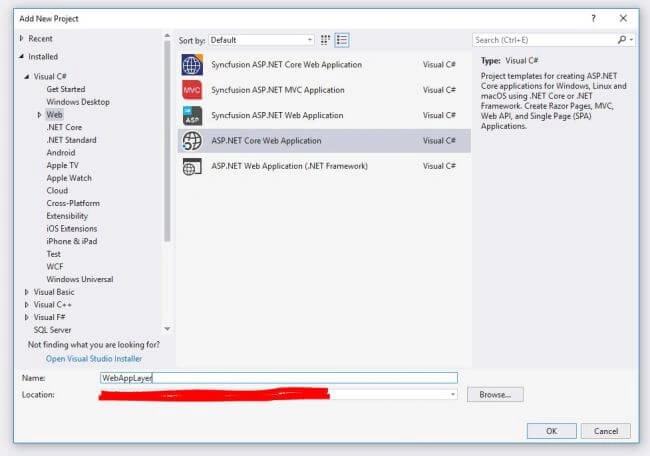
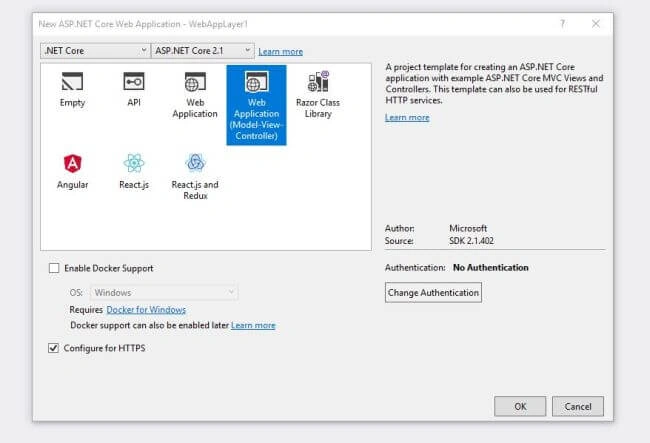
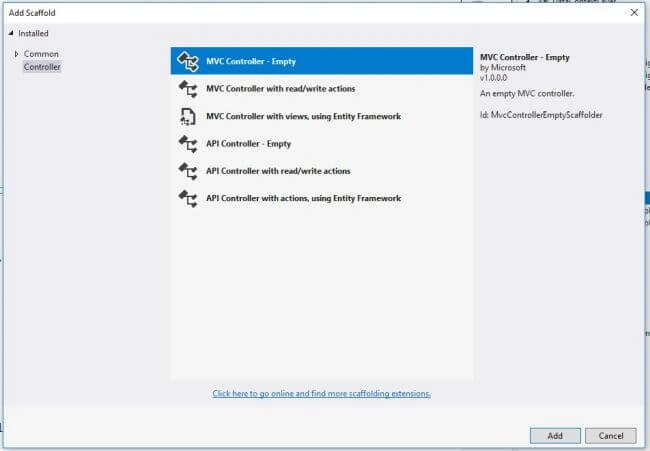
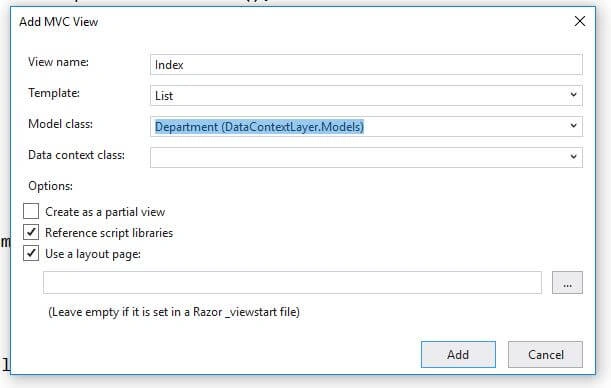
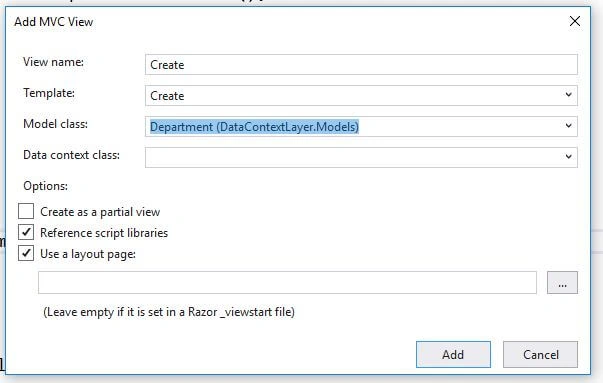
- using System;
- using System.Collections.Generic;
- using System.Linq;
- using System.Threading.Tasks;
- using DataContextLayer.DataContext;
- using DataContextLayer.Models;
- using Microsoft.AspNetCore.Mvc;
- namespace WebAppLayer.Controllers
- {
- public class DepartmentsController : Controller
- {
- EFDataContext _dbContext = new EFDataContext();
- public IActionResult Index()
- {
- List<Department> data = this._dbContext.Departments.ToList();
- return View(data);
- }
- public IActionResult Create()
- {
- return View();
- }
- [HttpPost]
- public IActionResult Create(Department model)
- {
- ModelState.Remove("DepartmentId");
- if (ModelState.IsValid)
- {
- _dbContext.Departments.Add(model);
- _dbContext.SaveChanges();
- return RedirectToAction("Index");
- }
- return View();
- }
- public IActionResult Edit(int id)
- {
- Department data = _dbContext.Departments.Where(p => p.DepartmentId == id).FirstOrDefault();
- return View("Create", data);
- }
- [HttpPost]
- public IActionResult Edit(Department model)
- {
- ModelState.Remove("DepartmentId");
- if (ModelState.IsValid)
- {
- _dbContext.Departments.Update(model);
- _dbContext.SaveChanges();
- return RedirectToAction("Index");
- }
- return View("Create", model);
- }
- public IActionResult Delete(int id)
- {
- Department data = _dbContext.Departments.Where(p => p.DepartmentId == id).FirstOrDefault();
- if (data != null)
- {
- _dbContext.Departments.Remove(data);
- _dbContext.SaveChanges();
- }
- return RedirectToAction("Index");
- }
- }
- }
- @model IEnumerable<DataContextLayer.Models.Department>
- @{
- ViewData["Title"] = "Index";
- }
- <strong>Index</strong>
- <p>
- <a asp-action="Create">Create New</a>
- </p>
- <table class="table">
- <thead>
- <tr>
- <th>
- @Html.DisplayNameFor(model => model.DepartmentId)
- </th>
- <th>
- @Html.DisplayNameFor(model => model.DepartmentCode)
- </th>
- <th>
- @Html.DisplayNameFor(model => model.DepartmentName)
- </th>
- <th>
- @Html.DisplayNameFor(model => model.Description)
- </th>
- <th></th>
- </tr>
- </thead>
- <tbody>
- @foreach (var item in Model) {
- <tr>
- <td>
- @Html.DisplayFor(modelItem => item.DepartmentId)
- </td>
- <td>
- @Html.DisplayFor(modelItem => item.DepartmentCode)
- </td>
- <td>
- @Html.DisplayFor(modelItem => item.DepartmentName)
- </td>
- <td>
- @Html.DisplayFor(modelItem => item.Description)
- </td>
- <td>
- @Html.ActionLink("Edit", "Edit", new { id = item.DepartmentId }) |
- @Html.ActionLink("Delete", "Delete", new { id = item.DepartmentId }, new { onclick = "return confirm('Are you sure to delete?')" })
- </td>
- </tr>
- }
- </tbody>
- </table>
- @model DataContextLayer.Models.Department
- @{
- ViewData["Title"] = Model != null ? "Edit" : "Create";
- }
- <strong>@ViewData["Title"]</strong>
- <h4>Department</h4>
- <hr />
- <div class="row">
- <div class="col-md-4">
- <form asp-action="@ViewData["Title"]">
- <div asp-validation-summary="ModelOnly" class="text-danger"></div>
- <input type="hidden" asp-for="DepartmentId" class="form-control" />
- <div class="form-group">
- <label asp-for="DepartmentCode" class="control-label"></label>
- <input asp-for="DepartmentCode" class="form-control" />
- <span asp-validation-for="DepartmentCode" class="text-danger"></span>
- </div>
- <div class="form-group">
- <label asp-for="DepartmentName" class="control-label"></label>
- <input asp-for="DepartmentName" class="form-control" />
- <span asp-validation-for="DepartmentName" class="text-danger"></span>
- </div>
- <div class="form-group">
- <label asp-for="Description" class="control-label"></label>
- <input asp-for="Description" class="form-control" />
- <span asp-validation-for="Description" class="text-danger"></span>
- </div>
- <div class="form-group">
- <input type="submit" value="Save" class="btn btn-default" />
- </div>
- </form>
- </div>
- </div>
- <div>
- <a asp-action="Index">Back to List</a>
- </div>
- @section Scripts {
- @{await Html.RenderPartialAsync("_ValidationScriptsPartial");}
- }
- using System;
- using System.Collections.Generic;
- using System.Linq;
- using System.Threading.Tasks;
- using DataContextLayer.DataContext;
- using DataContextLayer.Models;
- using Microsoft.AspNetCore.Mvc;
- namespace WebAppLayer.Controllers
- {
- public class DesignationsController : Controller
- {
- EFDataContext _dbContext = new EFDataContext();
- public IActionResult Index()
- {
- //List<Designation> data = _dbContext.Designations.ToList();
- var data = (from dept in _dbContext.Departments
- join desig in _dbContext.Designations
- on dept.DepartmentId equals desig.DepartmentId
- select new Designation
- {
- DesignationId = desig.DesignationId,
- DesignationCode = desig.DesignationCode,
- DesignationName = desig.DesignationName,
- DepartmentId = desig.DepartmentId,
- DepartmentName = dept.DepartmentName
- }).ToList();
- return View(data);
- }
- public IActionResult Create()
- {
- ViewBag.Departments = _dbContext.Departments.ToList();
- return View();
- }
- [HttpPost]
- public IActionResult Create(Designation model)
- {
- ModelState.Remove("DesignationId");
- if (ModelState.IsValid)
- {
- _dbContext.Designations.Add(model);
- _dbContext.SaveChanges();
- return RedirectToAction("Index");
- }
- ViewBag.Departments = _dbContext.Departments.ToList();
- return View();
- }
- public IActionResult Edit(int id)
- {
- Designation data = _dbContext.Designations.Where(p => p.DesignationId == id).FirstOrDefault();
- ViewBag.Departments = _dbContext.Departments.ToList();
- return View("Create", data);
- }
- [HttpPost]
- public IActionResult Edit(Designation model)
- {
- ModelState.Remove("DesignationId");
- if (ModelState.IsValid)
- {
- _dbContext.Designations.Update(model);
- _dbContext.SaveChanges();
- return RedirectToAction("Index");
- }
- ViewBag.Departments = _dbContext.Departments.ToList();
- return View("Create", model);
- }
- public IActionResult Delete(int id)
- {
- Designation data = _dbContext.Designations.Where(p => p.DesignationId == id).FirstOrDefault();
- if (data != null)
- {
- _dbContext.Designations.Remove(data);
- _dbContext.SaveChanges();
- }
- return RedirectToAction("Index");
- }
- }
- }
- @model IEnumerable<DataContextLayer.Models.Designation>
- @{
- ViewData["Title"] = "Index";
- }
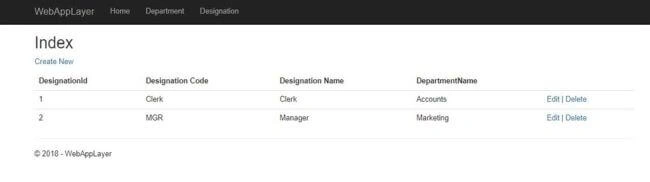
- <strong>Index</strong>
- <p>
- <a asp-action="Create">Create New</a>
- </p>
- <table class="table">
- <thead>
- <tr>
- <th>
- @Html.DisplayNameFor(model => model.DesignationId)
- </th>
- <th>
- @Html.DisplayNameFor(model => model.DesignationCode)
- </th>
- <th>
- @Html.DisplayNameFor(model => model.DesignationName)
- </th>
- <th>
- @Html.DisplayNameFor(model => model.DepartmentName)
- </th>
- <th></th>
- </tr>
- </thead>
- <tbody>
- @foreach (var item in Model) {
- <tr>
- <td>
- @Html.DisplayFor(modelItem => item.DesignationId)
- </td>
- <td>
- @Html.DisplayFor(modelItem => item.DesignationCode)
- </td>
- <td>
- @Html.DisplayFor(modelItem => item.DesignationName)
- </td>
- <td>
- @Html.DisplayFor(modelItem => item.DepartmentName)
- </td>
- <td>
- @Html.ActionLink("Edit", "Edit", new { id=item.DesignationId }) |
- @Html.ActionLink("Delete", "Delete", new { id=item.DesignationId })
- </td>
- </tr>
- }
- </tbody>
- </table>
- @model DataContextLayer.Models.Designation
- @{
- ViewData["Title"] = Model != null ? "Edit" : "Create";
- }
- <strong>@ViewData["Title"]</strong>
- <h4>Designation</h4>
- <hr />
- <div class="row">
- <div class="col-md-4">
- <form asp-action="@ViewData["Title"]">
- <div asp-validation-summary="ModelOnly" class="text-danger"></div>
- <input type="hidden" asp-for="DesignationId" class="form-control" />
- <div class="form-group">
- <label asp-for="DesignationCode" class="control-label"></label>
- <input asp-for="DesignationCode" class="form-control" />
- <span asp-validation-for="DesignationCode" class="text-danger"></span>
- </div>
- <div class="form-group">
- <label asp-for="DesignationName" class="control-label"></label>
- <input asp-for="DesignationName" class="form-control" />
- <span asp-validation-for="DesignationName" class="text-danger"></span>
- </div>
- <div class="form-group">
- <label asp-for="DepartmentId" class="control-label"></label>
- <select asp-for="DepartmentId" asp-items="@(new SelectList(ViewBag.Departments,"DepartmentId","DepartmentName"))" class="form-control">
- <option value="">--Select--</option>
- </select>
- <span asp-validation-for="DepartmentId" class="text-danger"></span>
- </div>
- <div class="form-group">
- <input type="submit" value="Save" class="btn btn-default" />
- </div>
- </form>
- </div>
- </div>
- <div>
- <a asp-action="Index">Back to List</a>
- </div>
- @section Scripts {
- @{await Html.RenderPartialAsync("_ValidationScriptsPartial");}
- } N
kalu singh raoPosted Oct 18, 2018, 12:58 AM
I have one question in MongoDB. Can we fetch records through object id in c# ? If yes then how can we perform this action. Please share any example for better understanding. Thanks in advance.