

This scenario targets a database that doesn’t exist and code first will create, or an empty database that code first will add new tables .
Note: Make sure that the Entity Framework already installed with Visual Studio, otherwise install using NuGet Packages.
Step 1. Creating an MVC Application
- Open Visual Studio
- File, New, then click Project
- Select ASP.NET MVC3/4 Web Application.
- Enter the name of application as "CodeFirstDemo".
- Click OK
Step 2. Creating the Model
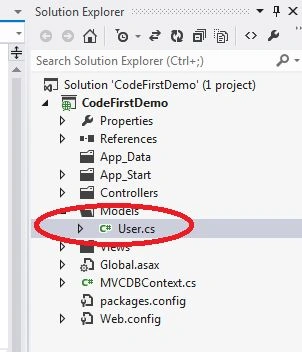
Right click on the Models folder and create a model with the name of "User" as in the following image and create a property as in the below code,
- public class User
- {
- public int UserId
- {
- get;
- set;
- }
- public string FirstName
- {
- get;
- set;
- }
- public string LastName
- {
- get;
- set;
- }
- public string EMail
- {
- get;
- set;
- }
- public string Address
- {
- get;
- set;
- }
- public string PhoneNo
- {
- get;
- set;
- }
- public string Company
- {
- get;
- set;
- }
- public string Designation
- {
- get;
- set;
- }
- }
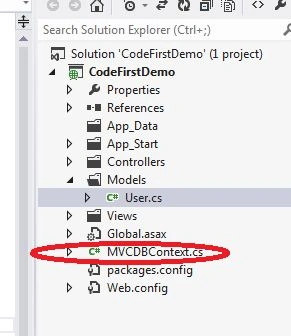
Create a class with the Name MVCDBContext as in the following screenshot and write the code as follows in MVCDBContext class.
- using System.Data.Entity;
- using System.Linq;
- using CodeFirstDemo.Models;
- namespace CodeFirstDemo
- {
- public class MVCDBContext: DbContext
- {
- public DbSet < User > Users
- {
- get;
- set;
- }
- }
- }
Step 4 : Create a Controller.
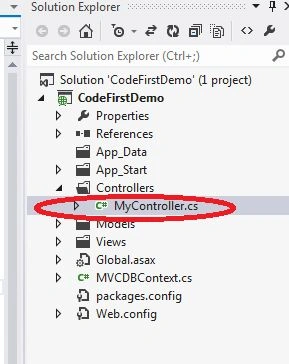
Right click on the Controller folder and create a controller with the name "MyController" as in the following image. Write the following code in Mycontroller.cs within Index Action.
- public ActionResult Index()
- {
- var dbContext = new MVCDBContext();
- var userList = from user in dbContext.Users select user;
- var users = new List < CodeFirstDemo.Models.User > ();
- if (userList.Any())
- {
- foreach(var user in userList)
- {
- users.Add(new CodeFirstDemo.Models.User()
- {
- UserId = user.UserId, Address = user.Address,
- Company = user.Company, FirstName = user.FirstName,
- LastName = user.LastName, Designation = user.Designation,
- EMail = user.EMail, PhoneNo = user.PhoneNo
- });
- }
- }
- ViewBag.FirstName = "My First Name";
- ViewData["FirstName"] = "My First Name";
- if (TempData.Any())
- {
- var tempData = TempData["TempData Name"];
- }
- return View(users);
- }
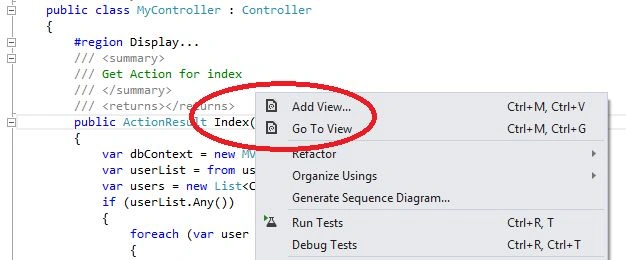
- Right click on Index and select Add View… as in the following screenshot.
- Click on Add button that appear in the dialog box.
- Go to Views folder and choose Index.cshtml in My folder.
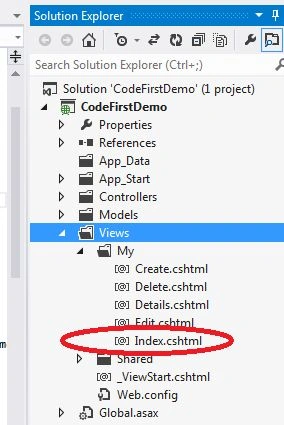
- Type the following code in Index.cshtml file.
Now, again go to MyController and create a new action with the name of Details as follows.- @model List < CodeFirstDemo.Models.User > @
- {
- ViewBag.Title = "Index";
- Layout = "~/Views/Shared/_Layout.cshtml";
- }
- < h2 > Index
- < /h2>
- < p >
- @Html.ActionLink("Create New", "Create")
- < /p>
- < div > < table > < tr > < th >
- FirstName
- < /th> < th >
- LastName
- < /th> < th > EMail
- < /th> < th > Address
- < /th> < th > PhoneNo
- < /th> < th > Company
- < /th> < th > Designation
- < /th> < th > < /th> < /tr>
- @foreach(var item in Model)
- {
- < tr > < td >
- @Html.DisplayFor(modelItem => item.FirstName)
- < /td> < td > @Html.DisplayFor(modelItem => item.LastName)
- < /td> < td > @Html.DisplayFor(modelItem => item.EMail)
- < /td> < td > @Html.DisplayFor(modelItem => item.Address)
- < /td> < td > @Html.DisplayFor(modelItem => item.PhoneNo)
- < /td> < td > @Html.DisplayFor(modelItem => item.Company)
- < /td> < td > @Html.DisplayFor(modelItem => item.Designation)
- < /td> < td > @Html.ActionLink("Edit", "Edit", new
- {
- id = item.UserId
- }) | @Html.ActionLink("Details", "Details", new
- {
- id = item.UserId
- }) | @Html.ActionLink("Delete", "Delete", new
- {
- id = item.UserId
- }) < /td> < /tr>
- } < /table> < /div>
Again, Right click on the Details ActionResult and add view as same as index. Write the code as follows in your Details view which you just created.- public ActionResult Details(int ? id)
- {
- var dbContext = new MVCDBContext();
- var userDetails = dbContext.Users.FirstOrDefault(userId => userId.UserId == id);
- var user = new CodeFirstDemo.Models.User();
- if (userDetails != null)
- {
- user.UserId = userDetails.UserId;
- user.FirstName = userDetails.FirstName;
- user.LastName = userDetails.LastName;
- user.Address = userDetails.Address;
- user.PhoneNo = userDetails.PhoneNo;
- user.EMail = userDetails.EMail;
- user.Company = userDetails.Company;
- user.Designation = userDetails.Designation;
- }
- return View(user);
- }
Repeat the same process for creating an action in MyController for Create, Edit and Delete as follows and also add views.- @model CodeFirstDemo.Models.User
- @
- {
- ViewBag.Title = "Details";
- }
- < h2 >
- Details
- < /h2>
- < fieldset > < legend > User
- < /legend>
- < div class = "display-label" > FirstName
- < /div> < div class = "display-field" >
- @Html.DisplayFor(model => model.FirstName)
- < /div> < div class = "display-label" > LastName
- < /div> < div class = "display-field" >
- @Html.DisplayFor(model => model.LastName)
- < /div> < div class = "display-label" > EMail
- < /div> < div class = "display-field" >
- @Html.DisplayFor(model => model.EMail)
- < /div> < div class = "display-label" > Address
- < /div> < div class = "display-field" >
- @Html.DisplayFor(model => model.Address)
- < /div> < div class = "display-label" > PhoneNo
- < /div> < div class = "display-field" >
- @Html.DisplayFor(model => model.PhoneNo)
- < /div> < div class = "display-label" > Company
- < /div> < div class = "display-field" >
- @Html.DisplayFor(model => model.Company)
- < /div> < div class = "display-label" > Designation
- < /div> < div class = "display-field" >
- @Html.DisplayFor(model => model.Designation)
- < /div> < /fieldset> < p >
- @Html.ActionLink("Edit", "Edit", new
- {
- id = Model.UserId
- }) | @Html.ActionLink("Back to List", "Index") < /p>
- #region Edit...
- /// <summary>
- /// Get Action for Edit
- /// </summary>
- /// <param name="id"></param>
- /// <returns></returns>
- public ActionResult Edit(int ? id)
- {
- var dbContext = new MVCDBContext();
- var userDetails = dbContext.Users.FirstOrDefault(userId => userId.UserId == id);
- var user = new CodeFirstDemo.Models.User();
- if (userDetails != null)
- {
- user.UserId = userDetails.UserId;
- user.FirstName = userDetails.FirstName;
- user.LastName = userDetails.LastName;
- user.Address = userDetails.Address;
- user.PhoneNo = userDetails.PhoneNo;
- user.EMail = userDetails.EMail;
- user.Company = userDetails.Company;
- user.Designation = userDetails.Designation;
- }
- return View(user);
- }
- /// <summary>
- /// Post Action for Edit
- /// </summary>
- /// <param name="id"></param>
- /// <param name="user"></param>
- /// <returns></returns>
- [HttpPost]
- public ActionResult Edit(int ? id, User userDetails)
- {
- TempData["TempData Name"] = "Akhil";
- try
- {
- var dbContext = new MVCDBContext();
- var user = dbContext.Users.FirstOrDefault(userId => userId.UserId == id);
- if (user != null)
- {
- user.FirstName = userDetails.FirstName;
- user.LastName = userDetails.LastName;
- user.Address = userDetails.Address;
- user.PhoneNo = userDetails.PhoneNo;
- user.EMail = userDetails.EMail;
- user.Company = userDetails.Company;
- user.Designation = userDetails.Designation;
- dbContext.SaveChanges();
- }
- return RedirectToAction("Index");
- }
- catch
- {
- return View();
- }
- }#
- endregion# region Delete...
- /// <summary>
- /// Get Action for Delete
- /// </summary>
- /// <param name="id"></param>
- /// <returns></returns>
- public ActionResult Delete(int ? id)
- {
- var dbContext = new MVCDBContext();
- var user = new CodeFirstDemo.Models.User();
- var userDetails = dbContext.Users.FirstOrDefault(userId => userId.UserId == id);
- if (userDetails != null)
- {
- user.FirstName = userDetails.FirstName;
- user.LastName = userDetails.LastName;
- user.Address = userDetails.Address;
- user.PhoneNo = userDetails.PhoneNo;
- user.EMail = userDetails.EMail;
- user.Company = userDetails.Company;
- user.Designation = userDetails.Designation;
- }
- return View(user);
- }
- /// <summary>
- /// Post Action for Delete
- /// </summary>
- /// <param name="id"></param>
- /// <param name="userDetails"> </param>
- /// <returns></returns>
- [HttpPost]
- public ActionResult Delete(int ? id, CodeFirstDemo.Models.User userDetails)
- {
- try
- {
- var dbContext = new MVCDBContext();
- var user = dbContext.Users.FirstOrDefault(userId => userId.UserId == id);
- if (user != null)
- {
- dbContext.Users.Add(user);
- dbContext.SaveChanges();
- }
- return RedirectToAction("Index");
- }
- catch
- {
- return View();
- }
- }#endregion
Create.cshtml
- @model CodeFirstDemo.Models.User
- @
- {
- ViewBag.Title = "Create";
- } < h2 > Create < /h2> < script src = "@Url.Content("~/Scripts/jquery.validate.min.js ")"
- type = "text/javascript" > < /script> < script src = "@Url.Content("~/Scripts/jquery.validate.unobtrusive.min.js ")"
- type = "text/javascript" > < /script>
- @using(Html.BeginForm())
- {
- @Html.ValidationSummary(true) < fieldset > < legend > User
- < /legend> < div class = "editor-label" >
- @Html.LabelFor(model => model.FirstName)
- < /div> < div class = "editor-field" >
- @Html.EditorFor(model => model.FirstName)
- @Html.ValidationMessageFor(model => model.FirstName)
- < /div> < div class = "editor-label" >
- @Html.LabelFor(model => model.LastName)
- < /div> < div class = "editor-field" >
- @Html.EditorFor(model => model.LastName)
- @Html.ValidationMessageFor(model => model.LastName)
- < /div> < div class = "editor-label" >
- @Html.LabelFor(model => model.EMail)
- < /div> < div class = "editor-field" >
- @Html.EditorFor(model => model.EMail)
- @Html.ValidationMessageFor(model => model.EMail)
- < /div> < div class = "editor-label" >
- @Html.LabelFor(model => model.Address)
- < /div> < div class = "editor-field" >
- @Html.EditorFor(model => model.Address)
- @Html.ValidationMessageFor(model => model.Address)
- < /div> < div class = "editor-label" >
- @Html.LabelFor(model => model.PhoneNo)
- < /div> < div class = "editor-field" >
- @Html.EditorFor(model => model.PhoneNo)
- @Html.ValidationMessageFor(model => model.PhoneNo)
- < /div> < div class = "editor-label" >
- @Html.LabelFor(model => model.Company)
- < /div> < div class = "editor-field" >
- @Html.EditorFor(model => model.Company)
- @Html.ValidationMessageFor(model => model.Company)
- < /div> < div class = "editor-label" >
- @Html.LabelFor(model => model.Designation)
- < /div> < div class = "editor-field" >
- @Html.EditorFor(model => model.Designation)
- @Html.ValidationMessageFor(model => model.Designation)
- < /div> < p > < input type = "submit"
- value = "Create" / > < /p> < /fieldset>
- } < div > @Html.ActionLink("Back to List", "Index")
- < /div>
- @model CodeFirstDemo.Models.User
- @
- {
- ViewBag.Title = "Delete";
- }
- < h2 > Delete
- < /h2>
- < h3 > Are you sure you want to delete this ?
- < /h3> < fieldset > < legend > User
- < /legend>
- < div class = "display-label" > FirstName
- < /div> < div class = "display-field" >
- @Html.DisplayFor(model => model.FirstName)
- < /div> < div class = "display-label" > LastName
- < /div> < div class = "display-field" >
- Html.DisplayFor(model => model.LastName)
- < /div> < div class = "display-label" > EMail
- < /div> < div class = "display-field" >
- @Html.DisplayFor(model => model.EMail)
- < /div> < div class = "display-label" > Address
- < /div> < div class = "display-field" >
- @Html.DisplayFor(model => model.Address)
- < /div> < div class = "display-label" > PhoneNo
- < /div> < div class = "display-field" >
- @Html.DisplayFor(model => model.PhoneNo)
- < /div> < div class = "display-label" > Company
- < /div> < div class = "display-field" >
- @Html.DisplayFor(model => model.Company)
- < /div> < div class = "display-label" > Designation
- < /div> < div class = "display-field" >
- @Html.DisplayFor(model => model.Designation)
- < /div> < /fieldset>
- @using(Html.BeginForm())
- { < p > < input type = "submit"
- value = "Delete" / > | @Html.ActionLink("Back to List", "Index") < /p>
- }
- @model CodeFirstDemo.Models.User
- @
- {
- ViewBag.Title = "Edit";
- } < h2 > Edit < /h2> < script src = "@Url.Content("~/Scripts/jquery.validate.min.js ")"
- type = "text/javascript" > < /script> < script src = "@Url.Content("~/Scripts/jquery.validate.unobtrusive.min.js ")"
- type = "text/javascript" > < /script>
- @using(Html.BeginForm())
- {
- @Html.ValidationSummary(true) < fieldset > < legend > User < /legend>
- @Html.HiddenFor(model => model.UserId) < div class = "editor-label" > @Html.LabelFor(model => model.FirstName) < /div> < div class = "editor-field" > @Html.EditorFor(model => model.FirstName)
- @Html.ValidationMessageFor(model => model.FirstName)
- < /div> < div class = "editor-label" >
- @Html.LabelFor(model => model.LastName)
- < /div> < div class = "editor-field" >
- @Html.EditorFor(model => model.LastName)
- @Html.ValidationMessageFor(model => model.LastName)
- < /div> < div class = "editor-label" >
- @Html.LabelFor(model => model.EMail)
- < /div> < div class = "editor-field" >
- @Html.EditorFor(model => model.EMail)
- @Html.ValidationMessageFor(model => model.EMail)
- < /div> < div class = "editor-label" >
- @Html.LabelFor(model => model.Address)
- < /div> < div class = "editor-field" >
- @Html.EditorFor(model => model.Address)
- @Html.ValidationMessageFor(model => model.Address)
- < /div> < div class = "editor-label" >
- @Html.LabelFor(model => model.PhoneNo)
- < /div> < div class = "editor-field" >
- @Html.EditorFor(model => model.PhoneNo)
- @Html.ValidationMessageFor(model => model.PhoneNo)
- < /div> < div class = "editor-label" >
- @Html.LabelFor(model => model.Company)
- < /div> < div class = "editor-field" >
- @Html.EditorFor(model => model.Company)
- @Html.ValidationMessageFor(model => model.Company)
- < /div> < div class = "editor-label" >
- @Html.LabelFor(model => model.Designation)
- < /div> < div class = "editor-field" >
- @Html.EditorFor(model => model.Designation)
- @Html.ValidationMessageFor(model => model.Designation)
- < /div> < p > < input type = "submit"
- value = "Save" / > < /p> < /fieldset>
- } < div > @Html.ActionLink("Back to List", "Index") < /div>

Now press F5 to run the application,
Summary
In this walk-through we looked at code first development using a new database. We defined a model using classes and then used that model to create a database and performed CRUD operation.
Jaco ZwartsPosted Jan 18, 2016, 12:43 AM
This was really helpful thank you!
Santhakumar MunuswamyPosted Jan 9, 2016, 2:28 AM
Thanks for nice article.
Debasis SahaPosted Jan 6, 2016, 11:52 PM
Good One..
Arul RPosted Jan 6, 2016, 10:40 PM
Nice share
Hussein SalmanPosted Jan 6, 2016, 5:41 PM
good
Ankur MistryPosted Jan 6, 2016, 4:01 PM
Nice share
Raja TPosted Jan 6, 2016, 6:17 AM
Good,Thanks for sharing