

Introduction
Hi everyone. Today I will share the default behavior of Entity Framework that assumes that the table name in the database is pluralized.
For example, in the Code First approach you made entity (class) named Student and expect the Student Table will be created. But the default table created in the Db will be Students. We will understand it with creating a sample application.
Creating Sample Application
Create a sample console application.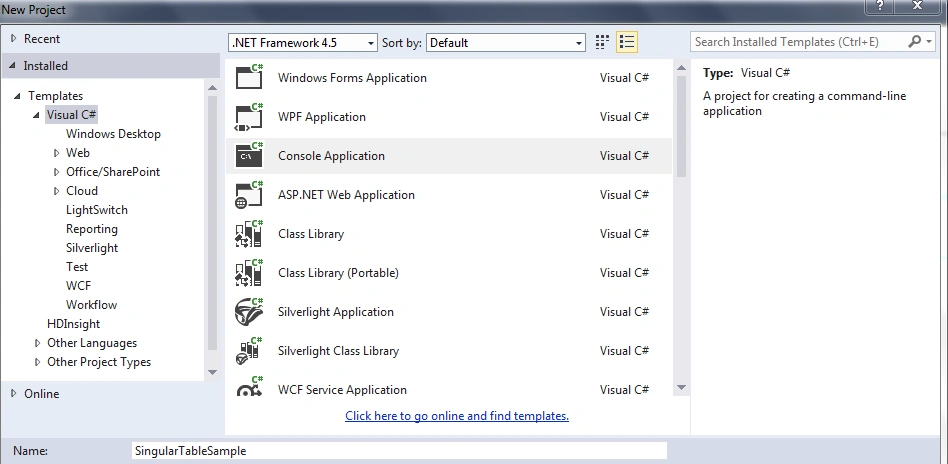
Figure 1: Create an Application
Then install the Nuget package Entityframework.
Figure 2: Install Nuget Package
Now add a connection string in the App.config file as in the following:
- <connectionStrings>
- <add name="ConnString" connectionString="server=****;database=MVCSample;uid=**;password=***;Connection Timeout=3" providerName="System.Data.SqlClient"/>
- </connectionStrings>
- using System;
- using System.Collections.Generic;
- using System.ComponentModel.DataAnnotations;
- using System.Data.Entity;
- using System.Linq;
- using System.Text;
- using System.Threading.Tasks;
- namespace SingularTableSample
- {
- class Program
- {
- static void Main(string[] args)
- {
- using(StudentDBContext studentDBContext = new StudentDBContext())
- {
- Student student = new Student();
- student.StudentName = "Vivek";
- studentDBContext.Students.Add(student);
- studentDBContext.SaveChanges();
- Console.ReadKey();
- }
- }
- }
- public class Student
- {
- [Key]
- public int StudentId
- {
- get;
- set;
- }
- public string StudentName
- {
- get;
- set;
- }
- }
- public class StudentDBContext: DbContext
- {
- public StudentDBContext(): base("ConnString")
- {
- }
- public DbSet < Student > Students
- {
- get;
- set;
- }
- }
- }
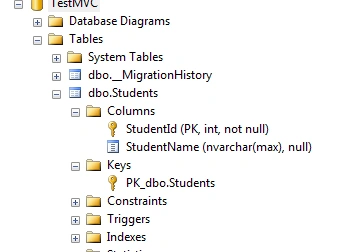
Figure 3: Solution Explorer
For solving this problem the Entity Framework provides a very good approach, Conventions, that allow you to specify how you want your database to be set up.
Simply add the following code to your DBContext class and add the following namespace:
- using System.Data.Entity.ModelConfiguration.Conventions;
- protected override void OnModelCreating(DbModelBuilder modelBuilder)
- {
- modelBuilder.Conventions.Remove < PluralizingTableNameConvention > ();
- }
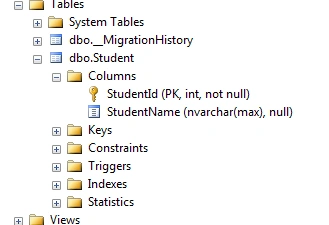
Figure 4: Output
Refer to this link:
Pluralizing Table Name Convention Class
ashish fPosted Oct 15, 2018, 11:32 PM
'The model backing the 'sampledbContext' context has changed since the database was created. Consider using Code First Migrations to update the database
Sonu ChaudharyPosted May 26, 2016, 10:44 AM
Good one...
Bhuvanesh MohankumarPosted May 6, 2016, 3:58 PM
Good one...
Sachin KaliaPosted Jun 10, 2015, 7:05 AM
Gud one Vivek..Keep posting :)
Manoj KulkarniPosted May 25, 2015, 12:02 AM
Nice article. Thank you for sharing