

In this article, we are going to learn how to maintain the user login details in SQL server table with password encryption format and decrypt the user password and validate the credentials in the login form.
Step 1
Create the Database and table to maintain the user login credentials.
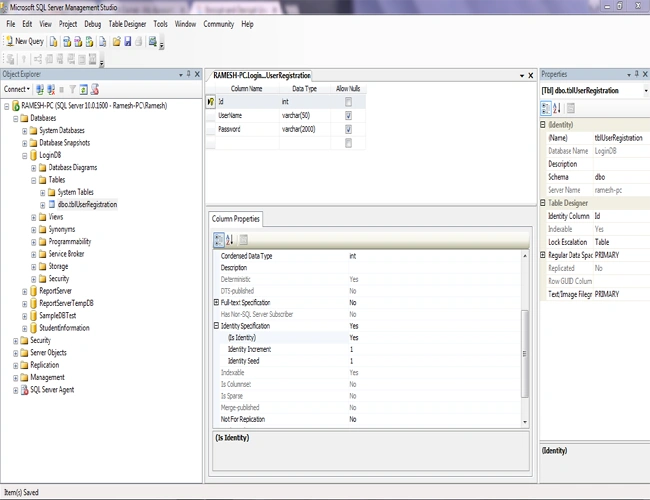
Here, I have created my database and named it as "LoginDB" and created a table "tblUserRegistration" to maintain the user credentials.
Please refer to the below image for your reference.
Note
The table "tblUserRegistration" has three columns - Id, UserName, Password. Id is a primary key; set its identification to yes and initialize starting value as1. UserName and Password are string values, so I set these as varchar datatype.
The table "tblUserRegistration" has three columns - Id, UserName, Password. Id is a primary key; set its identification to yes and initialize starting value as1. UserName and Password are string values, so I set these as varchar datatype.
Step 2
Let's create a simple Windows application in Visual Studio.
To create a Windows application, open Visual Studio and go to New Project. A new dialog window will appear.; Click C# in the left pane and select Windows Form Application there. Name your project and click OK.
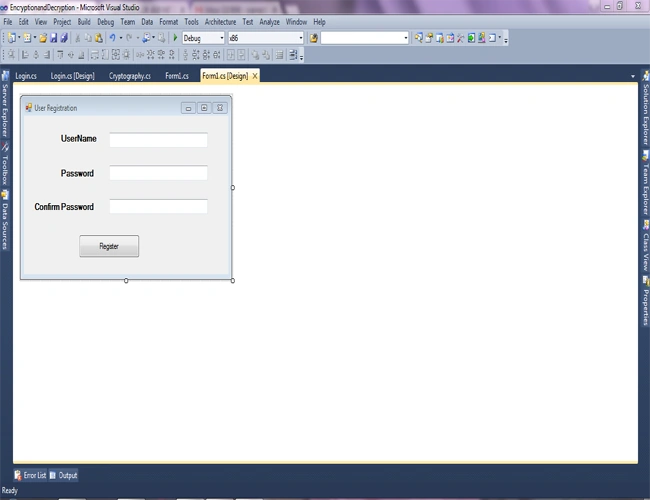
Here, I have created my project and named it as "EncryptionandDecryption". Now, we will design our user registration form for registering new user credentials.
Step 3
Now, let's create a simple class file in our project to write encryption and decryption logic.To add a class file, right click your project -> Add -> New item -> select class in the dialog box and name your class file. Click OK.
Here, I have created my class file and named it as "Cryptography". Now, we can write our encryption and decryption logic.
Please find the below code for your reference.
- using System;
- using System.Collections.Generic;
- using System.Linq;
- using System.Text;
- using System.Security.Cryptography;
- using System.IO;
- namespace EncryptionandDecryption
- {
- public class Cryptography
- {
- public static string Encrypt(string encryptString)
- {
- string EncryptionKey = "0ram@1234xxxxxxxxxxtttttuuuuuiiiiio"; //we can change the code converstion key as per our requirement
- byte[] clearBytes = Encoding.Unicode.GetBytes(encryptString);
- using (Aes encryptor = Aes.Create())
- {
- Rfc2898DeriveBytes pdb = new Rfc2898DeriveBytes(EncryptionKey, new byte[] {
- 0x49, 0x76, 0x61, 0x6e, 0x20, 0x4d, 0x65, 0x64, 0x76, 0x65, 0x64, 0x65, 0x76
- });
- encryptor.Key = pdb.GetBytes(32);
- encryptor.IV = pdb.GetBytes(16);
- using (MemoryStream ms = new MemoryStream())
- {
- using (CryptoStream cs = new CryptoStream(ms, encryptor.CreateEncryptor(), CryptoStreamMode.Write))
- {
- cs.Write(clearBytes, 0, clearBytes.Length);
- cs.Close();
- }
- encryptString = Convert.ToBase64String(ms.ToArray());
- }
- }
- return encryptString;
- }
- public static string Decrypt(string cipherText)
- {
- string EncryptionKey = "0ram@1234xxxxxxxxxxtttttuuuuuiiiiio"; //we can change the code converstion key as per our requirement, but the decryption key should be same as encryption key
- cipherText = cipherText.Replace(" ", "+");
- byte[] cipherBytes = Convert.FromBase64String(cipherText);
- using (Aes encryptor = Aes.Create())
- {
- Rfc2898DeriveBytes pdb = new Rfc2898DeriveBytes(EncryptionKey, new byte[] {
- 0x49, 0x76, 0x61, 0x6e, 0x20, 0x4d, 0x65, 0x64, 0x76, 0x65, 0x64, 0x65, 0x76
- });
- encryptor.Key = pdb.GetBytes(32);
- encryptor.IV = pdb.GetBytes(16);
- using (MemoryStream ms = new MemoryStream())
- {
- using (CryptoStream cs = new CryptoStream(ms, encryptor.CreateDecryptor(), CryptoStreamMode.Write))
- {
- cs.Write(cipherBytes, 0, cipherBytes.Length);
- cs.Close();
- }
- cipherText = Encoding.Unicode.GetString(ms.ToArray());
- }
- }
- return cipherText;
- }
- }
- }
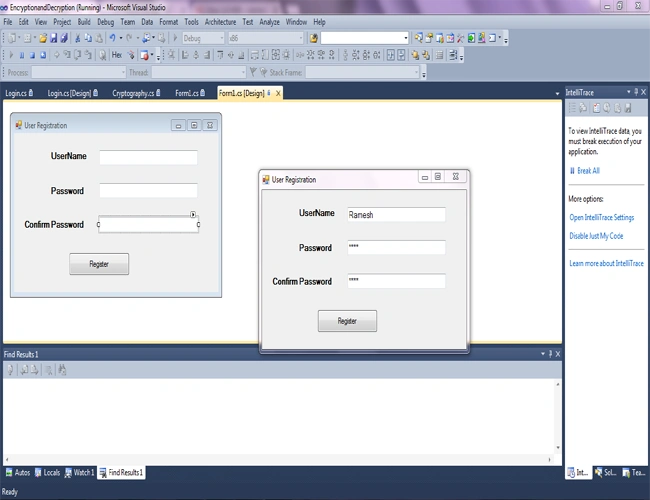
Let's write a code for registering a new user on Register button click event. Please find the below code for your reference.
- using System.Collections.Generic;
- using System.ComponentModel;
- using System.Data;
- using System.Drawing;
- using System.Linq;
- using System.Text;
- using System.Windows.Forms;
- using System.Data.SqlClient;
- namespace EncryptionandDecryption
- {
- public partial class Form1 : Form
- {
- public Form1()
- {
- InitializeComponent();
- }
- SqlConnection con = new SqlConnection("Data Source=172.18.1.3;Initial Catalog=LoginDB;User ID=prog;Password=XqvF^D2$wJ");
- private void btnRegister_Click(object sender, EventArgs e)
- {
- if (txtUserName.Text != "" && txtPassword.Text != "" && txtConfirmPassword.Text != "") //validating the fields whether the fields or empty or not
- {
- if (txtPassword.Text.ToString().Trim().ToLower() == txtConfirmPassword.Text.ToString().Trim().ToLower()) //validating Password textbox and confirm password textbox is match or unmatch
- {
- string UserName = txtUserName.Text;
- string Password = Cryptography.Encrypt(txtPassword.Text.ToString()); // Passing the Password to Encrypt method and the method will return encrypted string and stored in Password variable.
- con.Open();
- SqlCommand insert=new SqlCommand("insert into tblUserRegistration(UserName,Password)values('"+UserName+"','"+Password+"')",con);
- insert.ExecuteNonQuery();
- con.Close();
- MessageBox.Show("Record inserted successfully", "Success", MessageBoxButtons.OK, MessageBoxIcon.Information);
- }
- else
- {
- MessageBox.Show("Password and Confirm Password doesn't match!.. Please Check..", "Error", MessageBoxButtons.OK, MessageBoxIcon.Information); //showing the error message if password and confirm password doesn't match
- }
- }
- else
- {
- MessageBox.Show("Please fill all the fields!..", "Error", MessageBoxButtons.OK, MessageBoxIcon.Information); //showing the error message if any fields is empty
- }
- }
- }
- }
Step 5
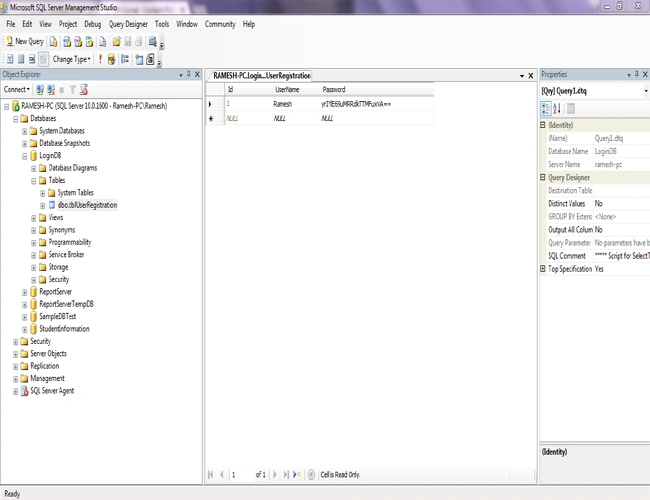
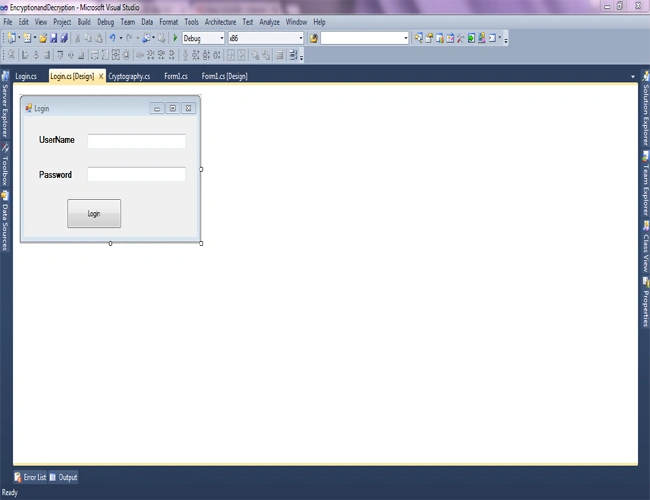
Now, we will design our login form and compare with DB. But here, we have encrypted our password in DB.The user is not aware of that. So in the back-end, we have to decrypt the user password and need to check.
Let's see how to do that.
- using System;
- using System.Collections.Generic;
- using System.ComponentModel;
- using System.Data;
- using System.Drawing;
- using System.Linq;
- using System.Text;
- using System.Windows.Forms;
- using System.Data.SqlClient;
- namespace EncryptionandDecryption
- {
- public partial class Login : Form
- {
- public Login()
- {
- InitializeComponent();
- }
- SqlConnection con = new SqlConnection("Data Source=RAMESH-PC;Initial Catalog=LoginDB;Integrated Security=True");
- private void btnLogin_Click(object sender, EventArgs e)
- {
- string Password = "" ;
- bool IsExist = false;
- con.Open();
- SqlCommand cmd = new SqlCommand("select * from tblUserRegistration where UserName='" + txtUserName.Text + "'", con);
- SqlDataReader sdr = cmd.ExecuteReader();
- if (sdr.Read())
- {
- Password = sdr.GetString(2); //get the user password from db if the user name is exist in that.
- IsExist = true;
- }
- con.Close();
- if (IsExist) //if record exis in db , it will return true, otherwise it will return false
- {
- if (Cryptography.Decrypt(Password).Equals(txtPassword.Text))
- {
- MessageBox.Show("Login Success", "Success", MessageBoxButtons.OK, MessageBoxIcon.Information);
- Form1 frm1 = new Form1();
- frm1.ShowDialog();
- }
- else
- {
- MessageBox.Show("Password is wrong!...", "error", MessageBoxButtons.OK, MessageBoxIcon.Information);
- }
- }
- else //showing the error message if user credential is wrong
- {
- MessageBox.Show("Please enter the valid credentials", "error", MessageBoxButtons.OK, MessageBoxIcon.Information);
- }
- }
- }
- }
Thanks for reading my article. Please post comments if you have any feedback or queries.
Lia MeedsPosted May 30, 2020, 9:23 AM
Hi, may I know what type of AES you use? AES's block size
Dalyssa WebbPosted May 6, 2020, 8:33 PM
I got an error: "System.IndexOutOfRangeException: 'Index was outside the bounds of the array.'"
bishoe nbPosted Apr 20, 2020, 10:03 AM
Thank you.....
Jay Jay PamaPosted Mar 11, 2020, 7:04 PM
I got an error on con.open(); how do i you fix this?
Aurelian MePosted Jan 7, 2020, 4:38 AM
Unfortunately after I`ve fix this I`ve got another error (The input data is not a complete block.) on line 53 from Cryptography class. Ramesh can you help me with this issue?
Aurelian MePosted Jan 7, 2020, 4:34 AM
Hello Hussain, I have got the same error and I have fix it by adding after cipherText = cipherText.Replace(" ", "+"); the following code: int mod4 = cipherText.Length % 4; if (mod4 > 0) { cipherText += new string('=', 4 - mod4); }
Hussain FazaalPosted Oct 28, 2019, 3:17 AM
I get a error in this code invalid length for base-64 char array or string c#