

Here are the steps,
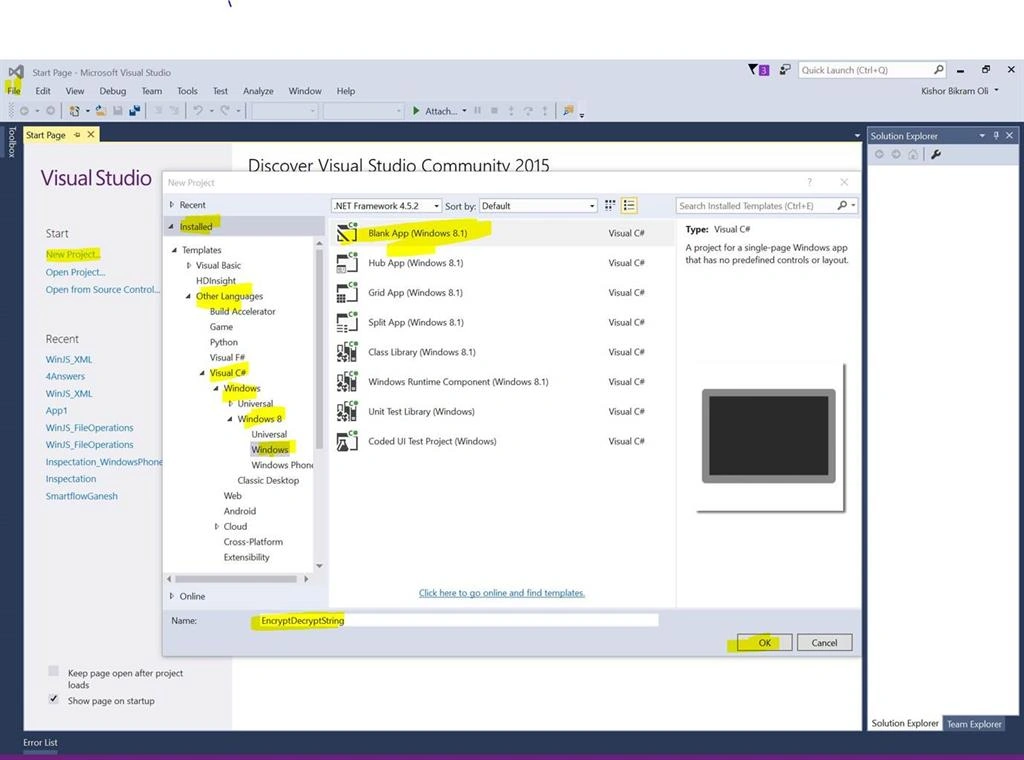
Step 1: Create a simple Windows Project. New Project, Visual C#, Windows 8, Windows, then click Blank App (Windows 8.1).
Step 2:
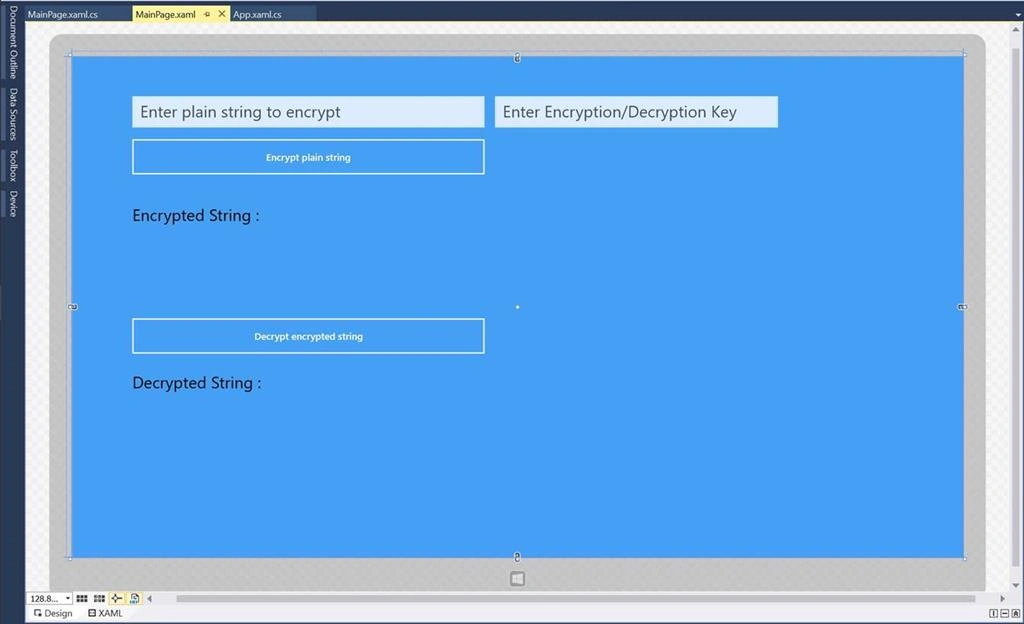
Lets add the following elements in MainPage.xaml :
Step 2:
Lets add the following elements in MainPage.xaml :
- Input Field to enter the plain string
- Input field to enter the key to encrypt
- Two buttons Encrypt string and Decrypt string with click events
- Two Textblocks to display the encrypted and decrypted string.
Complete MainPage.xaml code snippet is:
- <Page
- x:Class="EncryptDecryptString.MainPage"
- xmlns="http://schemas.microsoft.com/winfx/2006/xaml/presentation"
- xmlns:x="http://schemas.microsoft.com/winfx/2006/xaml"
- xmlns:local="using:EncryptDecryptString"
- xmlns:d="http://schemas.microsoft.com/expression/blend/2008"
- xmlns:mc="http://schemas.openxmlformats.org/markup-compatibility/2006"
- mc:Ignorable="d">
- <Grid Background="#FF449FF5">
- <TextBox x:Name="txtPlainString" HorizontalAlignment="Left" TextWrapping="Wrap" PlaceholderText="Enter plain string to encrypt" VerticalAlignment="Top" Margin="92,60,0,0" Width="540" Height="48" FontSize="25"/>
- <TextBox x:Name="txtKey" HorizontalAlignment="Left" TextWrapping="Wrap" PlaceholderText="Enter Encryption/Decryption Key" VerticalAlignment="Top" Margin="648,60,0,0" Width="434" FontSize="25" Height="48"/>
- <Button x:Name="btnEncrypt" Content="Encrypt plain string" HorizontalAlignment="Left" VerticalAlignment="Top" Margin="89,123,0,0" Height="60" Width="546" Click="btnEncrypt_Click"/>
- <TextBlock HorizontalAlignment="Left" TextWrapping="Wrap" Text="Encrypted String : " VerticalAlignment="Top" FontSize="25" Margin="92,229,0,0" Foreground="Black"/>
- <TextBlock x:Name="txtEncryptedString" HorizontalAlignment="Left" TextWrapping="Wrap" VerticalAlignment="Top" Margin="92,289,0,0" Height="40" FontSize="30" Width="899"/>
- <Button x:Name="btnDecrypt" Content="Decrypt encrypted string" HorizontalAlignment="Left" VerticalAlignment="Top" Margin="89,398,0,0" Height="60" Width="546" Click="btnDecrypt_Click"/>
- <TextBlock HorizontalAlignment="Left" TextWrapping="Wrap" Text="Decrypted String : " VerticalAlignment="Top" Margin="92,486,0,0" FontSize="25" Height="34" Width="238" Foreground="Black"/>
- <TextBlock x:Name="txtdecryptedString" HorizontalAlignment="Left" TextWrapping="Wrap" VerticalAlignment="Top" Margin="92,547,0,0" FontSize="30" Height="40" Width="899"/>
- </Grid>
- </Page>
Step 3:
In the code behind: MainPage.xaml.cs.
Update your code with this:
- using System;
- using System.Collections.Generic;
- using System.IO;
- using System.Linq;
- using System.Runtime.InteropServices.WindowsRuntime;
- using System.Threading.Tasks;
- using Windows.Foundation;
- using Windows.Foundation.Collections;
- using Windows.Security.Cryptography;
- using Windows.Security.Cryptography.Core;
- using Windows.Storage.Streams;
- using Windows.UI.Xaml;
- using Windows.UI.Xaml.Controls;
- using Windows.UI.Xaml.Controls.Primitives;
- using Windows.UI.Xaml.Data;
- using Windows.UI.Xaml.Input;
- using Windows.UI.Xaml.Media;
- using Windows.UI.Xaml.Navigation;
- // The Blank Page item template is documented at http://go.microsoft.com/fwlink/?LinkId=234238
- namespace EncryptDecryptString
- {
- /// <summary>
- /// An empty page that can be used on its own or navigated to within a Frame.
- /// </summary>
- public sealed partial class MainPage : Page
- {
- public MainPage()
- {
- this.InitializeComponent();
- }
- private async void btnEncrypt_Click(object sender, RoutedEventArgs e)
- {
- string plainString = txtPlainString.Text;
- string key = txtKey.Text;
- string encryptedString = await EncryptStringHelper(plainString, key);
- txtEncryptedString.Text = encryptedString;
- }
- private async void btnDecrypt_Click(object sender, RoutedEventArgs e)
- {
- string encryptedString = txtEncryptedString.Text;
- string key = txtKey.Text;
- string decryptedString = await DecryptStringHelper(encryptedString, key);
- txtdecryptedString.Text = decryptedString;
- }
- private async Task<string> EncryptStringHelper(string plainString, string key)
- {
- try
- {
- var hashKey = GetMD5Hash(key);
- var decryptBuffer = CryptographicBuffer.ConvertStringToBinary(plainString, BinaryStringEncoding.Utf8);
- var AES = SymmetricKeyAlgorithmProvider.OpenAlgorithm(SymmetricAlgorithmNames.AesEcbPkcs7);
- var symmetricKey = AES.CreateSymmetricKey(hashKey);
- var encryptedBuffer = CryptographicEngine.Encrypt(symmetricKey, decryptBuffer, null);
- var encryptedString = CryptographicBuffer.EncodeToBase64String(encryptedBuffer);
- return encryptedString;
- }
- catch (Exception ex)
- {
- return "";
- }
- }
- private async Task<string> DecryptStringHelper(string encryptedString, string key)
- {
- try
- {
- var hashKey = GetMD5Hash(key);
- IBuffer decryptBuffer = CryptographicBuffer.DecodeFromBase64String(encryptedString);
- var AES = SymmetricKeyAlgorithmProvider.OpenAlgorithm(SymmetricAlgorithmNames.AesEcbPkcs7);
- var symmetricKey = AES.CreateSymmetricKey(hashKey);
- var decryptedBuffer = CryptographicEngine.Decrypt(symmetricKey, decryptBuffer, null);
- string decryptedString = CryptographicBuffer.ConvertBinaryToString(BinaryStringEncoding.Utf8, decryptedBuffer);
- return decryptedString;
- }
- catch (Exception ex)
- {
- return "";
- }
- }
- private static IBuffer GetMD5Hash(string key)
- {
- IBuffer bufferUTF8Msg = CryptographicBuffer.ConvertStringToBinary(key, BinaryStringEncoding.Utf8);
- HashAlgorithmProvider hashAlgorithmProvider = HashAlgorithmProvider.OpenAlgorithm(HashAlgorithmNames.Md5);
- IBuffer hashBuffer = hashAlgorithmProvider.HashData(bufferUTF8Msg);
- if (hashBuffer.Length != hashAlgorithmProvider.HashLength)
- {
- throw new Exception("There was an error creating the hash");
- }
- return hashBuffer;
- }
- }
- }
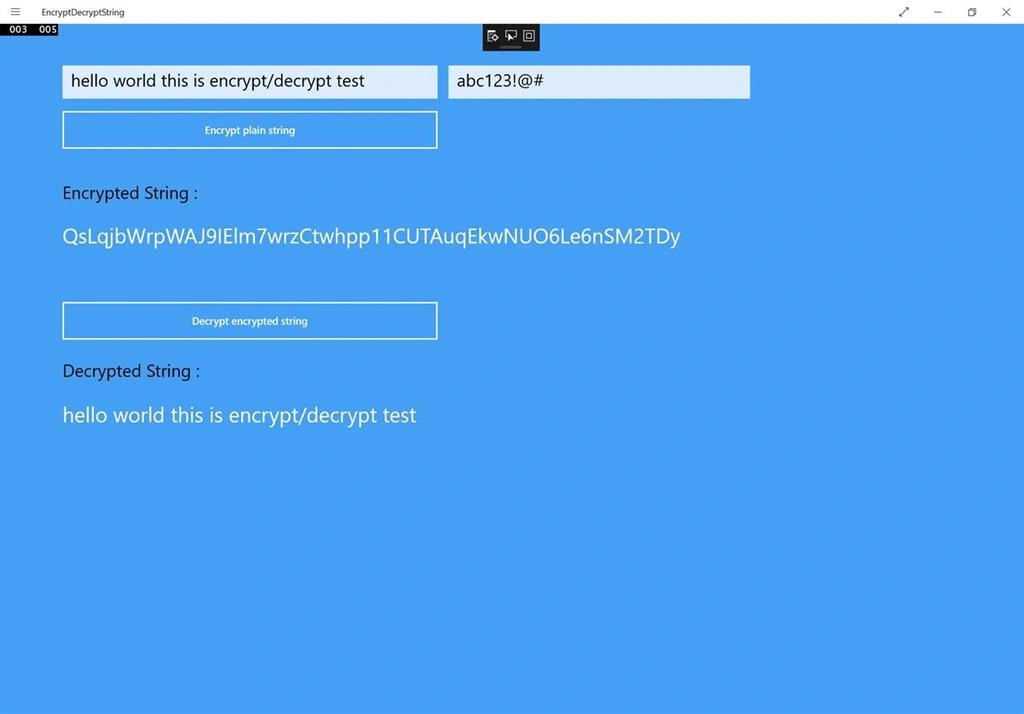
Now you are all set. Run the application and enter plain string and key. Click on the Encrypt string button. You will see the encrypted string.
That’s it.
Thanks, Happy Coding!
Read more articles on Windows Runtime apps:
Gail BowenPosted Aug 23, 2018, 5:47 AM
Thank you - this was perfect
Kuppurasu NagarajPosted Apr 30, 2016, 2:45 PM
Nice Sharing..