

Here are the steps:
Step 1:
Create a simple Windows Runtime Project. Click New Project, Visual C#, Windows 8, Windows, then Blank App (Windows 8.1).
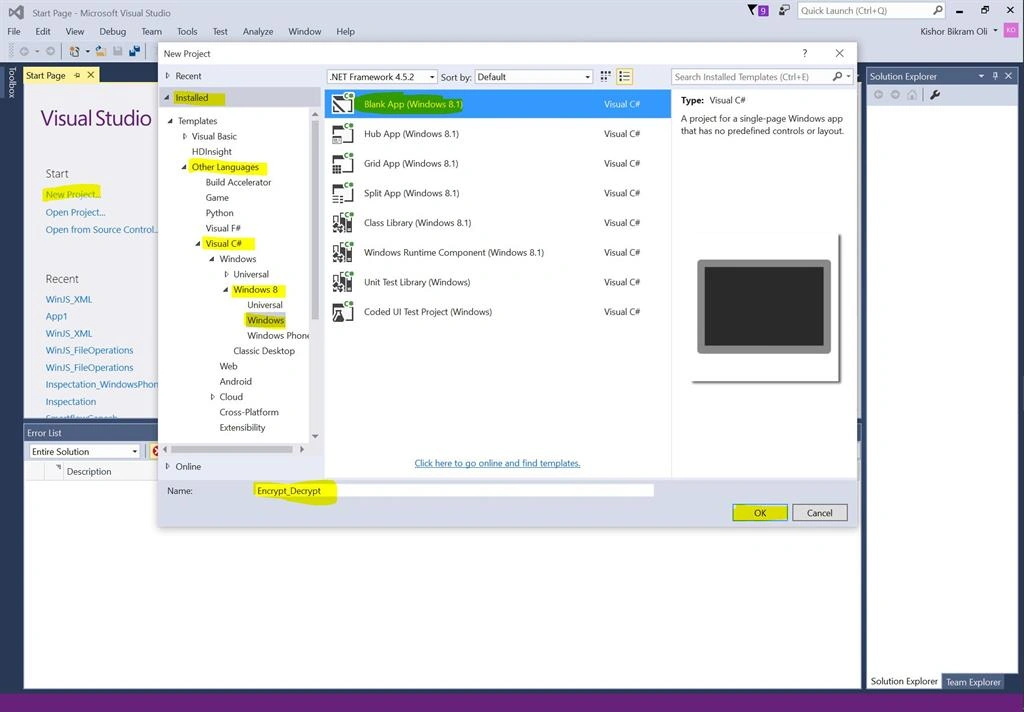
Step 2:
Let's add two buttons in MainPage.xaml with click events:
- Encrypt Button
- Decrypt Button
- <Page
- x:Class="Encrypt_Decrypt.MainPage"
- xmlns="http://schemas.microsoft.com/winfx/2006/xaml/presentation"
- xmlns:x="http://schemas.microsoft.com/winfx/2006/xaml"
- xmlns:local="using:Encrypt_Decrypt"
- xmlns:d="http://schemas.microsoft.com/expression/blend/2008"
- xmlns:mc="http://schemas.openxmlformats.org/markup-compatibility/2006"
- mc:Ignorable="d">
- <Grid Background="{ThemeResource ApplicationPageBackgroundThemeBrush}">
- <Button Content="Encrypt" Name="btn_Encrypt" Height="125" Margin="65,365,0,278" Width="225" Click="btn_Encrypt_Click"></Button>
- <Button Content="Decrypt" Name="btn_Decrypt" Margin="350,365,0,278" Height="125" Width="231" Click="btn_Decrypt_Click"></Button>
- </Grid>
- </Page>
Step 3:
Let's add a text file in Solution Explorer for testing purpose. We will copy that file from Installed Location to Local folder and encrypt it.
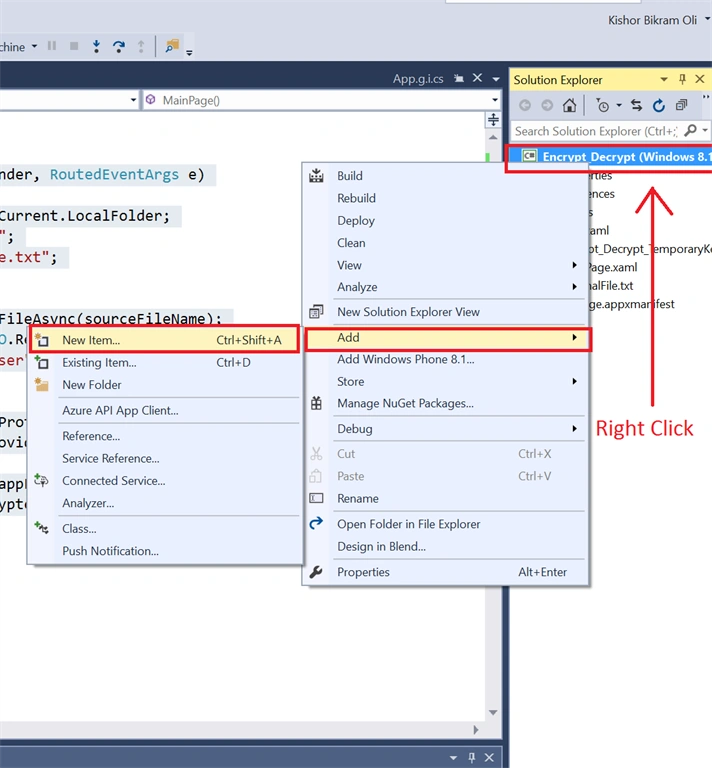
Step 4: Name it ‘OriginalFile.txt’
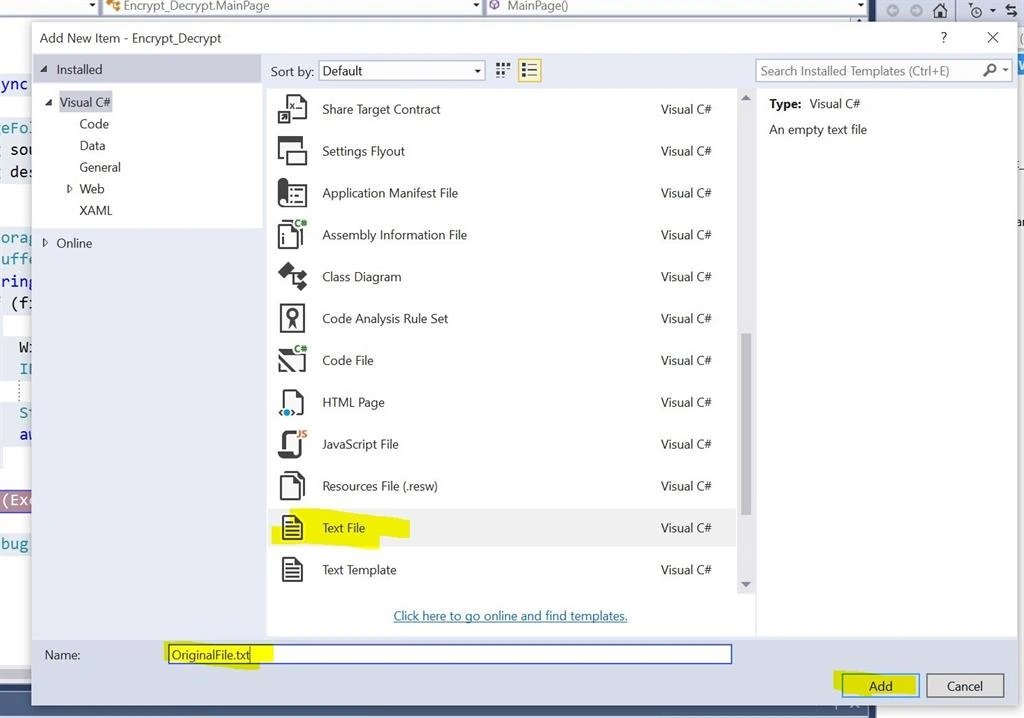
Step 5:Add some text in this text file.
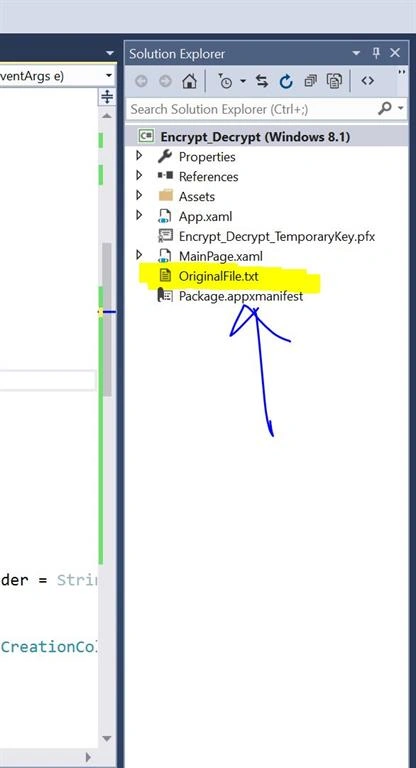
Step 6:
In the code behind: MainPage.xaml.cs, Update your code with this:
- using System;
- using System.Collections.Generic;
- using System.Diagnostics;
- using System.IO;
- using System.Linq;
- using System.Runtime.InteropServices.WindowsRuntime;
- using Windows.ApplicationModel;
- using Windows.Foundation;
- using Windows.Foundation.Collections;
- using Windows.Storage;
- using Windows.Storage.Streams;
- using Windows.UI.Xaml;
- using Windows.UI.Xaml.Controls;
- using Windows.UI.Xaml.Controls.Primitives;
- using Windows.UI.Xaml.Data;
- using Windows.UI.Xaml.Input;
- using Windows.UI.Xaml.Media;
- using Windows.UI.Xaml.Navigation;
- namespace Encrypt_Decrypt
- {
-
- public sealed partial class MainPage : Page
- {
- public MainPage()
- {
- this.InitializeComponent();
- }
- private async void btn_Encrypt_Click(object sender, RoutedEventArgs e)
- {
- //For Copying File from Installed Location to Local Folder
- StorageFolder appFolder = ApplicationData.Current.LocalFolder;
- StorageFile stopfile = await StorageFile.GetFileFromApplicationUriAsync(new Uri("ms-appx:///OriginalFile.txt"));
- await stopfile.CopyAsync(ApplicationData.Current.LocalFolder, "OriginalFile.txt", NameCollisionOption.ReplaceExisting);
- string sourceFileName = "OriginalFile.txt";
- string destinationFileName = "EncryptedFile.txt";
- try
- {
- StorageFile file = await appFolder.GetFileAsync(sourceFileName);
- IBuffer fileStreamBuffer = await FileIO.ReadBufferAsync(file);
- string protectionDescriptor = "LOCAL=user";
- if (fileStreamBuffer.Length != 0)
- {
- Windows.Security.Cryptography.DataProtection.DataProtectionProvider provider = String.IsNullOrEmpty(protectionDescriptor) ? new Windows.Security.Cryptography.DataProtection.DataProtectionProvider() : new Windows.Security.Cryptography.DataProtection.DataProtectionProvider(protectionDescriptor);
- IBuffer encryptedBuffer = await provider.ProtectAsync(fileStreamBuffer);
- StorageFile encryptedFile = await appFolder.CreateFileAsync(destinationFileName, CreationCollisionOption.ReplaceExisting);
- await FileIO.WriteBufferAsync(encryptedFile, encryptedBuffer);
- }
- }
- catch (Exception ex)
- {
- Debug.WriteLine(ex.ToString());
- }
- }
- private async void btn_Decrypt_Click(object sender, RoutedEventArgs e)
- {
- StorageFolder appFolder = ApplicationData.Current.LocalFolder;
- string sourceFileName = "EncryptedFile.txt";
- string destinationFileName = "DecryptedFile.txt";
- try
- {
- StorageFile file = await appFolder.GetFileAsync(sourceFileName);
- IBuffer fileStreamBuffer = await FileIO.ReadBufferAsync(file);
- string protectionDescriptor = "LOCAL=user";
- if (fileStreamBuffer.Length != 0)
- {
- Windows.Security.Cryptography.DataProtection.DataProtectionProvider provider = String.IsNullOrEmpty(protectionDescriptor) ? new Windows.Security.Cryptography.DataProtection.DataProtectionProvider() : new Windows.Security.Cryptography.DataProtection.DataProtectionProvider(protectionDescriptor);
- IBuffer encryptedBuffer = await provider.UnprotectAsync(fileStreamBuffer);
- StorageFile encryptedFile = await appFolder.CreateFileAsync(destinationFileName, CreationCollisionOption.ReplaceExisting);
- await FileIO.WriteBufferAsync(encryptedFile, encryptedBuffer);
- }
- }
- catch (Exception ex)
- {
- Debug.WriteLine(ex.ToString());
- }
- }
- }
- }
Step 7:
Run the application. Click on Encrypt and Decrypt button. You can see the files being encrypted and decrypted in the Application Local Folder:
This PC, C, Users > [Your User Name] > AppData, Local, Packages > [App package name] > LocalState,

That’s it.
Thanks, Happy Coding!
Read more articles on Windows Runtime Apps:
Kuppurasu NagarajPosted Apr 25, 2016, 11:58 AM
Nice sharing
Gowtham RajamanickamPosted Apr 25, 2016, 10:00 AM
good article..
Vignesh ManiPosted Apr 25, 2016, 8:14 AM
Nice