

What is CORS?
Cross-Origin Resource Sharing (CORS) manages the cross-origin requests. Unlike same-origin policy, CORS allows making a request from one origin to another. CORS allows the servers to specify who can access the resource on the server from outside.
The origin is made up of three parts - the protocol, host, and the port number.
This is in continuation of my last article (create RESTful API using ASP.NET Core with Entity Framework Core) so I highly recommend you to go through my previous article for the basic set up of an ASP.NET Core application.
Cross Domain call
Before enabling the CORS, let’s see how the cross-domain call is restricted. Let’s create an ASP.NET Core web application.
Step1
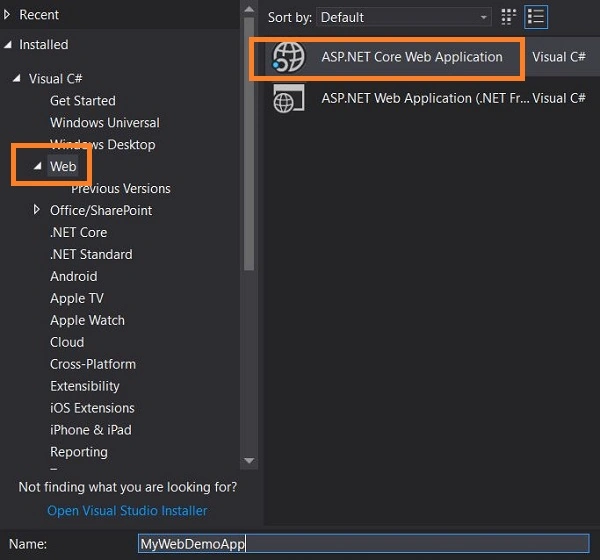
Open Visual Studio, click on NEW ->Project. Select ASP.NET Web Application template under Web, as shown in the below figure.
Step 2
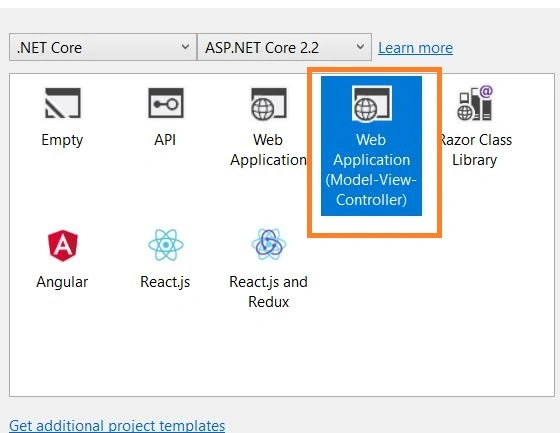
Select web application (Model-View-Controller) template, as shown in the below figure,
Step 3
Click OK. This will create a web application with a default template.
Step 4
Go to the Index.cshtml page and add the below code and run the application.
- <script>
- $.ajax({
- url: "https://localhost:44348/api/Libraries/GetAllAuthor",
- success: function (result) {
- console.log(result);
- }
- })
- </script>
From the above code, you can notice the AJAX call I made to access the API which is not from the same origin. This is from the ASP.NET Core API application which is created in my last article.
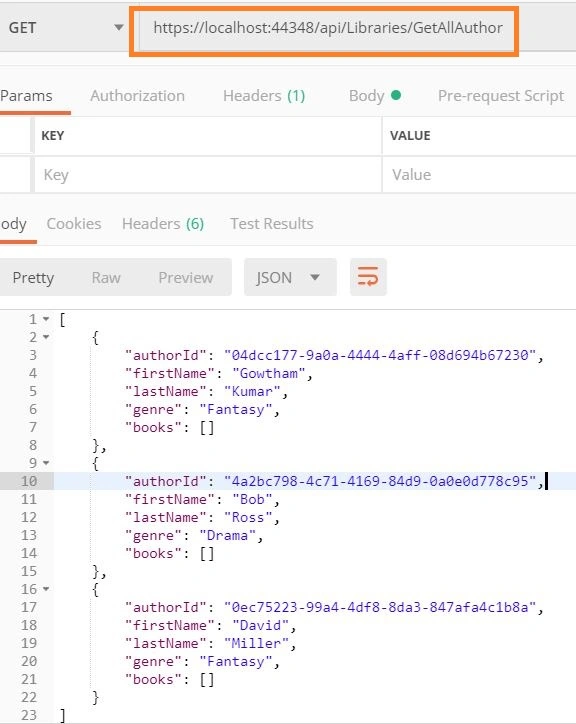
Testing the API in the Postman tool.
In the browser console, you will get an error message as shown in the below figure.

Now it’s time to Enable CORS in our API application so that we can access it from a different origin.
Enable CORS in ASP.NET Core API Application
Enabling CORS Globally
Open the ASP.NET Core API application which we created in my last article.
Go to Startup.cs file and add the below code in Configure method, which will inject CORS into a container.
- app.UseCors(options => options.AllowAnyOrigin());
- services.AddCors(c =>
- {
- c.AddPolicy("AllowOrigin", options => options.AllowAnyOrigin());
- });
The above code tells that the API’s can be accessed from any origin globally.
Run the application,
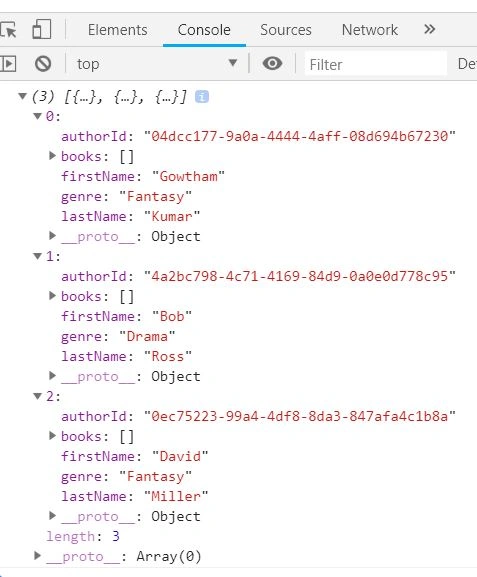
From the above figure you can notice we got a response from the API successfully and the response it printed in browser console was as expected.
Enabling for origin
Go to Startup.cs file and add the below code in Configure method,
- app.UseCors(options=>options.WithOrigins("https://localhost:44342"));
Add the below code in ConfigureServices method
- services.AddCors(c =>
- {
- c.AddPolicy("AllowOrigin", options => options.WithOrigins("https://localhost:44342"));
- });
- // GET: api/Libraries/GetAllAuthor
- [HttpGet]
- [Route("GetAllAuthor")]
- [EnableCors("AllowOrigin")]
- public IActionResult GetAllAuthor()
- {
- IEnumerable<Author> authors = _libraryRepository.GetAllAuthor();
- return Ok(authors);
- }
Now this API can be accessed only from the origin https://localhost:44342.
We can also define EnableCors at the controller level so that all the actions under this controller can be accessed from the origin https://localhost:44342
- [Route("api/Libraries")]
- [ApiController]
- [EnableCors("AllowOrigin")]
- public class LibrariesController : ControllerBase
- {
- private readonly ILibraryRepository<Author> _libraryRepository;
- public LibrariesController(ILibraryRepository<Author> libraryRepository)
- {
- _libraryRepository = libraryRepository;
- }
- // GET: api/Libraries/GetAllAuthor
- [HttpGet]
- [Route("GetAllAuthor")]
- public IActionResult GetAllAuthor()
- {
- IEnumerable<Author> authors = _libraryRepository.GetAllAuthor();
- return Ok(authors);
- }
- }
- }
Conclusion
We saw how to enable the CORS in ASP.NET Core API applications, will see more about ASP.NET Core in my future articles. I hope you have enjoyed this article. Your valuable feedback, questions, or comments about this article are always welcomed.
Arjun ColbayPosted Nov 29, 2020, 8:23 AM
Thank you for explaining this, I met an issue after implementing exactly like this, but I got an error like, "contains CORS metadata, but a middleware was not found that supports CORS. Can you please suggest any thing to do more on this?
Guest UserPosted Dec 13, 2019, 12:41 PM
I have done exactly as described above using my WebAPI2 application using .NET Core 3.1 and I still get this error: Cross-Origin Request Blocked: The Same Origin Policy disallows reading the remote resource at http://mypc/myapi/weatherforecast. (Reason: CORS header ‘Access-Control-Allow-Origin’ missing). I am running my Angular 8 app using http://localhost:4200 and have specified AllowAnyOrigin in the ConfigureServices method of my Startup.cs as well as app.UseCors("mypoilcy") in the Configure method. Any thoughts on what else to check?
Hao HoangPosted Sep 28, 2019, 11:15 PM
Thanks for supporting.
Andres Leonardo Cano MuñozPosted Jul 28, 2019, 10:04 PM
Uds son de lo mejor
Dejan StojanovicPosted Jun 16, 2019, 1:52 AM
If you have the policy declared in the services and you are referring it with EnableCors attribute, is it necessary to have it in the pipeline as well?
Sagar JaybhayPosted Feb 20, 2019, 9:58 PM
Nice Article