

Introduction
Nowadays, ASP.NET WebAPI is a trending technology. Everyone is trying to access the service through AJAX requests or the server side. The problem is when a WebAPI is hosted and the other application (different domain) tries to access the WebAPI through an AJAX request. Here, enabling CORS plays a vital role in WebAPI.
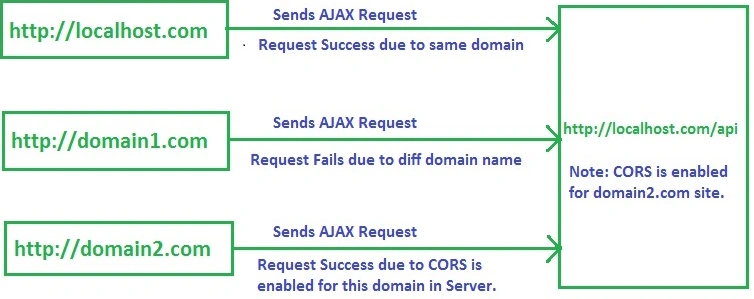
Figure 1: Understanding of CORS
In the below figure, we have hosted one WebService at localhost.com. We are sending 3 AJAX requests to get the response from WebService:
same domain, other domain(domain1.com), other domain(domain2.com) with CORS enabled.
When the Request comes from the same domain, it works perfectly.
When the Request comes from some other domain(domain1.com), it throws an error. It means the browser has a property called Access-Control-Allow-Origin which restricts the requests from different domains for security purposes. So, we need to enable CORS to accomplish the request.
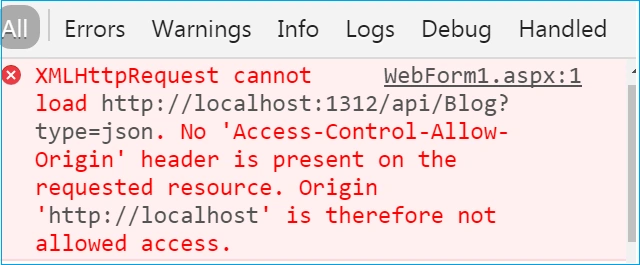
Figure 2: CORS error in the browser
From the above discussion, we need to enable CORS in Server-to-Server requests. Request comes from the other domain, it works perfectly because CORS is enabled.
Before starting the discussion, here are some terminologies and their definition.
What is WebAPI?
ASP.NET Web API is a framework that is used to make it easy to build HTTP services that reach a broad range of clients, including browsers and mobile devices. ASP.NET Web API is an ideal platform for building RESTful applications on the .NET framework. Moreover, Web API is open source and an ideal platform for building RESTful services over the .NET framework. It uses HTTP methods mainly GET, POST, PUT, and DELETE to communicate with clients. For more on WebAPI, visit here.
What is CORS?
CORS stands for Cross-Origin Resource Sharing. It is a mechanism that allows restricted resources on a web page to be requested from another domain, outside the domain from which the resource originated. A web page may freely embed images, stylesheets, scripts, iframes, and videos.
For security reasons, browsers restrict cross-origin HTTP requests initiated from within scripts. For example, XMLHttpRequest follows the same-origin policy. So, a web application using XMLHttpRequest could only make HTTP requests to its own domain. To improve web applications, developers asked browser vendors to allow XMLHttpRequest to make cross-domain requests.
What is the same origin policy?
Browsers allow a web page to make AJAX requests only within the same domain. Browser security prevents a web page from making AJAX requests to another domain. This is called the origin policy.
We can enable CORS in WebAPI,
- Using JSONP
- Using Microsoft.AspNet.WebApi.Cors
Using JSONP(JSON with Padding) formatter.
What is JSONP?
JSONP stands for JSON with Padding. It helps to implement cross-domain requests by the browser's same-origin policy. It wraps up a JSON response into a JavaScript function (callback function) and sends that back as a Script to the browser. This allows you to bypass the same origin policy and load JSON from an external server into the JavaScript on your webpage.
{
   "name": "manas",
   "age": 23,
   "temper": "moody"
}
With JSONP, when the server receives the "callback" parameter, it wraps up the result a little differently, and returns like this.
// JSONP:
newPerson({
  'name': 'manas',
  'age': 23,
  'temper': 'moody'
});
First, we need to enable CORS in WebAPI, then we call the service from another application AJAX request. In order to enable CORS, we need to install the JSONP package from NuGet (see Figure 3).
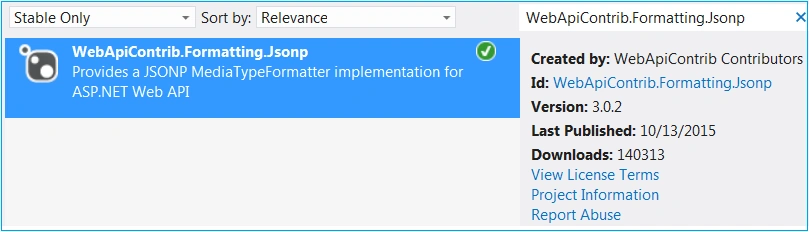
Figure 3: Adding Jsonp package from NuGet
After adding the Jsonp package, we need to add the following code snippet in the App_Start\WebApiConfig.cs file. It creates an instance of the JsonpMediaTypeFormatter class and adds it to the config formatted object.
var jsonpFormatter = new JsonpMediaTypeFormatter(config.Formatters.JsonFormatter);
config.Formatters.Add(jsonpFormatter);
Now, we are ready with CORS enabled in the Server and the other application needs to send AJAX requests that are hosted on another domain. In the below code snippet, it sends the datatype as JSONP which works for cross-domain requests.
<script src="http://ajax.aspnetcdn.com/ajax/jQuery/jquery-2.0.3.min.js"></script>
<script>
    $(document).ready(function () {
        $.ajax({
            type: 'POST',
            url: 'http://localhost:1312/api/Blog',
            cache: true,
            dataType: 'jsonp',
            success: function (json) {
                var htmlContent = "";
                $.each(json, function (key, item) {
                    htmlContent += "<tr><td>" + item.Id + "</td><td>" + item.Name + "</td><td>" + item.Url + "</td></tr>";
                });
                $('#blogs').append(htmlContent);
            },
            error: function (parsedjson, textStatus, errorThrown) {
                $('body').append(
                    "parsedJson status: " + parsedjson.status + '</br>' +
                    "errorStatus: " + textStatus + '</br>' +
                    "errorThrown: " + errorThrown);
            }
        });
    });
</script>
Disadvantages
- Incompatible in old browser
- Security issues that can steal your cookies(leads to a whole bunch of potential problems).
Using Microsoft.AspNet.WebApi.Cors
To use the Microsoft CORS package, you need to install it from the NuGet package.
Go to Tools Menu-> Library Package Manager -> Package Manager Console -> execute the below command.
Install-Package Microsoft.AspNet.WebApi.Cors
To register/enable CORS we are going to use the EnableCorsAttribute class and it takes four params(4th one is optional).
- Origins: Here, we need to set Origins which means from which domain the requests will be accepted. If you have more than one domain, then you can set it as comma-separated. Additionally, if you want any domain request to be accepted then use the wild card as,
- Request Headers: The Request header parameter specifies which Request headers are allowed. To allow any header set value to "*"
- HTTP Methods: The methods parameter specifies which HTTP methods are allowed to access the resource. Use comma-separated values when you have multiple HTTP methods like "get, put, post". To allow all HTTP methods, use the wildcard value "*".
- exposedHeaders: By default, the browser does not expose all of the response headers to the application. The response headers that are available by default are Cache-Control, Content-Language, Content-Type, Expires, Last-Modified, and Pragma.
To make other headers available in the browser you need to use exposed headers. You can set custom headers like below code snippet.
[EnableCors(origins: "*", headers: "*", methods: "*", exposedHeaders: "X-My-Header")]
public class TestController : ApiController
{
}
You can configure CORS support for Web API at three levels.
- Global level
- Controller level
- Action Level
Global level
Here, we are going to enable CORS at a Global level, which means it is applicable to all controllers and their actions. You need to add below code snippet below in the App_Start/WebApiConfig.cs file. It creates an instance of the EnableCorsAttribute class by passing the required parameters.
- "http://localhost:80/DemoApp/WebForm1.aspx": The server enables CORS for this domain.
- "*": STAR means it accepts all request headers.
- "GET, POST": It indicates it accepts only GET, POST HTTP verbs. If any request comes to a server other than "GET, POST" it throws an exception.
public static void Register(HttpConfiguration config)
{
    EnableCorsAttribute cors = new EnableCorsAttribute("http://localhost:80/DemoApp/WebForm1.aspx", "*", "GET,POST");
    config.EnableCors(cors);
}
Controller level
We can enable CORS at the Controller level which means all the actions present inside are ready to serve requests from cross-domain. Here we need to add the EnableCors attribute on the top of the controller by passing the required parameter(same as discussed above).
[EnableCors(origins: "http://localhost:5901/DemoApp/WebForm1.aspx", headers: "*", methods: "*")]
public class ValuesController : ApiController
{
}
Action Level
Likewise, at the controller level, we can enable CORS at the Action level which means CORS is enabled for particular actions and is ready to serve requests from cross-domain. Here, we need to add the EnableCors attribute on the top of the action by passing the required parameter (same as discussed above).
public class ValuesController : ApiController
{
    [EnableCors(origins: "http://localhost:5901", headers: "*", methods: "*")]
    // GET api/values
    public IEnumerable<string> Get()
    {
        return new string[] { "value1", "value2" };
    }
}
Enable CORS in WebAPI 1.0
If you are working in WebAPI 1.0 then you need to add the following code in the Global.asax file. Here we enabled CORS in the Application_BeginRequest() event which checks the origin name and then adds headers to the response object.
protected void Application_BeginRequest()
{
    string[] allowedOrigin = new string[] { "http://localhost:2051", "http://localhost:2052" };
    var origin = HttpContext.Current.Request.Headers["Origin"];
    if (origin != null && allowedOrigin.Contains(origin))
    {
        HttpContext.Current.Response.AddHeader("Access-Control-Allow-Origin", origin);
        HttpContext.Current.Response.AddHeader("Access-Control-Allow-Methods", "GET,POST");
    }
}
Disable CORS
Suppose you enabled CORS in Global or Controller level then all actions are enabled for CORS. However, if you want CORS to not be enabled for a couple of actions due to some security reason, the DisableCors attribute plays a vital role in Disable CORS which means other domains can't call the action.
[DisableCors()]
// GET api/values/5
public string Get(int id)
{
    return "value";
}
CORS is mostly server-side technology that works tightly with a browser. So CORS in browser support is also necessary. See what browsers are supported by CORS: http://enable-cors.org/client.html
Note. If you encounter the above exception, you have to install the package: Install-Package Microsoft.AspNet.WebApi –IncludePrerelease.
or install Microsoft ASP.NET Web API 2.2.
{
    "Attempt by method 'System.Web.Http.GlobalConfiguration..cctor()' to
    access field 'System.Web.Http.GlobalConfiguration.CS$<>9__CachedAnonymousMethodDelegate2' failed."
}
Conclusion
CORS is Cross Origin Request Sharing which enables you to call the methods of one domain from an external domain. We discussed enabling CORS in two ways: JSONP and Microsoft Cors package. Due to security reasons, browser incompatibility of Microsoft Cors wins over JSONP.
Hope this helps!
Atanu BaklyPosted Jul 3, 2020, 11:58 PM
I install "Install-Package Microsoft.AspNet.WebApi.Cors" and allow "Global level", Delete and update is not working, please advice me what needs to be done
dinesh kumarPosted Mar 4, 2020, 1:21 AM
Its very nice and working by using client side technology " <script> ajax({....})</script>" . and its not working using server side technology can you please suggest me .
VenkataRamakoti BandaruPosted Feb 27, 2020, 8:18 PM
My App Server running as www.angulartestapp.com from 192.168.##.## IP Address. My Web API running as www.angulartestapi.com from 192.172.##.## IP Address. for authentication purposes, I am using JWT Token, after 1st log in to my application, I got the token. Is that token valid for accessing API from Fiddler/Postman Scenarios: Q: When a user logged in (App Login) session is live in one client Ip. Q: Can I access the Web API service from tools like Fiddler/Postman by passing the token generated in the request? Q: How can I restrict access to the WEB API Service from these tools, when the application goes to the production server? Q: If I copy the token and try to access the Web API service from another client machine, can I access the service, and how can I restrict that?
VenkataRamakoti BandaruPosted Feb 27, 2020, 8:14 PM
I have enable cors for domain1.com, and using JWT token for authentication when my first login got the token, so by using that token can i access web api through postman or fiddler?
Kranthi Vardhan KolluruPosted Feb 6, 2020, 9:44 PM
I tried with CORS, but still i am getting the error "Access to XMLHttpRequest at 'https://localhost:44300/api/RCM/rcmData' from origin 'http://localhost:63132' has been blocked by CORS policy: Response to preflight request doesn't pass access control check: No 'Access-Control-Allow-Origin' header is present on the requested resource." any suggestions please
Amitesh KaushikPosted Dec 7, 2019, 5:23 AM
What if I want to access the single Web API from multiple sites? do I have to add all the sites url in the following code ? [EnableCors(origins: "http://localhost:5901", headers: "*", methods: "*")]
Kamlesh KumarPosted May 16, 2019, 8:04 AM
Well said , thank you for the valuable information
AKshay RautPosted May 9, 2018, 8:17 AM
Is there a way I can add multiple origins dynamically?
Sameer KPosted Mar 12, 2018, 6:59 AM
Well said , thank you for the valuable information
Animation TvPosted Dec 12, 2017, 3:38 AM
Hi. I add var cors = new EnableCorsAttribute("*", "*", "*"); config.EnableCors(cors); in startUp. Help me security??
Sagar PrakashPosted Nov 8, 2017, 3:27 AM
Thank you ..Good explanation
Gourav BhattPosted Oct 18, 2017, 7:02 AM
Very nicely expalin .. Thank you :)
Zaw ZawPosted Sep 19, 2017, 12:41 AM
What need to allow if request is from Window Client?
Hamid KhanPosted Sep 9, 2017, 3:22 PM
Nice................
Naveen BishtPosted Apr 17, 2017, 11:57 PM
Very nicely expalin ..
Sridhar SharmaPosted Mar 2, 2017, 10:37 PM
Nice Article Manas :)
Bikesh SrivastavaPosted Jan 25, 2017, 8:31 AM
very nice article but you need to focus on this part of code @carlos Munoz public static void Register(HttpConfiguration config) { EnableCorsAttribute cors = new EnableCorsAttribute("http://localhost:80/DemoApp/WebForm1.aspx", "*", "GET,POST"); config.EnableCors(cors); }
Manas MohapatraPosted Jan 25, 2017, 6:35 AM
Did you follow the article properly. And add domain name in config properly.
Carlos MunozPosted Jan 24, 2017, 1:39 PM
Hi i am receving this error: XMLHttpRequest cannot load http://localhost:30088/token. No 'Access-Control-Allow-Origin' header is present on the requested resource. Origin 'http://localhost:4200' But my app angular 2(client) and web api are in same pc. What could be the problem?
Chinmaya DashPosted Nov 1, 2016, 8:10 AM
Can u help me thanks in advance
Chinmaya DashPosted Nov 1, 2016, 8:10 AM
I am getting the token from web api but when i am passing that token to to authorize method it is showing unauthorized by doing ajax call also i have done that cors part
Chinmaya DashPosted Nov 1, 2016, 8:08 AM
Can you give a sample which carried authentication by calling web api
Bikesh SrivastavaPosted Oct 25, 2016, 11:05 PM
Nice
Thiruppathi RPosted Oct 25, 2016, 12:22 AM
Very Nice ...
Pradeep SahooPosted Oct 24, 2016, 8:39 PM
Very useful . Thanks for putting effort and writting.