

This is a series of articles to discuss CORS (Cross Origin Resource Sharing) issue for both setup and consuming.
This article is a continuation of the previous article series, Enable CORS in .NET Core Web API (1), (2), and (3), when we tested the CORS in Web API, we used IIS as server, and then got the way to configure IIS 10 to be CORS enabled.
Introduction
To make IIS 10 CORS enabled, we must do these two things,
- lnstall the CORS Module in IIS 10;
- Configure IIS 10 according to IIS CORS module Configuration Reference
Install CORS module in IIS 10
The Microsoft IIS CORS Module is an extension that enables web sites to support the CORS (Cross-Origin Resource Sharing) protocol.
The IIS CORS module helps with setting appropriate response headers and responding to preflight requests. Once installed, the IIS CORS module is configured via a site or application
web.config and has its own cors configuration section within system.webserver.Configure IIS 10 to be CORS enabled
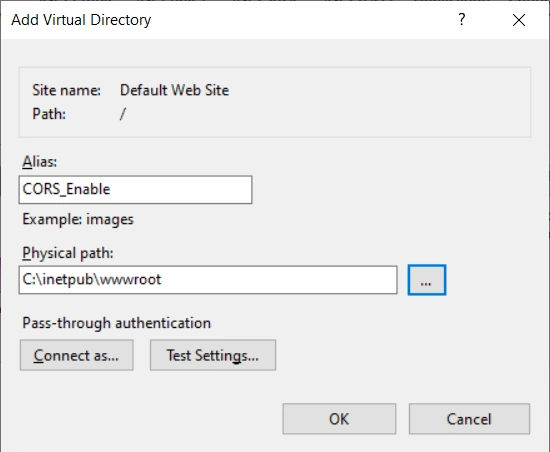
Open IIS, we make a new virtual directory under the default web site,
- Right click Defatult Web Site > Add Virtual Directory;
- In Add Virtual Directory dialog box, Name Alias as CORS_Enable;
- Choose a Physical path: sya, C:\inetpub\wwwroot
- Click OK
We have,
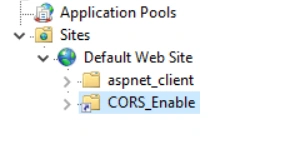
We make the virtual directory CORS enabled, just add a web.config file with the content copied from IIS CORS module Configuration Reference,
<?xml version="1.0" encoding="UTF-8"?>
<configuration>
    <system.webServer>
        <cors enabled="true" failUnlistedOrigins="true">
            <add origin="*" />
            <add origin="https://*.microsoft.com"
                 allowCredentials="true"
                 maxAge="120">
                <allowHeaders allowAllRequestedHeaders="true">
                    <add header="header1" />
                    <add header="header2" />
                </allowHeaders>
                <allowMethods>
                     <add method="DELETE" />
                </allowMethods>
                <exposeHeaders>
                    <add header="header1" />
                    <add header="header2" />
                </exposeHeaders>
            </add>
            <add origin="http://*" allowed="false" />
        </cors>
    </system.webServer>
</configuration>
We will see the difference between the Default Web Site and its sub site, CORS_Enable.
Test the CORS effect
We use the Angular client developed in Part II, in the file src/app/app.component.ts
import { Component, OnInit, ViewChild } from '@angular/core';
import { HttpClient } from '@angular/common/http'; // remote

import { AgGridAngular } from 'ag-grid-angular';
import 'ag-grid-enterprise';

@Component({
    selector: 'app-root',
    templateUrl: './app.component.html',
    styleUrls: ['./app.component.scss']
})
export class AppComponent {
    @ViewChild('agGrid') agGrid: AgGridAngular;
    title = 'ag-Grid';

    columnDefs = [
      { field: 'make', sortable: true, filter: true },
      { field: 'model', sortable: true, filter: true },
      { field: 'price', sortable: true, filter: true }
  ];

  rowData: any;

  constructor(private http: HttpClient) {

  }

  ngOnInit() {
      this.rowData = this.http.get('https://www.ag-grid.com/example-assets/row-data.json');
  }

  getSelectedRows() {
    const selectedNodes = this.agGrid.api.getSelectedNodes();
    const selectedData = selectedNodes.map(node => {

      return node.data;
    });
    const selectedDataStringPresentation = selectedData.map(node => node.make + ' ' + node.model).join(', ');

    alert(`Selected nodes: ${selectedDataStringPresentation}`);
  }
}
We download the small size data from server: https://www.ag-grid.com/example-assets/small-row-data.json,
[
    { "make": "Toyota", "model": "Celica", "price": 35000 },
    { "make": "Ford", "model": "Mondeo", "price": 32000 },
    { "make": "Porsche", "model": "Boxter", "price": 72000 }
]
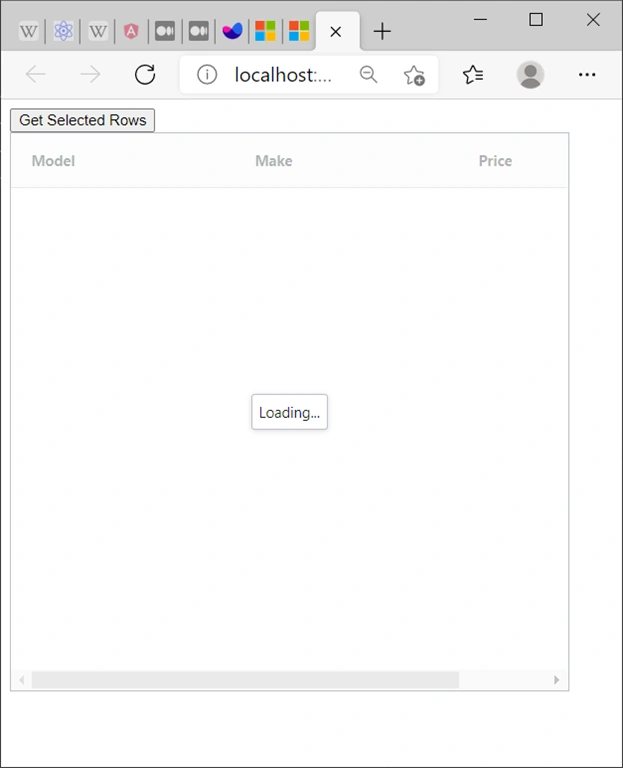
and save it as small-row-data.json in both Default Web Site C:\inetpub\wwwroot\small-row=data.json; and sub site C:\inetpub\wwwroot\CORS_Enable\small-row-data.json, now we run the Angular by targetting to these two sites,
Not CORS enabled site,
// this.rowData = this.http.get('https://www.ag-grid.com/example-assets/row-data.json');
this.rowData = this.http.get('http://localhost/small-row-data.json');
Result
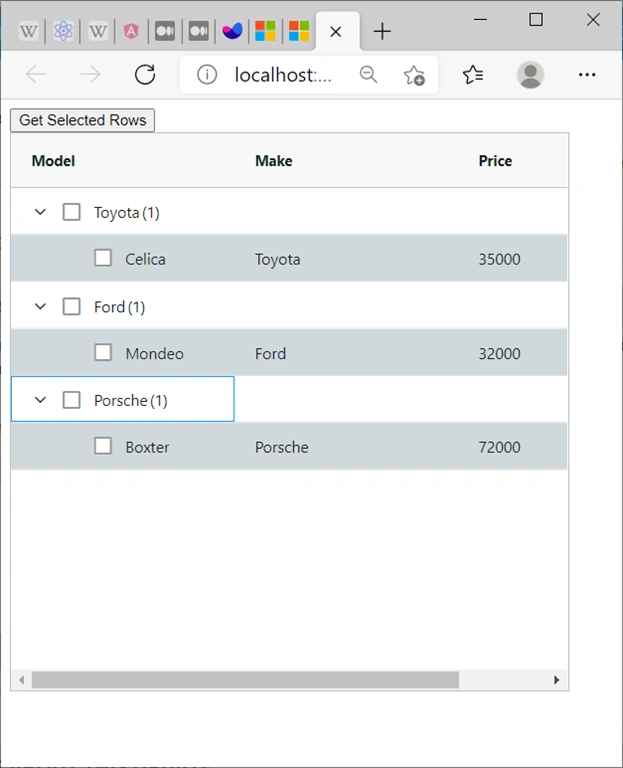
CORS enabled site,
// this.rowData = this.http.get('https://www.ag-grid.com/example-assets/row-data.json');
this.rowData = this.http.get('http://localhost/CORS_Enable/small-row-data.json');
Result
ParthaPosted Apr 20, 2023, 10:22 AM
We can just add this in web.config to handle cors. <system.webServer> <httpProtocol> <customHeaders> <add name="Access-Control-Allow-Methods" value="*" /> <add name="Access-Control-Allow-Headers" value="Content-Type" /> </customHeaders> </httpProtocol> </system.webServer>
ParthaPosted Apr 20, 2023, 10:11 AM
How to use cors on an asp.net website where content is blocked