

Introduction
Strands Agents is an open-source SDK that simplifies the development of AI agents capable of using tools, making decisions, and automating workflows — moving far beyond basic chatbot interactions.
In this article, you will learn how to create a travel buddy agent that remembers user preferences using the Strands Agents SDK and FAISS as the local vector store backend.
Strands Agents SDK includes a built-in memory tool called Mem0, which supports multiple backends like FAISS (local), OpenSearch (AWS-native), and the Mem0 Platform (API-based). This memory layer enables agents to store, retrieve, and reason with contextual knowledge — forming the foundation for stateful and adaptive user experiences.
In this example, you will use FAISS (via the faiss-cpu package), which is the default backend for local development. No additional configuration is required to get started.
Pre-requisites
- Install or update to the latest version of the AWS CLI.
- Get credentials to grant programmatic access.
- Visual Studio Code.
- Python 3.10+
- Access to Amazon Bedrock foundation model. The default model provider is Amazon Bedrock and the default model is Claude 3.7 Sonnet in the US Oregon (us-west-2) region.
Build the Travel Buddy Agent using Strands Agents SDK
Perform the following steps to create and configure an agent using Strands Agents SDK.
- Open Visual Studio Code.
- Navigate to the folder where you want to create your Python file.
- Open a new PowerShell terminal in Visual Studio Code.
- Run the following command to create a virtual environment.
python -m venv .venv - Run the following command to activate the virtual environment.
.venv\Scripts\Activate.ps1 - Run the following command to install the required packages.
pip install strands-agents faiss-cpu - Create a new Python file and name it as travel_agent.py.
- Copy and paste the below code to travel_agent.py.
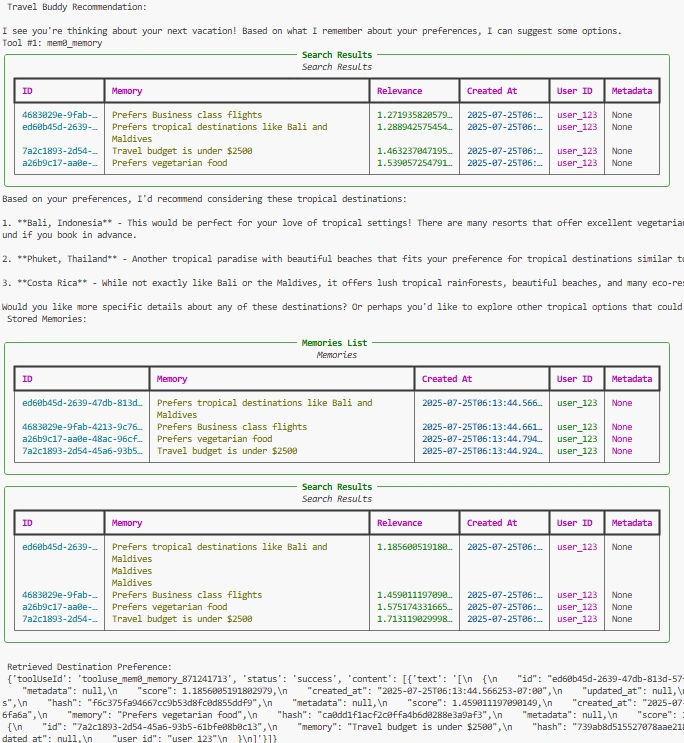
from strands import Agent from strands_tools import mem0_memory # Sample user ID for demo purpose user_id = "user_123" # Define the system prompt for Travel Buddy agent system_prompt = """ You are Travel Buddy, a friendly AI assistant helping users plan vacations. You remember their preferences — such as favorite destinations, travel class, budget, and dietary restrictions. Use that memory to suggest trips that match their style. """ # Initialize the Travel Buddy agent with memory capability (FAISS- Default) agent = Agent( tools=[mem0_memory], system_prompt=system_prompt, ) # Store user's travel preferences as memory agent.tool.mem0_memory( action="store", content="User prefers tropical destinations like Bali and Maldives, Business class flights, vegetarian food, and a budget under $2500.", user_id=user_id ) # Ask a question that utilizes stored memory print("\n Travel Buddy Recommendation:\n") response = agent("Where should I travel next?", user_id=user_id) # List all stored memories for the user print("\n Stored Memories:\n") memories = agent.tool.mem0_memory( action="list", user_id=user_id ) # Retrieve specific memory about destination preference destination_memory = agent.tool.mem0_memory( action="retrieve", query="What kind of destinations do I prefer?", user_id=user_id ) print("\n Retrieved Destination Preference:\n", destination_memory) - Run the following command to execute your Python code.
python -u .\travel_agent.py
Output
Summary
In this article, you learned how to build an Agentic AI assistant — a Travel Buddy — using the Strands Agents SDK and FAISS-based memory.
You explored how to:
- Configure an agent with memory
- Store and retrieve user preferences
- Deliver personalized recommendations based on memory
This foundational memory capability sets the stage for building adaptive, stateful, and human-like AI assistants.
Join the conversation! Your thoughts help the community grow.