
Introduction
In this article we will create the Web API and access the Web API using MVC 5 and send email using Web API 2.
Let’s start step by step:
- Create ASP.NET Web API Application/ Project
- Working with Web API Application
- Adding a model
- Adding a controller
- Adding Helper class
- Calling the Web Api with JavaScript and J Query (test web API)
- Use Rest client to call the API and send Email Notification (Install Fiddler)
Create the project
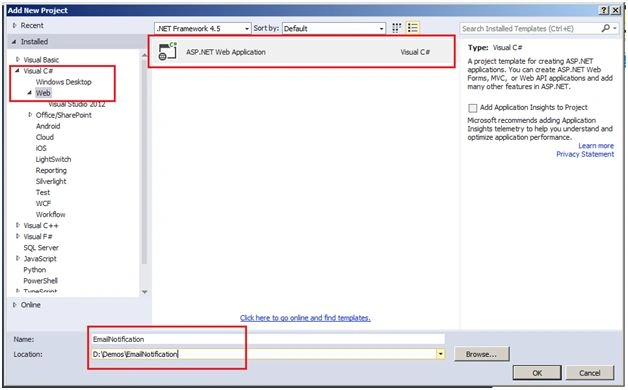
Start Visual Studio 2013/2015 and from the File menu, select New, then Project.
Select the ASP.NET Web Application project template. Name the project Email Notification and click OK.
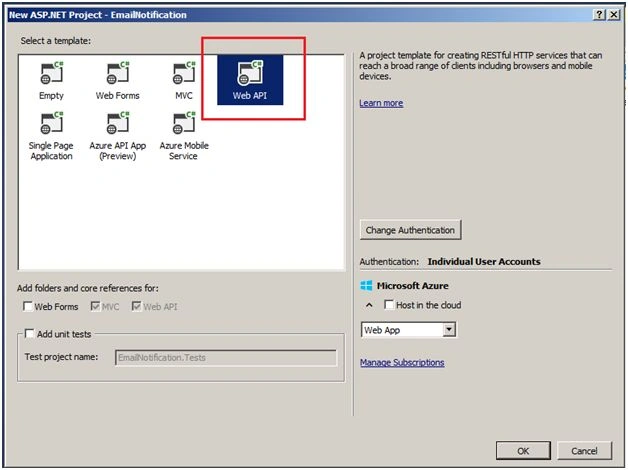
Select a template Web API.
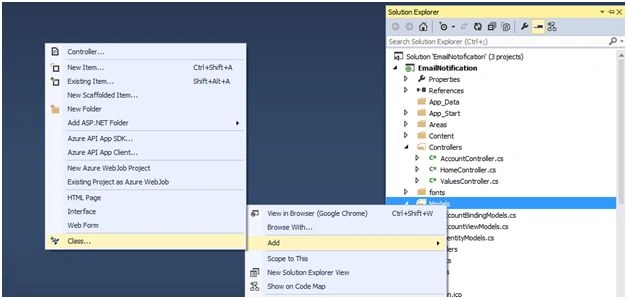
Add a model class
A model is an object that represents the data in your application. In this case, the only model is a TeamA item.
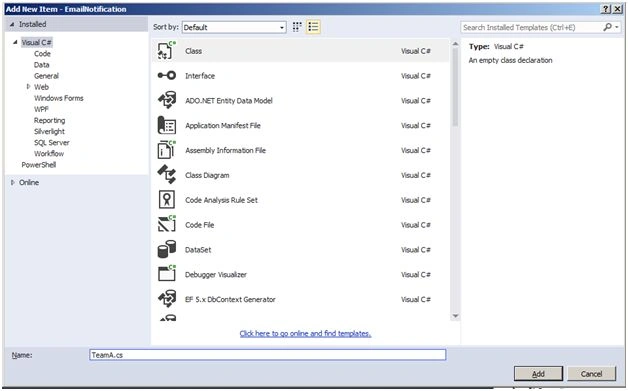
Add a class file “TeamA.cs”.
Replace the generated code with:
- namespace EmailNotification.Models
- {
- public class TeamA
- {
- public int Id
- {
- get;
- set;
- }
- public string Name
- {
- get;
- set;
- }
- public string Type
- {
- get;
- set;
- }
- public decimal Price
- {
- get;
- set;
- }
- }
- }
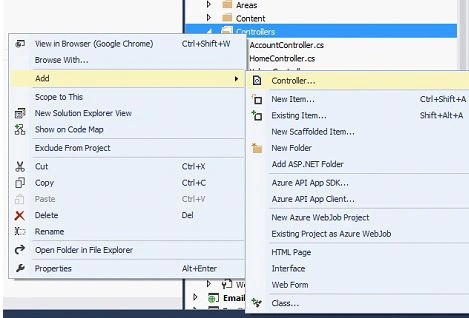
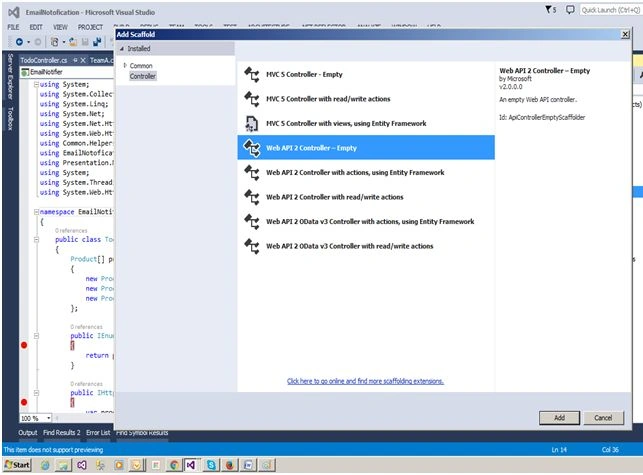
In the Add Scaffold wizard, select the Web API 2 Empty Controller: Name it EmailNotifier.
In the Add Controller dialog, name the controller "EmailNotifierController " and click Add.
Replace code with the following controller.
- public class EmailNotifierController: ApiController
- {
- TeamGroupA[] teamA = new TeamGroupA[]
- {
- new TeamGroupA
- {
- Id = 1, Name = "zing", Type = "Cricket", Price = 1
- },
- new TeamGroupA
- {
- Id = 2, Name = "Yo-yo", Type = "Football", Price = 3.75 M
- },
- new TeamGroupA
- {
- Id = 3, Name = "soft", Type = "Software", Price = 16.99 M
- }
- };
- // Run the application
- public IEnumerable < TeamGroupA > GetAllTeams()
- {
- return teamA;
- }
- }
The controller defines two methods that return products:
- The GetAllTeams method returns the entire list of products as an IEnumerable<TeamGroupA> type.
As we are working with Web API it may contain one or more methods.
Now add new model for AdpaterResponsebase for another API method as SendEmailNotification.cs.
AdapterResponseBase.cs

Replace model code with the following code:
- using System;
- using System.Collections.Generic;
- namespace EmailNotification.Models
- {
- public class ResponseBase
- {}
- public class RequestBase
- {}
- public class RequestBase < T > : RequestBase
- {
- public RequestBase()
- {}
- public RequestBase(T data)
- {
- Data = data;
- }
- public T Data
- {
- get;
- set;
- }
- }
- }
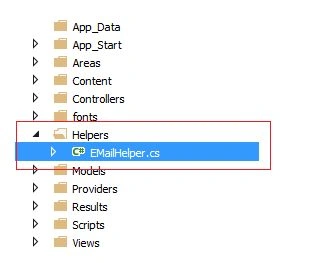
Replace class code with the following:
- using System;
- using System.Collections.Generic;
- using System.Linq;
- using System.Text;
- using System.Threading.Tasks;
- namespace Common.Helpers
- {
- public class EMailHelper
- {
- // Note: To send email you need to add actual email id and credential so that it will work as expected
- public static readonly string EMAIL_SENDER = "[email protected]"; // change it to actual sender email id or get it from UI input
- public static readonly string EMAIL_CREDENTIALS = "*******"; // Provide credentials
- public static readonly string SMTP_CLIENT = "smtp-mail.outlook.com"; // as we are using outlook so we have provided smtp-mail.outlook.com
- public static readonly string EMAIL_BODY = "Reset your Password <a href='http://{0}.safetychain.com/api/Account/forgotPassword?{1}'>Here.</a>";
- private string senderAddress;
- private string clientAddress;
- private string netPassword;
- public EMailHelper(string sender, string Password, string client)
- {
- senderAddress = sender;
- netPassword = Password;
- clientAddress = client;
- }
- public bool SendEMail(string recipient, string subject, string message)
- {
- bool isMessageSent = false;
- //Intialise Parameters
- System.Net.Mail.SmtpClient client = new System.Net.Mail.SmtpClient(clientAddress);
- client.Port = 587;
- client.DeliveryMethod = System.Net.Mail.SmtpDeliveryMethod.Network;
- client.UseDefaultCredentials = false;
- System.Net.NetworkCredential credentials = new System.Net.NetworkCredential(senderAddress, netPassword);
- client.EnableSsl = true;
- client.Credentials = credentials;
- try
- {
- var mail = new System.Net.Mail.MailMessage(senderAddress.Trim(), recipient.Trim());
- mail.Subject = subject;
- mail.Body = message;
- mail.IsBodyHtml = true;
- //System.Net.Mail.Attachment attachment;
- //attachment = new Attachment(@"C:\Users\XXX\XXX\XXX.jpg");
- //mail.Attachments.Add(attachment);
- client.Send(mail);
- isMessageSent = true;
- }
- catch(Exception ex)
- {
- isMessageSent = false;
- }
- return isMessageSent;
- }
- }
- }
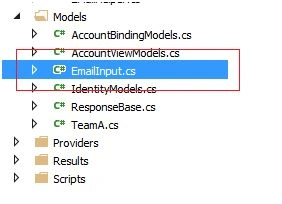
- using System;
- namespace EmailNotofication.Models
- {
- public class EmailInput
- {
- public string UserName
- {
- get;
- set;
- }
- public string EmailId
- {
- get;
- set;
- }
- }
- }
Calling the Web API with Javascript and jQuery
Here we will add an HTML page that uses AJAX to call the web API. We'll use jQuery to make the AJAX calls and also to update the page with the results.
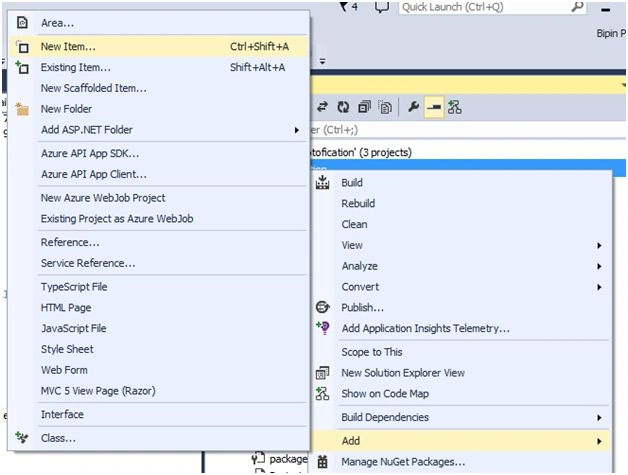
In Solution Explorer, right-click the project and select Add, then select New Item.
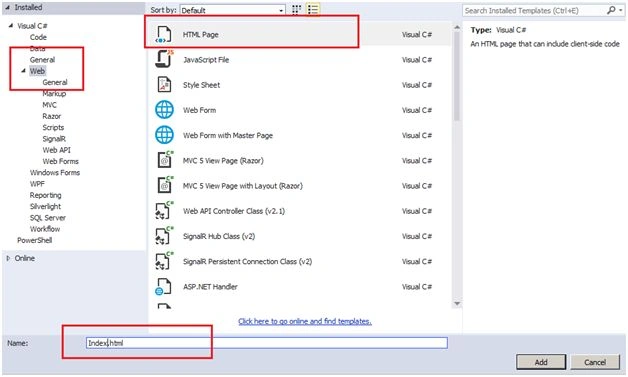
In the Add New Item dialog, select the Web node under Visual C#, and then select the HTML Page item. Name the page "index.html".
Replace everything in this file with the following:
- <!DOCTYPE html>
- <html xmlns="http://www.w3.org/1999/xhtml">
- <head>
- <title>Notification App</title>
- </head>
- <body>
- <div>
- <h2>All Teams</h2>
- <ul id="teams" /> </div>
- <script src="http://ajax.aspnetcdn.com/ajax/jQuery/jquery-2.0.3.min.js"></script>
- <script>
- var uri = 'api/EmailNotifier/GetAllTeams';
- $(document).ready(function()
- {
- // Send an AJAX request
- $.getJSON(uri).done(function(data)
- {
- // On success, 'data' contains a list of teams.
- $.each(data, function(key, item)
- {
- // Add a list item for the teams.
- $('<li>',
- {
- text: formatItem(item)
- }).appendTo($('#teams'));
- });
- });
- });
- function formatItem(item)
- {
- return item.Name + ': $' + item.Price;
- }
- </script>
- </body>
- </html>
To get a list of teams, send an HTTP GET request to "/api/GetAllTeams".
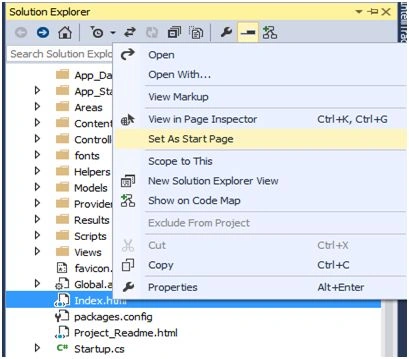
Set index.html as start page:
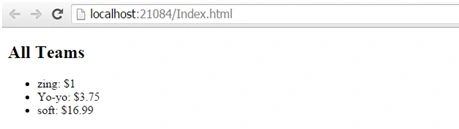
Run the project,
Yippee! Here we got success for calling Web API using Ajax. Now let’s add method for Email Notification.
We will call SendEmailNotification API using RestClient.
Add the following method to controller:
- [HttpPost]
- public async Task < IHttpActionResult > SendEmailNotification(EmailInput data)
- {
- ResponseBase updateResponse = new ResponseBase();
- var updateRequest = new RequestBase < EmailInput > (data);
- try
- {
- EMailHelper mailHelper = new EMailHelper(EMailHelper.EMAIL_SENDER, EMailHelper.EMAIL_CREDENTIALS, EMailHelper.SMTP_CLIENT);
- var emailBody = String.Format(EMailHelper.EMAIL_BODY);
- if(mailHelper.SendEMail(data.EmailId, EMailHelper.EMAIL_SUBJECT, emailBody))
- {
- //
- }
- }
- catch(Exception ex)
- {}
- return Ok(updateResponse);
- }
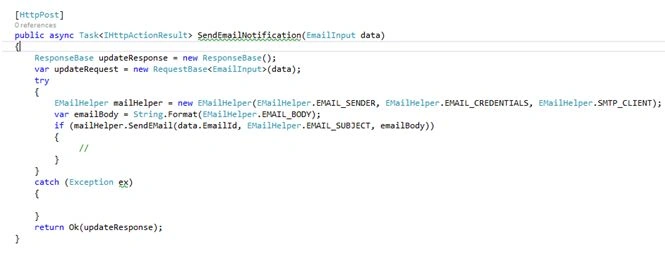
You need to add extension for RestClient to your chrome browser to call API.
Pass the parameter and do necessary changes to call API from rest client as in the following:
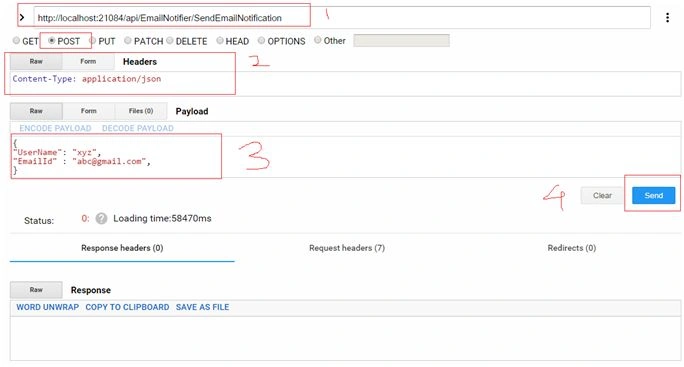
http://localhost:21084/api/EmailNotifier/SendEmailNotification
HTTPPOST
- Content-Type: application/json
- {
- "UserName": "xyz",
- "EmailId" : "[email protected]",
- }
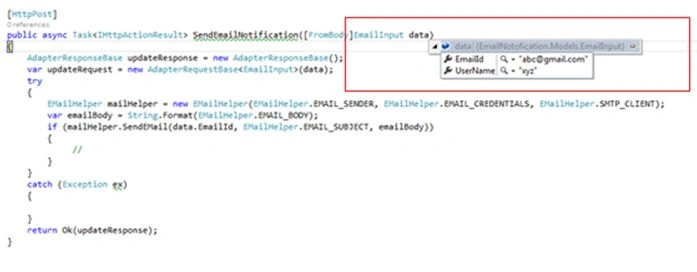
After successful execution we will get response as follows:

Note: To send email you need to add actual email id and credential so that it will work as expected.
Read more articles on ASP.NET:
Md GhousePosted Oct 3, 2018, 7:02 AM
Could you explain how can i config cc
Amit Kumar SinghPosted Mar 16, 2016, 1:22 AM
Nice one
anil jadhavPosted Mar 8, 2016, 4:17 AM
good one
Sonu ChaudharyPosted Mar 7, 2016, 7:16 AM
good one.Can u explain TDD in mvc
Jithil JohnPosted Mar 7, 2016, 7:05 AM
Good one
Jithil JohnPosted Mar 7, 2016, 7:05 AM
Good one
Raja TPosted Mar 6, 2016, 2:16 AM
Nice, Thanks for sharing
Ankit BansalPosted Mar 6, 2016, 1:04 AM
Good share..please share more articles on WebAPI using ASP.NET MVC..
Humayun Kabir MamunPosted Mar 5, 2016, 10:54 PM
Nice...
Sonu ChaudharyPosted Mar 5, 2016, 12:12 PM
Really great one
Kaushal ParikPosted Mar 5, 2016, 1:02 AM
Very good article. Is there any specific usage of Web API in sending emails here?
Vignesh ManiPosted Mar 4, 2016, 12:00 PM
NIce
sreenivasa kPosted Mar 4, 2016, 11:49 AM
good
Debasis SahaPosted Mar 4, 2016, 10:46 AM
Good
Asfend YarPosted Mar 4, 2016, 10:17 AM
nice