

Introduction
Azure Active Directory is the Identity and Access Management (IAM) solution offered by Microsoft.
Azure AD can authenticate accounts from different sources, which are as follows:
- Azure Subscription
- Office 365 Subscription
- Microsoft Intune and Dynamics Subscription
- Third Party cloud-based SaaS applications (which supports Azure AD authentication)
- On Premise Active Directory accounts
You can refer to this Microsoft document to get more details about the Azure AD authentication.
We need two app registrations in Azure portal for AD authentication. One for Web API application and one for Angular application.
Create App registrations in Azure portal
Login to Azure portal -> click Azure Active Directory blade
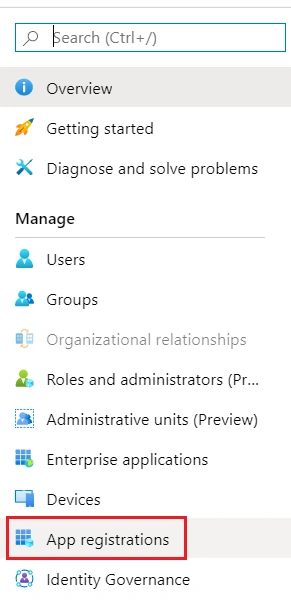
Choose App registration blade
Click + New registration
Give a valid name and redirect URI here. We can give the redirect URI in angular code as well.
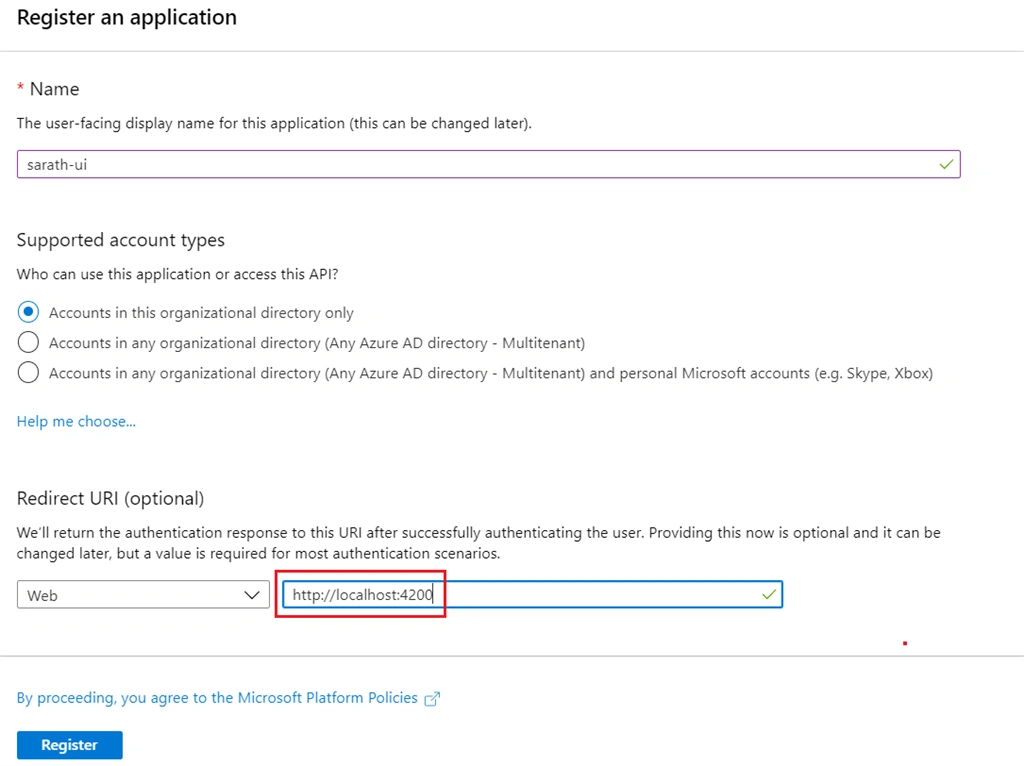
Click “Register” button to create the app.
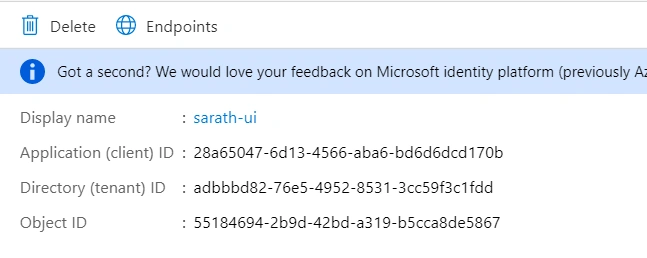
We can see the app registration details like client id, tenant id etc. We must use these details later in our Angular application.
Click Authentication tab in the left side and select Access Token and Id tokens and click Save button.
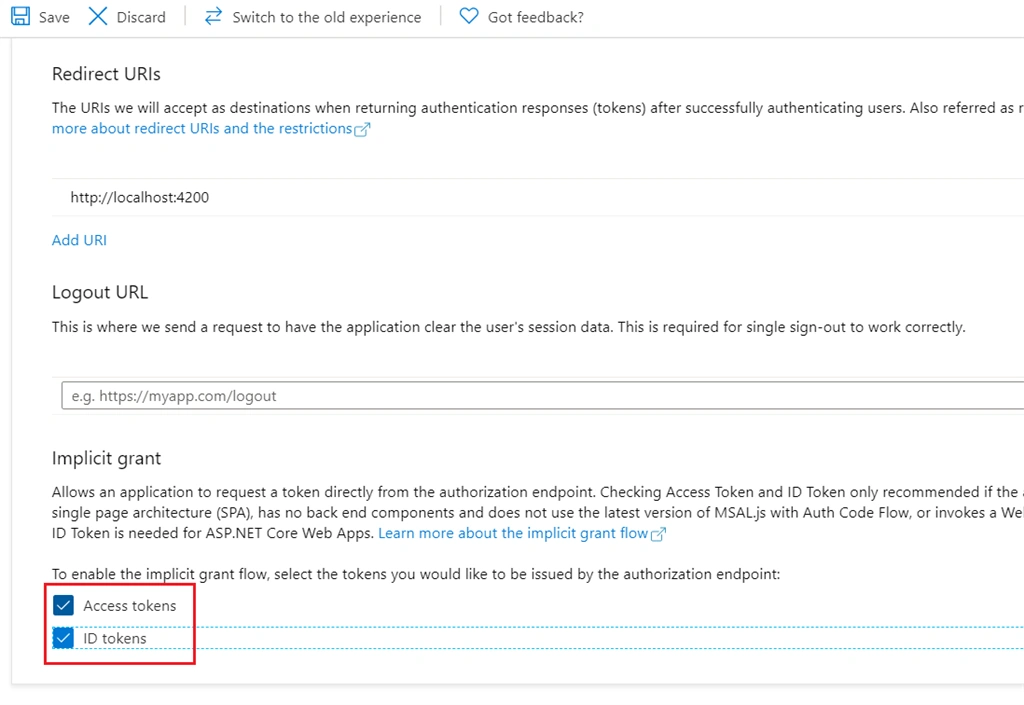
We will use these tokens for our Authentication and Authorization purpose later. We can click App registration blade again and create a new app registration for Web API.
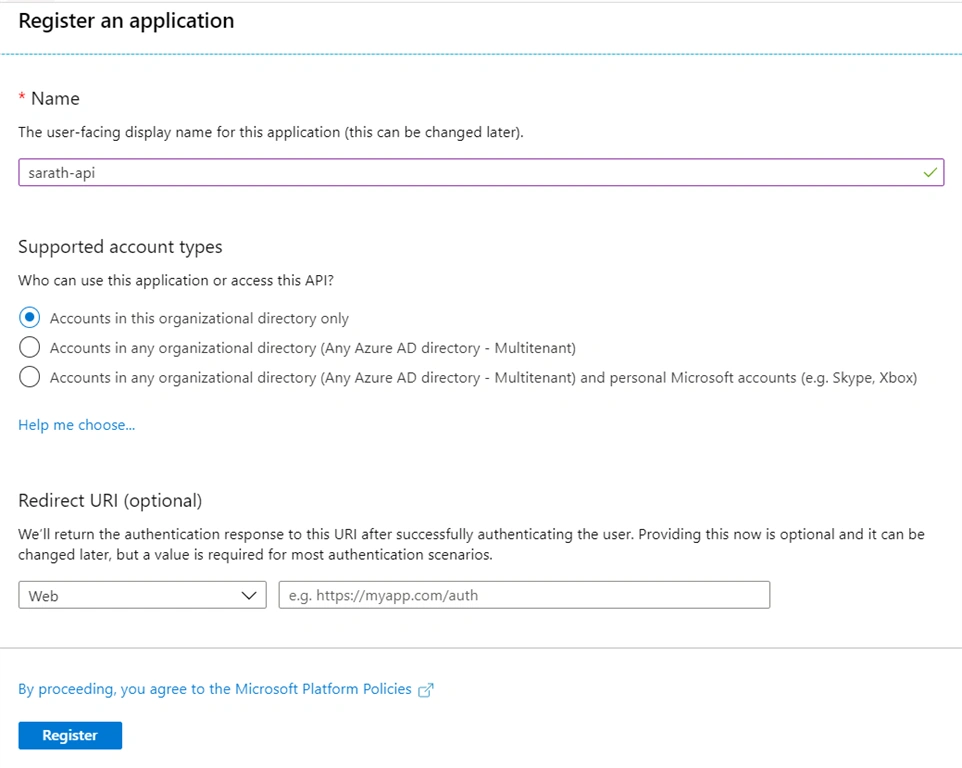
We have given app name only. No need to give redirect URI here because this is for API.
Click “Register” button to create app.
After the app registration will be populated, please click “Expose an API” blade.
Click Add Scope button
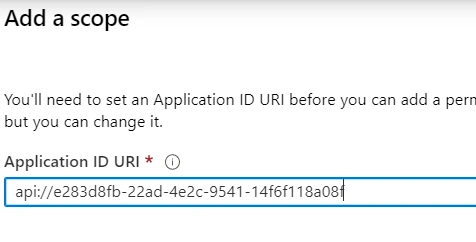
Click Save button.
One new window will be appeared and we can enter scope name, consent name and consent description in this window.
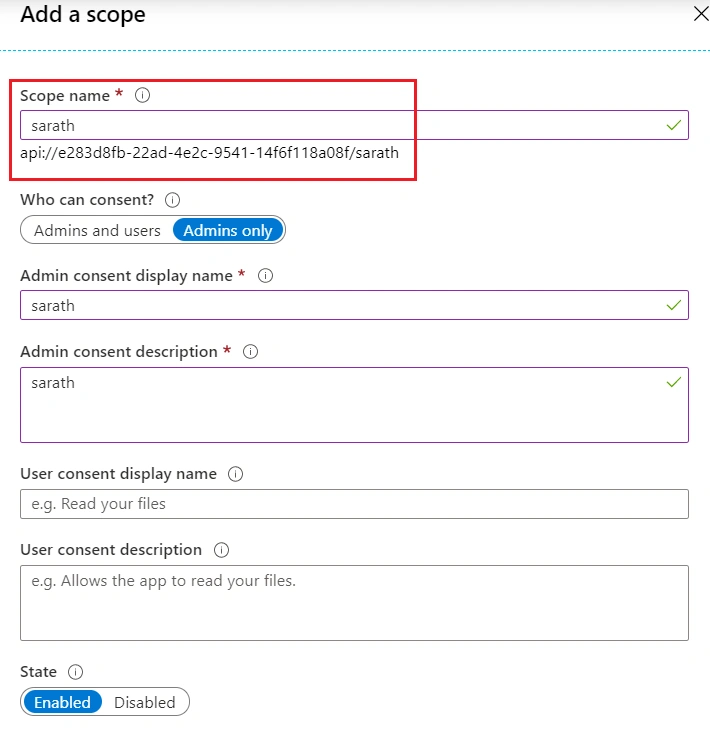
We will use this consent scope later in our Angular application.
We can link our previously created client application to this API app registration.
Click + Add a client application button and give correct client id from previously created app registration. Don’t forget to select consent scope along with client id.
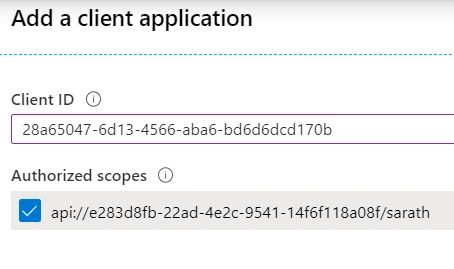
We have successfully created app registration for both UI and API. Now we can create ASP.NET Core web API and Angular 8 application and enable Azure AD authentication.
Create ASP.NET Core Web API in Visual Studio 2019
We can create ASP.NET Core Web API application using default API template in Visual Studio.
We must install “Microsoft.AspNetCore.Authentication.AzureAD.UI” library using NuGet. This is used for AD authentication.
We have already created two app registrations in Azure active directory. We can use the client id and tenant id for API here in appsettings as given below.
appsettings.json
- {
- "Logging": {
- "LogLevel": {
- "Default": "Information",
- "Microsoft": "Warning",
- "Microsoft.Hosting.Lifetime": "Information"
- }
- },
- "AllowedHosts": "*",
- "AzureActiveDirectory": {
- "Instance": "https://login.microsoftonline.com/",
- "Domain": "<your domain>.onmicrosoft.com",
- "TenantId": "adbbbd82-76e5-4952-8531-3cc59f3c1fdd",
- "ClientId": "api://e283d8fb-22ad-4e2c-9541-14f6f118a08f"
- }
- }
Staturp.cs
- using Microsoft.AspNetCore.Authentication;
- using Microsoft.AspNetCore.Authentication.AzureAD.UI;
- using Microsoft.AspNetCore.Builder;
- using Microsoft.AspNetCore.Hosting;
- using Microsoft.Extensions.Configuration;
- using Microsoft.Extensions.DependencyInjection;
- using Microsoft.Extensions.Hosting;
- using System;
- namespace AzureADAPI
- {
- public class Startup
- {
- public Startup(IConfiguration configuration)
- {
- Configuration = configuration;
- }
- public IConfiguration Configuration { get; }
- // This method gets called by the runtime. Use this method to add services to the container.
- public void ConfigureServices(IServiceCollection services)
- {
- services.AddControllers();
- services.AddAuthentication(AzureADDefaults.BearerAuthenticationScheme).AddAzureADBearer(options => Configuration.Bind("AzureActiveDirectory", options));
- string corsDomains = "http://localhost:4200";
- string[] domains = corsDomains.Split(",".ToCharArray(), StringSplitOptions.RemoveEmptyEntries);
- services.AddCors(o => o.AddPolicy("AppCORSPolicy", builder =>
- {
- builder.AllowAnyOrigin()
- .AllowAnyMethod()
- .AllowAnyHeader()
- .AllowCredentials()
- .WithOrigins(domains);
- }));
- }
- // This method gets called by the runtime. Use this method to configure the HTTP request pipeline.
- public void Configure(IApplicationBuilder app, IWebHostEnvironment env)
- {
- if (env.IsDevelopment())
- {
- app.UseDeveloperExceptionPage();
- }
- app.UseCors("AppCORSPolicy");
- app.UseRouting();
- app.UseAuthentication();
- app.UseAuthorization();
- app.UseEndpoints(endpoints =>
- {
- endpoints.MapControllers();
- });
- }
- }
- }
Create an Employee class. This will be used in our Employees controller class to return some dummy data to Angular application later.
Employee.cs
- namespace AzureADAPI
- {
- public class Employee
- {
- public int Id { get; set; }
- public string Name { get; set; }
- public string Company { get; set; }
- public string City { get; set; }
- }
- }
Create Employee controller with single Get method. This method will be called from Angular application to test AD authentication.
EmployeeController.cs
- using Microsoft.AspNetCore.Authorization;
- using Microsoft.AspNetCore.Mvc;
- using System.Collections.Generic;
- // For more information on enabling Web API for empty projects, visit https://go.microsoft.com/fwlink/?LinkID=397860
- namespace AzureADAPI.Controllers
- {
- [Authorize]
- [Route("api/[controller]")]
- public class EmployeesController : Controller
- {
- [HttpGet]
- public IEnumerable<Employee> Get()
- {
- List<Employee> employees = new List<Employee>
- {
- new Employee { Id = 1, Name = "Sarathlal Saseendran", Company = "Orion Business Innovations", City = "Kochi" },
- new Employee { Id = 2, Name = "Anil Soman", Company = "Cognizant", City = "Bangalare" }
- };
- return employees;
- }
- }
- }
Please note, we have decorated above controller with [Authorize] decorator.
We have completed the API application enabled with AD authentication. We can create Angular application from scratch and add all the components and services.
Create Angular 8 application using Angular CLI
I am still using the stable version of Angular 8 LTS (8.3.26)
As we discussed earlier, we are using “@azure/msal-angular” library for AD authentication. Unfortunately, the latest version is still in preview mode. Hence, I am using the stable version 0.1.4 in our application.
Please use below command to install this stable version.
npm i @azure/[email protected]
We need RxJs compatible version also in our application.
Please install that also.
npm i rxjs-compat
We can add AD related client id, tenant id, consent scope details inside the environment variable.
environment.ts
- export const environment = {
- production: false,
- baseUrl:'http://localhost:58980/',
- scopeUri: ['api://e283d8fb-22ad-4e2c-9541-14f6f118a08f/sarath'],
- tenantId: 'adbbbd82-76e5-4952-8531-3cc59f3c1fdd',
- uiClienId: '28a65047-6d13-4566-aba6-bd6d6dcd170b',
- redirectUrl: 'http://localhost:4200'
- };
We can create a services folder and create a MsalUserService class.
msaluser.service.ts
- import { Injectable } from '@angular/core';
- import * as Msal from 'msal';
- import { environment } from 'src/environments/environment';
- import { Observable } from 'rxjs';
- @Injectable()
- export class MsalUserService {
- private accessToken: any;
- public clientApplication: Msal.UserAgentApplication = null;
- constructor() {
- this.clientApplication = new Msal.UserAgentApplication(
- environment.uiClienId,
- 'https://login.microsoftonline.com/' + environment.tenantId,
- this.authCallback,
- {
- storeAuthStateInCookie: true,
- //cacheLocation: 'localStorage' ,
- });
- }
- public GetAccessToken(): Observable<any> {
- if (sessionStorage.getItem('msal.idtoken') !== undefined && sessionStorage.getItem('msal.idtoken') != null) {
- this.accessToken = sessionStorage.getItem('msal.idtoken');
- }
- return this.accessToken;
- }
- public authCallback(errorDesc, token, error, tokenType) {
- if (token) {
- } else {
- console.log(error + ':' + errorDesc);
- }
- }
- public getCurrentUserInfo() {
- const user = this.clientApplication.getUser();
- alert(user.name);
- }
- public logout() {
- this.clientApplication.logout();
- }
- }
We have used this service for getting access token (for authentication), logout function and also for getting logged in user name.
We can create an employee class
Employee.ts
- export class Employee {
- id: number;
- name: string;
- company: string;
- city: string;
- }
We can create a DataService for getting employee data from Web API application.
data.service.ts
- import { Injectable } from '@angular/core';
- import { HttpClient, HttpHeaders } from '@angular/common/http';
- import { Observable } from 'rxjs';
- import { environment } from 'src/environments/environment';
- import { MsalUserService } from './msaluser.service';
- import { Employee } from './employee';
- @Injectable({
- providedIn: 'root'
- })
- export class DataService {
- private url = environment.baseUrl + 'api/employees';
- httpOptions = {
- headers: new HttpHeaders({
- 'Content-Type': 'application/json'
- })
- };
- constructor(private http: HttpClient, private msalService: MsalUserService
- ) { }
- getEmployees(): Observable<Employee[]> {
- this.httpOptions = {
- headers: new HttpHeaders({
- 'Content-Type': 'application/json',
- 'Authorization': 'Bearer ' + this.msalService.GetAccessToken()
- })
- };
- return this.http.get(this.url, this.httpOptions)
- .pipe((response: any) => {
- return response;
- });
- }
- getCurrentUserInfo(){
- this.msalService.getCurrentUserInfo();
- }
- logout(){
- this.msalService.logout();
- }
- }
For every request, we are calling access token from MsalUserService and added to request header.
We can add default MsalGuard inside the AppRoutingModule class.
app-routing.module.ts
- import { NgModule } from '@angular/core';
- import { Routes, RouterModule } from '@angular/router';
- import { AppComponent } from './app.component';
- import { MsalGuard } from '@azure/msal-angular';
- const routes: Routes = [
- {
- path: '',
- component: AppComponent,
- canActivate: [MsalGuard]
- }
- ];
- @NgModule({
- imports: [RouterModule.forRoot(routes)],
- exports: [RouterModule]
- })
- export class AppRoutingModule { }
Whenever we route to App component, MsalGuard will protect the component with AD authentication.
We can modify the AppModule class with below code.
app.module.ts
- import { BrowserModule } from '@angular/platform-browser';
- import { NgModule } from '@angular/core';
- import { AppRoutingModule } from './app-routing.module';
- import { AppComponent } from './app.component';
- import { environment } from 'src/environments/environment';
- import { MsalModule, MsalInterceptor } from '@azure/msal-angular';
- import { HttpClientModule, HttpClient, HTTP_INTERCEPTORS } from '@angular/common/http';
- import { MsalUserService } from './services/msaluser.service';
- export const protectedResourceMap: any =
- [
- [environment.baseUrl, environment.scopeUri
- ]
- ];
- @NgModule({
- declarations: [
- AppComponent
- ],
- imports: [
- MsalModule.forRoot({
- clientID: environment.uiClienId,
- authority: 'https://login.microsoftonline.com/' + environment.tenantId,
- //cacheLocation: 'localStorage',
- protectedResourceMap: protectedResourceMap,
- redirectUri: environment.redirectUrl
- }),
- BrowserModule,
- AppRoutingModule,
- HttpClientModule
- ],
- providers: [
- HttpClient,
- MsalUserService,
- {
- provide: HTTP_INTERCEPTORS, useClass: MsalInterceptor, multi: true
- }
- ],
- bootstrap: [AppComponent]
- })
- export class AppModule { }
We have registered MsalModule and MsalInterceptor inside the AppModule.
We can modify the default App component with below code.
app.component.ts
- import { Component } from '@angular/core';
- import { Employee } from './services/employee';
- import { DataService } from './services/data.service';
- @Component({
- selector: 'app-root',
- templateUrl: './app.component.html',
- styleUrls: ['./app.component.css']
- })
- export class AppComponent {
- title = 'AzureMSALAngular';
- employees: Employee[];
- errorMessage: any;
- constructor(private dataService: DataService) { }
- ngOnInit(): void {
- this.dataService.getEmployees().subscribe(
- values => {
- this.employees = values;
- },
- error => this.errorMessage = <any>error
- );
- }
- getUser(){
- this.dataService.getCurrentUserInfo();
- }
- logout(){
- this.dataService.logout();
- }
- }
Also modify the template file.
app.component.html
- <h3>Azure AD Authentication with Azure Angular MSAL library</h3>
- <hr>
- <table>
- <thead>
- <tr>
- <th>Id</th>
- <th>Name</th>
- <th>Company</th>
- <th>City</th>
- </tr>
- </thead>
- <tbody>
- <tr *ngFor="let employee of employees">
- <td>{{ employee.id }}</td>
- <td>{{ employee.name }}</td>
- <td>{{ employee.company }}</td>
- <td>{{ employee.city }}</td>
- </tr>
- </tbody>
- </table>
- <hr>
- <button (click)="getUser()">User Name</button>
- <button (click)="logout()">Logout</button>
We have completed the coding part of Angular application as well.
We can run both Web API and Angular application.
Application will immediately ask your AD credentials.
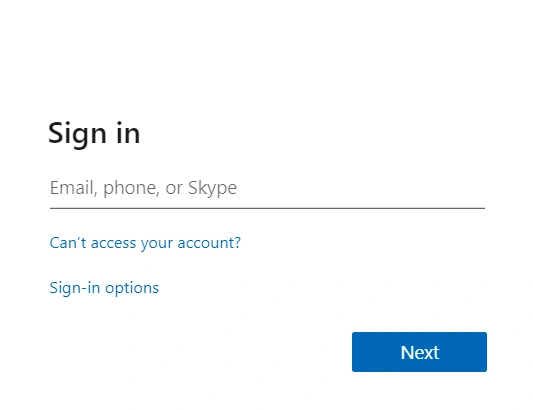
After the successful login, it will ask your consent to access the AD app registration. Once you approved the consent, it will not ask again.
We can see the dummy Employee data has been taken from Web API successfully.
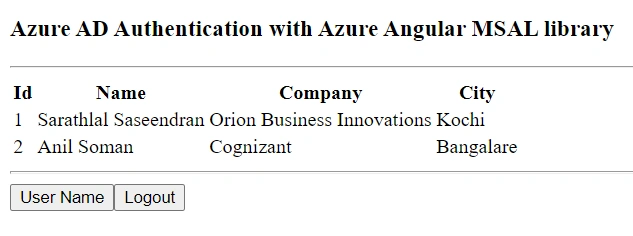
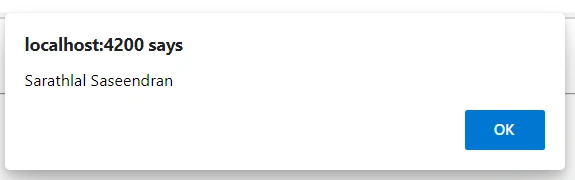
If you click the Logout button, application will be successfully signed out.
Conclusion
In this post, we have seen how to create an Azure AD enabled ASP.NET Core Web API application and Angular 8 application and communicate with each other. We have used "@azure/msal-angular" library to enable Azure AD in Angular application. This library is a wrapper for base library “msal”. Latest version of this library is still in preview. I have used the stable version. We can create AD enabled application using “msal” library as well. We can see those details in another article.
Hamid KhanPosted Sep 6, 2023, 4:14 AM
Very good concept
Takhir MirzaevPosted Feb 1, 2022, 2:36 PM
Hi, do you have MEAN stack example?
jagdish joshiPosted Jan 28, 2022, 10:42 AM
API is giving following error while validating the token. Please help Bearer error="invalid_token", error_description="The audience '{Angular client id}' is invalid"
MANAS SANTRAPosted Sep 16, 2021, 7:53 AM
It did not worked on updated version. Please update whole project and examples.
Somesh YogarajPosted May 24, 2021, 3:50 PM
Hi Sarathlal, Does App registrations in Azure for angular and .net core api apps costs.
Fabio CiconiPosted Mar 3, 2021, 4:17 AM
How can I get the user in the backend?
Chetan GaonkarPosted Dec 14, 2020, 2:54 PM
Bearer error="invalid_token", error_description="The signature is invalid" issue on calling api
Riad JaradehPosted Nov 18, 2020, 9:51 AM
How to get user's AAD memberships? It seems that if you have more than 6 groups, then the token will have [hasgroups] property in it but not the groups themselves.. after I get that token, how can I query back MS Graph to get the security groups? in a better scenario, if I assigned the security groups to roles, will this token get me the roles?
Adel TabarehPosted Oct 17, 2020, 5:21 AM
Is it really the correct ClientId in the appsettings? it looks like the scope instead?
Viju VPosted Sep 24, 2020, 7:16 AM
Thank you for the article. However api call is not getting initiated and nor shown in the network tab(debug). I afraid that I missed some stuff since I am new to Angular Development. I am using the same sample application. Please help
Arnab DeyPosted Sep 13, 2020, 12:59 PM
Does this IE Compatible? it's not working in IE. Any help would be appreciated.
Harsh PatelPosted Aug 10, 2020, 8:31 AM
Is this possible same example i can implement in Asp.net mVC 4 Web api ?
MohamedAquib ChiniwalaPosted Jul 15, 2020, 11:07 AM
Please can you illustrate how to redirect to a unauthrized access page or any other page if you get an error in callBack.
DennisPosted Jun 29, 2020, 3:32 PM
How would you handle roles? I'm trying this in Okta and roles has been a huge challenge that I cannot figure out.
Kartik BeheraPosted Jun 24, 2020, 2:04 AM
How to set Redirect to returnUrl using @azure/msal-angular“: ”^1.0.0"
ROHITH GOPIPosted Jun 17, 2020, 9:22 AM
Bearer error="invalid_token", error_description="The audience is invalid" I am getting this error.
wilPosted Jun 14, 2020, 2:21 PM
Azure Active Directory B2C is deprecating login.microsoftonline.com, will you update the article to use B2Clogin.com schema?
Andrea MerlinPosted May 26, 2020, 10:02 AM
Hi. Is possible to get token claims and setup policy claims based to the api? Thanks
Hein AlbrechtPosted May 19, 2020, 2:42 AM
Hi. Where are you getting your MSAL library?
Saumen HalderPosted May 9, 2020, 11:10 PM
Works without any issues.. been searching for similar stuff for days before landing here. Thanks a log.
Luis CobaPosted May 8, 2020, 7:06 PM
Gracias por compartir conocimiento!!
Shahrukh KhanPosted May 7, 2020, 2:01 AM
Always getting 401 error. Please recheck the flow and update.
Shahrukh KhanPosted May 7, 2020, 2:00 AM
Something is missing in this article.