

Introduction
This is our second article in the Dynamics 365 and Azure series. In the first article, we had a basic introduction about Azure function and setting Azure function apps. In this article, we are going to discuss how we can read CSV files from Blob storage and process it to create/update contact records in Dynamics 365. Let’s say we have the following CSV file that we are going to upload to Azure Blob storage which will initiate our Azure function trigger and will process it.
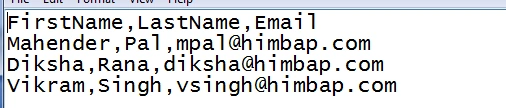
Details
We created an Azure function app in our last article, now the first thing we need to do is to refer to Dynamics 365 SDK, to get connected to our Dynamics 365 organization. First, log in to the Azure portal and navigate to the Azure function app that we created in the last article. Navigate to Platform Features from the Azure function app and click on App Service Editor under development tools. Right click on your Azure function trigger and add project.json file and assemble it like the following. I have done this integration for Dynamics 365 8.2.
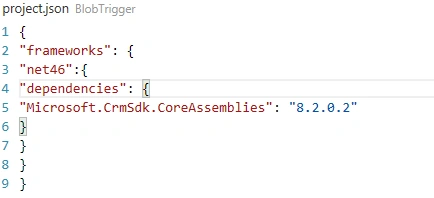
Now, we need to navigate to run.csx and first, we need to add a reference like the following:
- #r "System.Data"
- using System;
- using System.Text;
- using System.Data;
- using System.Net;
- using Microsoft.Xrm.Sdk;
- using Microsoft.Xrm.Sdk.Query;
- using Microsoft.Xrm.Sdk.Client;
Now, we will be using the following code in our Run method where we will be calling another method, CreateContacts, to process the CSV file.
- public static void Run(Stream myBlob, string name, TraceWriter log) {
- try {
- CreateContacts(myBlob, name, log);
- } catch (Exception e) {
- log.Info($ "Error occured: {e.Message}");
- }
- }
Here is the code to process CSV files from myblob storage-
- //read CSV file and store into data table
- private static DataTable GetContactDataFromCSV(Stream myBlob, TraceWriter log) {
- string Fulltext;
- DataTable contactDatatbl = new DataTable();
- try {
- using(StreamReader contactReader = new StreamReader(myBlob)) {
- while (!contactReader.EndOfStream) {
- //read full line
- Fulltext = contactReader.ReadToEnd().ToString();
- //split rows based on new line
- string[] rows = Fulltext.Split('\n');
- for (int i = 0; i < rows.Count() - 1; i++) {
- string[] rowValues = rows[i].Split(','); //split each row with comma to get individual values
- {
- log.Info($ "Reading file headers");
- if (i == 0) {
- for (int j = 0; j < rowValues.Count(); j++) {
- contactDatatbl.Columns.Add(rowValues[j]); //add headers
- }
- } else {
- DataRow dr = contactDatatbl.NewRow();
- for (int k = 0; k < rowValues.Count(); k++) {
- dr[k] = rowValues[k].ToString();
- }
- contactDatatbl.Rows.Add(dr);
- //add other rows
- }
- }
- }
- }
- }
- } catch (Exception e) {
- log.Info($ "Error occured in GetContactDataFromCSV Details {e.Message}");
- }
- return contactDatatbl;
- }
- //create or update contact
- private static void CreteContacts(Stream myBlob, string name, TraceWriter log) {
- Entity contact = null;
- try {
- //get CRM service instance
- OrganizationServiceProxy service = GetServiceProxy(log);
- string firstName = string.Empty;
- string lastName = string.Empty;
- string email = string.Empty;
- //read blob file into data table
- DataTable contactRecords = GetContactDataFromCSV(myBlob, log);
- log.Info($ "Total Records :{contactRecords.Rows.Count}");
- //loop datatable rows
- foreach(DataRow row in contactRecords.Rows) { //clear any existing
- firstName = string.Empty;
- lastName = string.Empty;
- email = string.Empty;
- //get firstname
- firstName = (row["FirstName"].ToString() != "" ? row["FirstName"].ToString() : string.Empty); //get last name
- lastName = (row["LastName"].ToString() != "" ? row["LastName"].ToString() : string.Empty); //get last name
- email = (row["Email"].ToString() != "" ? row["Email"].ToString() : string.Empty); //query contact to check if record already exists
- contact = GetContactDetails(firstName, lastName, email, service, log);
- //check for contact
- if (contact == null) {
- //create new contact
- //call method of create contact
- } else {
- //update existing contact
- //call method for contact update based on the contactId
- }
- }
- } catch (Exception e) {
- log.Info($ "Error occured in process cotnact records {e.Message}");
- }
- }
- private static Guid GetContactDetails(string firstname, string lastname, string email, OrganizationServiceProxy service, TraceWriter log) {
- Guid contactId = Guid.Empty;
- try {
- QueryExpression query = new QueryExpression {
- EntityName = "contact", ColumnSet = new ColumnSet(new string[] {
- "firstname",
- "lastname",
- "emailaddress1"
- }),
- Criteria = {
- Filters = {
- new FilterExpression {
- FilterOperator = LogicalOperator.And, Conditions = {
- new ConditionExpression("firstname", ConditionOperator.Equal, firstname),
- new ConditionExpression("lastname", ConditionOperator.Equal, lastname),
- new ConditionExpression("emailaddress1", ConditionOperator.Equal, email)
- }
- }
- }
- }
- };
- EntityCollection contactResultss = service.RetrieveMultiple(query);
- if (contactResultss.Entities.Count > 0)
- return contactResultss.Entities.FirstOrDefault().Id;
- } catch (Exception e) {
- log.Info($ "Error occured in Get Contact Details {e.Message}");
- }
- return contactId;
- }
The above code will read CSV files from Blob storage into the data table and will check if the same record exists with a combination of first name, last name and email. It will call the update method otherwise it will create it.
And we can use the following method to connect to Dynamics 365 organization.
- private static OrganizationServiceProxy GetServiceProxy(TraceWriter log)
- {
- IServiceManagement<IOrganizationService> orgServiceManagement = ServiceConfigurationFactory.CreateManagement<IOrganizationService>(new Uri(".... /XRMServices/2011/Organization.svc"));
- AuthenticationCredentials authCredentials = new AuthenticationCredentials();
- authCredentials.ClientCredentials.UserName.UserName = "[email protected]";
- authCredentials.ClientCredentials.UserName.Password = "password";
- AuthenticationCredentials tokenCredentials = orgServiceManagement.Authenticate(authCredentials);
- return new OrganizationServiceProxy(orgServiceManagement, tokenCredentials.SecurityTokenResponse);
- }
Keep in mind to connect using hardcoded credentials also we need include following references in our Azure function trigger. We can include the reference for ActiveDirectory assembly in project.json just like we did for Dynamics 365 V 8.
- using Microsoft.IdentityModel.Clients.ActiveDirectory;
This way we can process CSV files from Blob storage, and connect to Dynamics 365 to create or update contact record. But the problem in this approach is to connect to Dynamics 365 using a hard-coded username and password, so in the next article, we will discuss how to configure Server to Server authentication instead of using hard-coded credentials.
Stay tuned for the next article!
Mohammed FakhriPosted Mar 25, 2021, 7:40 AM
Fantastic.
Naresh SinghalPosted Oct 29, 2018, 11:34 PM
Fantastic Article Bro, Thanks for sharing ..!
Rushi MehtaPosted Oct 26, 2018, 10:35 PM
Thanks for sharing