

To change the background color/image of the Grid background in Windows Phone 8 or Windows Phone 8.1 you can use the following procedure. Well I am not sure this works for Windows 10 for Mobile also! If you have set same background image or color for the entire app then you want to change the color or image that is coming from cms or a cloud, then you are in the right place.
Step 1
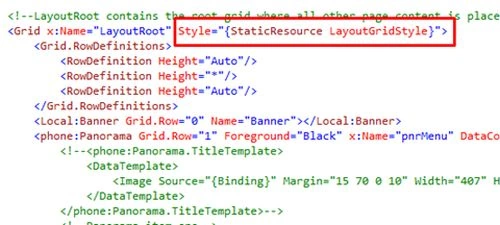
Verify this you have set your Style like this in all pages or in the required page of your app like this.
Step 2
Go to the app.xaml the Page then create an empty Setter Property with Key=LayoutGridStyle.

Here you can Create a Static Style Also As Mentioned Below,Which Works as a Default Image.If there is no image coming from cms or cloud.
You should not use a Name instead of a Key. This won't work out here "Because x:Key is only valid inside a resource dictionary and is added to a dictionary, x:Name is used locally and represents a variable within the class.".
If you are giving the Setter property in the same page where you set your style there you can use the x:Name, but here we are adding to the dictionary of the app resource so you should use x:Key.
Step 3
Now to change the color, just use the following code.
- System.Windows.Style style = new System.Windows.Style(typeof(Grid));
- style.Setters.Add(new Setter(Grid.BackgroundProperty, new SolidColorBrush(Utility.ConvertStringToColor(Global.BackGroundColor))));
- if (!ReferenceEquals(Application.Current.Resources.FirstOrDefault(rr = > rr.Key.ToString() == "LayoutGridStyle"), null)) {
- Application.Current.Resources.Remove("LayoutGridStyle");
- }
- Application.Current.Resources.Add("LayoutGridStyle", style);
- (Application.Current.RootVisual as PhoneApplicationFrame).Navigate(new Uri("/View/Menu/MainMenu.xaml", UriKind.Relative));
- public static Color ConvertStringToColor(String hex) {
- //remove the # at the front
- hex = hex.Replace("#", "");
- byte a = 255;
- byte r = 255;
- byte g = 255;
- byte b = 255;
- int start = 0;
- //handle ARGB strings (8 characters long)
- if (hex.Length == 8) {
- a = byte.Parse(hex.Substring(0, 2), System.Globalization.NumberStyles.HexNumber);
- start = 2;
- }
- //convert RGB characters to bytes
- r = byte.Parse(hex.Substring(start, 2), System.Globalization.NumberStyles.HexNumber);
- g = byte.Parse(hex.Substring(start + 2, 2), System.Globalization.NumberStyles.HexNumber);
- b = byte.Parse(hex.Substring(start + 4, 2), System.Globalization.NumberStyles.HexNumber);
- return Color.FromArgb(a, r, g, b);
- }
- style.Setters.Add(new Setter(Grid.BackgroundProperty, new SolidColorBrush(Colors.Orange)));
Statically
- <Application.Resources>
- <Style x:Key="LayoutGridStyle" TargetType="Grid">
- <Setter Property="Background">
- <Setter.Value>
- <ImageBrush ImageSource="/Assets/Squash.jpg"/>
- </Setter.Value>
- </Setter>
- </Style>
- </Application.Resources>
- ImageBrush myBrush = new ImageBrush();
- myBrush.ImageSource = new BitmapImage(new Uri("Assets/Squash.jpg", UriKind.Relative));
- LayoutGridStyle.Setters.Add(new Setter(Grid.BackgroundProperty, myBrush));if (!ReferenceEquals(Application.Current.Resources.FirstOrDefault(rr => rr.Key.ToString() == "LayoutGridStyle"), null)){Application.Current.Resources.Remove("LayoutGridStyle");}Application.Current.Resources.Add("LayoutGridStyle", LayoutGridStyle);
- (Application.Current.RootVisual as PhoneApplicationFrame).Navigate(new Uri("/View/Menu/MainMenu.xaml", UriKind.Relative));
- RootFrame = new PhoneApplicationFrame {
- Background = new ImageBrush() {
- ImageSource = new BitmapImage(new Uri("Assets/Squash.png", UriKind.Relative)),
- Stretch = System.Windows.Media.Stretch.None,
- AlignmentX = AlignmentX.Center,
- AlignmentY = AlignmentY.Center
- }
- };
Atìf ShabeerPosted Jul 2, 2015, 8:55 AM
We can achieve this task by simply creating the singleton class for app. am i right?
Sibeesh VenuPosted Jul 1, 2015, 6:45 AM
Good one.
Deepak JainPosted Jul 1, 2015, 6:01 AM
nice article
Debasis SahaPosted Jul 1, 2015, 12:46 AM
Good One...
Gopi ChandPosted Jun 30, 2015, 11:19 PM
Good one