

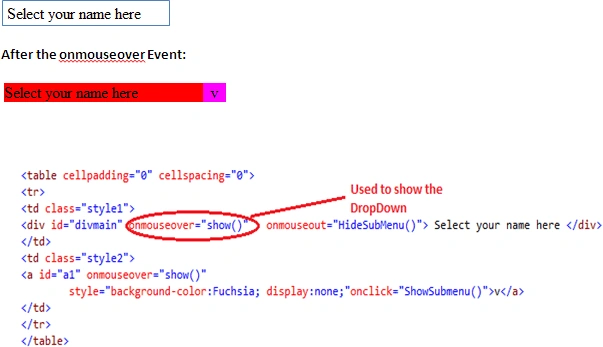
Now we write the JavaScript function show():
- <script language="JavaScript" type="text/javascript" >
- function show() {
- document.getElementById('divmain').style.backgroundColor = "Red";
- document.getElementById('a1').style.display = 'block';
- }
- </script>
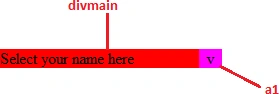
Here we set the background color of the div (divmain) and show the a1.
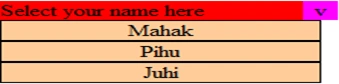
Step 2: When we click on the a1 the following submenu will show:
- <a id="a1" onmouseover="show()"
- style="background-color:Fuchsia; display:none;" onclick="ShowSubmenu()">v</a>
- Here the ShowSubmenu() function is used to display the Submenu:
- <table cellpadding="0" cellspacing="0" onmouseover="ShowSubmenu()" onmouseout="HideSubMenu()">
- <tr><td id="td1" bgcolor="#FFCC99" class="style3" onmouseout="hidestyletd1()" onmouseover="showstyletd1()" onclick="onclicktd1()" style="border-width: thin; border-style: solid; text-align: center; display:none">Mahak</td></tr>
- <tr><td id="td2" bgcolor="#FFCC99" class="style4" onmouseout="hidestyletd2()" onmouseover="showstyletd2()" onclick="onclicktd2()"
- style="border-width: thin; border-style: solid; text-align: center; display:none">Pihu</td></tr>
- <tr><td id="td3" bgcolor="#FFCC99" class="style4" onmouseout="hidestyletd3()" onmouseover="showstyletd3()" onclick="onclicktd3()"
- style="border-width: thin; border-style: solid; text-align: center; display:none">Juhi</td></tr>
- </table>
Here we set the display property of td1,td2,td3 is None.
Now we write the ShowSubmenu function in Javascript:
Here we set the display property of td to 'block'.
The other function HideSubMenu() is used to hide the SubMenu when we click outside the submenu:
Step 3: Now we change the background color and forecolor of the submenu with the help of javascript:
Here the showstyle functions are used to change the colors on the onmouse over the event and the hidestyle is used not to change the color means it sets the default color:

Step 4: Now if we want to display the Name like this:
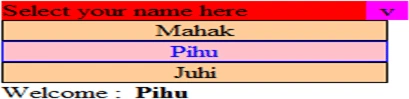
There is a Label (lblname) Control to display the name on the click of the SubMenu.
Now we write the ShowSubmenu function in Javascript:
- function ShowSubmenu() {
- document.getElementById('td1').style.display = 'block';
- document.getElementById('td2').style.display = 'block';
- document.getElementById('td3').style.display = 'block';
- }
The other function HideSubMenu() is used to hide the SubMenu when we click outside the submenu:
- function HideSubMenu() {
- document.getElementById('td1').style.display = 'none';
- document.getElementById('td2').style.display = 'none';
- document.getElementById('td3').style.display = 'none';
- }
- <tr><td id="td1" bgcolor="#FFCC99" class="style3" onmouseout="hidestyletd1()" onmouseover="showstyletd1()" onclick="onclicktd1()" style="border-width: thin; border-style: solid; text-align: center; display:none">Mahak</td></tr>
- <tr><td id="td2" bgcolor="#FFCC99" class="style4" onmouseout="hidestyletd2()" onmouseover="showstyletd2()" onclick="onclicktd2()"
- style="border-width: thin; border-style: solid; text-align: center; display:none">Pihu</td></tr>
- <tr><td id="td3" bgcolor="#FFCC99" class="style4" onmouseout="hidestyletd3()" onmouseover="showstyletd3()" onclick="onclicktd3()"
- style="border-width: thin; border-style: solid; text-align: center; display:none">Juhi</td></tr>
- function showstyletd1() {
- document.getElementById('td1').style.backgroundColor = "Pink";
- document.getElementById('td1').style.color = "Blue";
- }
- function hidestyletd1() {
- document.getElementById('td1').style.backgroundColor = "#FFCC99";
- document.getElementById('td1').style.color = "Black";
- }
- function showstyletd2() {
- document.getElementById('td2').style.backgroundColor = "Pink";
- document.getElementById('td2').style.color = "Blue";
- }
- function hidestyletd2() {
- document.getElementById('td2').style.backgroundColor = "#FFCC99";
- document.getElementById('td2').style.color = "Black";
- }
- function showstyletd3() {
- document.getElementById('td3').style.backgroundColor = "Pink";
- document.getElementById('td3').style.color = "Blue";
- }
- function hidestyletd3() {
- document.getElementById('td3').style.backgroundColor = "#FFCC99";
- document.getElementById('td3').style.color = "Black";
- }
Step 4: Now if we want to display the Name like this:
There is a Label (lblname) Control to display the name on the click of the SubMenu.
- <asp:Label ID="lblname" runat="server" Text="" style="font-weight: 700"></asp:Label>
Here we write the following Code:
- <tr><td id="td1" bgcolor="#FFCC99" class="style3" onmouseout="hidestyletd1()" onmouseover="showstyletd1()" onclick="onclicktd1()" style="border-width: thin; border-style: solid; text-align: center; display:none">Mahak</td></tr>
- <tr><td id="td2" bgcolor="#FFCC99" class="style4" onmouseout="hidestyletd2()" onmouseover="showstyletd2()" onclick="onclicktd2()"
- style="border-width: thin; border-style: solid; text-align: center; display:none">Pihu</td></tr>
- <tr><td id="td3" bgcolor="#FFCC99" class="style4" onmouseout="hidestyletd3()" onmouseover="showstyletd3()" onclick="onclicktd3()"
- style="border-width: thin; border-style: solid; text-align: center; display:none">Juhi</td></tr>
Now we can write the Javascript function:
Here we set the innerHTML property of the Label (lblname).
Complete Code:
- function onclicktd1()
- {
- document.getElementById('lblname').innerHTML = "Mahak";
- }
- function onclicktd2()
- {
- document.getElementById('lblname').innerHTML = "Pihu";
- }
- function onclicktd3()
- {
- document.getElementById('lblname').innerHTML = "Juhi";
- }
Complete Code:
- <head runat="server">
- <title></title>
- <script language="JavaScript" type="text/javascript" >
- function show() {
- document.getElementById('divmain').style.backgroundColor = "Red";
- document.getElementById('a1').style.display = 'block';
- }
- function ShowSubmenu() {
- document.getElementById('td1').style.display = 'block';
- document.getElementById('td2').style.display = 'block';
- document.getElementById('td3').style.display = 'block';
- }
- function HideSubMenu() {
- document.getElementById('td1').style.display = 'none';
- document.getElementById('td2').style.display = 'none';
- document.getElementById('td3').style.display = 'none';
- }
- function showstyletd1() {
- document.getElementById('td1').style.backgroundColor = "Pink";
- document.getElementById('td1').style.color = "Blue";
- }
- function hidestyletd1() {
- document.getElementById('td1').style.backgroundColor = "#FFCC99";
- document.getElementById('td1').style.color = "Black";
- }
- function showstyletd2() {
- document.getElementById('td2').style.backgroundColor = "Pink";
- document.getElementById('td2').style.color = "Blue";
- }
- function hidestyletd2() {
- document.getElementById('td2').style.backgroundColor = "#FFCC99";
- document.getElementById('td2').style.color = "Black";
- }
- function showstyletd3() {
- document.getElementById('td3').style.backgroundColor = "Pink";
- document.getElementById('td3').style.color = "Blue";
- }
- function hidestyletd3() {
- document.getElementById('td3').style.backgroundColor = "#FFCC99";
- document.getElementById('td3').style.color = "Black";
- }
- function onclicktd1()
- {
- document.getElementById('lblname').innerHTML = "Mahak";
- }
- function onclicktd2()
- {
- document.getElementById('lblname').innerHTML = "Pihu";
- }
- function onclicktd3()
- {
- document.getElementById('lblname').innerHTML = "Juhi";
- }
- </script>
- <style type="text/css">
- .style1
- {
- width: 199px;
- }
- .style2
- {
- width: 23px;
- text-align: center;
- }
- .style3
- {
- height: 19px;
- width: 209px;
- }
- .style4
- {
- text-align: center;
- width: 209px;
- }
- </style>
- </head>
- <body>
- <form id="form1" runat="server">
- <div>
- <table cellpadding="0" cellspacing="0">
- <tr>
- <td class="style1">
- <div id="divmain" onmouseover="show()" onmouseout="HideSubMenu()"> Select your name here </div>
- </td>
- <td class="style2">
- <a id="a1" onmouseover="show()"
- style="background-color:Fuchsia; display:none;"onclick="ShowSubmenu()">v</a>
- </td>
- </tr>
- </table>
- <table cellpadding="0" cellspacing="0" onmouseover="ShowSubmenu()" onmouseout="HideSubMenu()">
- <tr><td id="td1" bgcolor="#FFCC99" class="style3" onmouseout="hidestyletd1()" onmouseover="showstyletd1()" onclick="onclicktd1()" style="border-width: thin; border-style: solid; text-align: center; display:none">Mahak</td></tr>
- <tr><td id="td2" bgcolor="#FFCC99" class="style4" onmouseout="hidestyletd2()" onmouseover="showstyletd2()" onclick="onclicktd2()"
- style="border-width: thin; border-style: solid; text-align: center; display:none">Pihu</td></tr>
- <tr><td id="td3" bgcolor="#FFCC99" class="style4" onmouseout="hidestyletd3()" onmouseover="showstyletd3()" onclick="onclicktd3()"
- style="border-width: thin; border-style: solid; text-align: center; display:none">Juhi</td></tr>
- </table>
- Welcome
- :
- <asp:Label ID="lblname" runat="server" Text="" style="font-weight: 700"></asp:Label>
- </div>
- </form>
- </body>
-
Join the conversation! Your thoughts help the community grow.