

Dropbox.NET
Dropbox API is a .NET SDK for API v2, which helps you easily integrate Dropbox into your app. The Dropbox .NET SDK is a Portable Class Library that works with multiple platforms, including Windows, Windows Phone, and Mono.
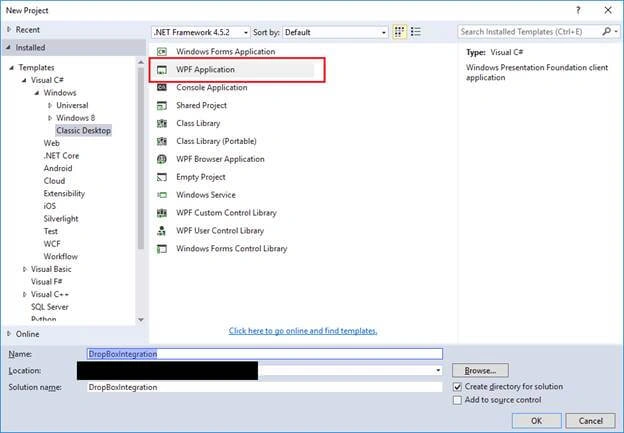
Step 1 Create a WPF Application
- Create a new WPF application.
Step 2 Install Dropbox.NET SDK in to the project
- Dropbox.NET SDK can be installed through NuGet.
- Open NuGet Package Manager Console (PMC) in Visual Studio.
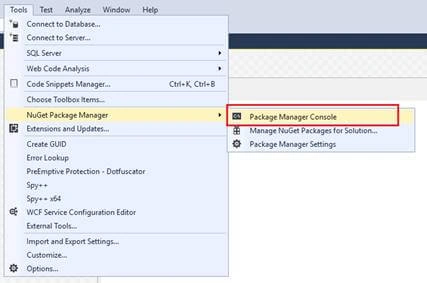
- Run the below-mentioned command in PMC to install Dropbox API.
PM> Install-Package Dropbox.Api
- Follow the basic steps to complete the installation.
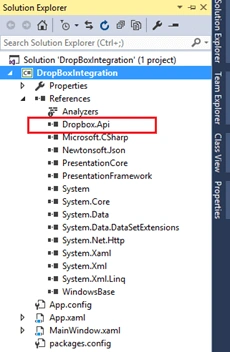
- After successful installation, Dropbox.Api will be added into the project references.
Step 3 Create App in Dropbox
- Go to the below-mentioned link to create an account in Dropbox.
https://www.dropbox.com
- Navigate to below-mentioned link to create new app required to work with Dropbox API.
https://www.dropbox.com/developers/apps
- Follow the steps and create a new app as per your convenience.
Step 4 Configure Created App for Access
- Click on the created application and redirect to the Settings tab.
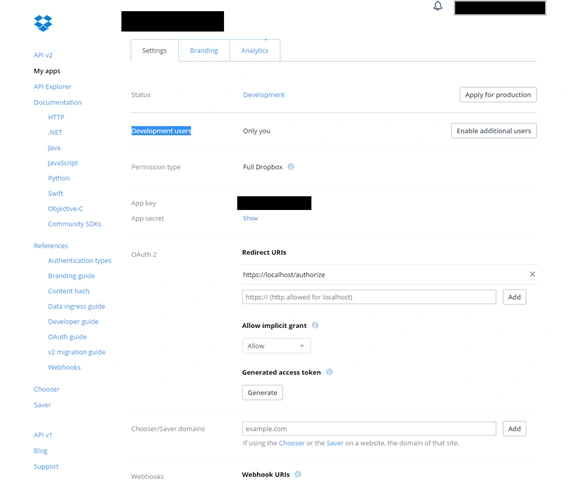
- Initially, only one user can access API and to enable multiple users, click on “Enable additional users” button. This will allow 500 users to use this app for API use.
- App Key: This is a unique key generated for this app which will be required for the API connection.
- Redirected URIs: Here, we can add redirection URIs required for the API connection. (For testing purpose, we should add https://localhost.authorize)
- There is no fixed pattern for the URL, We can go with the structure as per our convenience.
Step 5 Start Development for API Integration.
- In the above 4 steps, we have completed the prerequisite steps required to start development related to API Integration.
- Same as Prerequisite, we have to do some authentication steps to login into Dropbox for Upload, Download etc. operations.
DropBoxBase Class
- This class contains all the operations related to Dropbox.
- using Dropbox.Api;
- using Dropbox.Api.Files;
- using System;
- using System.Collections.Generic;
- using System.IO;
- using System.Linq;
- using System.Net.Http;
- using System.Text;
- using System.Threading.Tasks;
- using System.Windows;
- namespace DropBoxIntegration
- {
- class DropBoxBase
- {
- #region Variables
- private DropboxClient DBClient;
- private ListFolderArg DBFolders;
- private string oauth2State;
- private const string RedirectUri = "https://localhost/authorize"; // Same as we have configured Under [Application] -> settings -> redirect URIs.
- #endregion
- #region Constructor
- public DropBoxBase(string ApiKey, string ApiSecret, string ApplicationName = "TestApp")
- {
- try
- {
- AppKey = ApiKey;
- AppSecret = ApiSecret;
- AppName = ApplicationName;
- }
- catch (Exception)
- {
- throw;
- }
- }
- #endregion
- #region Properties
- public string AppName
- {
- get; private set;
- }
- public string AuthenticationURL
- {
- get; private set;
- }
- public string AppKey
- {
- get; private set;
- }
- public string AppSecret
- {
- get; private set;
- }
- public string AccessTocken
- {
- get; private set;
- }
- public string Uid
- {
- get; private set;
- }
- #endregion
- #region UserDefined Methods
- /// <summary>
- /// This method is to generate Authentication URL to redirect user for login process in Dropbox.
- /// </summary>
- /// <returns></returns>
- public string GeneratedAuthenticationURL()
- {
- try
- {
- this.oauth2State = Guid.NewGuid().ToString("N");
- Uri authorizeUri = DropboxOAuth2Helper.GetAuthorizeUri(OAuthResponseType.Token, AppKey, RedirectUri, state: oauth2State);
- AuthenticationURL = authorizeUri.AbsoluteUri.ToString();
- return authorizeUri.AbsoluteUri.ToString();
- }
- catch (Exception)
- {
- throw;
- }
- }
- /// <summary>
- /// This method is to generate Access Token required to access dropbox outside of the environment (in ANy application).
- /// </summary>
- /// <returns></returns>
- public string GenerateAccessToken()
- {
- try
- {
- string _strAccessToken = string.Empty;
- if (CanAuthenticate())
- {
- if (string.IsNullOrEmpty(AuthenticationURL))
- {
- throw new Exception("AuthenticationURL is not generated !");
- }
- Login login = new Login(AppKey, AuthenticationURL, this.oauth2State); // WPF window with Webbrowser control to redirect user for Dropbox login process.
- login.Owner = Application.Current.MainWindow;
- login.ShowDialog();
- if (login.Result)
- {
- _strAccessToken = login.AccessToken;
- AccessTocken = login.AccessToken;
- Uid = login.Uid;
- DropboxClientConfig CC = new DropboxClientConfig(AppName, 1);
- HttpClient HTC = new HttpClient();
- HTC.Timeout = TimeSpan.FromMinutes(10); // set timeout for each ghttp request to Dropbox API.
- CC.HttpClient = HTC;
- DBClient = new DropboxClient(AccessTocken, CC);
- }
- else
- {
- DBClient = null;
- AccessTocken = string.Empty;
- Uid = string.Empty;
- }
- }
- return _strAccessToken;
- }
- catch (Exception ex)
- {
- throw ex;
- }
- }
- /// <summary>
- /// Method to create new folder on Dropbox
- /// </summary>
- /// <param name="path"> path of the folder we want to create on Dropbox</param>
- /// <returns></returns>
- public bool CreateFolder(string path)
- {
- try
- {
- if (AccessTocken == null)
- {
- throw new Exception("AccessToken not generated !");
- }
- if (AuthenticationURL == null)
- {
- throw new Exception("AuthenticationURI not generated !");
- }
- var folderArg = new CreateFolderArg(path);
- var folder = DBClient.Files.CreateFolderAsync(folderArg);
- var result = folder.Result;
- return true;
- }
- catch (Exception ex)
- {
- return false;
- }
- }
- /// <summary>
- /// Method is to check that whether folder exists on Dropbox or not.
- /// </summary>
- /// <param name="path"> Path of the folder we want to check for existance.</param>
- /// <returns></returns>
- public bool FolderExists(string path)
- {
- try
- {
- if (AccessTocken == null)
- {
- throw new Exception("AccessToken not generated !");
- }
- if (AuthenticationURL == null)
- {
- throw new Exception("AuthenticationURI not generated !");
- }
- var folders = DBClient.Files.ListFolderAsync(path);
- var result = folders.Result;
- return true;
- }
- catch (Exception ex)
- {
- return false;
- }
- }
- /// <summary>
- /// Method to delete file/folder from Dropbox
- /// </summary>
- /// <param name="path">path of file.folder to delete</param>
- /// <returns></returns>
- public bool Delete(string path)
- {
- try
- {
- if (AccessTocken == null)
- {
- throw new Exception("AccessToken not generated !");
- }
- if (AuthenticationURL == null)
- {
- throw new Exception("AuthenticationURI not generated !");
- }
- var folders = DBClient.Files.DeleteAsync(path);
- var result = folders.Result;
- return true;
- }
- catch (Exception ex)
- {
- return false;
- }
- }
- /// <summary>
- /// Method to upload files on Dropbox
- /// </summary>
- /// <param name="UploadfolderPath"> Dropbox path where we want to upload files</param>
- /// <param name="UploadfileName"> File name to be created in Dropbox</param>
- /// <param name="SourceFilePath"> Local file path which we want to upload</param>
- /// <returns></returns>
- public bool Upload(string UploadfolderPath, string UploadfileName, string SourceFilePath)
- {
- try
- {
- using (var stream = new MemoryStream(File.ReadAllBytes(SourceFilePath)))
- {
- var response = DBClient.Files.UploadAsync(UploadfolderPath + "/" + UploadfileName, WriteMode.Overwrite.Instance, body: stream);
- var rest = response.Result; //Added to wait for the result from Async method
- }
- return true;
- }
- catch (Exception ex)
- {
- return false;
- }
- }
- /// <summary>
- /// Method to Download files from Dropbox
- /// </summary>
- /// <param name="DropboxFolderPath">Dropbox folder path which we want to download</param>
- /// <param name="DropboxFileName"> Dropbox File name availalbe in DropboxFolderPath to download</param>
- /// <param name="DownloadFolderPath"> Local folder path where we want to download file</param>
- /// <param name="DownloadFileName">File name to download Dropbox files in local drive</param>
- /// <returns></returns>
- public bool Download(string DropboxFolderPath, string DropboxFileName, string DownloadFolderPath, string DownloadFileName)
- {
- try
- {
- var response = DBClient.Files.DownloadAsync(DropboxFolderPath + "/" + DropboxFileName);
- var result = response.Result.GetContentAsStreamAsync(); //Added to wait for the result from Async method
- return true;
- }
- catch (Exception ex)
- {
- return false;
- }
- }
- #endregion
- #region Validation Methods
- /// <summary>
- /// Validation method to verify that AppKey and AppSecret is not blank.
- /// Mendatory to complete Authentication process successfully.
- /// </summary>
- /// <returns></returns>
- public bool CanAuthenticate()
- {
- try
- {
- if (AppKey == null)
- {
- throw new ArgumentNullException("AppKey");
- }
- if (AppSecret == null)
- {
- throw new ArgumentNullException("AppSecret");
- }
- return true;
- }
- catch (Exception)
- {
- throw;
- }
- }
- #endregion
- }
- }
Login Window
- Form to redirect the user for login into Dropbox for authentication.
XAML
- <Window x:Class="DropBoxIntegration.Login"
- xmlns="http://schemas.microsoft.com/winfx/2006/xaml/presentation"
- xmlns:x="http://schemas.microsoft.com/winfx/2006/xaml"
- xmlns:d="http://schemas.microsoft.com/expression/blend/2008"
- xmlns:mc="http://schemas.openxmlformats.org/markup-compatibility/2006"
- xmlns:local="clr-namespace:DropBoxIntegration"
- mc:Ignorable="d" WindowStartupLocation="CenterOwner" WindowStyle="ToolWindow"
- Title="Login" BorderThickness="2" BorderBrush="#FF333738" Loaded="Window_Loaded">
- <Grid>
- <Grid.ColumnDefinitions>
- <ColumnDefinition Width="457*"/>
- <ColumnDefinition Width="30"/>
- </Grid.ColumnDefinitions>
- <Grid.RowDefinitions>
- <RowDefinition Height="30"/>
- <RowDefinition Height="131*"/>
- </Grid.RowDefinitions>
- <Border HorizontalAlignment="Stretch"
- VerticalAlignment="Stretch" Margin="2" Grid.Row="1" Grid.ColumnSpan="2" SnapsToDevicePixels="True">
- <WebBrowser x:Name="Browser" Navigating="Browser_Navigating"/>
- </Border>
- </Grid>
- </Window>
.CS Class
- using Dropbox.Api;
- using System;
- using System.Collections.Generic;
- using System.Linq;
- using System.Text;
- using System.Threading.Tasks;
- using System.Windows;
- using System.Windows.Controls;
- using System.Windows.Data;
- using System.Windows.Documents;
- using System.Windows.Input;
- using System.Windows.Media;
- using System.Windows.Media.Imaging;
- using System.Windows.Shapes;
- namespace DropBoxIntegration
- {
- /// <summary>
- /// Interaction logic for Login.xaml
- /// </summary>
- public partial class Login : Window
- {
- #region Variables
- private const string RedirectUri = "https://localhost/authorize";
- private string DBAppKey = string.Empty;
- private string DBAuthenticationURL = string.Empty;
- private string DBoauth2State = string.Empty;
- #endregion
- #region Properties
- public string AccessToken { get; private set; }
- public string UserId { get; private set; }
- public bool Result { get; private set; }
- #endregion
- public Login(string AppKey, string AuthenticationURL, string oauth2State)
- {
- InitializeComponent();
- DBAppKey = AppKey;
- DBAuthenticationURL = AuthenticationURL;
- DBoauth2State = oauth2State;
- }
- public void Navigate()
- {
- try
- {
- if (!string.IsNullOrEmpty(DBAppKey))
- {
- Uri authorizeUri = new Uri(DBAuthenticationURL);
- Browser.Navigate(authorizeUri);
- }
- }
- catch (Exception)
- {
- throw;
- }
- }
- private void Window_Loaded(object sender, RoutedEventArgs e)
- {
- Dispatcher.BeginInvoke(new Action(Navigate));
- // Navigate();
- }
- private void Button_Click(object sender, RoutedEventArgs e)
- {
- try
- {
- this.Close();
- }
- catch (Exception)
- {
- throw;
- }
- }
- private void Browser_Navigating(object sender, System.Windows.Navigation.NavigatingCancelEventArgs e)
- {
- if (!e.Uri.AbsoluteUri.ToString().StartsWith(RedirectUri.ToString(), StringComparison.OrdinalIgnoreCase))
- {
- // we need to ignore all navigation that isn't to the redirect uri.
- return;
- }
- try
- {
- OAuth2Response result = DropboxOAuth2Helper.ParseTokenFragment(e.Uri);
- if (result.State != DBoauth2State)
- {
- return;
- }
- this.AccessToken = result.AccessToken;
- this.Uid = result.Uid;
- this.Result = true;
- }
- catch (ArgumentException ex)
- {
- }
- finally
- {
- e.Cancel = true;
- this.Close();
- }
- }
- }
- }
MainWindow
- UI Interface to work with Dropbox.
Xaml
- <Window x:Class="DropBoxIntegration.MainWindow"
- xmlns="http://schemas.microsoft.com/winfx/2006/xaml/presentation"
- xmlns:x="http://schemas.microsoft.com/winfx/2006/xaml"
- xmlns:d="http://schemas.microsoft.com/expression/blend/2008"
- xmlns:mc="http://schemas.openxmlformats.org/markup-compatibility/2006"
- xmlns:local="clr-namespace:DropBoxIntegration"
- mc:Ignorable="d"
- Title="MainWindow" Height="321" Width="1024" MinHeight="300" MinWidth="600">
- <Grid>
- <Grid.RowDefinitions>
- <RowDefinition Height="35"/>
- <RowDefinition Height="70"/>
- <RowDefinition Height="113*"/>
- <RowDefinition Height="20"/>
- </Grid.RowDefinitions>
- <Label Content="Work with your DropBox account" FontSize="18" Foreground="Black" FontWeight="SemiBold" Margin="20,0,5,0"></Label>
- <GroupBox x:Name="gbAuthentication" HorizontalAlignment="Stretch" Margin="2" VerticalAlignment="Stretch" Grid.Row="1" Background="White">
- <GroupBox.Header>
- <Label Content="DropBox Authentication" FontWeight="SemiBold"></Label>
- </GroupBox.Header>
- <Grid>
- <Grid.ColumnDefinitions>
- <ColumnDefinition Width="100"/>
- <ColumnDefinition Width="100*"/>
- <ColumnDefinition Width="100"/>
- </Grid.ColumnDefinitions>
- <Label Content="App Key: " Grid.Column="0" HorizontalContentAlignment="Right" Margin="2"/>
- <TextBox x:Name="txtApiKey" Grid.Column="1" Margin="2" MaxLength="100" Text=""></TextBox>
- <Button Content="Authenticate" x:Name="btnApiKey" Grid.Column="2" Margin="2" Click="btnApiKey_Click"></Button>
- </Grid>
- </GroupBox>
- <GroupBox x:Name="gbDropBox" HorizontalAlignment="Stretch" Margin="2" Grid.Row="2" VerticalAlignment="Stretch" Background="White" IsEnabled="false">
- <GroupBox.Header>
- <Label Content="DropBox Operations" FontWeight="SemiBold"></Label>
- </GroupBox.Header>
- <Grid>
- <Grid.ColumnDefinitions>
- <ColumnDefinition Width="05"/>
- <ColumnDefinition Width="220*"/>
- <ColumnDefinition Width="220*"/>
- <ColumnDefinition Width="220*"/>
- <ColumnDefinition Width="220*"/>
- <ColumnDefinition Width="05"/>
- </Grid.ColumnDefinitions>
- <Grid.RowDefinitions>
- <RowDefinition Height="05"/>
- <RowDefinition Height="150*"/>
- <RowDefinition Height="05"/>
- </Grid.RowDefinitions>
- <Button x:Name="btnCreateFolder" Content="Create Folder" HorizontalAlignment="Stretch" Margin="5" VerticalAlignment="Stretch" Grid.Row="1" Grid.Column="1" FontSize="14" Click="btnCreateFolder_Click"/>
- <Button x:Name="btlUpload" Content="Upload File" HorizontalAlignment="Stretch" Margin="5" VerticalAlignment="Stretch" Grid.Row="1" Grid.Column="2" FontSize="14" Click="btlUpload_Click"/>
- <Button x:Name="btnDownload" Content="Download File" HorizontalAlignment="Stretch" Margin="5" VerticalAlignment="Stretch" Grid.Row="1" Grid.Column="3" FontSize="14" Click="btnDownload_Click"/>
- <Button x:Name="btnDelete" Content="Delete File/Directory" HorizontalAlignment="Stretch" Margin="5" VerticalAlignment="Stretch" Grid.Row="1" Grid.Column="4" FontSize="14" Click="btnDelete_Click"/>
- </Grid>
- </GroupBox>
- </Grid>
- </Window>
.CS File
- using Dropbox.Api;
- using System;
- using System.Collections.Generic;
- using System.Linq;
- using System.Text;
- using System.Threading.Tasks;
- using System.Windows;
- using System.Windows.Controls;
- using System.Windows.Data;
- using System.Windows.Documents;
- using System.Windows.Input;
- using System.Windows.Media;
- using System.Windows.Media.Imaging;
- using System.Windows.Navigation;
- using System.Windows.Shapes;
- namespace DropBoxIntegration
- {
- /// <summary>
- /// Interaction logic for MainWindow.xaml
- /// </summary>
- public partial class MainWindow : Window
- {
- #region Variables
- private string strAppKey = "[Yor Application App Key]";
- private string strAccessToken = string.Empty;
- private string strAuthenticationURL = string.Empty;
- private DropBoxBase DBB;
- #endregion
- #region Constructor
- public MainWindow()
- {
- InitializeComponent();
- }
- #endregion
- #region Private Methods
- public void Authenticate()
- {
- try
- {
- if (string.IsNullOrEmpty(strAppKey))
- {
- MessageBox.Show("Please enter valid App Key !");
- return;
- }
- if (DBB == null)
- {
- DBB = new DropBoxBase(strAppKey, "TestApp");
- strAuthenticationURL = DBB.GeneratedAuthenticationURL(); // This method must be executed before generating Access Token.
- strAccessToken = DBB.GenerateAccessToken();
- gbDropBox.IsEnabled = true;
- }
- else gbDropBox.IsEnabled = false;
- }
- catch (Exception)
- {
- throw;
- }
- }
- #endregion
- private void btnApiKey_Click(object sender, RoutedEventArgs e)
- {
- try
- {
- strAppKey = txtApiKey.Text.Trim();
- Authenticate();
- }
- catch (Exception)
- {
- throw;
- }
- }
- private void btnCreateFolder_Click(object sender, RoutedEventArgs e)
- {
- try
- {
- if (DBB != null)
- {
- if (strAccessToken != null && strAuthenticationURL != null)
- {
- if (DBB.FolderExists("/Dropbox/DotNetApi") == false)
- {
- DBB.CreateFolder("/Dropbox/DotNetApi");
- }
- }
- }
- }
- catch (Exception ex)
- {
- ex = ex.InnerException ?? ex;
- }
- }
- private void btlUpload_Click(object sender, RoutedEventArgs e)
- {
- try
- {
- if (DBB != null)
- {
- if (strAccessToken != null && strAuthenticationURL != null)
- {
- DBB.Upload("/Dropbox/DotNetApi", "Sample-test.jpg", @"D:\Capture4-test.PNG");
- }
- }
- }
- catch (Exception)
- {
- throw;
- }
- }
- private void btnDownload_Click(object sender, RoutedEventArgs e)
- {
- try
- {
- if (DBB != null)
- {
- if (strAccessToken != null && strAuthenticationURL != null)
- {
- DBB.Download("/Dropbox/DotNetApi", "Sample-test.jpg", @"D:\", "capture4_dwnld.png");
- }
- }
- }
- catch (Exception)
- {
- throw;
- }
- }
- private void btnDelete_Click(object sender, RoutedEventArgs e)
- {
- try
- {
- if (DBB != null)
- {
- if (strAccessToken != null && strAuthenticationURL != null)
- {
- DBB.Delete("/Dropbox/DotNetApi");
- }
- }
- }
- catch (Exception)
- {
- throw;
- }
- }
- }
- }
Sonal AyarePosted Mar 23, 2021, 11:08 AM
I have the problem working with Uri, do I have to register the URI generated ion the code? it gives me Error 400 "Invalid redirect_uri. It must exactly match one of the redirect URIs you've pre-configured for your app (including the path). I have added only https://localhost.authorize
Ahmed SamirPosted Apr 23, 2020, 7:42 PM
I have a problem with redirect Uril, it gives me Error 400 "Invalid redirect_uri. It must exactly match one of the redirect URIs you've pre-configured for your app (including the path)." although I have the same Uri in both code and app console (http://127.0.0.1:52475/) . I have IIS installed and I registered this port there "if I understand correctly"
Indra SyamPosted Aug 19, 2019, 10:17 PM
Hi can I get the source code for this one? because it seems that the link is broken and I can't download the .zip file
Francesco ValentinoPosted Apr 24, 2019, 7:51 AM
I have a problem with code, OAuth2Response result = DropboxOAuth2Helper.ParseTokenFragment(e.Uri); Get mi error The supplied uri doesn't contain a fragment. Parameter Name: RedirectedUri. How i can resolve?
Nagendra PanyamPosted Mar 27, 2019, 9:30 AM
Get the folder contains list means am getting only folder details but i want to know inside folder items list is it possible..
Ganesh PatilPosted Aug 13, 2018, 2:57 AM
Hi Maulik, I got the solution for Logout the the existing user which is saved in the WPF browser.----------------------------------------- DropBoxAPI DBB;DBB = new DropBoxBase(strAppKey, "TestApp"); strAuthenticationURL = DBB.GeneratedAuthenticationURL(); Login login = new Login(AppKey, AuthenticationURL, ""); login.Browser.Navigate("https://www.dropbox.com/logout");---------------------------This will logout the existing logged user.
Ganesh PatilPosted Aug 10, 2018, 5:27 AM
Actually when Authenticate() method executing , it already getting set DBB == null. Then execute the strAuthenticationURL = DBB.GeneratedAuthenticationURL(); strAccessToken = DBB.GenerateAccessToken();
Ganesh PatilPosted Aug 8, 2018, 6:17 AM
Hi Maulik, actually I am not able to redirect for login window for another user using below code...DBB = null;DBB = new DropBoxBase(strAppKey, "PTM_Centralized"); Please help me for how Redirect to log in again for another user or logout current user.
ashish kostiPosted Aug 6, 2018, 9:05 AM
Hi Maulik, I am trying to get access token from the Authenticate function from MainWindow class. But having some problem. Can you tell me which URI is used as RedirectUri in Login Class? Actually When I am putting RedirectUri of Login Class and DropBoxBase class same it is not generating the access token. Because there is a check in Browser_Navigating function in Login Class which is checking for String StartsWith.
Amit OhalPosted Aug 2, 2018, 2:28 AM
I am actually looking for use case where multiple users will login from same app. So in that case, we will need to create new access token for new login credentials. So, I want to know process to logout previous user and continue with new login.
Ganesh PatilPosted Jul 30, 2018, 5:28 AM
Thanks, the above code in amazing. Could you please let me know where it is storing the login information.?
Nikhilesh NIKKIPosted Jul 2, 2018, 4:58 AM
Download function is returning true, but the file is not being downloaded in the destination path
Sahan KoralegedaraPosted Apr 17, 2018, 2:45 AM
Can you just tell me how to get (return) shared URL after file upload complete ???
ashish jayaraPosted Feb 7, 2018, 4:31 AM
Hi do you have the same code in mvc?
Barancan GencPosted Dec 24, 2017, 3:13 PM
Thanks! this library very helpful!