

Introduction
In this article, I will draw graphics for the football playground using the HTML5 Canvas element & JavaScript. Visually, the canvas is nothing more than an HTML element, but it is more powerful to draw any graphics.
It is a container for graphics design on which one can draw graphics with the help of JavaScript. Like other HTML elements, we can set properties like height, width, id, styles, and other attributes. We can understand this in the following image where I have mentioned the id of canvas as "canvasPlayground".
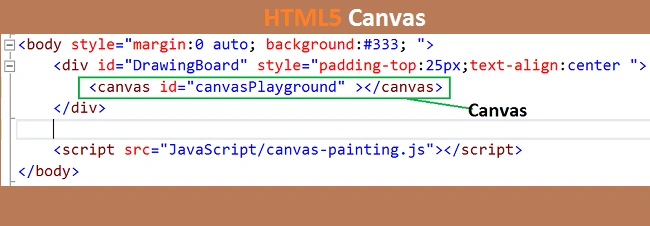
Figure- canvas
Story
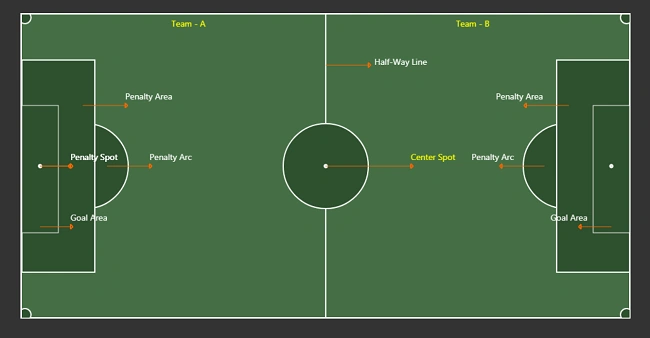
Yes, it's true. I had significantly less knowledge of football playgrounds, like what is penalty area, penalty spot, goal area, and so many things. So two days ago, I was studying about a football playground when I saw a magnificent image of the playground. Then there is a question came into my mind - "Can I draw the same type of ground image using programming?" I got an answer; yes, I can do that.
There can be a different way to draw this image, but for this article/solution, I am using HTML5 canvas with JavaScript.
Note
In this article, I will draw the same football ground with different colors.
Before Start
Before going to start drawing for the football ground, let's know about the basic concept of the canvas, and it's methods that are being used to draw the objects on it. The <canvas> element creates a fixed drawing surface size, possibly in a 2d context or 3. But in this article, I will discuss the 2 contexts only.
We can draw various shapes and text, but I will use the following in this article. Maybe in the next article, I will explore more about the canvas.
- Circle
To draw a circular shape over the canvas, in this article, I will use a circle object to draw the center spot and penalty arc. - Rectangle
we can draw rectangular share where we need to show a rectangular object. In this article, I will use it to draw several shapes like penalty area, goal area, and main ground. - Line
we can draw the line on canvas by using the line. I will use it to draw a halfway line of the ground and an arrow line to indicate the name of the ground area. - Text
We can draw text as well. So In this article, I will use it to indicate the information on the ground.
The <canvas> element has a method called getContext(), used to render context and its drawing functions. getContext() takes one parameter as a type of context that may be either 2D or 3D.
Example
var canvasElement = document.getElementById("canvasPlayground");
var context = canvasPlayground.getContext("2d");
I think IE8 doesn't support canvas. All the latest browsers have canvas support. So by the following line of code, we can check whether this browser has support for canvas.
//Check is this browser has support for canvas or not
if(canvasElement.getContext){
     //This browser has support for canvas
}
else{
     //it doesn't have support for canvas
}
Some of us(beginners) may not be aware of the canvas, so let's briefly examine some essential functions that will be used in this article.
List of canvas functions which are will be used in this article:
- beginPath()
It is used to create a new path after that; we can move it by using moveTo(), lineTo(), or any other function.//... context.beginPath(); //... - moveTo(xPostion, yPosition)
It is used to move the pen to the specified coordinates. We use this function as a starting point, but we can use it where we need to change the direction of the path as well.context.moveTo(0,0); - lineTo(xPostion, yPosition)
It's used to draw a straight line. This method takes two arguments, xPostion, and yPosition, which are the coordinates of the line's endpoint//... context.lineTo(0,0); context.lineTo(100,0) //.. - fill()
It's used to draw a solid path by filling the path area - fillStyle()
It's used to fill the background-color - stroke()
It's used to draw a shape with an outline/border - strokeStyle()
It's used to fill the color of the stroke outline - lineWidth()
It's used to change the width of the stroke line - arc(xPos, yPos, radius, startAngle, endAngle, anticlockwise)
We use the arc() or arcTo() methods to draw arcs or circles. - fillRect(xPos, yPos, width, height)
It is used to draw a fill rectangular shape from the specified x and y position with mentioned dimension(with x height) - strokeRect(x, y, width, height)
It is used to draw fill rectangle outline - clearRect(x, y, width, height)
It clears the specified rectangular area by making it fully transparent.
Let us start step by step drawing a football playground on canvas
For this article, I am using Visual Studio 2013, but it's not mandatory. We can do it by using Notepad with any browser.
Step 1
Create an index.html page and replace the existing code by following the lines of code.
<!DOCTYPE html>
<html xmlns="http://www.w3.org/1999/xhtml">
<head>
    <title></title>
</head>
<body style="margin:0 auto; background:#333; ">
    <div id="DrawingBoard" style="padding-top:25px;text-align:center ">
        <canvas id="canvasPlayground" ></canvas>
    </div>

    <script src="JavaScript/canvas-painting.js"></script>
</body>
</html>
Step 2
Create a new javascript file and named it canvas-painting.js, or named it according to your choice and update the script reference.
Step 3
To make the calculation feasible and centralized, I have declared some variables which will be used using drawing the playground. So paste the following code snippet into your javascript file.
var _height=500;//height of the canvas
var _width = 1000; //width of the canvas
var x1 = 0, y1 = 0, x2; y2 = 0;

var canvas = {
    width: _width,
    height: _height,
    halfWidth: _width / 2,
    lineWith: 2,
    backgorund: { Default: "#08a107", Orange: "#f60", Green: "#f80" },
    borerColor: { White: "#fff", Green: "#f80" },
    colorMap: { Orange: "#f60", Green: "#f80" }
};
var common = {
    fillColor: { Default: "#0d5f0c", Green: "green", Red: "red", Orange: "#f60", White: "#fff" },
    borderColor: "#fff",
    fontFamily: " 'Segoe UI',Arial,sans-serif",
    font: { Default: "12px 'Segoe UI',Arial,sans-serif", Heading: "14px 'Segoe UI',Arial,sans-serif" },
    lineWidth: { Pixel1: 1, Pixel2: 2, Pixel3:3, Pixel4: 4, Pixel5: 5 },
    arrowLength:{Default:70,Pixel50:50}
};

var penaltyArea = {
    height: Math.ceil((canvas.height * 70) / 100),
    width: Math.ceil((canvas.width * 12) / 100),
    yPosition: Math.ceil(((canvas.height * 30) / 100) / 2),
    xPosition: { TeamA: 0, TeamB: canvas.width - Math.ceil((canvas.width * 12) / 100) }
};
var goalArea = {
    height: Math.ceil((penaltyArea.height * 60)/100),
    width: Math.ceil(penaltyArea.width / 2),
    yPositon: (canvas.height - penaltyArea.height),
    xPosition: { TeamA: 0, TeamB: Math.ceil(canvas.width - (penaltyArea.width / 2)) }
};
var penaltyArc = {
    xPosition: { TeamA: penaltyArea.width - goalArea.width / 4, TeamB: canvas.width - penaltyArea.width + goalArea.width / 4 },
    yPosition: canvas.height/2,
    radius:goalArea.height/3
};

var groundCorner={
    radius:Math.ceil((canvas.height*2)/100)
};
Step 4
Now add the following code snippet in your javascript file because I will use these variables in upcoming functions,
var captioinText = "";
var canvasElement = document.getElementById("canvasPlayground");
var context = canvasPlayground.getContext("2d");
Step 5
Now I will create a function with the name playgorund(); after that, I will add some methods which will be used to draw the playground. The name of the methods is below.
- setGroundStyles()- to set the height, width, and background styles of the canvas
- drawCenterSpot()- to draw the Center Spot of the ground at the center point of ground
- drawCorner()- to draw an arc on all four corners
- drawPenaltyArea()- to draw penalty arc for both teams
- drawGoalArea()- to draw goal area for both teams
- drawPenaltyArc()- to draw penalty at both penalty area
- drawPenaltySpot()- to draw penalty spot for both teams
- writeText()- to indicate the area of the ground by the name
- drawLine()- to draw the line like a ground divider (Half-Way Line)
- drawArrowLine()- to draw an arrow line at the text
- drawCaptionForTeamA();
- drawCaptionForTeamB();
function playground() {

}
playground.prototype.setGroundStyles = function () {
    canvasElement.setAttribute("width", canvas.width);
    canvasElement.setAttribute("height", canvas.height);
    canvasElement.style.border = "2px solid " + canvas.borerColor.White;
    canvasElement.style.margin = "auto 25px";
    canvasElement.style.background = canvas.backgorund.Default;
}
playground.prototype.drawCenterSpot = function (xAxis, yAxis, radius) {
    context.beginPath();
    context.arc(xAxis, yAxis, radius, 0, 2 * Math.PI);
    context.fillStyle = common.fillColor.Default;
    context.fill();
    context.lineWidth = common.lineWidth.Pixel2;
    context.strokeStyle = common.borderColor;
    context.stroke();
}

playground.prototype.drawCorner = function (xAxis, yAxis) {
    context.beginPath();
    context.arc(xAxis, yAxis, groundCorner.radius, 0, 2 * Math.PI);
    context.fillStyle = common.fillColor.Default;
    context.fill();
    context.lineWidth = common.lineWidth.Pixel2;
    context.strokeStyle = common.borderColor;
    context.stroke();

}
//Rectangular Area
playground.prototype.drawPenaltyArea = function (xAxis, yAxis) {
    context.beginPath();
    context.fillStyle = common.fillColor.Default;
    context.fill();
    context.fillRect(xAxis, yAxis, penaltyArea.width, penaltyArea.height);
    context.lineWidth = common.lineWidth.Pixel2;
    context.strokeStyle = common.borderColor;
    context.strokeRect(xAxis, yAxis, penaltyArea.width, penaltyArea.height);
}
playground.prototype.drawGoalArea = function (xAxis, yAxis) {
    context.beginPath();
    context.fillStyle = common.fillColor.Default;
    context.fill();
    context.fillRect(xAxis, yAxis, goalArea.width, goalArea.height);
    context.lineWidth = common.lineWidth.Pixel1;
    context.strokeStyle = common.borderColor;
    context.strokeRect(xAxis, yAxis, goalArea.width, goalArea.height);
}
playground.prototype.drawPenaltyArc = function (xAxis, yAxis, radius) {
    context.beginPath();
    context.arc(xAxis, yAxis, radius, 0, 2 * Math.PI);
    context.fillStyle = common.fillColor.Default;
    context.fill();
    context.lineWidth = common.lineWidth.Pixel2;
    context.strokeStyle = common.borderColor;
    context.stroke();

}
playground.prototype.drawPenaltySpot = function (xAxis, yAxis, radius) {
    context.beginPath();
    context.arc(xAxis, yAxis, radius, 0, 2 * Math.PI);
    context.fillStyle = common.fillColor.Default;
    context.fill();
    context.lineWidth = common.lineWidth.Pixel3;
    context.strokeStyle = common.borderColor;
    context.stroke();
}

playground.prototype.writeText = function (text, xAxis, yAxis, font,color) {
    font = (typeof font == 'undefined') ? common.font.Default : font;
    color = (arguments.length >= 5) ? color : common.fillColor.White;
    context.font = font;
    context.fillStyle = color;
    context.fillText(text, xAxis, yAxis);

}
playground.prototype.drawLine = function (x1, y1, x2, y2) {
    context.beginPath();
    context.moveTo(x1, y1);
    context.lineTo(x2, y2);
    context.stroke();
    context.lineWidth = common.lineWidth;
    context.fillStyle = common.fillColor.White;
    context.fill();
}
playground.prototype.drawArrowLine = function (x1, y1, x2, y2, isReverseArrow) {
    context.beginPath();
    context.moveTo(x1, y1);
    context.lineTo(x2, y2);
    context.strokeStyle = common.fillColor.Orange;
    context.lineWidth = common.lineWidth.Pixel1;
    context.stroke();

    var x2ofLine = x2;
    var y2OfLine = y2;

    if (!isReverseArrow) {
        for (var i = 0; i <= 2; i++) {
            x1 = x2ofLine;
            y1 = ((i == 0) || (i == 2)) ? (y2OfLine - 4) : (y2OfLine + 4);
            x2 = (i == 2) ? (x2ofLine) : (x2ofLine + 4);
            y2 = (i == 2) ? (y2OfLine + 4) : y2OfLine;

            context.beginPath();
            context.moveTo(x1, y1);
            context.lineTo(x2, y2);
            context.lineWidth = common.lineWidth.Pixel2;
            context.strokeStyle = common.fillColor.Orange
            context.stroke();
        }
    }
    else {
        for (var i = 0; i <= 2; i++) {
            x1 = x2ofLine;
            y1 = ((i == 0) || (i == 2)) ? (y2OfLine + 4) : (y2OfLine - 4);
            x2 = (i == 2) ? (x2ofLine) : (x2ofLine - 4);
            y2 = (i == 2) ? (y2OfLine - 4) : y2OfLine;

            context.beginPath();
            context.moveTo(x1, y1);
            context.lineTo(x2, y2);
            context.lineWidth = 2;
            context.strokeStyle = common.fillColor.Orange;
            context.stroke();
        }
    }

}

playground.prototype.drawCaptionForTeamA = function (ground) {
    //Caption for Penalty Area
    x1 = penaltyArea.width - 20;
    y1 = canvas.height - penaltyArea.height;
    x2 = x1 + common.arrowLength.Default;
    y2 = y1;
    ground.drawArrowLine(x1, y1, x2, y2, false);
    captioinText = "Penalty Area";
    ground.writeText(captioinText, x2, y2 - 10, common.font.Heading);

    //Caption for Goal Area
    x1 = goalArea.width - goalArea.width / 2;
    y1 = canvas.height - goalArea.height + 60;
    x2 = x1 + common.arrowLength.Pixel50;
    y2 = y1;
    ground.drawArrowLine(x1, y1, x2, y2, false);
    captioinText = "Goal Area";
    ground.writeText(captioinText, x2, y2 - 10, common.font.Heading);

    //Caption for Penalty Arc
    x1 = penaltyArea.width + 20;
    y1 = canvas.height / 2;
    x2 = x1 + common.arrowLength.Default;
    y2 = y1;
    ground.drawArrowLine(x1, y1, x2, y2, false);
    captioinText = "Penalty Arc";
    ground.writeText(captioinText, x2, y2 - 10, common.font.Heading);

    //Caption for Penalty Spot
    x1 = goalArea.width / 2;
    y1 = canvas.height / 2;
    x2 = x1 + common.arrowLength.Pixel50;
    y2 = y1;
    ground.drawArrowLine(x1, y1, x2, y2, false);
    captioinText = "Penalty Spot";
    ground.writeText(captioinText, x2, y2 - 10, common.font.Heading);
}


playground.prototype.drawCaptionForTeamB = function (ground) {

    //Caption for Penalty Area
    x1 = canvas.width - penaltyArea.width + 20;
    y1 = canvas.height - penaltyArea.height ;
    x2 = x1 - common.arrowLength.Default;
    y2 = y1;
    ground.drawArrowLine(x1, y1, x2, y2, true );
    captioinText = "Penalty Area";
    ground.writeText(captioinText, x2 - 50, y2 - 10, common.font.Heading);

    //Caption for Goal Area
    x1 = canvas.width - goalArea.width/2;
    y1 = canvas.height - goalArea.height + 60;
    x2 = x1 - common.arrowLength.Pixel50;
    y2 = y1;
    ground.drawArrowLine(x1, y1, x2, y2, true);
    captioinText = "Goal Area";
    ground.writeText(captioinText, x2-50, y2 - 10, common.font.Heading);

    //Caption for Penalty Arc
    x1 = canvas.width -  penaltyArea.width -20;
    y1 = canvas.height / 2;
    x2 = x1 - common.arrowLength.Default;
    y2 = y1;
    ground.drawArrowLine(x1, y1, x2, y2, true);
    captioinText = "Penalty Arc";
    ground.writeText(captioinText, x2 -50, y2 - 10, common.font.Heading);

    //Caption for Penalty Spot
    x1 = goalArea.width / 2;
    y1 = canvas.height / 2;
    x2 = x1 + common.arrowLength.Pixel50;
    y2 = y1;
    ground.drawArrowLine(x1, y1, x2, y2, true);
    captioinText = "Penalty Spot";
    ground.writeText(captioinText, x2, y2 - 10, common.font.Heading);
}
Step 6
No, add the following code snippet, which will draw the football playground on the window load().
window.onload = function () {
    var xPos = 0;
    var yPos = 0;
    var ground = new playground();
    ground.setGroundStyles();
    setTimeout(function () {
        //First draw all corners
        ground.drawCorner(5, 5);//Left Top
        ground.drawCorner(5, canvas.height - 5); //Bottom Left
        ground.drawCorner(canvas.width - 5, 5); //Top Right
        ground.drawCorner(canvas.width - 5, canvas.height - 5); //Bottom Right

        //Now draw ground devider after 500 ms
        setTimeout(function () {
            //Half-way line
            ground.drawLine(canvas.width / 2, 0, canvas.width / 2, canvas.height);
            captioinText = "Half-Way Line";
            xPos = (canvas.width / 2) + common.arrowLength.Default;
            yPos = canvas.height / 6;

            //Now draw center spot
            setTimeout(function(){
                ground.drawArrowLine(canvas.halfWidth, yPos, xPos, yPos);
                ground.writeText(captioinText, xPos + 10, yPos, common.font.Heading);
                ground.drawCenterSpot(canvas.width / 2, canvas.height / 2, penaltyArc.radius);
                ground.drawPenaltySpot(canvas.width / 2, canvas.height / 2, 2);

                //Draw Team a Penaly Areas
                setTimeout(function () {
                    //Team-A
                    captioinText = "Team - A";
                    xPos = Math.ceil((canvas.width) / 4) - Math.ceil(captioinText.length / 2);
                    yPos = 20;
                    ground.writeText(captioinText, xPos, yPos, common.font.Heading, "Yellow");
                    ground.drawPenaltyArc(penaltyArc.xPosition.TeamA, penaltyArc.yPosition, penaltyArc.radius);
                    ground.drawPenaltyArea(penaltyArea.xPosition.TeamA, penaltyArea.yPosition);
                    ground.drawGoalArea(goalArea.xPosition.TeamA, goalArea.yPositon);
                    ground.drawPenaltySpot(goalArea.width / 2, canvas.height / 2, 2);
                    ground.drawCaptionForTeamA(ground);

                    ////Draw Team a Penaly Areas
                    setTimeout(function () {
                        //Team*B
                        captioinText = "Team - B";
                        xPos = canvas.width - canvas.width / 3.5;
                        ground.writeText(captioinText, xPos, yPos, common.font.Heading, "Yellow");
                        ground.drawPenaltyArc(penaltyArc.xPosition.TeamB, penaltyArc.yPosition, penaltyArc.radius);
                        ground.drawPenaltyArea(penaltyArea.xPosition.TeamB, penaltyArea.yPosition);
                        ground.drawGoalArea(goalArea.xPosition.TeamB, goalArea.yPositon);
                        ground.drawPenaltySpot(canvas.width - (goalArea.width / 2), canvas.height / 2, 2);
                        ground.drawCaptionForTeamB(ground);

                        setTimeout(function () {
                            //Draw Captions for Center Spot
                            ground.drawArrowLine(canvas.halfWidth, canvas.height / 2, canvas.halfWidth + penaltyArc.radius * 2, canvas.height / 2, false);
                            captioinText = "Center Spot";
                            xPos = canvas.halfWidth + penaltyArc.radius * 2;
                            yPos = (canvas.height / 2) - 10;
                            ground.writeText(captioinText, xPos, yPos, common.font.Heading, "yellow");
                        }, 500);
                    }, 500);
                }, 1000);
            },500);
        }, 500);
    }, 5000);

}

You can see that I have used the setTimeout function to draw the object one after another.
Output
Summary
This article taught us about the HTML5 canvas element to draw a football playground using JavaScript. In the upcoming article, I will explore more about canvas, including 3d context and animations.
Hadshana KamalanathanPosted Jul 21, 2018, 11:11 PM
Nice, Thanks for sharing
Amit MishraPosted Jul 5, 2017, 11:58 PM
Well Written, waiting for more interesting articles