

- 150
- 75
- 38
- 15
I use the size of the ellipse as 150, so in the first gradient size it will divide two colors (viz. Red & Blue) in equal size.
The main code for first type of size:
using System;
using System.Collections.Generic;
using System.ComponentModel;
using System.Data;
using System.Drawing;
using System.Linq;
using System.Text;
using System.Windows.Forms;
namespace MyBlog
{
public partial class Form1 : Form
{
public Form1()
{
InitializeComponent();
}
private void button1_Click(object sender, EventArgs e)
{
Rectangle myGradientRectangle = new Rectangle(10, 10, 150, 150);
using (Graphics myGradientGraphic = this.CreateGraphics())
{
using (System.Drawing.Drawing2D.LinearGradientBrush myGradientBrush = new System.Drawing.Drawing2D.LinearGradientBrush(myGradientRectangle, Color.Red, Color.Blue, System.Drawing.Drawing2D.LinearGradientMode.ForwardDiagonal))
{
myGradientGraphic.FillEllipse(myGradientBrush, 10, 10, 150, 150);
}
}
}
}
}
Output of the above code looks like the below image :
DrawGradientEllipseInDifferentGradientSize1.JPG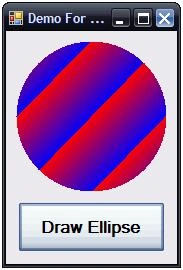
In the second size it will divide a rectangle in two equal sizes & each size of rectangle again divides into two equal sizes (viz. Red & Blue).
Main code :
using System;
using System.Collections.Generic;
using System.ComponentModel;
using System.Data;
using System.Drawing;
using System.Linq;
using System.Text;
using System.Windows.Forms;
namespace MyBlog
{
public partial class Form1 : Form
{
public Form1()
{
InitializeComponent();
}
private void button1_Click(object sender, EventArgs e)
{
Rectangle myGradientRectangle = new Rectangle(10, 10, 75, 75);
using (Graphics myGradientGraphic = this.CreateGraphics())
{
using (System.Drawing.Drawing2D.LinearGradientBrush myGradientBrush = new System.Drawing.Drawing2D.LinearGradientBrush(myGradientRectangle, Color.Red, Color.Blue, System.Drawing.Drawing2D.LinearGradientMode.ForwardDiagonal))
{
myGradientGraphic.FillEllipse(myGradientBrush, 10, 10, 150, 150);
}
}
}
}
}
Output of the above code looks like the image shown below:
DrawGradientEllipseInDifferentGradientSize2.JPG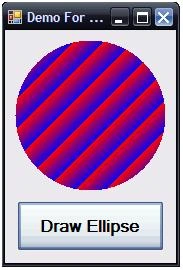
The third size will divide the rectangle into four equal sizes & each size of rectangle is again divided into two equal sizes (viz. Red & Blue).
Main code :
using System;
using System.Collections.Generic;
using System.ComponentModel;
using System.Data;
using System.Drawing;
using System.Linq;
using System.Text;
using System.Windows.Forms;
namespace MyBlog
{
public partial class Form1 : Form
{
public Form1()
{
InitializeComponent();
}
private void button1_Click(object sender, EventArgs e)
{
Rectangle myGradientRectangle = new Rectangle(10, 10, 37, 38);
using (Graphics myGradientGraphic = this.CreateGraphics())
{
using (System.Drawing.Drawing2D.LinearGradientBrush myGradientBrush = new System.Drawing.Drawing2D.LinearGradientBrush(myGradientRectangle, Color.Red, Color.Blue, System.Drawing.Drawing2D.LinearGradientMode.ForwardDiagonal))
{
myGradientGraphic.FillEllipse(myGradientBrush, 10, 10, 150, 150);
}
}
}
}
}
The output of the above code looks like the image below:
DrawGradientEllipseInDifferentGradientSize3.JPG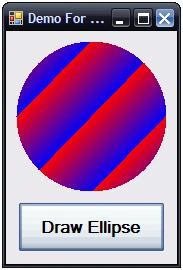
The third size will divide a rectangle into ten equal sizes & each size of rectangle is again divided into two equal sizes (viz. Red & Blue).
Main code :
using System;
using System.Collections.Generic;
using System.ComponentModel;
using System.Data;
using System.Drawing;
using System.Linq;
using System.Text;
using System.Windows.Forms;
namespace MyBlog
{
public partial class Form1 : Form
{
public Form1()
{
InitializeComponent();
}
private void button1_Click(object sender, EventArgs e)
{
Rectangle myGradientRectangle = new Rectangle(10, 10, 15, 15);
using (Graphics myGradientGraphic = this.CreateGraphics())
{
using (System.Drawing.Drawing2D.LinearGradientBrush myGradientBrush = new System.Drawing.Drawing2D.LinearGradientBrush(myGradientRectangle, Color.Red, Color.Blue, System.Drawing.Drawing2D.LinearGradientMode.ForwardDiagonal))
{
myGradientGraphic.FillEllipse(myGradientBrush, 10, 10, 150, 150);
}
}
}
}
}
The output of the above code looks like the image shown below:
DrawGradientEllipseInDifferentGradientSize4.JPG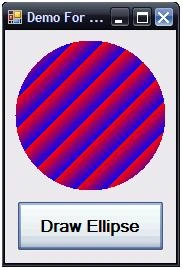
Join the conversation! Your thoughts help the community grow.