

Introduction
Recently, Angular has released its latest version 7.0. This major release has brought some changes in the core framework, Angular Material, toolchain etc. Let's see what's new in Angular v7.
What's new in Angular 7,
CLI prompt
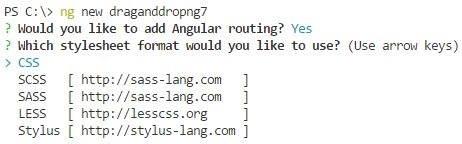
In this new feature, when we create a new Angular app, at that time, the Angular CLI prompts us with the options which are listed below.
Enable Angular Routing

Stylesheet format
- The bundle budget feature allows us to specify the bundling size with minimum and maximum values which directly put an impact on website performance.
- Angular Elements with the Content Projection are now supported.
- Virtual scroll using CDK is used to load the large numbers of the list and to build a faster user experience.
- Drag and Drop is a completely new feature added to version 7 and the same thing we are going to discuss in this article very soon.
- A few dependencies are updated like TypeScript 3.1, Nodejs 10 and RxJs 6.3.
So, these are some primary changes found in this new version and if you want to know more and detailed information than you can go to the official blog page from here.
Now, let's start with one of the new features called Drag and Drop which I was waiting for for a long time.
Get Started with Drag and Drop using Angular 7
To work with Drag and Drop, we have the module called @angular/cdk/drag-drop which is used to provide the interface to create drag and drop functionality easily.
A number of options are available with Drag and Drop as listed below.
- Basic Drag and Drop
- Sorting with Drag and Drop
- Drag and Drop with custom drag handle
- Transfer items between the list
- Drag and Drop with different orientation
- Locking with axis
Prerequisites
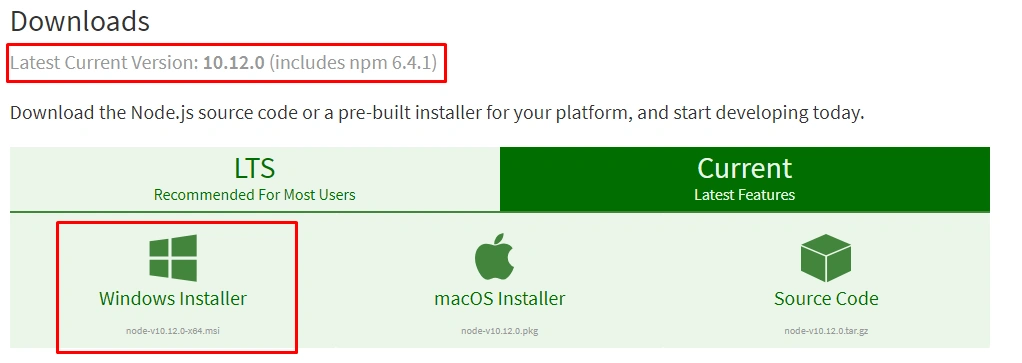
Nodejs > 10
We need to install the latest version of NodeJs from here.
Updated angular-cli
Install the latest version of angular-cli using the following npm command.
- npm install -g @angular-cli@latest
We have installed the latest version of Angular CLI and node.js. Now, let's create a new Angular 7 app. For that, follow these simple steps as described below.
- ng new draganddropng7
After running the above command, CLI prompts for the question, and the first one is to create an Angular Routing module.
The next question is to choose the format of Stylesheet.
So, select the appropriate options. I have allowed creating a routing module and chose the CSS format for my stylesheets.
In this article, we are going to learn about the Drag and Drop options so for that we are going to create new components.
- ng g c basic
- ng g c sorting
- ng g c handle
- ng g c orientation
- import { NgModule } from '@angular/core';
- import { Routes, RouterModule } from '@angular/router';
- import { BasicComponent } from './basic/basic.component';
- import { SortingComponent } from './sorting/sorting.component';
- import { HandleComponent } from './handle/handle.component';
- import { OrientationComponent } from './orientation/orientation.component';
- const routes: Routes = [
- { path: '', redirectTo: 'basic', pathMatch: 'full' },
- { path: 'basic', component: BasicComponent },
- { path: 'sorting', component: SortingComponent },
- { path: 'handle', component: HandleComponent },
- { path: 'orientation', component: OrientationComponent },
- ];
- @NgModule({
- imports: [RouterModule.forRoot(routes)],
- exports: [RouterModule]
- })
- export class AppRoutingModule { }
- import { BrowserModule } from '@angular/platform-browser';
- import { NgModule } from '@angular/core';
- import { AppRoutingModule } from './app-routing.module';
- import { AppComponent } from './app.component';
- import { BasicComponent } from './basic/basic.component';
- import { SortingComponent } from './sorting/sorting.component';
- import { HandleComponent } from './handle/handle.component';
- import { OrientationComponent } from './orientation/orientation.component';
- // To use material components
- import { MatToolbarModule, MatMenuModule, MatInputModule, MatTableModule, MatButtonModule, MatCardModule, MatTableDataSource, MatPaginatorModule, MatSortModule } from '@angular/material';
- import { BrowserAnimationsModule } from '@angular/platform-browser/animations';
- import { DragDropModule } from '@angular/cdk/drag-drop';
- @NgModule({
- declarations: [
- AppComponent,
- BasicComponent,
- SortingComponent,
- HandleComponent,
- OrientationComponent
- ],
- imports: [
- BrowserModule,
- AppRoutingModule,
- BrowserAnimationsModule,
- MatToolbarModule, MatMenuModule, MatInputModule, MatTableModule, MatButtonModule, MatCardModule, MatPaginatorModule, MatSortModule,
- DragDropModule
- ],
- exports: [
- MatToolbarModule, MatMenuModule, MatInputModule, MatTableModule, MatButtonModule, MatCardModule, MatPaginatorModule, MatSortModule
- ],
- providers: [],
- bootstrap: [AppComponent]
- })
- export class AppModule { }
- <mat-toolbar color="accent">
- <span>Manav Pandya - C#Corner</span>
- <span class="demo-toolbar"></span>
- <button mat-button [matMenuTriggerFor]="menu">Menu</button>
- <mat-menu #menu="matMenu">
- <button [routerLink]="['/basic']" mat-menu-item>Basic Drag & Drop</button>
- <button [routerLink]="['/sorting']" mat-menu-item>Sorting</button>
- <button [routerLink]="['/handle']" mat-menu-item>Drag using Handle</button>
- <button [routerLink]="['/orientation']" mat-menu-item>Horizontal Orientation</button>
- </mat-menu>
- </mat-toolbar>
- <router-outlet></router-outlet>
Basic Drag and Drop

To use Drag and Drop, we have already imported module @angular/cdk/drag-drop into the app.module.ts file, and to allow basic Drag and Drop effect we have directive named cdkDrag which allow an element to be dragged and dropped.
Open the file basic.component.html and paste the following source code.
- <mat-card>
- <div class="alert alert-info">
- <strong>Simple Drag and Drop</strong>
- </div>
- <div class="example-container mat-elevation-z8">
- <div class="example-box" cdkDrag>
- Hey, Drag Me
- </div>
- </div>
- </mat-card>
Drag and Drop with Sorting

If we want to sort the record from the list of the items, we can do this by using directive cdkDropList, thus every item in the list will act as a separate draggable element which used cdkDrag directive.
Now open the file sorting.component.html and replace the following code snippet.
- <mat-card>
- <div class="alert alert-info">
- <strong>Drag and Drop with Sorting</strong>
- </div>
- <div class="example-container mat-elevation-z8">
- <div cdkDropList class="example-list" (cdkDropListDropped)="drop($event)">
- <div class="example-box" *ngFor="let item of items" cdkDrag>{{item}}</div>
- </div>
- </div>
- </mat-card>
To get the list of items and to implement drop event, open sorting.component.ts file and paste the following source code.
- import { Component, OnInit } from '@angular/core';
- import { CdkDragDrop, moveItemInArray } from '@angular/cdk/drag-drop';
- @Component({
- selector: 'app-sorting',
- templateUrl: './sorting.component.html',
- styleUrls: ['./sorting.component.css']
- })
- export class SortingComponent {
- items = [
- 'ITEM 1',
- 'ITEM 2',
- 'ITEM 3',
- 'ITEM 4',
- 'ITEM 5',
- 'ITEM 6',
- 'ITEM 7',
- ];
- drop(event: CdkDragDrop<string[]>) {
- moveItemInArray(this.items, event.previousIndex, event.currentIndex);
- }
- }
Now we will be able to reorder the list of items without using any complex JavaScript based libraries.
Drag and Drop using Custom Drag Handle
We have seen a simple example where the whole element is to be dragged, but if you want to specify the specific place in the element from where the user can drag the element then we can do this by using directive cdkDragHandle.
Open the file handle.component.html and replace with the following source code.
- <mat-card>
- <div class="alert alert-info">
- <strong>Drag and Drop with Handle</strong>
- </div>
- <div class="example-container mat-elevation-z8">
- <div class="example-box" cdkDrag>
- Drag me using handle
- <div class="example-handle" cdkDragHandle>
- <svg width="24px" fill="currentColor" viewBox="0 0 24 24">
- <path d="M10 9h4V6h3l-5-5-5 5h3v3zm-1 1H6V7l-5 5 5 5v-3h3v-4zm14 2l-5-5v3h-3v4h3v3l5-5zm-9 3h-4v3H7l5 5 5-5h-3v-3z"></path>
- <path d="M0 0h24v24H0z" fill="none"></path>
- </svg>
- </div>
- </div>
- </div>
- </mat-card>

Drag and Drop using Horizontal orientation
By default, the orientation of the list will be vertical, but we can set it to horizontal using cdkDropListOrientation, open orientation.component.html and replace it with the following source code.
- <mat-card>
- <div class="alert alert-info">
- <strong>Drag and Drop with Horizontal Orientation</strong>
- </div>
- <div class="example-container mat-elevation-z8">
- <div cdkDropList cdkDropListOrientation="horizontal" class="example-list" (cdkDropListDropped)="drop($event)">
- <div class="example-box" *ngFor="let item of items" cdkDrag>{{item}}</div>
- </div>
- </div>
- </mat-card>
- import { Component, OnInit } from '@angular/core';
- import { CdkDragDrop, moveItemInArray } from '@angular/cdk/drag-drop';
- @Component({
- selector: 'app-orientation',
- templateUrl: './orientation.component.html',
- styleUrls: ['./orientation.component.css']
- })
- export class OrientationComponent {
- items = [
- 'ITEM 1',
- 'ITEM 2',
- 'ITEM 3',
- 'ITEM 4',
- 'ITEM 5',
- 'ITEM 6',
- 'ITEM 7',
- ];
- drop(event: CdkDragDrop<string[]>) {
- moveItemInArray(this.items, event.previousIndex, event.currentIndex);
- }
- }

Conclusion
Angular 7 brought a new feature and one of the features we have learned is Drag and Drop using angular/cdk, here in this article we have seen the examples of simple drag and drop, with sorting, using custom drag handle and with the different orientation.
I would recommend you to just refer to the complete guide from here where you will get to know more about these options. I hope this new feature will help you to implement Drag and Drop functionality in an easy manner, just download the source code attached to this article and do not forget to use CSS files, otherwise you will be unable to get the desired output.
Thanks for reading.
Gaurav PatniPosted Jan 5, 2019, 7:28 AM
Hi, as i followed the tutorial it is working but css is not working fine
Hamid KhanPosted Jan 1, 2019, 11:58 PM
Thanks Manav, for sharing drag and drop functionality in angular........
Shubham SawantPosted Nov 7, 2018, 8:13 AM
Nice Article
Muthu KumarPosted Oct 29, 2018, 8:00 AM
Very nice article sir.
Rushi MehtaPosted Oct 23, 2018, 1:36 AM
Well, Explained Article...! Thanks Manav
Mahesh VermaPosted Oct 23, 2018, 12:58 AM
Very informative, thanks for sharing Manav.
Naresh SinghalPosted Oct 22, 2018, 11:29 PM
Very Nice Example, Keep it up Manav Pandya .....
Debasis SahaPosted Oct 22, 2018, 12:14 PM
Great example Manav... Thanks for sharing..