

Tools Used: Visual C# .NET
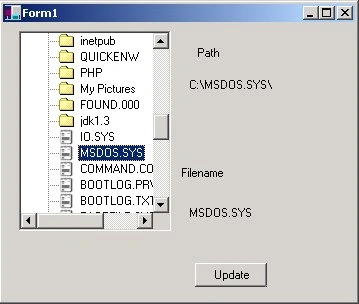
Drag and Drop in C#
Microsoft has added a series of properties and events to help you use drag and drop with your controls. You must set the AllowDrop property to allow for dragging and dropping within the tree view. Also, there are about 5 major events available for trapping drag-drop operations. We use 4 of them here: ItemDrag, DragOver, DragEnter, and DragDrop.
| Event | How It is Triggered |
| ItemDrag | The Initial Event triggered when the user starts to drag an item in the treeview. |
| DragOver | This is specific to treeviews and listviews and traps the item being dragged in the event parameter. AlsoHere is where you call DoDragDrop |
| DragEnter | This event occurs when the user drags over a drag and drop control with the mouse during a drag-drop operation |
| DragLeave | Occurs when the user moves the mouse onto the control when dragging an object. |
| DragDrop | Occurs when the user releases the mouse over the drop target |
| GiveFeedback | Gives feedback about the effects and the current cursor |
The Drag and Drop functionality also has another facet of control called DragDropEffects. Below is a table of these enumerations:
| Effects | Description |
| Move | The drag appears as a box along with the cursor. Data is moved to the target through the drop operation. |
| Copy | The drag appears as a box with a plus sign along with the cursor. Data is copied to the target through the drop operation. |
| Scroll | The drop target is scrolling while the item is being dragged. |
| Link | Data from the source of the item being dragged is linked to the target it is being dropped into. |
| All | The data is moved and scrolled in the drop target |
The only effects we are concerned with in this example is the Move and Copy Effects. When the user begins dragging, the delegated method below is called and it is here where we initiate the drag drop functionality by calling DoDragDrop. Do drag drop passes the data and the effect to initiate. We set the effect based on whether the user has pressed the control key or not. In this example, we don't actually use the data, since it's part of the same control, so it isn't so important what the first parameter is. We just maintain what is being dragged in a field of our class. Note that the Node being dragged is determined from the ItemDragEventArg received in this method:
- protected void treeView1_ItemDrag(object sender, System.WinForms.ItemDragEventArgs e)
- {
- // Remember the Item being dragged if it is a file node (ImageIndex == 2)
- TreeNode aNode = (TreeNode)e.Item;
- Bitmap bmp = imageList1.GetBitmap(2);
- // Only drag if it is a file, where not dragging directories in this example
- if (aNode.ImageIndex == 2)
- {
- StartNode = aNode;
- //The effect was previously set based on whether the ctrl key was pressed.
- // If it was, the effect will be copy otherwise it will be move
- // Set the state of the drag-drop operation, the state is a local enumeration in our class
- if (CurrentEffect == DragDropEffects.Move)
- {
- CurrentState = States.Move;
- }
- else
- {
- CurrentState = States.Copy;
- }
- // DoDragDrop sets things in motion for the drag drop operation by passing the data and the current effect
- // Data can be a bitmap, string or something that implements the IDataObject interface
- this.DoDragDrop(imageList1.GetBitmap(aNode.ImageIndex), CurrentEffect);
- }
- }
- protected void treeView1_DragOver(object sender, System.WinForms.DragEventArgs e)
- {
- // set the effect again to maintain the effect we set in the DoDragDrop, (Seems you have to do this, may be a bug)
- e.Effect = CurrentEffect;
- // Determine the node we are dragging over
- // FindTreeNode is a local function of this class that determines the node from a point
- TreeNode aNode = FindTreeNode(e.X, e.Y);
- if (aNode != null)
- {
- // If the node is a folder, change the color of the background to dark blue to simulate selection
- // Be sure to return the previous node to its original color by copying from a blank node
- if ((aNode.ImageIndex == 1) || (aNode.ImageIndex == 0))
- {
- aNode.BackColor = Color.DarkBlue;
- aNode.ForeColor = Color.White;
- if ((OldNode != null) && (OldNode != aNode))
- {
- OldNode.BackColor = OriginalNode.BackColor;
- OldNode.ForeColor = OriginalNode.ForeColor;
- }
- OldNode = aNode;
- }
- }
- }
- protected void treeView1_DragEnter(object sender, System.WinForms.DragEventArgs e)
- {
- e.Effect = CurrentEffect;
- }
- // called last when mouse released during a drop
- protected void treeView1_DragDrop(object sender, System.WinForms.DragEventArgs e)
- {
- // set a flag indicating if we are moving or not. If we are not moving, then we are copying
- bool movingFile = (CurrentEffect == DragDropEffects.Move);
- // determine the node we are dropping into from the coordinates of the DragEvent Arguement
- TreeNode DropNode = FindTreeNode(e.X, e.Y);
- // Reset the local state of the drag and the effect field
- CurrentState = States.Idle;
- CurrentEffect = DragDropEffects.Move;
- // If the drop target is a folder (not a file), then perform drop operations
- if (DropNode.ImageIndex != 2)
- {
- // it's a folder, drop the file
- if (movingFile)
- {
- MoveFile(StartNode, DropNode);// move the file from the startnode to the dropnode
- }
- else
- {
- CopyFile(StartNode, DropNode);// copy the file from the startnode to the dropnode
- }
- this.Invalidate(new Region(this.ClientRectangle)); // redraw the treeview
- treeView1.SelectedNode = DropNode; // select the drop node as the current selection
- }
- }
- private void MoveFile(TreeNode Node1, TreeNode Node2)
- {
- string strdir1 = Node1.Parent.FullPath; // get the path of the source item
- string strdir2 = Node2.FullPath; // get the path of the drop target
- strdir1 = strdir1 + "\\" + Node1.Text; // create file paths using the name of the source item
- strdir2 = strdir2 + "\\" + Node1.Text;
- Directory.Move(strdir1, strdir2);// use the static Directory Move command to move a file
- TreeNode aNode = new TreeNode(Node1.Text, 2, 2); // create a new file node
- Node1.Remove(); // remove the old file node
- Node2.Nodes.Add(aNode); // add the new file node under the target directory node
- }
Ramesh PalaniappanPosted Aug 29, 2016, 2:36 AM
Nice
kalu singh raoPosted Jul 7, 2016, 1:47 AM
Nice...
sagar shindePosted Mar 6, 2014, 7:27 AM
Hi i need help on drag drop.My scenario is i have listview with different type of files like TXT, doc, img etc. I need to implement drag and drop functionality on my listview. Like user can drag item from listview and he can drop it either in windows explorer or treeview control on the application. When the item is dropped to windows explorer then that file should be downloaded. If user drop that file to treeview then that file is moved to the selected node of the treeview. My problem is, in item drag event when the user tries to drop the file on treeview then data should se sent as listview item in DoDragDrop method, and when user drops to the explorer then i am creating file in temp folder and then sending the path to DoDragDrop Method. So how can i do this task alternatively.
ass holePosted Dec 10, 2011, 10:58 PM
YOUR CODE IS CRAPOLA AND YOUR MAMA SUCKS GOAT DICK
ass holePosted Dec 10, 2011, 10:55 PM
ANS DOES NOT COMPILEWOTH A CRAP VLAD HAS DIK UP GOATS AHOLE
ass holePosted Dec 10, 2011, 9:43 PM
HEY SHIT IN FACE AHOLE YOU CODE DOES NOT COMPILE AND YOU DUMB SOB YOU
Analyn ObalPosted Jan 15, 2011, 11:19 AM
I really like ur page..thank u..??
Khai VuPosted May 26, 2010, 11:52 PM
Could you help me solve this Test. It's too hard Test Content: Create a simple application with its associated sample code meet the Below Requirement? 1. A Windows Form Which contain a grid associated with a database table. 2. List of objects (globe and cube and cylinder) Which allow to be dragged & Dropped into a container on a form. 3. Users can define Dimensions and weight of the Above objects and containers. 4. Automatic display and total weight of the container after gravity center HAVING Dropped into several objects. 5. A container Should be able to be defined by users for its Dimensions and weight and gravity center.
mouli medidaPosted May 26, 2010, 7:31 AM
i want to insert a toolbox in win form ,not all controls just 4 or 5 like textbox,label,datagridview ,etc... it should have a drag and drop options ......... any help??? thankyou
suneetha reddyPosted Apr 9, 2010, 7:44 AM
my requirement is to drag and drop multiple rows of datagrid in winforms. can any one help me out??
karri lokesh narasimhPosted Dec 24, 2009, 12:25 PM
can u send me the code for these not in tree view we can select one we can drag that and if we dont need we can remove by using the mouse click selection.
spider1 spiderPosted Jan 31, 2008, 1:42 PM
plz update article for 2.o
pratap jenaPosted May 29, 2007, 1:47 AM
How to close a prior image when we want to display the second image in WPF Technologies of C# application
Vlad OrlovskyPosted Feb 21, 2007, 1:17 PM
Hi, What if I wanted to support drag-drop of out windows app. For example: User selects an image name from the drop-down and drags it to the desktop. The app resolves image location and copies it to the desktop. Thanks, Vlad
Vlad OrlovskyPosted Feb 21, 2007, 1:16 PM
test