

Introduction
In this article, we will learn how to document our already existing APIs with .Net and.Net Core. Many developers absolutely deplore writing documentation. It's boring to put all these things together in a document by manually writing them. To overcome this we have Swagger to implement documentation and it's an open-source API documentation tool.
Packages required to configure Swagger,
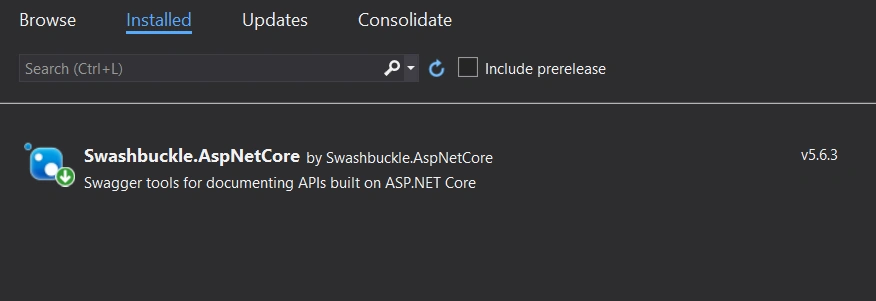
- Swashbuckle.AspNetCore (latest version) - This package adds Swagger and Swagger UI and other libraries to make it easy for us to create API documentation.
Step 1
After installing the package to the respective project, here I am sharing the screenshot for your reference if you are new to Swagger in ASP.Net Core
Step 2 - Setup
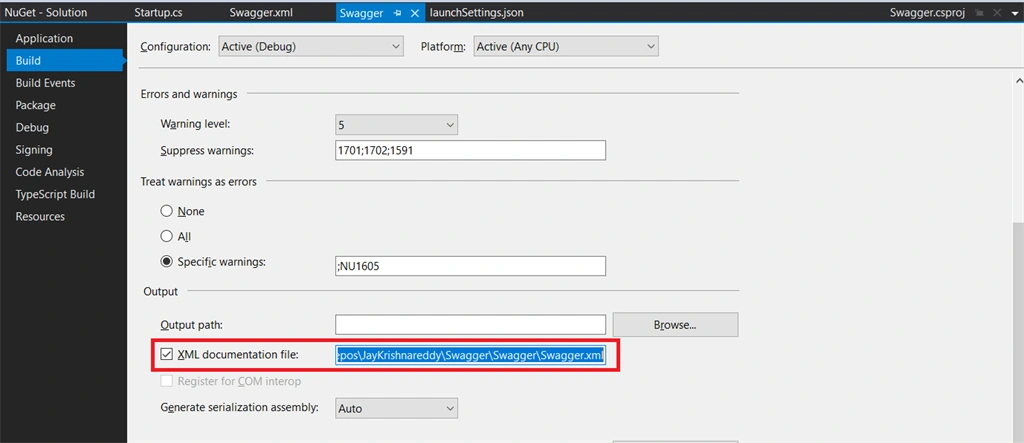
We need to enable our project to generate XML comments. The comments come from Triple-slash (///) comments throughout the code.
First, in the project properties, check the box labeled "Generate XML Documentation"
Right Click on the Solution and click on the Properties
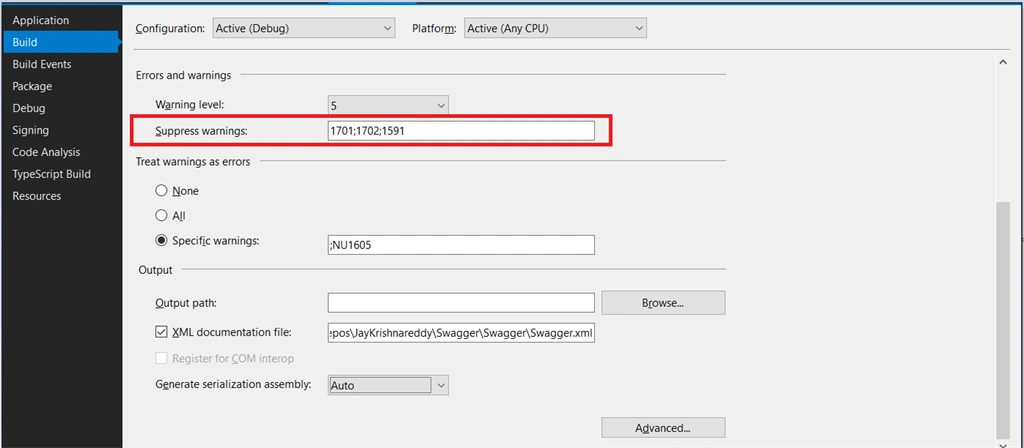
You will probably also want to suppress warning 1591, which will now give warnings about any method, class, or field that doesn't have triple-slash comments.
Step 3 - Configure Swagger
Startup.cs
- using Microsoft.AspNetCore.Builder;
- using Microsoft.AspNetCore.Hosting;
- using Microsoft.AspNetCore.HttpsPolicy;
- using Microsoft.AspNetCore.Mvc;
- using Microsoft.Extensions.Configuration;
- using Microsoft.Extensions.DependencyInjection;
- using Microsoft.Extensions.Hosting;
- using Microsoft.Extensions.Logging;
- using Microsoft.OpenApi.Models;
- using System;
- using System.Collections.Generic;
- using System.IO;
- using System.Linq;
- using System.Reflection;
- using System.Threading.Tasks;
- namespace Swagger
- {
- public class Startup
- {
- public Startup(IConfiguration configuration)
- {
- Configuration = configuration;
- }
- public IConfiguration Configuration { get; }
- // This method gets called by the runtime. Use this method to add services to the container.
- public void ConfigureServices(IServiceCollection services)
- {
- services.AddControllers();
- services.AddSwaggerGen(swagger =>
- {
- swagger.SwaggerDoc("v1", new OpenApiInfo
- {
- Version = "v1",
- Title = "Swagger Document API's",
- Description = $"Document your already existing API's with Swagger \r\n\r\n © Copyright {DateTime.Now.Year}. All rights reserved."
- });
- #region XMl Documentation
- var xmlFile = $"{Assembly.GetExecutingAssembly().GetName().Name}.xml";
- var xmlPath = Path.Combine(AppContext.BaseDirectory, xmlFile);
- swagger.IncludeXmlComments(xmlPath);
- #endregion
- });
- }
- // This method gets called by the runtime. Use this method to configure the HTTP request pipeline.
- public void Configure(IApplicationBuilder app, IWebHostEnvironment env)
- {
- if (env.IsDevelopment())
- {
- app.UseDeveloperExceptionPage();
- }
- app.UseHttpsRedirection();
- app.UseRouting();
- app.UseAuthorization();
- app.UseEndpoints(endpoints =>
- {
- endpoints.MapControllers();
- });
- app.UseSwagger();
- app.UseSwaggerUI(o =>
- {
- o.SwaggerEndpoint("/swagger/v1/swagger.json", "Swagger");
- });
- }
- }
- }
- {
- "$schema": "http://json.schemastore.org/launchsettings.json",
- "iisSettings": {
- "windowsAuthentication": false,
- "anonymousAuthentication": true,
- "iisExpress": {
- "applicationUrl": "http://localhost:62614",
- "sslPort": 44380
- }
- },
- "profiles": {
- "IIS Express": {
- "commandName": "IISExpress",
- "launchBrowser": true,
- "launchUrl": "swagger/index.html",
- "environmentVariables": {
- "ASPNETCORE_ENVIRONMENT": "Development"
- }
- },
- "Swagger": {
- "commandName": "Project",
- "launchBrowser": true,
- "launchUrl": "swagger/index.html",
- "applicationUrl": "https://localhost:5001;http://localhost:5000",
- "environmentVariables": {
- "ASPNETCORE_ENVIRONMENT": "Development"
- }
- }
- }
- }
In our XML Comments for methods.
WeatherController.cs
- using Microsoft.AspNetCore.Mvc;
- using Microsoft.Extensions.Logging;
- using System;
- using System.Collections.Generic;
- using System.ComponentModel.DataAnnotations;
- using System.Linq;
- using System.Threading.Tasks;
- namespace Swagger.Controllers
- {
- [ApiController]
- [Route("[controller]")]
- public class WeatherForecastController : ControllerBase
- {
- private static readonly string[] Summaries = new[]
- {
- "Freezing", "Bracing", "Chilly", "Cool", "Mild", "Warm", "Balmy", "Hot", "Sweltering", "Scorching"
- };
- private readonly ILogger<WeatherForecastController> _logger;
- public WeatherForecastController(ILogger<WeatherForecastController> logger)
- {
- _logger = logger;
- }
- /// <summary>
- /// Weather Forecast Get Method
- /// </summary>
- /// <returns>Json Data</returns>
- [HttpGet]
- public IEnumerable<WeatherForecast> Get()
- {
- var rng = new Random();
- return Enumerable.Range(1, 5).Select(index => new WeatherForecast
- {
- Date = DateTime.Now.AddDays(index),
- TemperatureC = rng.Next(-20, 55),
- Summary = Summaries[rng.Next(Summaries.Length)]
- })
- .ToArray();
- }
- /// <summary>
- /// Post method in weather controller.
- /// </summary>
- /// <remarks>
- /// Here is the sample to show remarks
- /// </remarks>
- /// <param name="Id">Pass the Id</param>
- /// <returns>Returns a Post Message</returns>
- [HttpPost]
- public IActionResult Post([Required] int Id)
- {
- return Ok();
- }
- }
- }
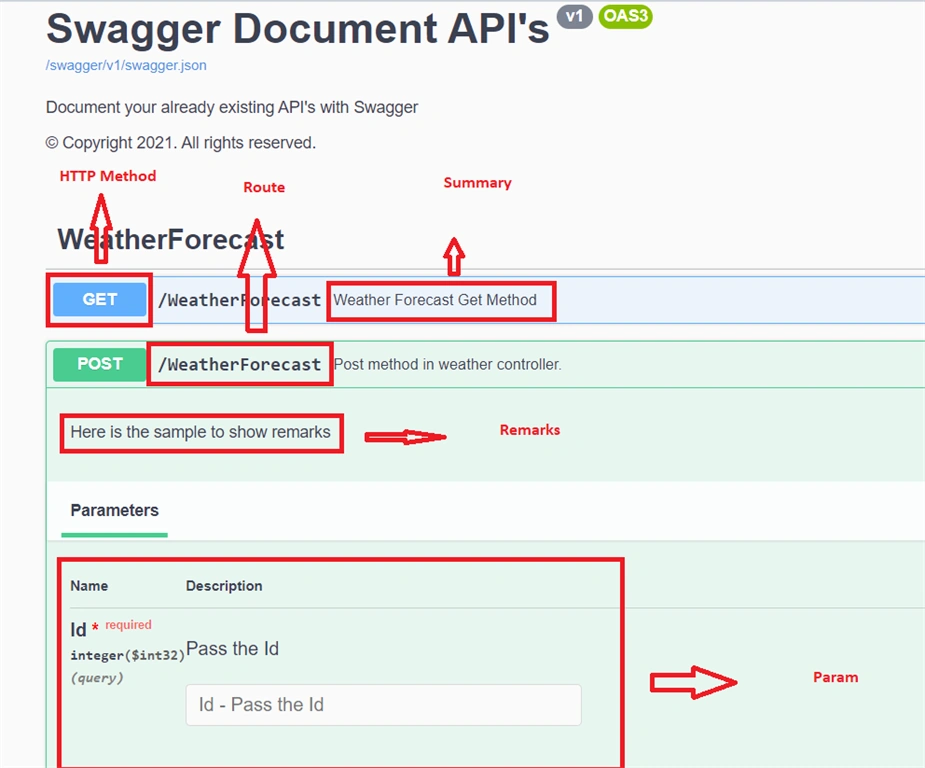
- Summary: A high-level summary of what are method /class/field is or does.
- remarks: Additional detail about the method/class/field
- param: A parameter to the method, and what it represents
- returns: A description of what the method returns.
Output - View Swagger
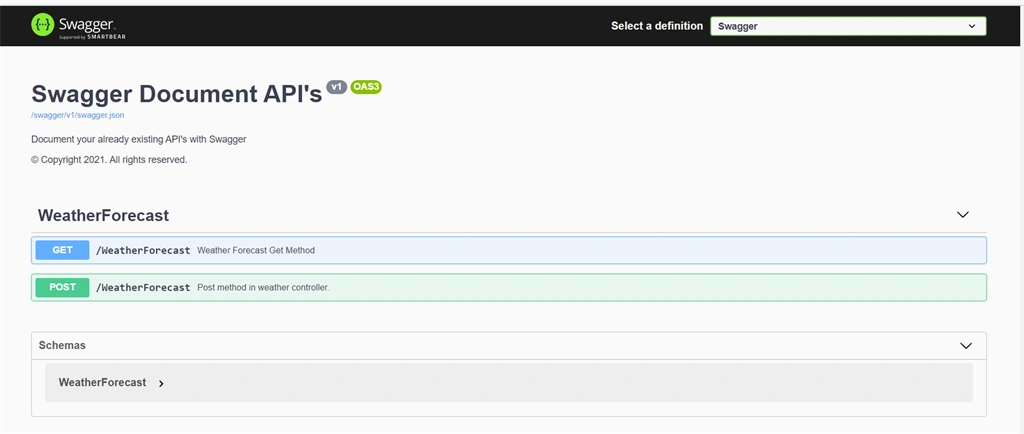
Here is a clear description of what is what in Swagger UI
Github URL: Swagger
Thanks for reading this article, Hope this article helps you!!!
Keep Learning.... !!!
Former memberPosted Jan 27, 2021, 10:20 AM
Nice Article Jay Krishna Reddy