

Today in this article I have provided an introduction to Presentation In QlikView applications.
Document properties of QlikView document
There are various document properties of QlikView documents. Then go to Settings -> Document properties.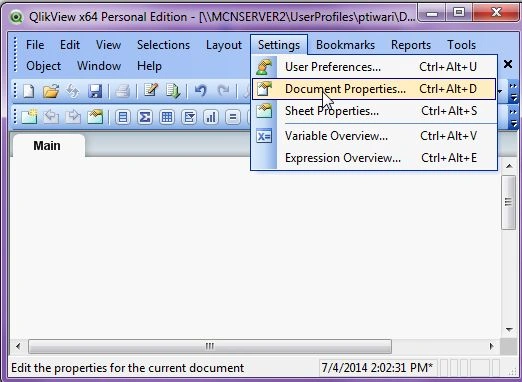
Now I introduce what Presentation is in QlikView document properties.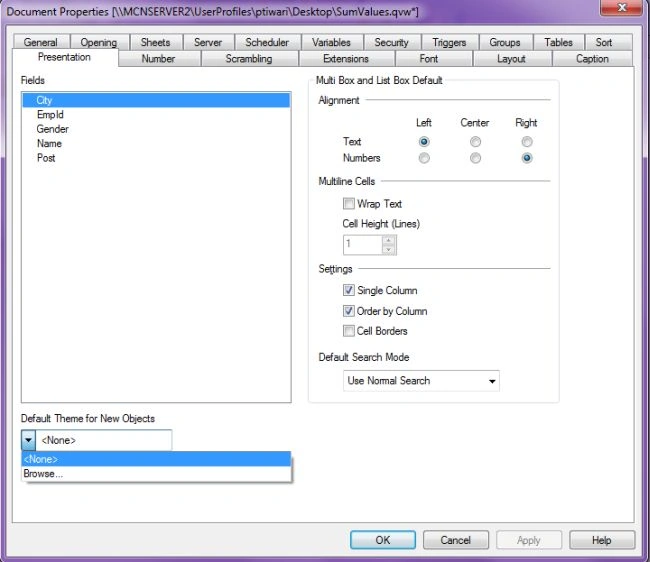
Introduction to Presentation
In this property tab, we can set the default presentation settings of the field. Field values used for list boxes and multi boxes. The list of fields are available in the Fields group.
The Multi Box and List Box group contains the sub-groups Alignment, Multiline Cells and Settings. The default Search Mode specifies the initial default search mode to be used in text search.
The following are the various types of presentation settings.
Default Theme for New Objects: At the bottom of the drop-down list there is a Browse... command in case the theme file resides in another location then in the default QlikView theme catalog. If no default theme is used, each new sheet object will inherit the properties of the last created or changed object. A theme can be selected from here. When we select a new theme then it is applied to all newly created sheets and also sheet objects in the document. It is also important that the theme used is defined for all types of objects that may occur in a QlikView document.
Alignment: By default text values are given left aligned, numbers values are given right aligned. The The default alignment of field values are given as separately for Text and Numbers.
Multiline Cells: In this setting, we need to find two options like Wrap Text and Cell Height Lines. If we select Wrap Text option, then the text contents of the cell (field value) will be displayed in two or more lines. If we want to set the number of cell lines is set in the Cell Height (Lines) edit box.
Settings: In these settings, you need to find the following three options.
- Single column: In this setting, checking this option forces single column mode.
- Order by Column: In multiple column displays the field values will be ordered by column, rather than by row.
- Cell Borders: This setting can be checked only when we introduce horizontal lines between field values.
Default Search Mode: In these settings, you need to find the following three options.
- Use Normal Search: In these settings, no additional characters will be added to the search string. In this setting, a normal search will be made without wildcards.
- Use Wildcard Search: The initial search string will be two wildcards with the cursor between them to facilitate a wildcard search.
- Use Previous: This search mode can be used as the last completed search.
Summary
This article provided an introduction to presentation in QlikView and describes what presentation are in document properties.
Shamim UddinPosted Sep 7, 2016, 10:08 PM
Nice Article