

Introduction
In this article, we're diving into a critical security practice: removing SMBv1 from domain controllers. While there’s already a wealth of material explaining why SMBv1 is bad, my goal here is to focus on how to take action in a production environment.
Let’s begin with a quick summary of why SMBv1 should be removed—especially from your domain controllers.
Why Disabling SMBv1 Matters?
- SMBv1 is outdated —think OS/2 1.0 old. If you're not connecting a Windows for Workgroups 3.11 PC to the internet, then you shouldn’t be trusting SMBv1 with your enterprise’s data either.
- Newer SMB versions (2.x and 3.x) offer security, performance, and resilience improvements. Even though Windows tries to negotiate the highest mutually supported version, systems can be tricked into downgrading to SMBv1 if it’s still enabled.
- SMBv1 is vulnerable—numerous known exploits target it.
- Legacy OSes like Windows XP and Server 2003 only support SMBv1. These systems should already be long-retired, but many environments still contain a few lingering instances.
Step 1. Auditing for SMBv1 Usage
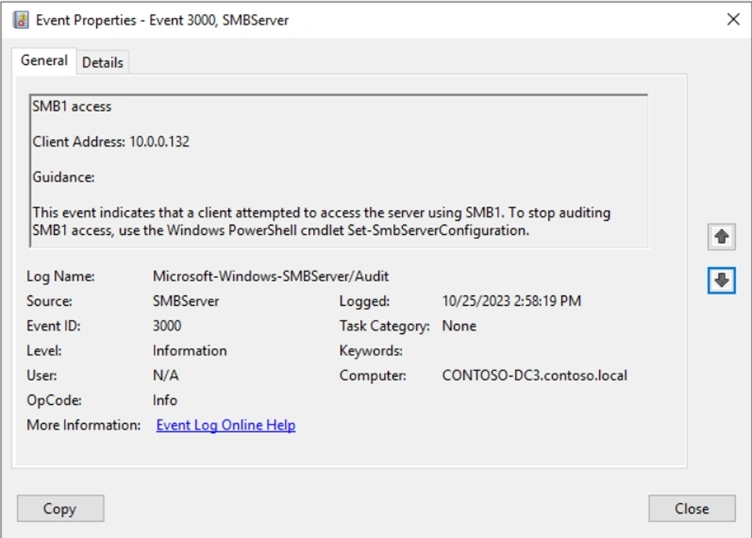
You can enable auditing on Windows Server 2008 R2 / Windows 7 and later to detect SMBv1 usage. SMBv1 negotiation logs appear as Event ID 3000 in the Microsoft-Windows-SMBServer/Audit log.
However, these events typically log only the client IP address—not the authenticated user or device name.
To quickly parse and export these logs:
# Define the log name and output file path
$logName = 'Microsoft-Windows-SMBServer/Audit'
$outputFile = 'C:\temp\SMBv1_Connections.csv'

# Get events with EventID 3000
$events = Get-WinEvent -LogName $logName -FilterXPath "*[System[EventID=3000]]"

# Extract and store relevant info
$eventData = foreach ($event in $events) {
    [PSCustomObject]@{
        ClientAddress = $event.Properties[0].Value
        TimeCreated   = $event.TimeCreated
    }
}

# Export to CSV
$eventData | Export-Csv -Path $outputFile -NoTypeInformation

Write-Output "Events exported to $outputFile"
Step 2. Capture More Intelligent Data
Let’s go further—how about capturing the authenticated username and device name, not just an IP?
Use Get-SmbSession to Identify Active SMBv1 Sessions
$sessions = Get-SmbSession | Where-Object { $_.Dialect -lt "2.0" }
This gives us ClientUserName, ClientComputerName, and the SMB dialect version.
Resolve Device Names Using nbtstat and Reverse DNS
Because reverse DNS is often unreliable, we fall back to nbtstat -A:
$nbtstatResult = nbtstat -A $clientIP
Then we can use Get-ADComputer to enrich the data:
$computer = Get-ADComputer -Filter { Name -eq $clientComputerName } -Properties OperatingSystem
Step 3. Automate the Detection
To avoid missing transient connections, configure a Scheduled Task to trigger on Event ID 3000. You can configure this under:
Task Scheduler → Create Task → Triggers → Begin the task: "On an Event"
Bringing It All Together
Here’s a more comprehensive script to gather rich SMBv1 session data:
$sessions = Get-SmbSession | Where-Object { $_.Dialect -lt "2.0" }

$sessionInfo = @()

foreach ($session in $sessions) {
    $clientComputerName = $session.ClientComputerName
    $resolutionMethod = "Not Resolved"

    if ($clientComputerName -match "\d+\.\d+\.\d+\.\d+") {
        $nbtstatResult = nbtstat -A $clientComputerName 2>&1
        $netbiosMatch = $nbtstatResult | Select-String -Pattern '(\S+)\s+<00>\s+UNIQUE\s+Registered'

        if ($netbiosMatch) {
            $clientComputerName = $netbiosMatch.Matches[0].Groups[1].Value
            $resolutionMethod = "nbtstat"
        }
    }

    if ($resolutionMethod -eq "Not Resolved") {
        try {
            $resolvedName = [System.Net.Dns]::GetHostEntry($clientComputerName).HostName
            $clientComputerName = $resolvedName.Split('.')[0]
            $resolutionMethod = "Reverse DNS"
        } catch {}
    }

    $computer = Get-ADComputer -Filter { Name -eq $clientComputerName } -Properties DistinguishedName, OperatingSystem, OperatingSystemVersion

    $sessionInfo += [PSCustomObject]@{
        ClientComputerName     = $clientComputerName
        ResolutionMethod       = $resolutionMethod
        DistinguishedName      = $computer?.DistinguishedName ?? "Not Found"
        OperatingSystem        = $computer?.OperatingSystem ?? "Not Found"
        OperatingSystemVersion = $computer?.OperatingSystemVersion ?? "Not Found"
        ClientUserName         = $session.ClientUserName
    }
}

$csvFilePath = "SMB1SessionsWithADInfo.csv"
$sessionInfo | Export-Csv -Path $csvFilePath -NoTypeInformation

Write-Host "SMBv1 session information exported to $csvFilePath"
Legacy Device Impact
Still have legacy Windows XP or 2003 devices? Keep these points in mind:
- Group Policy processing will break—no SYSVOL access.
- Domain join requires SMB; temporary re-enablement may be necessary.
- Devices might fall back to remote DCs, especially the PDC Emulator.
- Errors may include:
- The specified network name is no longer available.
- The network path was not found.
Final Thoughts – Do’s and Don’ts
✅ Do
- Audit now—even if you plan to disable it later.
- Use PowerShell and task scheduling to automate detection.
- Engage your CISO or security team for support.
- Investigate using network captures. (Try netsh trace start capture=yes)
- Read up on SMB Hardening techniques.
❌ Don’t
- Wait for all legacy systems to be retired.
- Assume SMBv1 clients are limited to known devices.
- Rely solely on DNS for resolution.
Join the conversation! Your thoughts help the community grow.