

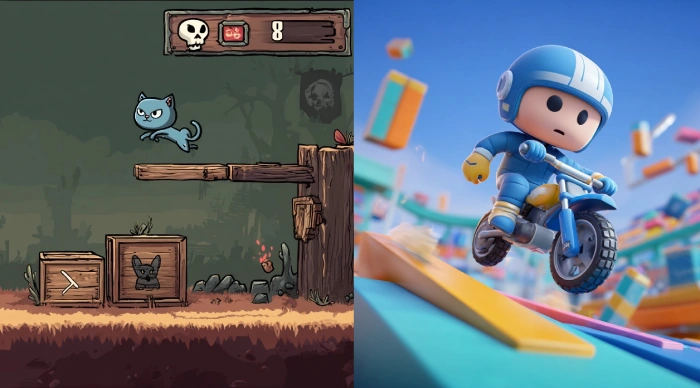
Unity is one of the most popular game development engines used worldwide for creating games across various platforms. One of Unity's strengths is its flexibility in supporting both 2D and 3D game development within the same environment. However, 2D and 3D development in Unity involve distinct workflows, tools, components, and concepts. Understanding these differences is critical to making the right decisions for your project and efficiently leveraging Unity’s features.
1. 🧭 Choosing Between 2D and 3D Modes
When creating a new project in Unity, you're prompted to select 2D or 3D mode. This setting configures the default environment for the editor but does not lock you into a mode. You can switch between 2D and 3D anytime during development.
-
2D Mode: Sets the Scene view to orthographic by default, and uses 2D tools, lighting, and physics.
-
3D Mode: Sets the Scene view to perspective by default and enables 3D tools and rendering settings.
2. Scene Setup and Camera
2D
-
Scene Plane: Typically, the gameplay occurs on the XY plane, and objects are often aligned along the Z-axis.
-
Camera: Uses an Orthographic Camera by default, which means no perspective distortion — objects remain the same size regardless of distance.
-
Movement: Usually restricted to two axes (X and Y), simplifying controls and animations.
3D
-
Scene Space: Objects exist in full 3D space (X, Y, Z).
-
Camera: Uses a Perspective Camera, which simulates human eye perspective — objects further away appear smaller, adding depth realism.
-
Movement: Objects can move freely along all three axes.
3. Assets and Graphics
2D
-
Uses Sprites — 2D images or animations that are rendered on a flat plane.
-
Sprite Sheets and Atlases are commonly used to optimize rendering.
-
No complex models; images have transparency (alpha channels) for shapes.
-
Visuals are often pixel art, hand-drawn art, or 2D vector art.
3D
-
Uses Meshes — 3D models made of vertices, edges, and faces.
-
Assets created in 3D modeling software (Blender, Maya, 3ds Max) imported as FBX, OBJ, etc.
-
Materials and shaders create realistic surfaces with textures, reflections, and normal maps.
-
Lighting and shadows play a significant role in creating realism.
4. Physics Systems
Unity provides separate physics engines for 2D and 3D.
2D
-
Uses 2D Physics Engine (
Physics2Dnamespace). -
Physics components include Rigidbody2D, BoxCollider2D, CircleCollider2D, PolygonCollider2D.
-
Collisions and physics calculations happen in 2D plane (X, Y).
-
Simplified physics calculations are faster and less resource-intensive.
3D
-
Uses 3D Physics Engine (
Physicsnamespace). -
Components include Rigidbody, BoxCollider, SphereCollider, MeshCollider, CapsuleCollider.
-
Physics calculations occur in full 3D space.
-
Simulations are more complex, handling rotations and forces along three axes.
5. Animation
2D
-
Uses Sprite Animations — swapping images (frames) to create motion.
-
Animation tools like Animator work with spritesheets or frame-by-frame.
-
Bone-based 2D animation tools (e.g., Unity's 2D Animation package) allow rigging and skeletal animation of sprites.
3D
-
Uses Skeletal Animation — 3D models with bones and skin weights.
-
Animations are typically created in external software and imported as animation clips.
-
Supports complex rigging, inverse kinematics, blend trees, and motion capture data.
6. Lighting and Shadows
2D
-
Lighting is simpler and mostly used for effects and atmosphere.
-
Unity supports 2D Lights through the Universal Render Pipeline (URP) 2D Renderer, enabling dynamic lighting and shadows for sprites.
-
Shadows and light behave differently since sprites are flat.
3D
-
Complex lighting systems including directional, point, spot, and area lights.
-
Shadows are calculated dynamically or baked.
-
Global illumination, reflections, and post-processing effects greatly enhance realism.
7. UI and User Interaction
While both 2D and 3D games use Unity’s UI system, 2D games often integrate UI more directly into the scene (like health bars or score displays on the screen).
-
2D games typically overlay UI in screen space and interact primarily with 2D inputs.
-
3D games may have world-space UI elements that exist in the 3D world and react to player movement.
8. Performance Considerations
-
2D games generally require fewer resources due to simpler geometry and physics, making them suitable for mobile and lower-end hardware.
-
3D games demand more from the GPU and CPU, as rendering 3D models, lighting, and physics is more computationally intensive.
9. Tools and Workflow Differences
Unity provides specialized tools to ease 2D and 3D development:
-
2D Tools: Sprite Editor, Tilemap, 2D Animation, 2D Physics Debugger.
-
3D Tools: Terrain Editor, ProBuilder, Mesh Renderer settings, advanced Lighting tools.
When starting a new project, Unity allows choosing 2D or 3D template that pre-configures camera settings and project defaults to streamline the workflow.
Summary Table of Differences
| Aspect | 2D Development | 3D Development |
|---|---|---|
| Scene Dimension | 2D plane (X, Y) | 3D space (X, Y, Z) |
| Camera | Orthographic | Perspective |
| Assets | Sprites, sprite sheets | 3D models, meshes |
| Physics Engine | 2D Physics (Rigidbody2D, Collider2D) | 3D Physics (Rigidbody, Collider) |
| Animation | Sprite/frame-based or 2D skeletal animation | 3D skeletal animations |
| Lighting | 2D Lights via URP, simpler lighting & shadows | Complex dynamic lighting, shadows |
| Performance | Lightweight | More resource-intensive |
| Common Use Cases | Platformers, puzzle games, 2D shooters | FPS, RPGs, simulators, open-world games |
When to Choose 2D vs 3D in Unity?
-
Choose 2D if
-
Your game is inherently flat and gameplay is on a 2D plane.
-
You prefer pixel art, cartoons, or hand-drawn aesthetics.
-
You want to target mobile or platforms with limited resources.
-
You want faster iteration and simpler physics.
-
-
Choose 3D if
-
Your game requires immersive environments with depth.
-
You want realistic lighting, shading, and models.
-
You plan to use VR or AR.
-
Your gameplay benefits from full 3D movement and interactions.
-
Conclusion
Unity’s ability to handle both 2D and 3D game development gives developers immense flexibility but also requires understanding the differences in workflows, components, and technical requirements. Whether you’re designing a simple side-scroller or a complex 3D world, choosing the right approach and understanding the core distinctions between 2D and 3D in Unity is essential to successful game development.
Join the conversation! Your thoughts help the community grow.