

Hi folks! Did you ever come across a scenario where you have been asked to create a team or a channel where you might think which should I create for my team? Or you might think which is best for what scenarios? This is the article where we will discuss the major differences between a team and a channel.
What is teams?
- Microsoft teams is a collaboration platform where we chat, schedule day to day meetings, share documentation with colleagues to fulfill business needs.
- Teams is a part of office 365 group. So, whenever we create teams’ other assets like SharePoint, one note, outlook, calendar, etc. been set up.
Now the question arises what is office 365 group? Office group is a security or membership group which is associated with other tools like sites, teams, planner, calendar, outlook, etc.
- Note: When you create an office 365 group teams not connected to the group you must connect it manually. Teams get automatically created when you create it from Microsoft teams.
What is Channel?
- Channel is a part of teams used to separate the conversations. Whenever a team is created, the default General Conversations channel gets created.
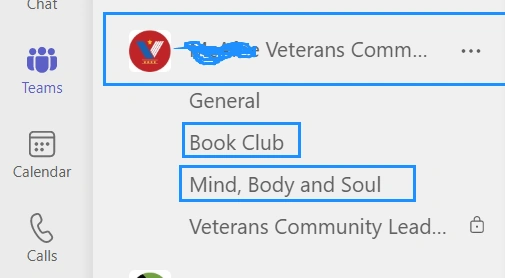
- Channel is used when we have a team let’s say Veteran Community is a team whereas channels are General, Mind, Body and Soul, Body Club, etc.
Types of Channels
Channels can be of two types: -
- Standard Channels.
- Private Channels.
Standard Channels are accessible to all team members whereas private channels are accessible to those who are part of that team.
Also, files are stored at folder within the SharePoint site, whereas for private channels files they have their own SharePoint site to store the files over there.
There are few limitations in number for creating teams and channels. Here listed below-
- Teams-Max of 500 teams is allowed.
- Standard Channel-Max of 200 standard channels per team is allowed.
- Private Channel-Max of 30 private channels per team is allowed.
Now the question arises when to create a team and when to create a private channel?
Scenarios to create a team
- When you have different projects in a wide range and a significant number of your teammates working on different project.
- When you want to share resources or materials within the same team member.
- When you want to share the resources by inviting external users to a specific content.
- Easy to follow archiving process with teams rather than channel.
Scenarios to create a private channel
- When you have a specific discussion to discuss with existing team.
- When you do not want to share the same resources or materials with other team members.
- When you do not want the external users to access your files or documents.
- Make sure while creating private channels you do not have the privilege to add other apps like planner tab to your private channels.
So the above are common differences which will help to take decisions whether to create a teams or a private channel.
Join the conversation! Your thoughts help the community grow.