

Difference between =, ==, and === in JavaScript
This guide clarifies the differences among =, == and === in JavaScript, with examples to demonstrate each operator.
-
=(Assignment Operator):-
The
=operator assigns a value to a variable. For instance,x = 5assigns the value5tox.
-
-
==(Loose Equality Operator):-
The
==operator compares two values for equality, ignoring their data types. This loose equality check will consider values equal if they are the same after type conversion. For example,5 == '5'would returntruebecause JavaScript converts the string'5'to the number5before comparing.
-
-
===(Strict Equality Operator):-
The
===operator performs a strict equality check, meaning it compares both the value and the type. It will only returntrueif both the value and data type are identical. For instance,5 === '5'would returnfalsebecause one is a number and the other is a string.
-
Let's look at examples for each operator to see how they work.
Example of = (Assignment Operator)
var number = 100; // Here number variable assigned using =
Example of == (Loose Equality Operator)
if (number == 100)
// Here Comparision between two values using ==.
//It will compare irrespective ve of datatype of variable
   alert("Both are equal");
else
   alert("Both are not equal");
Example of === (Strict Equality Operator)
if (number === 100)
// Here Comparision between two values using ===.
//It will compare checks, check means it will check datatype as well.
   alert("Both are equal");
else
   alert("Both are not equal");
Let’s look at an example below to understand how the == operator compares the values of two variables.
<h2>Difference between =, == and === in Javascript</h2>
<script type="text/javascript">
    function Comparision() {
        var number = 100;  // Here number variable assigned using =
        debugger;

        if (number == 100)
        // Here Comparision between two values using ==.
        //This will not the check datatype, irrespective ve of datatype it will do the comparison
            $("#lblMessage").text("Both are equal");
        else
            $("#lblMessage").text("Both are not equal");

      if(number == "100")
      //Here Comparision between two values using ==.
      //This will not check datatype, irrespective of datatype it will do comparison
            $("#lblMessage1").text("Both are equal");
        else
           $("#lblMessage1").text("Both are not equal");
    }
</script>
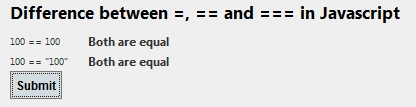
In the example above, the comparison returns true regardless of the data types of the values being compared. For instance, when we evaluate 100 == 100, both values are integers, so the comparison is straightforward and returns true. However, when we compare 100 == "100", where one value is an integer and the other is a string, JavaScript performs type conversion to make both values comparable. It converts the string "100" to the number 100, resulting in a comparison of 100 == 100, which also returns true.
This behavior shows that the == operator does not enforce strict type checking and will convert types as necessary to determine equality.
<h2>Difference between =, == and === in Javascript</h2>
<script type="text/javascript">
    function Comparision() {
        var number = 100;  // Here number variable assigned using =
        debugger;

        if (number === 100)
        // Here comparison between two values using ==.
        //This will not check datatype, irrespective of datatype it will do the comparison
            $("#lblMessage").text("Both are equal");
        else
            $("#lblMessage").text("Both are not equal");

        if (number === "100")
        // Here comparison between two values using ===.
        //This will not check datatype, irrespective of datatype it will do the comparison
            $("#lblMessage1").text("Both are equal");
        else
           $("#lblMessage1").text("Both are not equal");
    }
</script>
<table>
    <tr>
        <td>
            100 === 100
        </td>
        <td>
           <label id="lblMessage" runat="server" ></label>
        </td>
    </tr>
    <tr>
        <td>
            100 === "100"
        </td>
        <td>
           <label id="lblMessage1" runat="server" ></label>
        </td>
    </tr>

</table>
 <button id="btnSubmit" type="submit" onclick="Comparision();" class="btn btn-primary">Submit</button>
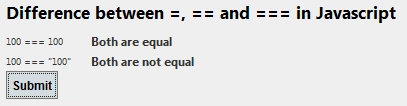
In the code snippet above, I've used the === operator to compare two variables. The comparison returns true for 100 === 100 because both the value and the data type (number) are identical. However, it returns false for 100 === "100" because, although the values look the same, one is a number and the other is a string. This result demonstrates that === performs a strict comparison, checking both the data type and value to ensure they are exactly the same.
Conclusion
This article has explained the differences between =, == and === in JavaScript. The single = is used for assigning values to variables, while == and === are used for comparison. The == operator compares two variables without considering their data types, allowing for type coercion. On the other hand, the === operator performs a strict comparison, checking both the value and the data type of the variables. If both the value and the type match, it returns true; otherwise, it returns false.
Check out my other JavaScript articles here:
Difference Between let, var, and const in JavaScript with Example
Count Number Of Character Occurrences In A String Using JavaScript
If you'd like to explore more articles, please Clcik Here
Jose PintoPosted Nov 18, 2021, 7:07 PM
Excellent article!!
Sujit SahooPosted Apr 16, 2020, 3:37 AM
Thank you sir..
Dastin PraterPosted Apr 5, 2020, 12:29 AM
I seen my instructor using these in class, and was completely lost. Thanks for the clarification.
Prakhar SrivastavaPosted Oct 7, 2019, 3:56 AM
Helpful article
Laxmidhar SahooPosted Nov 19, 2018, 10:26 PM
Thanks for a nice comparison among assignment and comparesion operators
Jignesh KumarPosted Aug 29, 2018, 10:47 AM
Thank you so much @shrimant
Shrimant TelgavePosted Aug 29, 2018, 10:43 AM
Nice article...
Prabu ElavarasanPosted Aug 27, 2018, 10:53 AM
Coool article :-)
Kapil Singh KumawatPosted Aug 27, 2018, 7:34 AM
Nice article
azat gumusPosted Aug 27, 2018, 7:30 AM
Simply explained with examples, thanks
Nanddeep NachanPosted Aug 27, 2018, 12:54 AM
Nicely explained. Thanks for sharing!
Hadshana KamalanathanPosted Aug 26, 2018, 7:07 PM
Nine Article.....
Jitendra WaghalePosted Aug 26, 2018, 3:24 PM
Thanks for sharing!!