
Problem
As developers, we learn that giving meaningful names to methods produces clean, readable and maintainable code. However, that’s not all we should be concerned about when it comes to method signatures. There are two other aspects of a method signature that must be given consideration when writing code: a) parameters b) return value.
Let’s look at the signature of a method we’ve defined in our repository, what does this tell you?
- public Movie FindById(int id) { ... }
- var movie = FindById(5);
- // use movie
- public Movie FindById(int id)
- {
- if id not found
- return null;
- return new Movie(); // id found
- }
Let’s look at another signature of a method we’ve defined in our service, what does this tell you?
- public bool UploadDocument(string fileName, string fileExtension) { ... }
- public bool UploadDocument(string fileName, string fileExtension)
- {
- if (string.IsNullOrEmpty(fileName))
- throw new ArgumentException("file name empty");
- if (string.IsNullOrEmpty(fileExtension))
- throw new ArgumentException("file extension empty");
- if (fileExtension == "pdf" ||
- fileExtension == "doc" ||
- fileExtension == "docx")
- {
- // upload
- return true;
- }
- else
- {
- return false;
- }
- }
These examples are simplistic but highlighted a few key points about these method signatures,
- Method signatures did not convey their true input and output – they were dishonest.
- In order to understand the input/output, we had to look into the implementation of the method – they were not well encapsulated.
- Input and output were ambiguous, without implementation details their meaning was unclear – they were not semantically readable.
- It is only at runtime that an invalid value is caught – the design is not defensive, allows a programmer to write code that could potentially fail.
How can we improve on this? I’ll provide one solution that I prefer – honest methods using domain abstractions as parameters and return value.
Solution
Making your method signatures as specific as possible make them easier to consume and less error-prone. One technique is to think in terms of concepts present in the business domain for which we’re writing the application and then using custom types to pass data in and out of methods. Using custom instead of primitive types provide richer semantic meaning to method signature and thus help with the readability of the code.
Back to our examples, let’s say that the development team creates a custom type to be used for the application which will contain either the return value or the error message. They name it Result. Let’s look at modified method signature from our earlier example, what does this tell you,
- public Result<Movie, Error> FindById(int id) { ... }
FAQ
What if the developer using the method doesn’t know what Result is? This would be part of team coding standards/guidelines. Then it is no different than using built-in types like int, float, enum etc. Developers know what to store in them. The custom type here has a clear semantic meaning, it would hold return value or a failure message.
Our next example is little more interesting, let’s look at modified method signature, what does this tell you?
- public UploadImageResult UploadDocument(UploadFile file) { ... }
To make it even more interesting, let’s say he/she doesn’t even have access to source code for this method. He decides to use intelliSense.
- Intellisence for service.

- Service needs UploadFile, intelliSense for it.

- Service returns UploadImageResult, intelliSense for it.
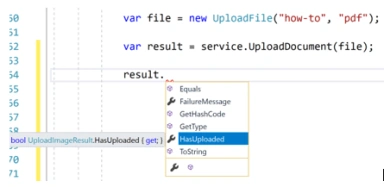
The public API for the method is discoverable and makes it difficult for the developer using it to get it wrong. We still have the guard clauses and validation, however, these are encapsulated within the UploadFile type.
- public sealed class UploadFile
- {
- public UploadFile(string fileName, string fileExtension)
- {
- if (string.IsNullOrEmpty(fileName))
- throw new ArgumentException("file name empty");
- if (string.IsNullOrEmpty(fileExtension))
- throw new ArgumentException("file extension empty");
- if (!IsValidFormat(fileExtension))
- throw new ArgumentException("incorrect file format");
- FileName = fileName;
- FileExtension = fileExtension;
- }
- public string FileName { get; }
- public string FileExtension { get; }
- private bool IsValidFormat(string fileExtension)
- => (new[] { "pdf", "doc", "docx" }).Contains(fileExtension)
- }
UploadFile still requires string parameters, are we not just moving the problem of primitive types and parameter guard clauses to a different place? Yes, we are. We are moving it up the call stack. We ‘do’ need these checks, but now they are - a) part of object creation b) encapsulated in a type c) help with ‘failing fast’.
FAQ
Why avoid throwing exceptions in a method and instead advertise failure using return type? By throwing an exception, you’re breaking the application and making an assumption that caller will catch it. You’re also coupling the caller with implementation detail of a method, breaking its encapsulation. The caller should depend only on input and output of a method, exceptions are neither of them.
When designing the public interface of our classes and methods, we should try to avoid its misuse. Creating methods with honest signatures is a good technique to hide implementation details (encapsulation), reduce bugs and improve code readability.
Note
This is not the only way to design your code, even if you don’t agree with my solution, hopefully, it will add a technique to your repertoire.
Source Code
Viknaraj ManogararajahPosted Jul 21, 2018, 10:53 PM
Nice Article, Thank you for sharing