

I am here to discuss one of the popular behavioral design patterns, called Strategy. Before going through its implementation, let’s begin by defining it.
As per GOF guys, Strategy Pattern is defined as following.
“Define a family of algorithms, encapsulate each one, and make them interchangeable. Strategy lets the algorithm vary independently from clients that use it.”
Well! Let’s understand what they mean and where this pattern can be fit.
It simply means that this pattern is about having a set of concrete strategies or family of algorithms and choosing the appropriate one at runtime based on the need. Some of the use cases can be classified.
- Choosing an appropriate sort algorithm at runtime out of several (Quick sort, Merge sort, Insertion sort etc.).
- Selecting the right hash algorithm at runtime out of the bunch (MD5, SHA1, SHA256 etc.).
- Opting a relevant average calculation method (Mean, Median, Mode etc.) at runtime.
- Picking an applicable billing strategy (Regular, Happy hour etc.) at runtime.
- Setting a suitable shipping courier object (FedEx, Bluedart, DTDC) at runtime.
Another example of strategy pattern in .NET framework is Sort method (Array.Sort). It uses insertion, heap, and quicksort at runtime based on the incoming data.
Excerpts from MSDN tell,
- If the partition size is fewer than 16 elements, it uses an insertion sort algorithm.
- If the number of partitions exceeds 2 * LogN, where N is the range of the input array, it uses a Heapsort algorithm.
- Otherwise, it uses a Quicksort algorithm.
Now, let’s see the custom implementation of the pattern. Please have a look at the code map diagram of the demo we have created.
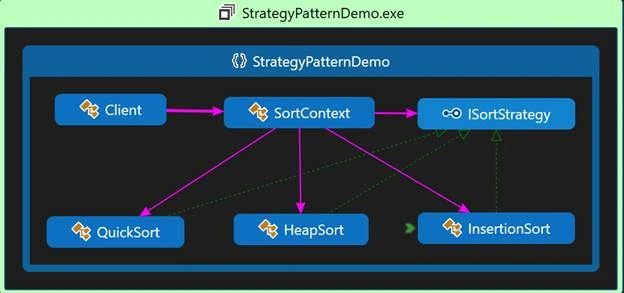
As you can see, Strategy pattern has some key components as given below.
- Strategy: -> Interface/abstract class for all supported algorithms. Here ISortStrategy is created to serve the purpose.
- ConcreteStrategy -> implements the algorithm defined in Strategy interface. Here QuickSort, HeapSort, and InsertionSort have been created for it.
- Context -> Sets the right strategy object and configured to use concrete strategy classes. Here, SortContext is doing this job.
- Client -> Calls the context object to set the context and then call the required method in context to do the job. Client class is serving the need here.
How Strategy pattern works
Let’s understand this by a demo project that we have created. First, create the Strategy interface to start with.
- using System.Collections.Generic;
- namespace StrategyPatternDemo
- {
- interface ISortStrategy
- {
- void Sort<T>(List<T> data);
- }
- }
As you can see, we have created a generic method to support all types of data. Now, let's create a concrete strategy class to implement the interface we have created above.
- using System;
- using System.Collections.Generic;
- namespace StrategyPatternDemo
- {
- class HeapSort : ISortStrategy
- {
- public void Sort<T>(List<T> list)
- {
- list.Sort();
- //We used default sort (.NET Fx) however you can write custom code as well
- Console.WriteLine($"After Sort using {this.GetType().Name}:");
- }
- }
- }
- //Namespace same as above
- class InsertionSort : ISortStrategy
- {
- public void Sort<T>(List<T> list)
- {
- list.Sort();
- //We used default sort (.NET Fx) however you can write custom code as well
- Console.WriteLine($"After Sort using {this.GetType().Name}:");
- }
- }
- //Namespace same as above
- class QuickSort : ISortStrategy
- {
- public void Sort<T>(List<T> list)
- {
- list.Sort();
- //We used default sort (.NET Fx) however you can write custom code as well
- Console.WriteLine($"After Sort using {this.GetType().Name}:");
- }
- }
As you can see in the above code that we have given unique implementations to each sort strategy, although we have used FCL Sort method in all three implementations as objective here is to explain design pattern instead of sorting algorithm, however, you can write your own code in each of them.
So at this point, we are done with strategy and concrete strategies and that is more than half of the code. Now, let’s create the remaining once and here is the code for Context i.e. SortContext.
- using System;
- using System.Collections.Generic;
- using static System.Console;
- namespace StrategyPatternDemo
- {
- class SortContext
- {
- private ISortStrategy sortStrategy = null;
- private void PrintList<T>(List<T> list)
- {
- foreach (T name in list)
- {
- Console.Write(name + " ");
- }
- WriteLine();
- }
- public void SetSortStrategy(TypeOfData typeOfData)
- {
- switch (typeOfData)
- {
- case TypeOfData.DaysInMonth:
- this.sortStrategy = new InsertionSort();
- break;
- case TypeOfData.PassengersInFlight:
- this.sortStrategy = new HeapSort();
- break;
- case TypeOfData.ResidentsInApt:
- this.sortStrategy = new QuickSort();
- break;
- default:
- break;
- }
- }
- public void SortAndPrint<T>(List<T> list)
- {
- WriteLine("Before Sort:");
- PrintList(list);
- sortStrategy.Sort(list);
- PrintList(list);
- WriteLine();
- }
- public enum TypeOfData
- {
- DaysInMonth,
- PassengersInFlight,
- ResidentsInApt
- }
- }
- }
As you can see in the class above, i.e., SortContext, we have done a few things as following.
- Created an enum to support the type of data to sort.
- Setting sort strategy by passing the type of data.
- Calling the appropriate Sort method based on the selected strategy in step#2 above.
- Calling the reusable Print method to print before and after sort data.
We are almost done. Now, it’s time to set up the client and see something in action. Let’s put the code for it.
- using System.Collections.Generic;
- using static System.Console;
- namespace StrategyPatternDemo
- {
- class Client
- {
- static void Main(string[] args)
- {
- Title = "Strategy Pattern Demo";
- SortContext sortContext = new SortContext(); ;
- //Sorting days in month
- var daysInMonth = new List<int> {5, 1, 17, 27, 12};
- sortContext.SetSortStrategy(SortContext.TypeOfData.DaysInMonth);
- sortContext.SortAndPrint(daysInMonth);
- //Sorting Passengers in flight
- var passInFlight = new List<string> {"Kamlesh","Vandana","Prakash","Aradhana","Anay"};
- sortContext.SetSortStrategy(SortContext.TypeOfData.PassengersInFlight);
- sortContext.SortAndPrint(passInFlight);
- //Sorting Residents in Apt
- var resiInApt = new List<string> {"Ramsagar", "Siyalali", "Mayank"};
- sortContext.SetSortStrategy(SortContext.TypeOfData.ResidentsInApt);
- sortContext.SortAndPrint(resiInApt);
- }
- }
- }
And here goes the output of the demo we have developed.
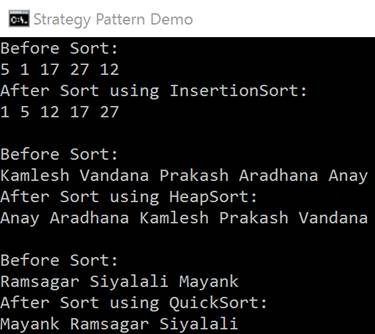
As you can see in the Client class that we are passing three type of data and based on the data, appropriate type of sorting strategy is selected at runtime.
Conclusion
In the article, we have gone through what Strategy pattern is, when and how to use it. Well, it can be used in places where you want to pick one implementation out of some at runtime. You can also download the attached demo project (StrategyPatternDemo.zip) to go through the full source code referred in the article.
Hope you have liked the article. Look forward to your comments/suggestions.
References
- https://msdn.microsoft.com/en-us/library/afwbytk2(v=vs.110).aspx
- http://www.dofactory.com/net/strategy-design-pattern
- https://en.wikipedia.org/wiki/Strategy_pattern
Join the conversation! Your thoughts help the community grow.