

How can you publish your web app or API from Visual Studio?
Here's how you can publish your web app or API from Visual Studio.
Prepare for Deployment
- Build Configuration: Ensure your project is built in "Release" mode. This optimizes the output for production.
- Database Considerations: If your app uses a database, handle any necessary schema updates during deployment. Consider separate scripts for deployment environments.
Initiate the Publish Process
- Right-click on your web app or API project in Solution Explorer.
- Select Publish.
Choose a Publish Target
- Folder: Publish to a local folder for testing or manual deployment.
- FTP/FTPS Server: Upload directly to an FTP server. Configure connection details like host, username, and password.
- IIS (Internet Information Services): Deploy directly to an IIS server on your local machine or a remote server.
- Azure App Service: Publish to Microsoft's cloud hosting platform (requires additional configuration).
Configure Publish Profile
- Profile: Choose an existing profile or create a new one with a descriptive name.
- Configuration: Select "Release" configuration.
- Connection Details: For FTP or IIS, provide server connection details.
Preview and Publish
- Preview: Review the files that will be deployed.
- Publish: Click "Publish" to initiate the deployment process. Visual Studio will build, package, and transfer your application files to the chosen destination.
Publish profile files in Visual Studio
A Visual Studio publishes a profile file with the extension. pubxml stores configurations for deploying your application. It essentially automates the publishing process by remembering various settings.
Please check the below thoughts for publishing profile files.
Benefits of Publish Profiles
- Saves Time and Effort: By storing configurations, you can publish your application with a few clicks instead of manually setting everything up each time.
- Multiple Configurations: You can create different profiles for various deployment environments, like testing, staging, or production. Each profile can have specific settings tailored to that environment.
- Reduced Errors: Fewer manual steps mean less chance of introducing errors during deployment.
Location of Publish Profile Files
Typically stored within your project directory in a folder called "Properties\PublishProfiles".
Content of Publish Profile Files
Written in XML and based on MSBuild, a build automation tool in Visual Studio.
Specify details like
- Project to be published
- Target location (e.g., Azure App Service, folder on a server)
- Configuration settings (e.g., Debug/Release)
- Authentication credentials (stored separately for security reasons)
Creating and Using Publish Profiles
- You can create profiles directly within Visual Studio by right-clicking your project and selecting "Publish".
- These profiles can then be used to publish your application through the Visual Studio interface or even the command line.
- Credentials stored in publish profiles are often kept separate in a hidden file (.publishsettings) for security reasons. Avoid checking this file into source control.
- For more information on creating and managing publish profiles, refer to the official Microsoft documentation on "Link #1".
- Importing existing publish settings into Visual Studio: "Link #2"
Create File
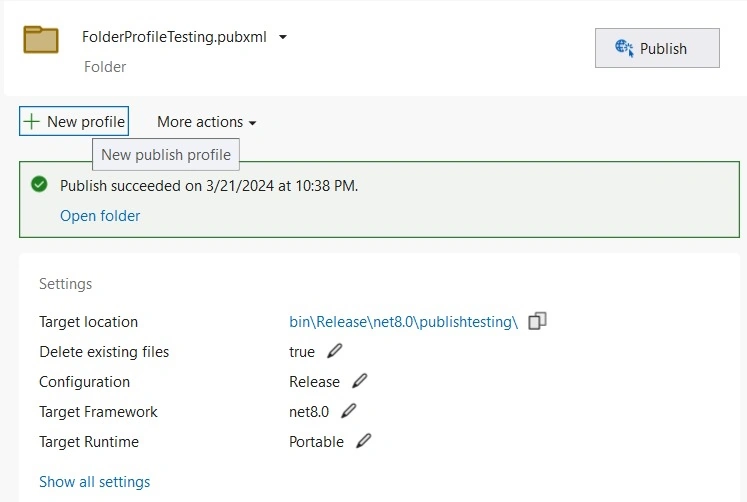
Choose the publishing category.
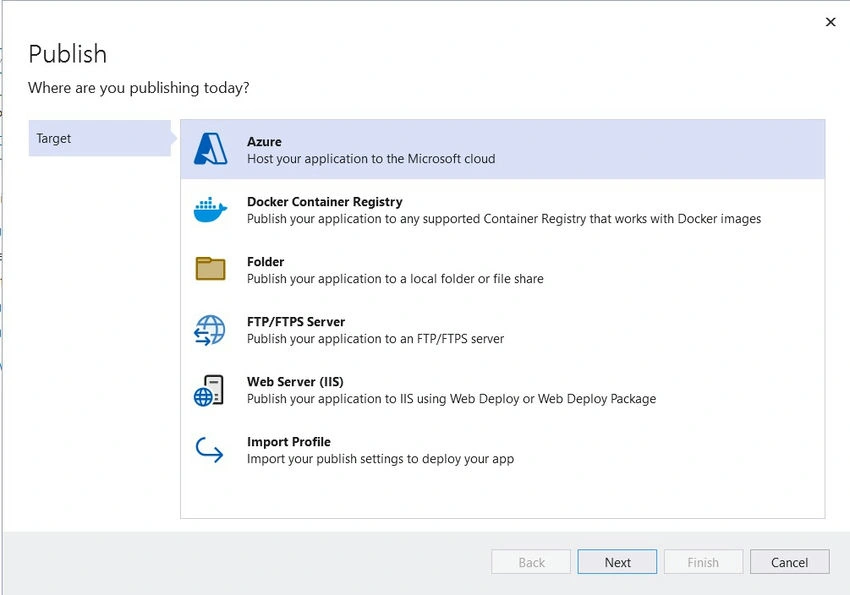
Specify the path of publishing files to place.

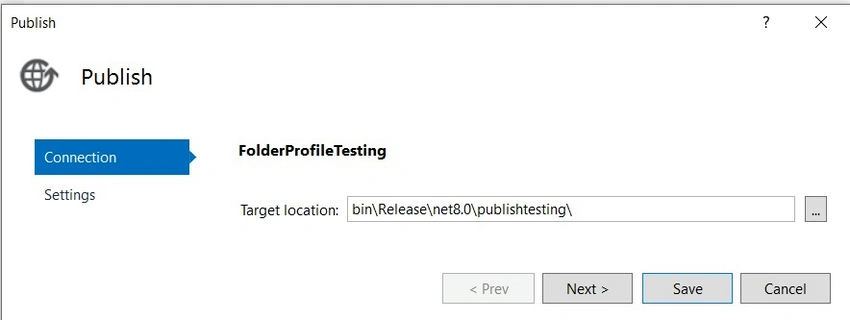
Update settings about configuration, Target Framework, Deployment Mode, Target Runtime, etc.
Where the file(s) will be saved or placed.
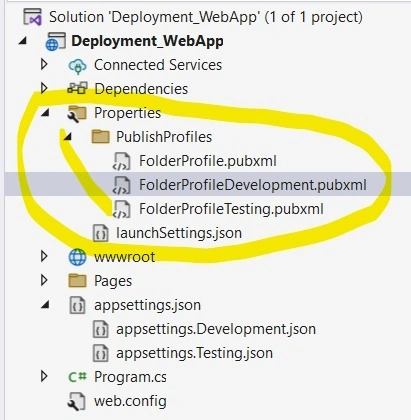
Look inside of the publish file.
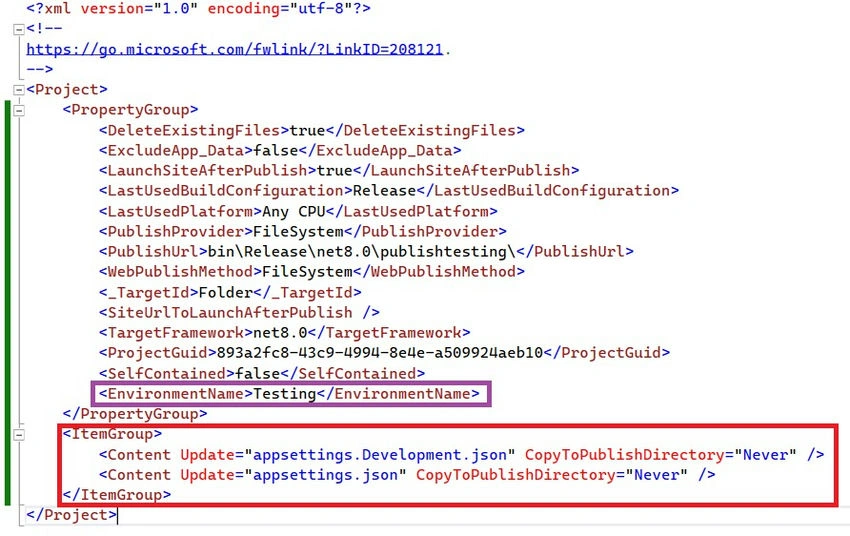
Some of the properties
- PublishMethod: Specifies the method used for publishing the application, such as WebDeploy, FileSystem, or MSDeploy.
- MSDeployServiceURL: Specifies the URL of the MSDeploy service to use for publishing.
- DeployIisAppPath: Specifies the IIS application path where the application will be deployed.
- Username and Password: Credentials used for publishing if authentication is required.
- AllowUntrustedCertificate: Indicates whether to allow untrusted SSL certificates during publishing.
- IncludeIisSettings: Specifies whether to include IIS settings during publishing.
- IncludeApp_Data: Specifies whether to include the App_Data folder during publishing.
- SkipExtraFilesOnServer: Specifies whether to skip files on the server that are not part of the project.
- MarkAsReadOnly: Specifies whether to mark published files as read-only on the server.
- PipelineDependsOnBuild: Specifies whether to run the build pipeline before publishing.
- DeployAsIisApp: Specifies whether to deploy the application as an IIS application.
- DeleteExistingFiles: Specifies whether to delete existing files on the server before publishing.
- EnviromentName: Specifies the ASPNETCORE ENVIRONMENT name for the publishing.
Highlighted in Red color for removing unwanted files while publishing for the application, It will help to delete or not include the file specified in the property CopyToPublishDirectory=" Never".
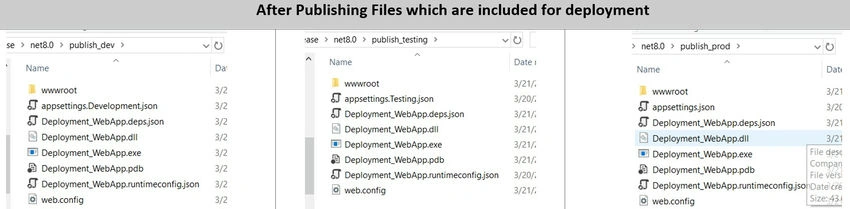
Sample Files for three different environments.
Development
<?xml version="1.0" encoding="utf-8"?>
<!--
    https://go.microsoft.com/fwlink/?LinkID=208121.
-->
<Project>
    <PropertyGroup>
        <DeleteExistingFiles>true</DeleteExistingFiles>
        <LastUsedBuildConfiguration>Release</LastUsedBuildConfiguration>
        <LastUsedPlatform>Any CPU</LastUsedPlatform>
        <PublishProvider>FileSystem</PublishProvider>
        <PublishUrl>bin\Release\net8.0\publishtesting\</PublishUrl>
        <WebPublishMethod>FileSystem</WebPublishMethod>
        <_TargetId>Folder</_TargetId>
        <TargetFramework>net8.0</TargetFramework>
        <ProjectGuid>893a2fc8-43c9-4994-8e4e-a509924aeb10</ProjectGuid>
        <SelfContained>false</SelfContained>
        <EnvironmentName>Development</EnvironmentName>
    </PropertyGroup>
    <ItemGroup>
        <Content Update="appsettings.Testing.json" CopyToPublishDirectory="Never" />
        <Content Update="appsettings.json" CopyToPublishDirectory="Never" />
    </ItemGroup>
</Project>
Testing
<?xml version="1.0" encoding="utf-8"?>
<!--
https://go.microsoft.com/fwlink/?LinkID=208121.
-->
<Project>
    <PropertyGroup>
        <DeleteExistingFiles>true</DeleteExistingFiles>
        <ExcludeApp_Data>false</ExcludeApp_Data>
        <LaunchSiteAfterPublish>true</LaunchSiteAfterPublish>
        <LastUsedBuildConfiguration>Release</LastUsedBuildConfiguration>
        <LastUsedPlatform>Any CPU</LastUsedPlatform>
        <PublishProvider>FileSystem</PublishProvider>
        <PublishUrl>bin\Release\net8.0\publishtesting\</PublishUrl>
        <WebPublishMethod>FileSystem</WebPublishMethod>
        <_TargetId>Folder</_TargetId>
        <SiteUrlToLaunchAfterPublish />
        <TargetFramework>net8.0</TargetFramework>
        <ProjectGuid>893a2fc8-43c9-4994-8e4e-a509924aeb10</ProjectGuid>
        <SelfContained>false</SelfContained>
        <EnvironmentName>Testing</EnvironmentName>
    </PropertyGroup>
    <ItemGroup>
        <Content Update="appsettings.Development.json" CopyToPublishDirectory="Never" />
        <Content Update="appsettings.json" CopyToPublishDirectory="Never" />
    </ItemGroup>
</Project>
Production
<?xml version="1.0" encoding="utf-8"?>
<!-- https://go.microsoft.com/fwlink/?LinkID=208121. -->
<Project>
  <PropertyGroup>
    <DeleteExistingFiles>false</DeleteExistingFiles>
    <ExcludeApp_Data>false</ExcludeApp_Data>
    <LaunchSiteAfterPublish>true</LaunchSiteAfterPublish>
    <LastUsedBuildConfiguration>Release</LastUsedBuildConfiguration>
    <LastUsedPlatform>Any CPU</LastUsedPlatform>
    <PublishProvider>FileSystem</PublishProvider>
    <PublishUrl>bin\Release\net8.0\publish\</PublishUrl>
    <WebPublishMethod>FileSystem</WebPublishMethod>
    <_TargetId>Folder</_TargetId>
  </PropertyGroup>
  <ItemGroup>
    <Content Update="appsettings.Development.json" CopyToPublishDirectory="Never" />
    <Content Update="appsettings.Testing.json" CopyToPublishDirectory="Never" />
  </ItemGroup>
</Project>
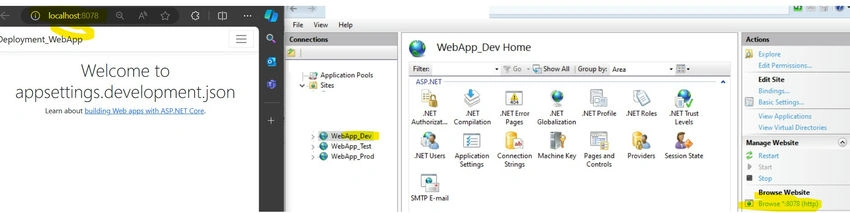
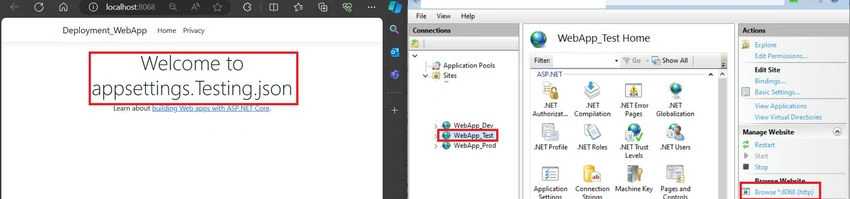
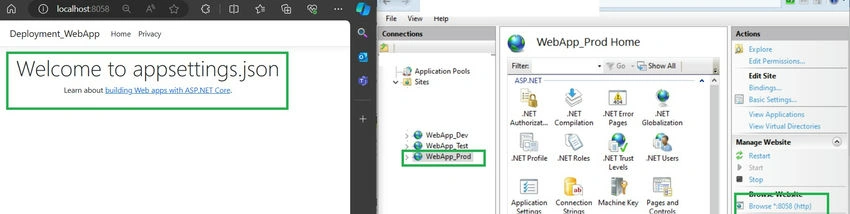
Result comparison after publishing

Join the conversation! Your thoughts help the community grow.