

Introduction
ASP.NET Core is an open-source and cross-platform framework to develop Web Applications and mobile back-end. ASP.NET Core, being a cross-platform framework, provides flexibility to develop and run applications on Windows, Linux, and Mac.
There are multiple ways to deploy an application on AWS EC2 Linux instance. I will post about the AWS code pipeline, which can be used to automate the deployment process and install an Application on EC2 instance, some other day. Now, we will focus on deploying ASP.NET Core Web Application on Amazon Linux instance.
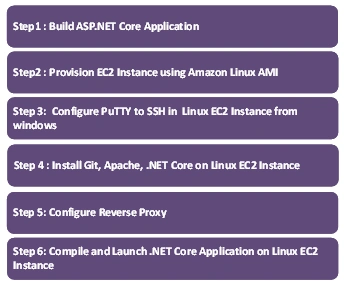
Step 1
Build ASP.NET Core Application
Develop your own ASP.NET Core Application from scratch. Alternatively, you can also use a sample Application on my GitHub for this demo.
Step 2
Provision EC2 instance, using Amazon Linux AMI
Provision a t2.micro instance, using Amazon Linux AMI, as it is eligible for free-tier usage for 12 months.

Logon to AWS console and launch Amazon Linux EC 2 Instance
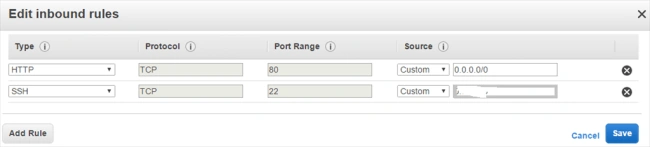
- Follow through the steps on launch instance wizard and configure inbound rules to allow HTTP and SSH protocol. Ensure that while deploying real-time production applications, you lock down security on SSH protocol to allow access from the desired source only. Leaving source as 0.0.0.0/0 gives access to everyone.
 /li>
/li>
- Create and download a new key pair. If you have already created a key pair, make sure you have access to .pem file. You will need .pem in the steps given below to generate a PPK file and logon to EC2 instance.
- Launch EC2 instance and note Public IP shown on the EC2 dashboard. You will need Public IP to SSH into EC2 instance.
Step 3
Configure PuTTY to SSH in Linux EC2 instance from Windows
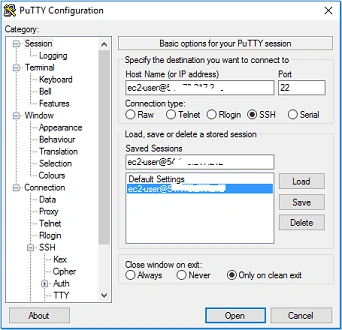
- Download PuTTY and PuTTYKeyGen from the PuTTY download page and configure PuTTY.
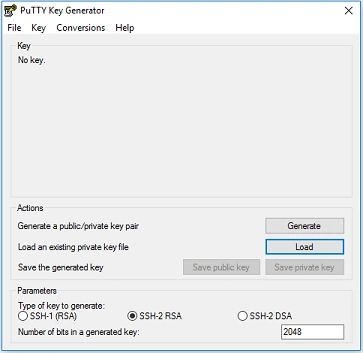
- Load downloaded PEM file and click on save the private key to generate a private key (.ppk) file without a passphrase.
- Specify the generated PPK file path in the PuTTY configuration for authenticating.
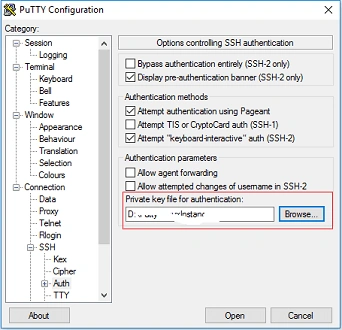
- Specify the username and public IP to SSH EC2 instance user name will be ec2-user@<Public IP Address>.
Step 4
Install GIT, Apache and .NET Core on Linux EC2 instance
- Elevate the permission for the installation using sudo su command.
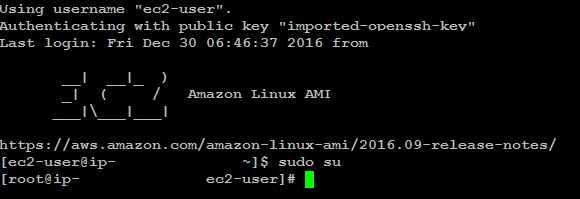
- Run the commands given below to install Apache and GIT.
- yum install httpd yum install git
- Execute the commands given below on terminal in sequence to download and install .NET Core.
- sudo yum install libunwind libicu
- curl -sSL -o dotnet.tar.gz https://go.microsoft.com/fwlink/?LinkID=835019
- sudo mkdir -p /opt/dotnet && sudo tar zxf dotnet.tar.gz -C /opt/dotnet
- sudo ln -s /opt/dotnet/dotnet /usr/local/bi
Refer to https://www.microsoft.com/net/core#linuxcentos steps described for installing .NET Core on CentOS 7.1 also works for Amazon Linux instance.
- Exit from sudo mode and run .NET command to verify the installation.

Step 5
Configure Reverse Proxy so that All Incoming Requests are Passed to kestrel Server
- Elevate the permissions to edit httpd.conf file and make the changes given below
- <VirtualHost *:80>
- ProxyPass/https://127.0.0.1:5000/
- ProxyPassReverse / https://127.0.0.1:5000/
- </VirtualHost>
- Restart httpd Service,
- sudo Service httpd restart
For more information on why we need a reverse proxy, refer to https://docs.microsoft.com/en-us/aspnet/core/publishing/linuxproduction.
Step 6
Compile and launch .NET Core Application on Linux EC2 instance
Execute the command given below to compile and launch the Application.
- dotnet restore dotnet run
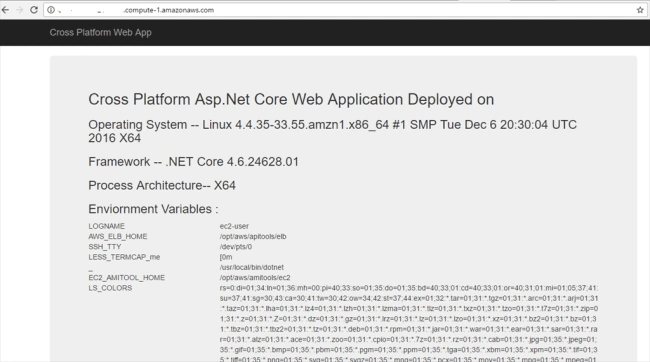
Browse deployed Application through public DNS name displayed on the EC2 dashboard. Sample Application displays OS, Frame, and Environment variables set on EC2 instance.
dd fdPosted Feb 2, 2021, 12:37 AM
Is it possible to run .net core service on aws linux ?
Zaif SenpaiPosted Aug 14, 2020, 12:30 PM
1. Instructions unclear for someone new to AWS2. Can not install dotnet by using this method 3. What is httpd.conf file? Where is it and how to edit it?
Raja SivaPosted Jun 25, 2020, 11:40 PM
Where do I need to deploy your webapp in ec2 instance(location of deployment folder)