

In this article, we are going to discuss deployment of bot application developed using Microsoft Bot framework.We have already created one bot in article Guided Conversations In Chatbot App Using FormFlow Of Microsoft Bot Framework. We will deploy this bot to Microsoft cloud.
Prerequisite
- Azure subscription: To use popular Azure Services free for 12 months, Create your Azure free account.
- To be ready with Bot application, refer Guided Conversations In Chatbot App Using FormFlow Of Microsoft Bot Framework.
Deploy Bot application to Azure
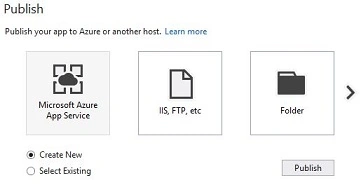
Open bot application project in visual studio. Right click on project and select “Publish…” option. It will prompt you for selecting a host for your bot application. Select “Microsoft Azure App Service” and “Create New” option. Click “Publish” button.
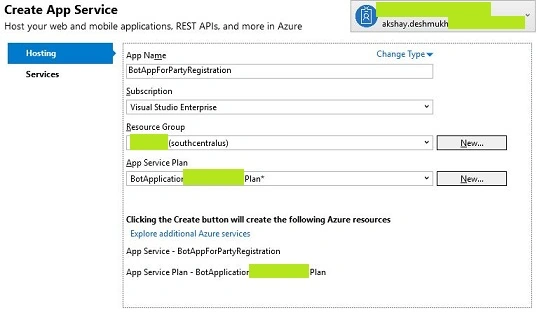
It will deploy bot application as app service and provide you the url in visual studio. And also it will open that url in browser.
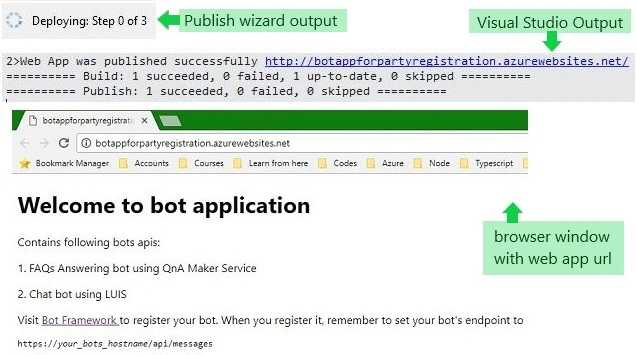
Our bot application is deployed to Azure. Now we will have to register it with Bot Framework in order to use it on various channels. I will demonstrate you the registration process for bot app in the video.
soumava chatterjeePosted May 17, 2019, 6:17 AM
Hi I have deploy my bot into azure in same way...but it showing internal server error
durgaprasad rapoluPosted Nov 8, 2018, 4:18 AM
How to chat bot replay with Facebook username