

Today, I am starting on the concept of SAS, i.e., Shared Access Signature. This article will be covering the basics of SAS token such as - why it is required and how to delegate access to the resources within the storage account to external clients.
Before, starting about SAS tokens, let’s understand why we actually need them. Using the diagram below, let’s try to understand how an Azure Storage account is accessed by external clients without SAS. In this diagram, the user is directly accessing the Azure Storage account using an account key.
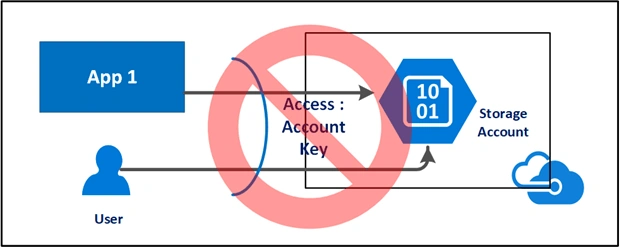
This is not the recommended approach because of the following reasons.
- Account key acts as a root password for your storage account.
- Provides administrative access to your account.
- Sharing the same with the external world opens your account for malicious use and any security breach.
- It doesn’t provide granular access to resources within the storage account.
Now, the obvious question is what is the recommended way to access the Azure Storage account?
The answer is “Shared Access Signature (SAS) Token”.
SAS is a secure way to grant limited access to the resources in your storage account to the external world (clients, apps), without compromising your account keys. It gives you the granular control over the type of access you grant to clients, which includes -
- Interval – You can specify how long the SAS token should be valid by mentioning the start time and the expiry time.
- Permission – You can specify the permission at the granular level, for example, your clients just want to read the blob so grant them only read permission.
- IP Address – If you want Azure Storage Account to be accessed from a particular IP or range of IPs then you can specify an optional IP Address or range of IP addresses in your SAS token.
- Protocol – If you want Azure Storage account to be accessed by either HTTPS or HTTP & HTTPS, you can specify the same in the SAS token.
Shared Access Signature Types
- Service SAS
It provides access to a resource in just one service provided by the storage account, such as Blob, Queue, Table or File. - Account SAS
It provides access to,
- A resource in one or more service provided by storage account.
- Service-Level APIs, Container-Level APIs, and/or Object-Level APIs.
- Read, Write, and Delete operations on blob containers, tables, queues, and file shares.
How Shared Access Signatures works
When a client uses a SAS URI as part of an input request, the storage service checks the SAS Token (parameters and signature) to verify if it is valid for authenticating the request. If the storage service verifies that the signature is valid, then the request is authorized. Otherwise, the request is declined with error code 403 (Forbidden).
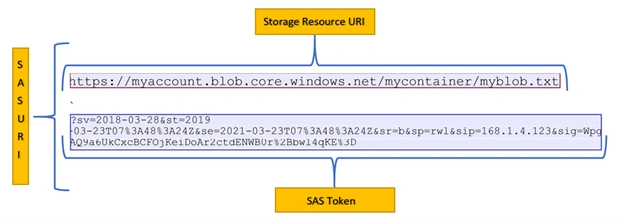
SAS URI - It is a signed URI which includes Storage Resource URI and SAS Token.
Storage URI – It points to one or more resources of your storage account. For example, blob container, file, queue, table or blob file, etc. as highlighted in the above diagram.
SAS Token – SAS token includes all the information which is used to access the resources in the form of a special set of query parameters as highlighted in the above diagram.
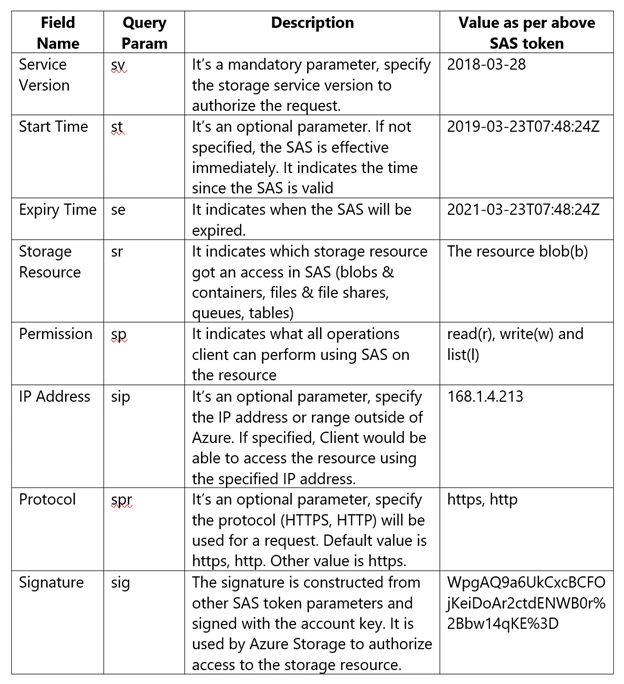
In this article, we learned about SAS basics, so what's next? Please stay tuned for discussing SAS further in my future articles on:
- Demystifying SAS Token Part 2 – Service SAS Token with Example
- Demystifying SAS Token Part 3 – Account SAS Token with Example
- Demystifying SAS Token Part 4 – Controlling SAS using Storage Access Policy
- Demystifying SAS Token Part 5 – Authenticate Access to Azure blobs & queues using Azure AD
Join the conversation! Your thoughts help the community grow.