

Versioning in SharePoint is an awesome feature that lets users create versions of their documents. However, when left unchecked, especially when the below category of “Document Version History” is selected – an end user will be able to create practically an indefinite number of versions. This is not a recommended best practice and may end up using a huge amount of storage over the years.
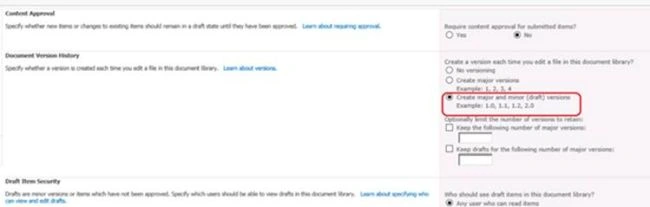
While you can always enable versioning settings, and delete the older versions manually, this will be a very cumbersome task, for libraries/lists with more than 1000s of list items.
The script below takes care of that! This script will be helpful in identifying the list of the versions, which needs to be deleted, based on dates of creation, and other input parameters.
Modes and Usage of the Script
This script has three modes,
- Delete item versions in SharePoint using PowerShell – Report Mode
This gives the report of the item versions that will be deleted but will not delete anything. This is useful for analyzing the files before the decision is made for deletion.
- Delete item versions in SharePoint using PowerShell – Recycle Mode
This mode will send the identified versions to the Recycle Bin rather than deleting them permanently. The report generated at the end will indicate the item versions moved to the Recycle Bin
- Delete item versions in SharePoint using PowerShell – Permanent Delete Mode
This mode will delete the identified versions permanently. Once deleted, the versions cannot be retrieved. The report generated at the end will indicate the item versions that have been successfully deleted.
However, it is to be noted that the current version of the document (Current Major Version and current Minor Version) will not be deleted, even if it falls into the category. This script will also let us users know of the storage size saved by means of deletion of the versions.

Input Parameters
The script takes in three input parameters, with sample examples are,
| $myWeb | "http://mysharepoint.com/sites/myweb1" | The URL of the web or subsite where the list/library is located |
| $myList | "Fantastic Library" | The name of the list/library |
| $myDate | "2014-01-01" | The date beyond each which the versions are to be deleted |
| $myPath | "E:\Satyajit\VersionHistoryDeleteCheckWithDateFilter.csv" | The location and name of the CSV report |
Code for Delete item versions in SharePoint using PowerShell – Report Mode
- ###########################################################################
- #### Delete-Item-Versions-in-SharePoint using PowerShell - Report Mode ####
- ###########################################################################
- if((Get-PSSnapin | Where {$_.Name -eq "Microsoft.SharePoint.PowerShell"}) -eq $null)
- {
- Add-PSSnapin Microsoft.SharePoint.PowerShell;
- }
- $myWeb = "http://mysharepoint.com/sites/myweb1"
- $myList = "Fantastic Library"
- $myDate = "2014-01-01"
- $myPath = "E:\Satyajit\VersionHistoryDeleteCheckWithDateFilter.csv"
- $results = @()
- $storageSaved = 0
- $SPWeb = Get-SPWeb $myWeb
- foreach ($list in $SPWeb.Lists)
- {
- if ($list.Title -eq $myList)
- {
- Write-Host "Name: " $list.Title
- Write-Host "Type: " $list.BaseType
- $itemColl = $list.Items
- foreach ($item in $itemColl)
- {
- foreach ($ver in $item.Versions)
- {
- #this block for non-current versions
- if (!$ver.IsCurrentVersion)
- {
- if ((Get-Date $ver.Created) -lt (Get-Date $myDate))
- {
- $RowDetails = @{
- "Document Name" = $item.Name
- "Version Number" = $ver.VersionLabel
- "Created Date" = $ver.Created
- "Created By" = $ver.CreatedBy
- "Delete Flag" = "Can be deleted"
- "Date Flag" = "Match"
- "Version Size (Kb)" = "{0:n2}"-f ($item.File.Versions.GetVersionFromLabel($ver.VersionLabel).Size/1KB)
- }
- $tempSize = "{0:n2}"-f ($item.File.Versions.GetVersionFromLabel($ver.VersionLabel).Size/1MB)
- $storageSaved = $storageSaved + $tempSize
- $results += New-Object PSObject -Property $RowDetails
- }
- else
- {
- $RowDetails = @{
- "Document Name" = $item.Name
- "Version Number" = $ver.VersionLabel
- "Created Date" = $ver.Created
- "Created By" = $ver.CreatedBy
- "Delete Flag" = "Do not Delete"
- "Date Flag" = "Does not Match"
- "Version Size (Kb)" = "{0:n2}"-f ($item.File.Versions.GetVersionFromLabel($ver.VersionLabel).Size/1KB)
- }
- $results += New-Object PSObject -Property $RowDetails
- }
- }
- #this block for current versions
- else
- {
- if ((Get-Date $ver.Created) -lt (Get-Date $myDate))
- {
- $RowDetails = @{
- "Document Name" = $item.Name
- "Version Number" = $ver.VersionLabel
- "Created Date" = $ver.Created
- "Created By" = $ver.CreatedBy
- "Delete Flag" = "Do not Delete "
- "Date Flag" = "Match"
- "Version Size (Kb)" = "{0:n2}"-f ($item.File.Versions.GetVersionFromLabel($ver.VersionLabel).Size/1KB)
- }
- $results += New-Object PSObject -Property $RowDetails
- }
- else
- {
- $RowDetails = @{
- "Document Name" = $item.Name
- "Version Number" = $ver.VersionLabel
- "Created Date" = $ver.Created
- "Created By" = $ver.CreatedBy
- "Delete Flag" = "Do not Delete"
- "Date Flag" = "Does not Match"
- "Version Size (Kb)" = "{0:n2}"-f ($item.File.Versions.GetVersionFromLabel($ver.VersionLabel).Size/1KB)
- }
- $results += New-Object PSObject -Property $RowDetails
- }
- }
- }
- }
- }
- }
- $TotalSizeSaved = @{
- "Document Name" = ""
- "Version Number" = ""
- "Created Date" = ""
- "Created By" = ""
- "Delete Flag" = ""
- "Date Flag" = ""
- "Version Size (Kb)" = "Total Size = " + $storageSaved
- }
- $results += New-Object PSObject -Property $TotalSizeSaved
- $results | export-csv -Path $myPath -NoTypeInformation
- Write-Host "---------------------------------------------------------------"
- Write-Host $storageSaved " MB can be saved from this library"
- Write-Host "---------------------------------------------------------------"
Code for Delete item versions in SharePoint using PowerShell – Recycle Mode
- #################################################################
- #### Delete-Item-Versions-in-SharePoint using PowerShell - Recycle Mode ####
- #################################################################
- if((Get-PSSnapin | Where {$_.Name -eq "Microsoft.SharePoint.PowerShell"}) -eq $null)
- {
- Add-PSSnapin Microsoft.SharePoint.PowerShell;
- }
- $myWeb = "http://mysharepoint.com/sites/myweb1"
- $myList = "Fantastic Library"
- $myDate = "2014-01-01"
- $myPath = "E:\Satyajit\VersionHistoryDeleteCheckWithDateFilter.csv"
- $results = @()
- $storageSaved = 0
- $SPWeb = Get-SPWeb $myWeb
- foreach ($list in $SPWeb.Lists)
- {
- if ($list.Title -eq $myList)
- {
- Write-Host "Name: " $list.Title
- Write-Host "Type: " $list.BaseType
- $itemColl = $list.Items
- foreach ($item in $itemColl)
- {
- foreach ($ver in $item.Versions)
- {
- #this block for non-current versions
- if (!$ver.IsCurrentVersion)
- {
- if ((Get-Date $ver.Created) -lt (Get-Date $myDate))
- {
- $RowDetails = @{
- "Document Name" = $item.Name
- "Version Number" = $ver.VersionLabel
- "Created Date" = $ver.Created
- "Created By" = $ver.CreatedBy
- "Status" = "Moved to Recycle Bin"
- "Date Flag" = "Match"
- "Version Size (Kb)" = "{0:n2}"-f ($item.File.Versions.GetVersionFromLabel($ver.VersionLabel).Size/1KB)
- }
- $tempSize = "{0:n2}"-f ($item.File.Versions.GetVersionFromLabel($ver.VersionLabel).Size/1MB)
- $storageSaved = $storageSaved + $tempSize
- $results += New-Object PSObject -Property $RowDetails
- $ver.Recycle()
- }
- else
- {
- $RowDetails = @{
- "Document Name" = $item.Name
- "Version Number" = $ver.VersionLabel
- "Created Date" = $ver.Created
- "Created By" = $ver.CreatedBy
- "Delete Flag" = "Ignored as Date does not match"
- "Date Flag" = "Does not Match"
- "Version Size (Kb)" = "{0:n2}"-f ($item.File.Versions.GetVersionFromLabel($ver.VersionLabel).Size/1KB)
- }
- $results += New-Object PSObject -Property $RowDetails
- }
- }
- }
- }
- }
- }
- $TotalSizeSaved = @{
- "Document Name" = ""
- "Version Number" = ""
- "Created Date" = ""
- "Created By" = ""
- "Delete Flag" = ""
- "Date Flag" = ""
- "Version Size (Kb)" = "Total Size = " + $storageSaved
- }
- $results += New-Object PSObject -Property $TotalSizeSaved
- $results | export-csv -Path $myPath -NoTypeInformation
- Write-Host "---------------------------------------------------------------"
- Write-Host $storageSaved " MB can be saved from this library"
- Write-Host "---------------------------------------------------------------"
Delete item versions in SharePoint using PowerShell – Permanent Delete Mode
- #################################################################
- #### Delete-Item-Versions-in-SharePoint using PowerShell - Recycle Mode ####
- #################################################################
- if((Get-PSSnapin | Where {$_.Name -eq "Microsoft.SharePoint.PowerShell"}) -eq $null)
- {
- Add-PSSnapin Microsoft.SharePoint.PowerShell;
- }
- $myWeb = "http://mysharepoint.com/sites/myweb1"
- $myList = "Fantastic Library"
- $myDate = "2014-01-01"
- $myPath = "E:\Satyajit\VersionHistoryDeleteCheckWithDateFilter.csv"
- $results = @()
- $storageSaved = 0
- $SPWeb = Get-SPWeb $myWeb
- foreach ($list in $SPWeb.Lists)
- {
- if ($list.Title -eq $myList)
- {
- Write-Host "Name: " $list.Title
- Write-Host "Type: " $list.BaseType
- $itemColl = $list.Items
- foreach ($item in $itemColl)
- {
- foreach ($ver in $item.Versions)
- {
- #this block for non-current versions
- if (!$ver.IsCurrentVersion)
- {
- if ((Get-Date $ver.Created) -lt (Get-Date $myDate))
- {
- $RowDetails = @{
- "Document Name" = $item.Name
- "Version Number" = $ver.VersionLabel
- "Created Date" = $ver.Created
- "Created By" = $ver.CreatedBy
- "Status" = "Deleted Successfully"
- "Date Flag" = "Match"
- "Version Size (Kb)" = "{0:n2}"-f ($item.File.Versions.GetVersionFromLabel($ver.VersionLabel).Size/1KB)
- }
- $tempSize = "{0:n2}"-f ($item.File.Versions.GetVersionFromLabel($ver.VersionLabel).Size/1MB)
- $storageSaved = $storageSaved + $tempSize
- $results += New-Object PSObject -Property $RowDetails
- $ver.Delete()
- }
- else
- {
- $RowDetails = @{
- "Document Name" = $item.Name
- "Version Number" = $ver.VersionLabel
- "Created Date" = $ver.Created
- "Created By" = $ver.CreatedBy
- "Delete Flag" = "Ignored as Date does not match"
- "Date Flag" = "Does not Match"
- "Version Size (Kb)" = "{0:n2}"-f ($item.File.Versions.GetVersionFromLabel($ver.VersionLabel).Size/1KB)
- }
- $results += New-Object PSObject -Property $RowDetails
- }
- }
- }
- }
- }
- }
- $TotalSizeSaved = @{
- "Document Name" = ""
- "Version Number" = ""
- "Created Date" = ""
- "Created By" = ""
- "Delete Flag" = ""
- "Date Flag" = ""
- "Version Size (Kb)" = "Total Size = " + $storageSaved
- }
- $results += New-Object PSObject -Property $TotalSizeSaved
- $results | export-csv -Path $myPath -NoTypeInformation
- Write-Host "---------------------------------------------------------------"
- Write-Host $storageSaved " MB can be saved from this library"
- Write-Host "---------------------------------------------------------------"
Output
It is recommended that these codes are run using the system account, or by any user who has sufficient privileges in the site. Once completed, the report log will be generated in the path specified.
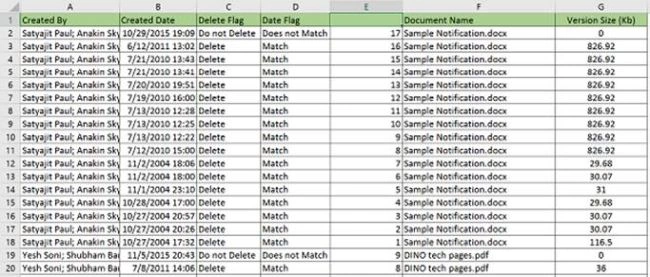
The PowerShell codes for this can also be found in my GitHub repo.
BenSoft BenPosted May 20, 2021, 6:01 AM
I ahev error returned:The following exception occurred while trying to enumerate the collection: "".At line:25 char:23 + foreach ($item in $itemColl)
BenSoft BenPosted May 20, 2021, 6:00 AM
I have error return in my case:
Praveen KumarPosted Aug 6, 2018, 3:31 AM
HtmlString += '<li class="image">'; htmlString += '<a nowrap class="link_tag" href="'+ results1[i].DownloadURL.Url +'">'; htmlString += results1[i].Title; if(banner=jQuery(results1[i].Banner_Image.Url) === null ? '' : jQuery(results1[i].Banner_Image.Url)) { htmlString +='<img class="baner_image" src="'+banner+'" alt="">'; } Hi satyajit, i am fetching the banner url from the list but i dont knew how to give null point exception to this function. can you please help me with this?
rajashri thoratPosted Jul 6, 2018, 7:49 AM
Hi,Can we do this using REST OR SPServices, i Want to delete the version history of multi line text column in SharePoint