

Introduction
The common way to delete an entity in Entity Framework is to retrieve the entity from the database into the context and then delete it from the context. Generally to delete the entity in Entity Framework, the developer uses the following.
- // Remove the entity from the entity collection
- using (Entities Context = new Entities())
- {
- DepartmentMaster deptDelete = Context.DepartmentMasters.Find(9);
- Context.DepartmentMasters.Remove(deptDelete);
- Context.SaveChanges();
- }
- // OR Changing the state of entity
- using (Entities Context = new Entities())
- {
- DepartmentMaster deptDelete = Context.DepartmentMasters.Find(9);
- Context.Entry(deptDelete).State = EntityState.Deleted;
- Context.SaveChanges();
- }
The code above has one problem; there are two database queries for one operation (one query for retrieving the data from the database and the other to delete the data from the database).
Interception/SQL logging in Entity Framework
Entity Framework 6.0 introduced the feature called "Logging SQL". While working with Entity Framework, it sends commands (or an equivalent SQL query) to the database to do a CRUD operation and this command can be intercepted by application code of Entity Framework. This feature of the Entity Framework is to capture an equivalent SQL query generated by Entity Framework internally and provide it as output.
How to enable SQL logging
The DbContext.Database.Log property can be set to delegate for any method that accepts a string as the parameter. Using this method, all SQL generated by the current context will be logged. For example, the following code can be used to send output to the Console.
- public Entities() : base("name=Entities")
- {
- Database.Log = Console.WriteLine;
- }
The following is the SQL logging output of the code above: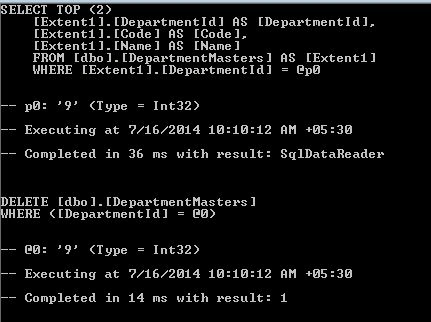
Solution
The probable solutions of deleting the entity without retrieving it are given below.
- By Changing State
DbContext has methods called Entry and Entry<TEntity>, these methods get a DbEntityEntry for the given entity and provide access to the information about the entity and return a DbEntityEntry object able to perform the action on the entity. Now we can perform the delete operation on the context by just changing the entity state to EntityState.Deleted.
- using (Entities Context = new Entities())
- {
- DepartmentMaster deptDelete = new DepartmentMaster { DepartmentId = 6 };
- Context.Entry(deptDelete).State = EntityState.Deleted;
- Context.SaveChanges();
- }
Log SQL Output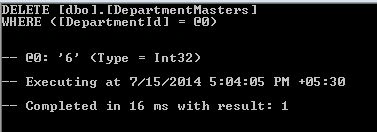
- By Executing SQL Query
- using (Entities Context = new Entities())
- {
- Context.Database.ExecuteSqlCommand("Delete DepartmentMasters where DepartmentId = {0}", new object[] { 8 });
- }
Log SQL Output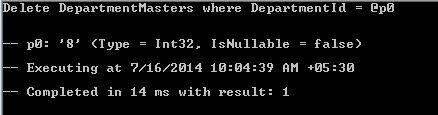
Summary
Using the methods described above, we can delete an existing entity without retrieving it from the database and we can gain some performance benefit.
Nadeem ShehzadPosted May 20, 2015, 11:27 AM
Will option #1 perform cascade delete like Remove on the Dbset, or leave the records orphans in the child tables
Andrew KlinmanPosted Mar 28, 2015, 8:26 PM
I tried the #1 approach and it doesn't seem to work. I don't get an error, and if I refresh my grid by querying, the row is gone. However, when I run the program again, the row is back, and of course it's still in the DB.
Ramesh MaruthiPosted Jul 21, 2014, 10:19 AM
Thanks Jignesh Sir !! Let me try with this :)
Ramesh MaruthiPosted Jul 18, 2014, 11:21 AM
Jignesh now days I am working on entity framework 6.0.1 , How this scenario works for bulk delete without retrieving from a database ? for an example I pass an array of ids , how does this work ? And if use where with parallel linq, I think it takes the same time DepartmentMaster deptDelete = Context.DepartmentMaster.Where (s =>s.DepartmentID == 9)); Context.DepartmentMasters.Remove(deptDelete); Context.SaveChanges(); SOrry if am wrong
Mahesh ChandPosted Jul 17, 2014, 5:49 PM
Nice to see Jignesh working with EF6.