

Introduction
In CSS, border property is used to enable a border around HTML element and border property also has different properties to change the border like color, style, and width.
CSS Border Properties
CSS Border Properties are used to create a border to a particular element and it also defines the boundary of the element.
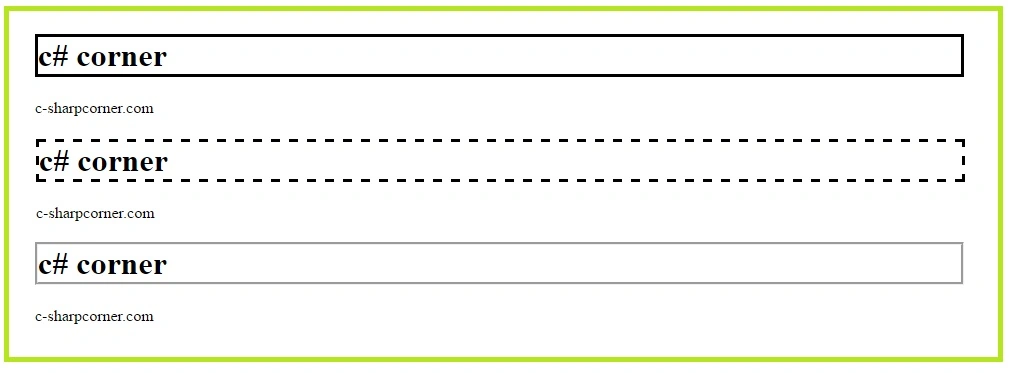
Border Style
Syntax
selected_element
{
border-style:style_type;
}
The type of style is listed below.
- dotted
To define a dotted border style, dotted border style is used.ExampleOutput
- <!DOCTYPE html>
- <html>
- <head>
- <style>
- h1 {
- border-style: dotted;
- }
- </style>
- </head>
- <body>
- <h1>c# corner</h1>
- <p>c-sharpcorner.com</p>
- </html>

- solid
To define a solid border style, dotted border style is used.ExampleOutput
- <!DOCTYPE html>
- <html>
- <head>
- <style>
- h1 {
- border-style: solid;
- }
- </style>
- </head>
- <body>
- <h1>c# corner</h1>
- <p>c-sharpcorner.com</p>
- </html>

- dashed
To define the dashed border style, dashed border style is used.ExampleOutput
- <!DOCTYPE html>
- <html>
- <head>
- <style>
- h1 {
- border-style: dashed;
- }
- </style>
- </head>
- <body>
- <h1>c# corner</h1>
- <p>c-sharpcorner.com</p>
- </html>

- double
To define the double border style, double border style is used.ExampleOutput
- <!DOCTYPE html>
- <html>
- <head>
- <style>
- h1 {
- border-style: double;
- }
- </style>
- </head>
- <body>
- <h1>c# corner</h1>
- <p>c-sharpcorner.com</p>
- </html>

- groove
To define 3D grooved border style, groove border style is used.ExampleOutput
- <!DOCTYPE html>
- <html>
- <head>
- <style>
- h1 {
- border-style: Groove;
- }
- </style>
- </head>
- <body>
- <h1>c# corner</h1>
- <p>c-sharpcorner.com</p>
- </html>

- hidden
To define hidden border style, hidden border style is used.ExampleOutput
- <!DOCTYPE html>
- <html>
- <head>
- <style>
- h1 {
- border-style: hidden;
- }
- </style>
- </head>
- <body>
- <h1>c# corner</h1>
- <p>c-sharpcorner.com</p>
- </html>

- none
To define no border, no border style is used.ExampleOutput
- <!DOCTYPE html>
- <html>
- <head>
- <style>
- h1 {
- border-style: none;
- }
- </style>
- </head>
- <body>
- <h1>c# corner</h1>
- <p>c-sharpcorner.com</p>
- </html>
- inset
To define 3D inset border style, inset border style is used.ExampleOutput
- <!DOCTYPE html>
- <html>
- <head>
- <style>
- h1 {
- border-style: inset;
- }
- </style>
- </head>
- <body>
- <h1>c# corner</h1>
- <p>c-sharpcorner.com</p>
- </html>

- outset
To define 3D outset border style, an outset border style is used.ExampleOutput
- <!DOCTYPE html>
- <html>
- <head>
- <style>
- h1 {
- border-style: outset;
- }
- </style>
- </head>
- <body>
- <h1>c# corner</h1>
- <p>c-sharpcorner.com</p>
- </html>

- ridge
To define 3D ridged border style, ridge border style is used.ExampleOutput
- <!DOCTYPE html>
- <html>
- <head>
- <style>
- h1 {
- border-style: ridge;
- }
- </style>
- </head>
- <body>
- <h1>c# corner</h1>
- <p>c-sharpcorner.com</p>
- </html>

Border Width
 Output
Output
Output
- To define the width of the border, the border-width property is used.
- We can define a border within px, pt, cm, em, etc.
- We can also use three pre-defined values: thin, medium, or thick. to define border width.
Syntax
selected_element
{
border-width:value;
}
Example
Output
 We also define the border width, using different units like-
- <!DOCTYPE html>
- <html>
- <head>
- <style>
- h1 {
- border-style: solid;
- border-width: 5px;
- }
- </style>
- </head>
- <body>
- <h1>c# corner</h1>
- <p>c-sharpcorner.com</p>
- </html>
- border-width:medium
- border-width:thin
- border-width:thik
Border Color
To define the border color of the HTML element, the border-color property is used
In CSS, we can define the color, using-
- Name of the color.
- Hex value of the color.
- The RGB value of the color.
Example 1
In this example, we will use the name of the color.
Output
- <!DOCTYPE html>
- <html>
- <head>
- <style>
- h1 {
- border-style: solid;
- border-color: red;
- }
- </style>
- </head>
- <body>
- <h1>c# corner</h1>
- <p>c-sharpcorner.com</p>
- </html>
Example 2
In this example, we will use RGB value of the color.
- <!DOCTYPE html>
- <html>
- <head>
- <style>
- h1 {
- border-style: solid;
- border-color: rgb(255, 0, 0);
- }
- </style>
- </head>
- <body>
- <h1>c# corner</h1>
- <p>c-sharpcorner.com</p>
- </html>
Example 3
In this example, we will use Hex value of the color.
- <!DOCTYPE html>
- <html>
- <head>
- <style>
- h1 {
- border-style: solid;
- border-color: #FF0000;
- }
- </style>
- </head>
- <body>
- <h1>c# corner</h1>
- <p>c-sharpcorner.com</p>
- </html>
Rounded Borders
To define a rounded border of the HTML element, the border-radius property is used.
Syntax
selected_element\
{
border-radius:value;
}
Example
Output

- <!DOCTYPE html>
- <html>
- <head>
- <style>
- h1 {
- border-style: solid;
- border-color: #FF0000;
- border-radius: 10px;
- }
- </style>
- </head>
- <body>
- <h1>c# corner</h1>
- <p>c-sharpcorner.com</p>
- </html>
Conclusion
In this article, we studied CSS - Border.
Riju SPosted Dec 9, 2016, 6:20 AM
Good post. i like it because all beginners very use full this post
Prasanna MuraliPosted Sep 5, 2016, 10:59 AM
Nice post......
Hasmukh BaldaniyaPosted Sep 3, 2016, 7:09 AM
Nice Click
Shamim UddinPosted Sep 3, 2016, 5:03 AM
Nice
RakeshPosted Sep 3, 2016, 2:31 AM
Good