

Introduction
In this article, we will explore a method to convert decimals to binary numbers using C#.
We will explore.
- What is Decimal
- What is Binary
- Convert Decimal to binary
Below are a few examples of inputs and Outputs.
Examples
- Input: 4 (Decimal Number)
- Output: 100 (Binary Number)
- Input: 9 (Decimal Number)
- Output: 1001 (Binary Number)
This is an essential technical interview question that may be posed to beginner, intermediate, and experienced candidates.
We previously covered the following.
- How to Reverse Number in C#
- How to Reverse a String in C#
- Palindrome String Program in C#
- Palindrome Number in C#
- How to Reverse Order of the Given String
- How To Reverse Each Word Of Given String
- How To Remove Duplicate Characters From String In C#
- Bubble Sort Algorithm
What are Decimal Numbers?
The numeral with a base of 10 is referred to as decimal Numbers. That means decimal numbers range from 0 to 9.
Example
- 4
- 71
What are Binary Numbers?
The Binary numbers are those numbers for which the base is 2. This implies that the binary numbers can be represented using just two digits, namely 0 and 1.
Example
- 101
- 111111
- 10101
Convert Domical to Binary Numbers
Let's examine the table below that displays what we are going to implement.
| Decimal | Binary |
| 1 | 0 |
| 2 | 10 |
| 3 | 11 |
| 4 | 100 |
| 5 | 101 |
| 6 | 110 |
| 7 | 111 |
| 8 | 1000 |
| 9 | 1001 |
| 10 | 1010 |
Let’s start.
Console.WriteLine("Enter a Decimal Number: ");
int number = Convert.ToInt32(Console.ReadLine());
string result = string.Empty;
for (int i = 0; number > 0; i++)
{
    result = number % 2 + result;
    number = number / 2;  // Corrected the syntax here
}
Console.WriteLine($"Binary Number: {result}");
Console.ReadLine();
Output
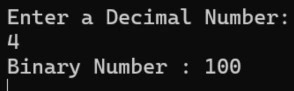
Let's try another number.
Output
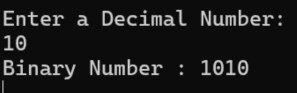
We have learned a method to convert decimals to binary Numbers. I hope you find this article enjoyable and useful.
Join the conversation! Your thoughts help the community grow.