

Introduction
This article introduces ASP.NET Web API debugging with the Route debugger. Here I provide an example of a Web API that is debugged with the Route debugger.
How the Router debugger works
There are three steps for debugging the Web API. These steps are as follows.
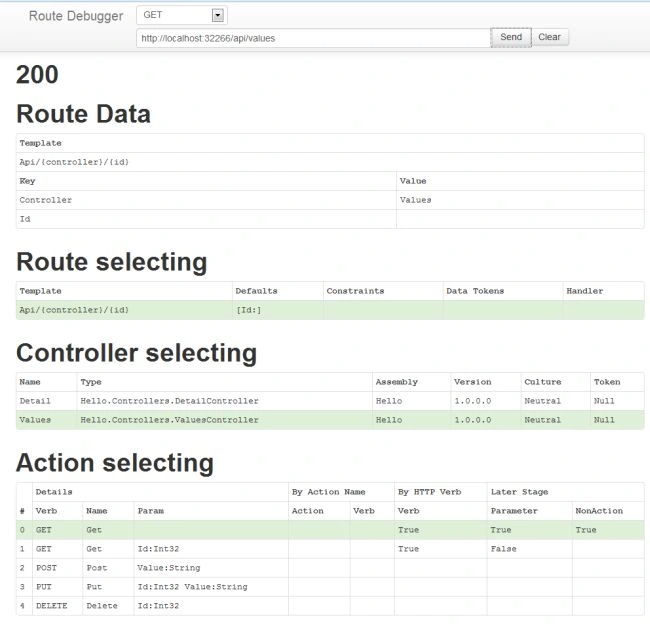
- In the first step it finds the matching route. Every route is defined with the Constraints, Data Token, templates and so on. By default these routes are defined in the "App_Start\WebApiConfig.cs" file.
- In the second step find the matching controller that perform the matching with the value of controller. If the matching controller is not found then the controller selection will fail.
- In the third step, after matching the controller, now find the public methods on the controller by the reflection. For matching the action the action it uses an algorithm that is defined below:
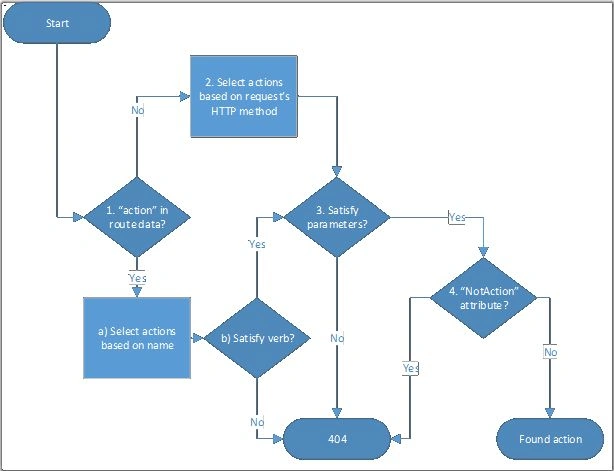
- The key action is contained by the data route then the action will be searched on the basis of the action name such as ASP.NET MVC, Web API.
It finds all the actions that have the name action in the route data.
There is every action supported by the HTTP methods; GET, POST, PUT and so on. If any action is not support by the HTTP methods then we eliminate those actions. - The Key "action" that is not contained by the route data the action directly searched on the bases of the request method.
- After selecting the action in the two steps above, now examine the parameters of the action method and if the methods do not match the parameters then we eliminate those actions.
- All eliminated actions are marked by the NonAction attributes.
Now we create the Web API application for debugging with the Route debugger.
Step 1
- Start Visual Studio 2012.
- click on "New Project", select "template"->"Visual C#"->"Web".
- Choose "ASP.NET MVC Application4".
- Click on"OK" button.
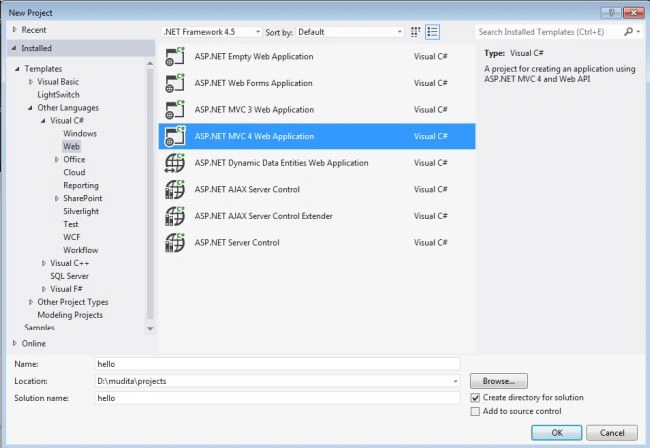
- From the new ASP.NET MVC4 Project:
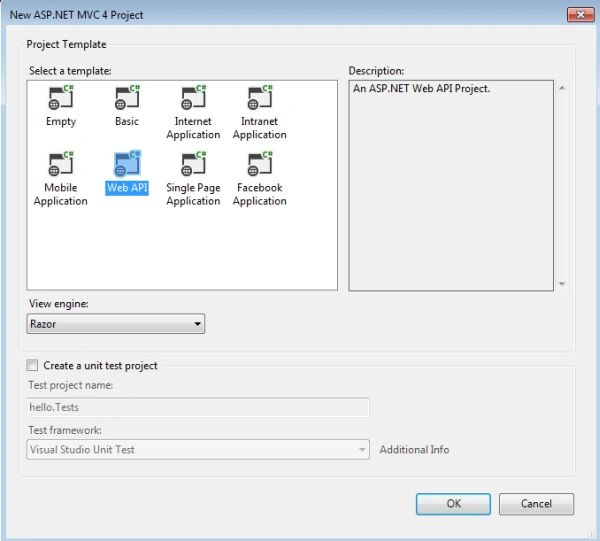
- Select "Web API".
- Click on "OK" button.
Step 2
Add the Model class "Detail.cs".
- In the "Solution Explorer".
- Right-click on the "Model Folder".
- Select "Add"->"Class".
- Change the name and Click on "OK" button.
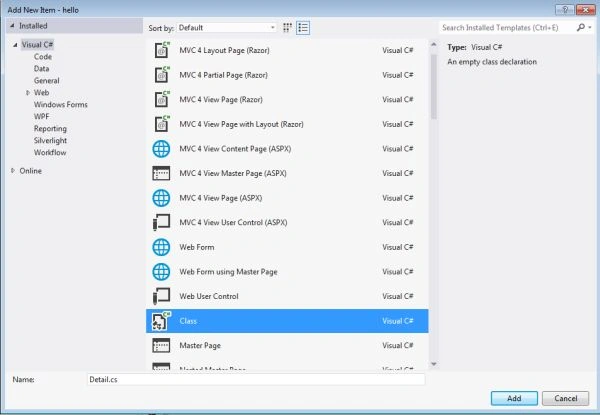
Write this code in the "Detail.cs" class.
- using System;
- using System.Collections.Generic;
- using System.Linq;
- using System.Web;
- namespace hello.Models
- {
- public class Detail
- {
- public int id { get; set; }
- public string name { get; set; }
- public string Address { get; set; }
- public double salary { get; set; }
- }
- }
Step 3
Create a controller Class "DetailsController.cs".
- In the "Solution Explorer".
- Right-click on the "Controller folder".
- Select "Add"->"Controller".
- Change the name and choose "Empty API Controller" from the Tepmlate.
- Click on "OK" button.
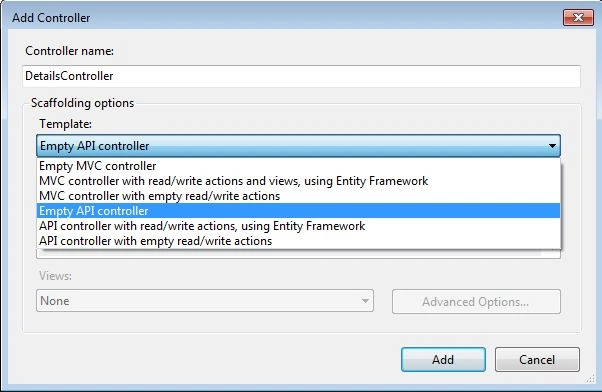
Write this code in the "DetailsController.cs" controller.
- using System;
- using System.Collections.Generic;
- using System.Linq;
- using System.Net;
- using System.Net.Http;
- using System.Web.Http;
- using hello.Models;
- namespace hello.Controllers
- {
- public class DetailController : ApiController
- {
- Detail[] details = new Detail[]
- {
- new Detail{id = 1,name="smith", Address="Delhi", salary=50000},
- new Detail{id = 2,name="John",Address="Kanpur",salary= 40000},
- new Detail {id = 3,name="Manya",Address="Lucknow",salary=480000}
- };
- public IEnumerable<Detail> GetAllDetails()
- {
- return details;
- }
- public Detail GetDetailById(int Id)
- {
- var detail = details.FirstOrDefault((I) => I.id == Id);
- if (detail == null)
- {
- throw new HttpResponseException(HttpStatusCode.NotFound);
- }
- return detail;
- }
- public IEnumerable<Detail> GetItemsByAddress(string add)
- {
- return details.Where(
- (I) => string.Equals(I.Address, add,
- StringComparison.OrdinalIgnoreCase));
- }
- }
- }
Step 4
Now the code in the "index.cshtml" file. This file exists in the the "View" -> "Home" -> "index.cshtml".
- <!DOCTYPE html>
- <html lang="en">
- <head>
- <title>ASP.NET Web API</title>
- <link href="../../Content/Site.css" rel="stylesheet" />
- <script src="~/Scripts/jquery-1.7.1.min.js"></script>
- <script type="text/javascript">
- $(document).ready(function () {
- $.getJSON("api/detail/",
- function (data) {
- $.each(data, function (key, val) {
- var str = val.name + ': $' + val.salary;
- $('<li/>', { text: str })
- .appendTo($('#detail'));
- });
- });
- });
- function find() {
- var id = $('#detId').val();
- $.getJSON("api/detail/" + id,
- function (data) {
- var str = data.name + ': $' + data.salary;
- $('#detail').text(str);
- })
- .fail(
- function (jqXHR, textStatus, err) {
- $('#detail').text('Error: ' + err);
- });
- }
- </script>
- </head>
- <body id="body" >
- <div class="main-content">
- <div>
- <h1>Showing All Items</h1>
- <ul id="details"/>
- </div>
- <div>
- <label for="detId">ID:</label>
- <input type="text" id="detId" size="5"/>
- <input type="button" value="Search" onclick="find();" />
- <p id="detail" />
- </div>
- </div>
- </body>
- </html>
Step 5
Now we install the Route Debugger.
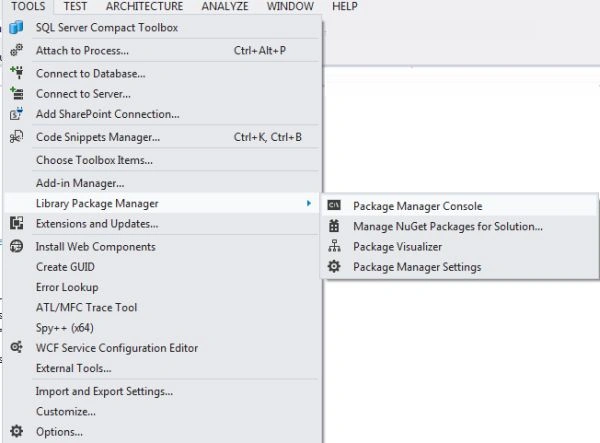
- In the "Tools" menu.
- Select the "Library Package manager" -> "Package Manager Console".
- Write this Command "Pm>Install-Package WebApiRouteDebugger".
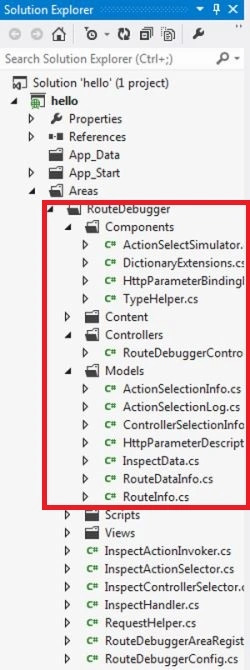
- After completing the installation the Solution Explorer looks like this:.
Step 6
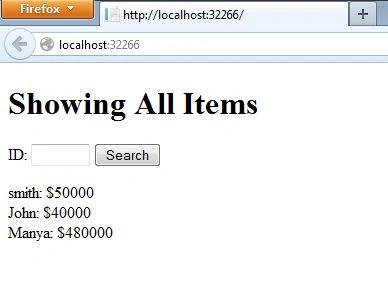
- Now execute the application. Press "F5". The application looks like this:
- Now we navigate to the URL "http://localhost:32266/rd" and press "Enter".
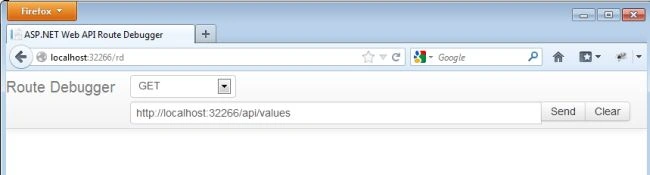
- For testing the URl click onthe "Send" button. The result looks like this:
Join the conversation! Your thoughts help the community grow.