

Debugging is a very important aspect of programming, but debugging with conditional breakpoints will increase your performance and you can also validate your data during this process. Breakpoints are one of the most important debugging techniques in your developer's toolbox. We set breakpoints wherever we want to pause debugger execution to see the state of code variables or look at the call stack at a certain point through breakpoints. We can also use breakpoint when we are trying to resolve a warning or issue in the program.
How to set breakpoints in the source code
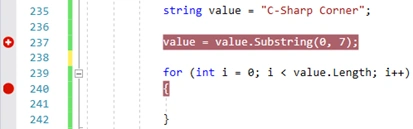
We can set a breakpoint on any line of executable code to pause the debugger to see some values. For example, in the following C# code, you could set a breakpoint on the line of code with the variable assignment, the for loop, or any code inside the for loop. You can't set a breakpoint on method signatures, declarations for a namespace or class, or variable declarations if there's no assignment and no getter/setter.

To set a breakpoint in source code, click in the far-left margin next to a line of code. You can also select the line and press F9, select Debug -> Toggle Breakpoint, or right-click and select Breakpoint -> Insert breakpoint. The breakpoint appears as a red dot in the left margin.
In the above code snippet, you have a breakpoint and when you reach on line 237, debugger will stop to check the value in the string variable and highlighted as yellow which shows a breakpoint hit. As shown below,

Conditional Breakpoint
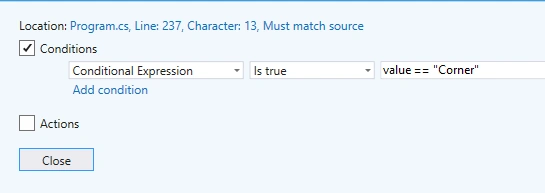
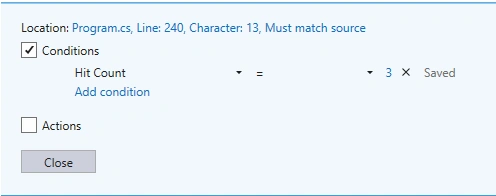
You can control the breakpoint through certain conditions. Breakpoint will hit if those conditions or criteria are met but those conditions should be a valid expression or an understandable format of a debugger.
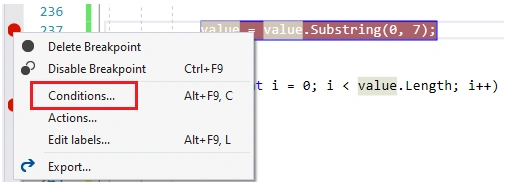
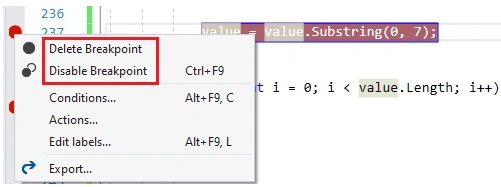
Right-click the breakpoint symbol and select Conditions. Or hover over the breakpoint symbol, select the Settings icon, and then select Conditions in the Breakpoint Settings window.

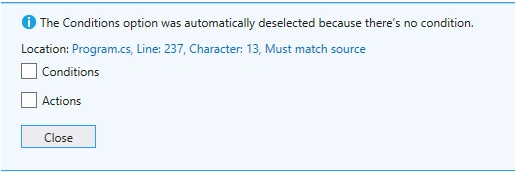
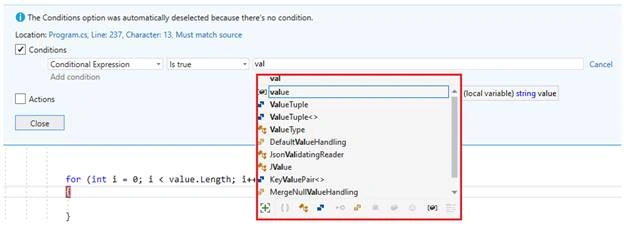
After selecting the above option you will see the following windows to add conditions.

Join the conversation! Your thoughts help the community grow.