

When we use the Web API to get or post data from a web page (HTML page) using AngularJs, it is very essential to maintain the data type formatting to get or post the proper value, since data is sent or received as JSON data. Now JSON reads all data types properly except the date datatype because JSON does not have any native date / time data type on its own. So when we parse any data containing a date time data type, it does not convert in proper format in JSON. A JSON date comes in a format that isn't directly convertable to JavaScript date objects (for example, /Date(1349301600000+0200)/ ). This can cause a bit of a headache. The following is the discussion for converting the date properly.
For doing this, we need to first create our web API controller. For that, we will first create a new class named Employee as in the following:
- public class Employee
- {
- public int SrlNo { get; set; }
- public string EmployeeName { get; set; }
- public string City { get; set; }
- public int Age { get; set; }
- public DateTime DOB { get; set; }
- public decimal GrossSalary { get; set; }
- }
Now we add a API controller named EmployeeController and add the following code there:
- public class EmployeeController : ApiController
- {
- [HttpPost]
- public List<Employee> post()
- {
- return PopulateEmpData();
- }
- private List<Employee> PopulateEmpData()
- {
- List<Employee> lstData = new List<Employee>();
- lstData.Add(new Employee
- {
- SrlNo = 1,
- EmployeeName = "Suman",
- City = "New Delhi",
- Age = 30,
- DOB = Convert.ToDateTime("1985-10-25"),
- GrossSalary = 20000
- });
- lstData.Add(new Employee
- {
- SrlNo = 2,
- EmployeeName = "Arnab",
- City = "Lucknow",
- Age = 25,
- DOB = Convert.ToDateTime("1990-05-02"),
- GrossSalary = 15000
- });
- lstData.Add(new Employee
- {
- SrlNo = 3,
- EmployeeName = "Tapas",
- City = "Kolkata",
- Age = 40,
- DOB = Convert.ToDateTime("1975-03-01"),
- GrossSalary = 000
- });
- return lstData;
- }
- }
Now for the AngularJs part. Add a blank HTML file named EmpInfo.Html and provide the following code:
- <!DOCTYPE html>
- <html xmlns="http://www.w3.org/1999/xhtml">
- <head>
- <title>Employee List</title>
- <script src="../Script/angular1.3.8.js"></script>
- <script src="../Script/angular-route.js"></script>
- <script src="../UserScript/MyApp.js"></script>
- <script src="../UserScript/EmpController.js"></script>
- </head>
- <body ng-app="MyApp" ng-controller="EmpController">
- <div>
- <div>
- <input type="button" value="Serialize Data" ng-click="fnButton1();" />
- <input type="button" value="Deserialize Data" ng-click="fnButton2();" />
- </div>
- <div>
- <h1>Data Before Deserialize</h1>
- <table style="width:100%;border:solid ;border-style:solid">
- <tr>
- <td>SrlNo</td>
- <td>Employee Name</td>
- <td>City</td>
- <td>Age</td>
- <td>Date of Birth</td>
- <td>Gross Salary</td>
- </tr>
- <tr ng-repeat="var in EmpData">
- <td>{{var.SrlNo}}</td>
- <td>{{var.EmployeeName}}</td>
- <td>{{var.City}}</td>
- <td>{{var.Age}}</td>
- <td>{{var.DOB}}</td>
- <td>{{var.GrossSalary}}</td>
- </tr>
- </table>
- </div>
- <div>
- <h1>Data After Deserialize</h1>
- <table style="width:100%;border:solid ;border-style:solid">
- <tr>
- <td>SrlNo</td>
- <td>Employee Name</td>
- <td>City</td>
- <td>Age</td>
- <td>Date of Birth</td>
- <td>Gross Salary</td>
- </tr>
- <tr ng-repeat="var1 in EmpDeSerializeData">
- <td>{{var1.SrlNo}}</td>
- <td>{{var1.EmployeeName}}</td>
- <td>{{var1.City}}</td>
- <td>{{var1.Age}}</td>
- <td>{{var1.DOB | date:"MM/dd/yyyy"}}</td>
- <td>{{var1.GrossSalary}}</td>
- </tr>
- </table>
- </div>
- </div>
- </body>
- </html>
Here we use MyApp as ng-app and EmpController as controller. In the page, we are creating two tables containing the same data. The first table contains the data without deserialization for datetime and the second table displays the deserialized data.
For doing it, we first create a JavaScript file MyApp.Js and define the Angular App within it. The code is as in the following:
- var MyApp = angular.module('MyApp', []);
- MyApp.controller("EmpController", ['$scope', '$http',
- function ($scope, $http, $location) {
- $scope.fnButton1 = function () {
- $http.post("http://localhost:59553/api/Employee")
- .then(function (response) {
- $scope.EmpData = response.data;
- });
- }
- }
- ]);

Here it is clearly shown that the value of the date of birth comes from the Web API with serialized format. JSON can't automatically deserialize the data. For doing this serialization we need to create a regular expression and convert the date value into proper format. For doing that, we will define a function for converting the datetime value as in the following within the EmpController.JS file.
- var iso8601RegEx = /(19|20|21)\d\d([-/.])(0[1-9]|1[012])\2(0[1-9]|[12][0-9]|3[01])T(\d\d)([:/.])(\d\d)([:/.])(\d\d)/;
- function fnConverDate(input) {
- if (typeof input !== "object") return input;
- for (var key in input) {
- if (!input.hasOwnProperty(key)) continue;
- var value = input[key];
- var type = typeof value;
- var match;
- if (type == 'string' && (match = value.match(iso8601RegEx))) {
- input[key] = new Date(value)
- }
- else if (type === "object") {
- fnConverDate(value);
- }
- }
- }
- MyApp.controller("EmpController", ['$scope', '$http',
- function ($scope, $http, $location) {
- $scope.fnButton1 = function () {
- $http.post("http://localhost:59553/api/Employee")
- .then(function (response) {
- $scope.EmpData = response.data;
- });
- }
- $scope.fnButton2 = function () {
- $http.post("http://localhost:59553/api/Employee")
- .then(function (response) {
- fnConverDate(response.data);
- $scope.EmpDeSerializeData = response.data;
- });
- }
- }
- ]);
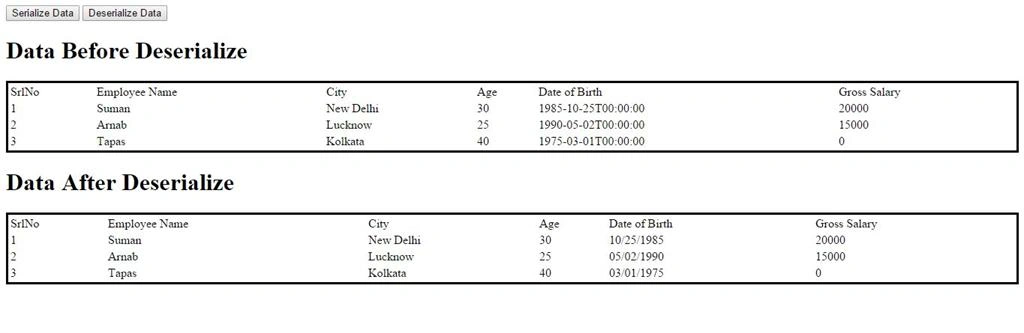
The first table displays the data with serialized date format value.
The second table displays the data with the deserialized date type value.
Sr KarthigaPosted Apr 19, 2016, 11:03 PM
Nice explanation
Muhammad ImranPosted Aug 28, 2015, 11:57 AM
You are star Mr Saha, i was struggling for whole day you gave me the solution man. brillinat
NitinPosted Jun 11, 2015, 7:36 AM
good one
Santhakumar MunuswamyPosted Jun 9, 2015, 2:44 PM
Thanks for nice one