

Introduction
In this second part of the article on Angular Material Datatable, we are going to learn how to implement searching, filtering, and one combined example in which we will implement all of the functionality using Angular Material Datatable.
I would recommend you to go through the first part of this article, where I have explained the basic configurations, for that just follow the given link.
In the first part of the series, we have learned different functionalities of Angular Material Datatable.
- Simple Datatable
- Data table With Pagination
- Data table With Sorting
In this part, we will continue learning more functionality. So, let's implement it one by one.
Data table with filtering
Filtering makes it easy to search the record from the tons of available records, we just need to pass the search string and based on the search string, we will get the matching records.
We can also implement filter functionality to the Datatable, for that follow a few steps and you will get the desired records into the Datatable.
For that, we can create a new component by using the command.
- ng g c withfiltering
- <mat-card>
- <div class="alert alert-info">
- <strong>Angular Material DataTable With Filtering</strong>
- </div>
- <div class="example-container mat-elevation-z8">
- <div class="">
- <mat-form-field style="width: 98%;">
- <input matInput (keyup)="Filter($event.target.value)" placeholder="Filter">
- </mat-form-field>
- </div>
- <mat-table #Table [dataSource]="MyDataSource">
- <!-- For ID -->
- <ng-container matColumnDef="id">
- <mat-header-cell *matHeaderCellDef> ID </mat-header-cell>
- <mat-cell *matCellDef="let post"> {{post.id}} </mat-cell>
- </ng-container>
- <!-- For Post ID -->
- <ng-container matColumnDef="postId">
- <mat-header-cell *matHeaderCellDef> Post ID </mat-header-cell>
- <mat-cell *matCellDef="let post"> {{post.postId}} </mat-cell>
- </ng-container>
- <!-- For Name -->
- <ng-container matColumnDef="name">
- <mat-header-cell *matHeaderCellDef> Name </mat-header-cell>
- <mat-cell *matCellDef="let post"> {{post.name}} </mat-cell>
- </ng-container>
- <!-- For Email ID -->
- <ng-container matColumnDef="email">
- <mat-header-cell *matHeaderCellDef> Email ID </mat-header-cell>
- <mat-cell *matCellDef="let post"> {{post.email}} </mat-cell>
- </ng-container>
- <!-- For Body -->
- <ng-container matColumnDef="body">
- <mat-header-cell *matHeaderCellDef> Body Text</mat-header-cell>
- <mat-cell *matCellDef="let post"> {{post.body}} </mat-cell>
- </ng-container>
- <mat-header-row *matHeaderRowDef="displayedColumns"></mat-header-row>
- <mat-row *matRowDef="let row; columns: displayedColumns;"></mat-row>
- </mat-table>
- <!-- To paginate between pages with search -->
- <mat-paginator #paginator [pageSize]="10" [pageSizeOptions]="[5, 10, 20]">
- </mat-paginator>
- </div>
- </mat-card>
In this HTML file, you can see that I have added textbox which is used to get the value from the user and perform filter operations in the data table.
- <mat-form-field style="width: 98%;">
- <input matInput (keyup)="Filter($event.target.value)" placeholder="Filter">
- </mat-form-field>
In order to implement evenly, open the withfiltering.component.ts file and paste the following code snippet.
- import { Component, OnInit ,ViewChild} from '@angular/core';
- import { MatTableDataSource,MatPaginator } from '@angular/material';
- import { DataServiceService } from '../service/data-service.service';
- import { MatSort } from '@angular/material';
- import { BehaviorSubject } from 'rxjs/BehaviorSubject';
- import { Observable } from 'rxjs/Observable';
- @Component({
- selector: 'app-withfiltering',
- templateUrl: './withfiltering.component.html',
- styleUrls: ['./withfiltering.component.css']
- })
- export class WithfilteringComponent implements OnInit {
- MyDataSource: any;
- displayedColumns = ['id', 'postId','name','email','body'];
- @ViewChild(MatPaginator) paginator: MatPaginator;
- constructor(public dataService: DataServiceService) { }
- ngOnInit() {
- this.RenderDataTable();
- }
- RenderDataTable() {
- this.dataService.GetAllComments()
- .subscribe(
- res => {
- this.MyDataSource = new MatTableDataSource();
- this.MyDataSource.data = res;
- this.MyDataSource.paginator = this.paginator;
- console.log(this.MyDataSource.data);
- },
- error => {
- console.log('There was an error while retrieving Comments !!!' + error);
- });
- }
- Filter(searchstring:string)
- {
- searchstring = searchstring.trim();
- searchstring = searchstring.toLowerCase();
- this.MyDataSource.filter = searchstring;
- }
- }
Code explanation
In the above component file, we have implemented the filter method in order to filter the records.
- filter()
It will be triggered every time the user input value is changed and also is going to populate the data table with the updated records.
To populate the data table with the dummy records, I'm using Fake REST API service and getting the records using API URL.
https://jsonplaceholder.typicode.com/comments
In the first part of this series, we have created a service file named data-service.ts file, so open the file and add the following method to get the list of comments.
- // To fill the Datatable with Comments [Dummy Data]
- public GetAllComments() {
- return this.http.get(this._baseUrl + 'comments')
- .map((res: Response) => {
- return res.json();
- })
- .catch(this.handleError);
- }
So far, we have implemented filter functionality using Angular Material Datatable, now it's time to see how it works.
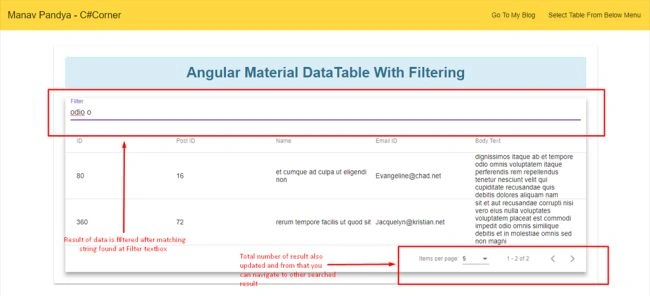
This is how we have implemented the filter functionality, isn't it simple? Our next move is to implement the combined example where we are going to include all the functionality like Pagination, Filtering, Sorting, Searching etc.
Combined example of Angular Material Datatable with all the functionalities
To implement this example, we can create a new separate component by executing the below ng command.
- ng g c combined
Now, open the combined.component.html file and replace it with the following code snippet.
- <mat-card>
- <div class="alert alert-info">
- <strong>Combined Angular DataTable Demo With All Functionality</strong>
- </div>
- <div class="example-container mat-elevation-z8">
- <!-- For Filtering -->
- <div class="">
- <mat-form-field style="width: 98%;">
- <input matInput (keyup)="Filter($event.target.value)" placeholder="Filter">
- </mat-form-field>
- </div>
- <mat-table #Table [dataSource]="MyDataSource" matSort>
- <!-- For ID -->
- <ng-container matColumnDef="id">
- <mat-header-cell *matHeaderCellDef mat-sort-header> ID </mat-header-cell>
- <mat-cell *matCellDef="let post"> {{post.id}} </mat-cell>
- </ng-container>
- <!-- For User ID -->
- <ng-container matColumnDef="userId">
- <mat-header-cell *matHeaderCellDef mat-sort-header> User ID </mat-header-cell>
- <mat-cell *matCellDef="let post"> {{post.userId}} </mat-cell>
- </ng-container>
- <!-- For Title -->
- <ng-container matColumnDef="title">
- <mat-header-cell *matHeaderCellDef mat-sort-header> Title </mat-header-cell>
- <mat-cell *matCellDef="let post"> {{post.title}} </mat-cell>
- </ng-container>
- <!-- For Completion Status -->
- <ng-container matColumnDef="completed">
- <mat-header-cell *matHeaderCellDef mat-sort-header> Completion Status</mat-header-cell>
- <mat-cell *matCellDef="let post"> {{post.completed}} </mat-cell>
- </ng-container>
- <mat-header-row *matHeaderRowDef="displayedColumns"></mat-header-row>
- <mat-row *matRowDef="let row; columns: displayedColumns;"></mat-row>
- </mat-table>
- <!-- To paginate between pages with search -->
- <mat-paginator #paginator [pageSize]="10" [pageSizeOptions]="[5, 10, 20]">
- </mat-paginator>
- </div>
- </mat-card>
This HTML file contains all of the code which is used to implement the datatable with all the functionalities.
Since this is a combined example of what we did previously, I'm not going to explain again about that, it's just like a wrapping up all the example covered in this two-part of series.
Now, open combined.component.ts file and replace with the following code snippet.
- import { Component, OnInit ,ViewChild} from '@angular/core';
- import { MatTableDataSource,MatPaginator,MatSort } from '@angular/material';
- import { DataServiceService } from '../service/data-service.service';
- import { BehaviorSubject } from 'rxjs/BehaviorSubject';
- import { Observable } from 'rxjs/Observable';
- @Component({
- selector: 'app-combined',
- templateUrl: './combined.component.html',
- styleUrls: ['./combined.component.css']
- })
- export class CombinedComponent implements OnInit {
- MyDataSource: any;
- displayedColumns = ['id', 'userId','title','completed'];
- @ViewChild(MatPaginator) paginator: MatPaginator;
- @ViewChild(MatSort) sort: MatSort;
- constructor(public dataService: DataServiceService) { }
- ngOnInit() {
- this.RenderDataTable();
- }
- RenderDataTable() {
- this.dataService.GetAllTodos()
- .subscribe(
- res => {
- this.MyDataSource = new MatTableDataSource();
- this.MyDataSource.data = res;
- this.MyDataSource.sort = this.sort;
- this.MyDataSource.paginator = this.paginator;
- console.log(this.MyDataSource.data);
- },
- error => {
- console.log('There was an error while retrieving Todos !!!' + error);
- });
- }
- Filter(searchstring:string)
- {
- searchstring = searchstring.trim();
- searchstring = searchstring.toLowerCase();
- this.MyDataSource.filter = searchstring;
- }
- }
It contains the all necessary code used for a different operation like Pagination, Filtering, Sorting etc.
For populating data table with the records, using the following Rest API.
https://jsonplaceholder.typicode.com/todos
To populate the data, we are going to call a method which is used to get the list of todos and then we will populate all those records into the data table.
For that open data-service.service.ts file and add additional method.
- // To fill the Datatable with Todos [Dummy Data]
- public GetAllTodos() {
- return this.http.get(this._baseUrl + 'todos')
- .map((res: Response) => {
- return res.json();
- })
- .catch(this.handleError);
- }
We are done with our example, now let's quickly run our example and see the complete and full fledged working Angular Material Datatable with different functionalities.
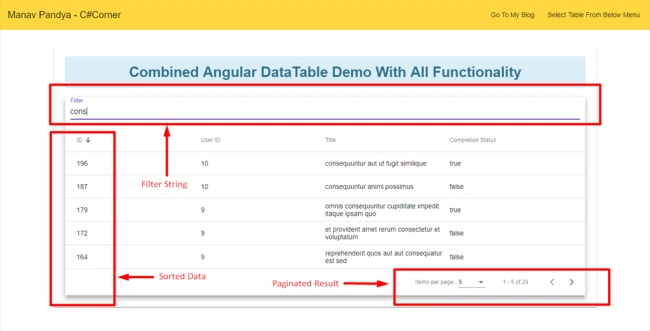
As you can see in the above figure, all the basic features were implemented.
Conclusion
In this part of the article, we have implemented filtering which contains all of the possible functionalities like Pagination, Filtering, Sorting etc.
Angular Material Datatable is a very effective and handy tool and it's pretty easy to implement such kind of different functionalities and can also provide different styles as per the requirement. I would recommend you to download the source code and implement it on your own.
Thanks for reading.
Laxmidhar SahooPosted Nov 13, 2018, 1:34 AM
Thanks for a good naration
EMMANUEL OKELLOPosted Oct 25, 2018, 8:01 AM
Great, thanks, exactly what I was looking for. May you please demonstrate how to add debounceTime and distinctUntilChanged to avoid rapidly hitting the backend.