

DATAFRAME ATTRIBUTES
In my previous article, we learned what a DataFrame is and how to create one. Refer to my previous article.
Now we will move onto "Attributes of DataFrame", which are useful when we want to fetch information related to a particular DataFrame.
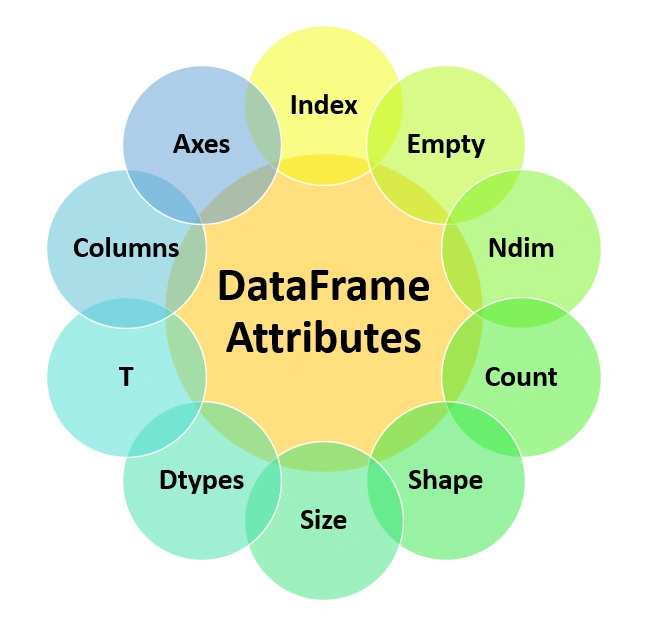
We have 10 Attributes, which are used as follows.
SYNTAX
<DataFrameObject>. <attribute_name>
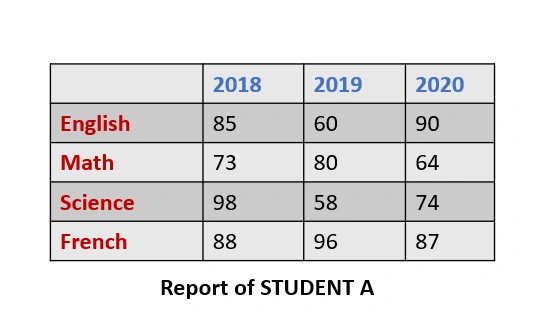
Let us understand all the attributes while considering the below DataFrame as an example,
INDEX
This attribute is used to fetch the index’s names, as the index could be 0,1,2,3 and so on, also it could be some names, as in our example, indexes are: English, Maths, Science, and French.
SYNTAX
<DataFrameObject>. <index>
- import pandas as pd
- dict= {'2018':[85,73,80,64], '2019':[60,80,58,96], '2020':[90,64,74,87] }
- df=pd.DataFrame(dict,index=['English','Math','Science','French'])
- print(df.index)
OUTPUT
Index(['English', 'Math', 'Science', 'French'], dtype='object')
COLUMNS
This attribute is used to fetch the column’s names, as in our case it should give column name as: 2018,2019, 2020
SYNTAX
<DataFrameObject>. <columns>
We use: print (df. columns)
AXES
This attribute is used to fetch both index and column names.
SYNTAX
<DataFrameObject>. <axes>
We use: print (df. axes)
- import pandas as pd
- dict= {'2018':[85,73,80,64], '2019':[60,80,58,96], '2020':[90,64,74,87] }
- df=pd.DataFrame(dict,index=['English','Math','Science','French'])
- print("When we use 'Columns':")
- print(df.columns)
- print("\n")
- print("When we use 'Axes':")
- print(df.axes)
OUTPUT

DTYPES
This attribute is used to fetch the data type values of the items in the DataFrame.
SYNTAX
<DataFrameObject>. <dtypes>
We use: print (df. dtypes)
- import pandas as pd
- dict= {'2018':[85,73,80,64], '2019':[60,80,58,96], '2020':[90,64,74,87] }
- df=pd.DataFrame(dict,index=['English','Math','Science','French'])
- print(df.dtypes)
OUTPUT
2018 int64
2019 int64
2020 int64
dtype: object
SIZE
This attribute is used to fetch the size of the DataFrame, which is the product of the number of rows and columns.
Here, in our example we have 4 rows and 3 columns, so 4*3 i.e. 12 is the size of our DataFrame.
SYNTAX
<DataFrameObject>. <size>
We use: print (df. size)
SHAPE
This attribute also gives you the size but it also mentions its shape, i.e. the number of rows and number of columns
SYNTAX
<DataFrameObject>. <shape>
We use: print (df. shape)
NDIM
This attribute is used to fetch the dimension of the given DataFrame. Like if it is 1-D, 2-D, or 3-D.
We are working on 2-D Data Structure.
SYNTAX
<DataFrameObject>. <ndim>
We use: print (df. ndim)
- import pandas as pd
- dict= {'2018':[85,73,80,64], '2019':[60,80,58,96], '2020':[90,64,74,87] }
- df=pd.DataFrame(dict,index=['English','Math','Science','French'])
- print("Size of the DataFrame is:",df.size)
- print("Shape of the DataFrame is:",df.shape)
- print("Dimension of the DataFrame is:",df.ndim)

EMPTY
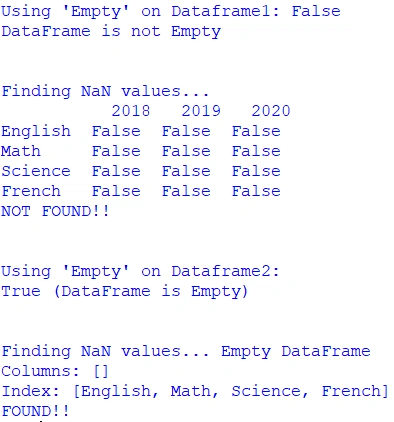
This attribute gives you a Boolean output in the form of true or false, by which we can find if there any emptiness of the DataFrame.
SYNTAX
<DataFrameObject>. <empty>
We have another attribute that can check the presence of NANs (Not a Number).
SYNTAX
<DataFrameObject>. <isna()>
- import pandas as pd
- import numpy as np
- dict= {'2018':[85,73,80,64], '2019':[60,80,58,96], '2020':[90,60,74,87] }
- df1=pd.DataFrame(dict,index=['English','Math','Science','French'])
- print("Using 'Empty' on Dataframe1:",df1.empty)
- print('DataFrame is not Empty')
- print('\n')
- print('Finding NaN values... ','\n',df1.isna())
- print('NOT FOUND!!')
- print('\n')
- df2=pd.DataFrame(index=['English','Math','Science','French'])
- print("Using 'Empty' on Dataframe2:")
- print(df2.empty,'(DataFrame is Empty)')
- print('\n')
- print('Finding NaN values...',df2.isna())
- print('FOUND!!')
OUTPUT
COUNT
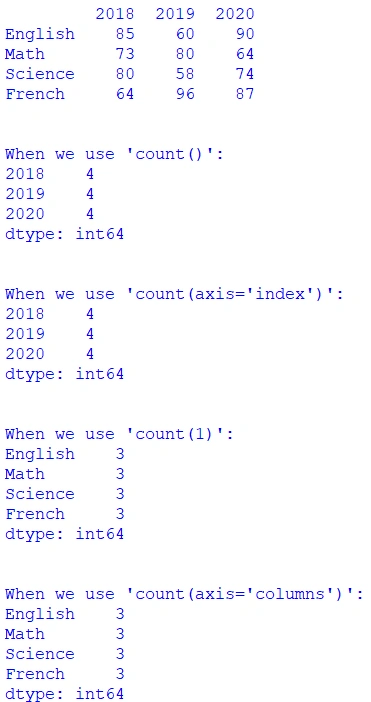
This attribute gives the count of the items in the DataFrame. By default, it gives the count of the rows.
We can set count (0) or count (1), 0 is for displaying the count of rows (this is by default) and 1 is for displaying the count of columns.
Instead, we can use axis='index' or axis=’columns’
SYNTAX
<DataFrameObject>. <count ()>
- import pandas as pd
- dict= {'2018':[85,73,80,64], '2019':[60,80,58,96], '2020':[90,64,74,87] }
- df=pd.DataFrame(dict,index=['English','Math','Science','French'])
- print(df)
- print('\n')
- print("When we use 'count()':")
- print(df.count())
- print('\n')
- print("When we use 'count(axis='index')':")
- print(df.count(axis='index'))
- print('\n')
- print("When we use 'count(1)':")
- print(df.count(1))
- print('\n')
- print("When we use 'count(axis='columns')':")
- print(df.count(axis='columns'))
OUTPUT
T
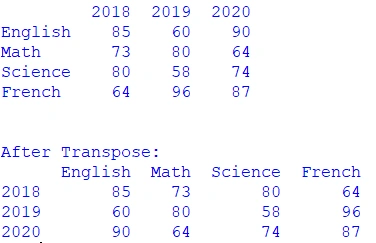
This attribute is used to transpose the DataFrame; i.e., rows becomes columns and columns become rows.
SYNTAX
<DataFrameObject>. <T>
- import pandas as pd
- dict= {'2018':[85,73,80,64], '2019':[60,80,58,96], '2020':[90,64,74,87] }
- df=pd.DataFrame(dict,index=['English','Math','Science','French'])
- print(df)
- print('\n')
- df1=df.T
- print("After Transpose:")
- print(df1)
OUTPUT
Summary
In this article, we learned about 10 dataframe attributes, their uses, and their implementation. Going forward you will become a pro in Pandas. Practice hard!
In my next article, we will learn about “How to Access data in DataFrames”.
Feedback or queries related to this article are most welcome.
Thanks for reading.
Join the conversation! Your thoughts help the community grow.