

Silverlight is a new cross-browser, cross-platform implementation of the .NET Framework for building and delivering the next generation of media experiences and Rich Interactive Applications(RIA) for the web. It runs in all popular browsers, including Microsoft Internet Explorer, Mozilla Firefox, Apple Safari, Opera. The plugin required to run Silverlight is very small in size hence gets installed very quickly.
It is combination of different technolgoies into a single development platform that allows you to select tools and the programming language you want to use. Silverlight integrates seamlessly with your existing Javascript and ASP.NET AJAX code to complement functionality which you have already created.
Silverlight aims to compete with Adobe Flash and the presentation components of Ajax. It also competes with Sun Microsystems' JavaFX, which was launched a few days after Silverlight.
In this article I m going to discuss how to do database connectivity and show data in DataGrid using Silverlight Enables Web Service.
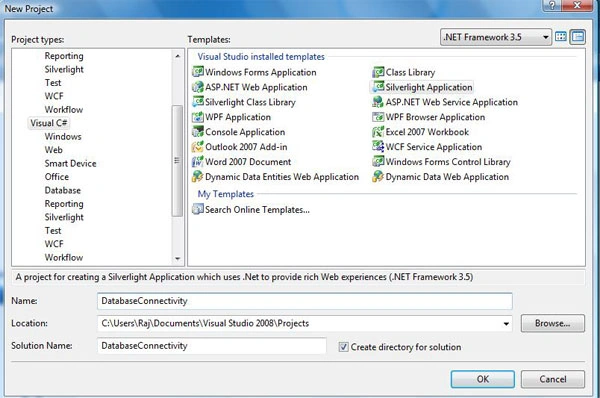
As you all know just create a new project using Silverlight Application.
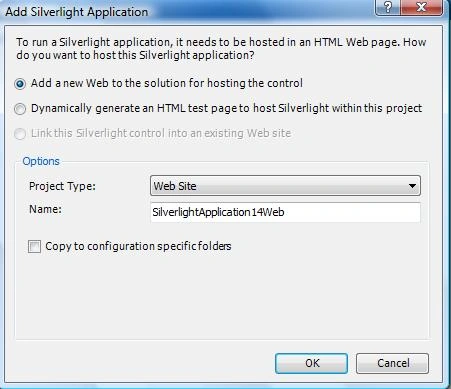
And by default "Add a new Web to the solution for hosting the control" radio button is checked. And click OK.
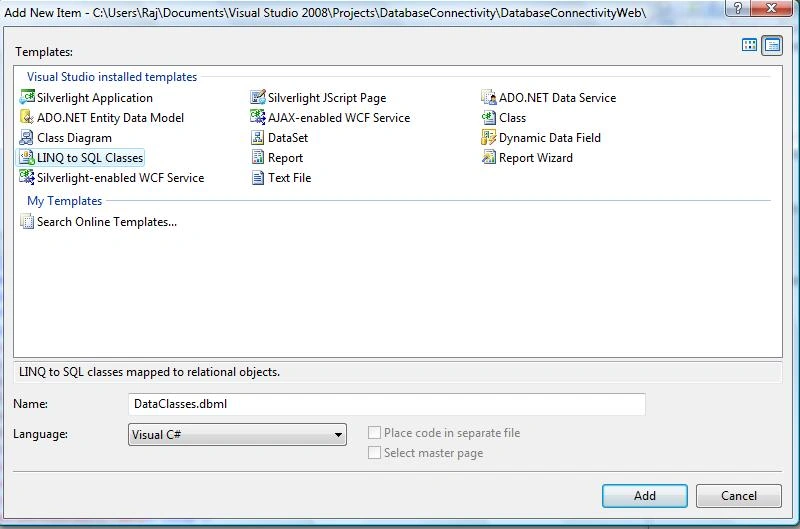
Add a new LINQ to SQL class in App_Code folder.
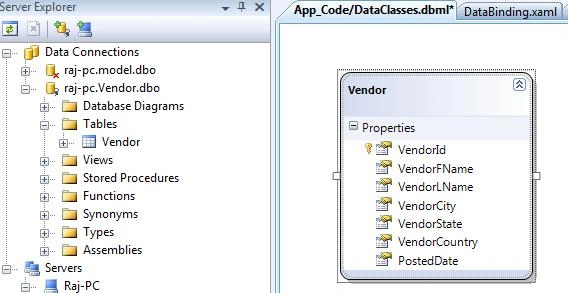
And using server explorer drag and drop your table in DataClass. And you will see like this.
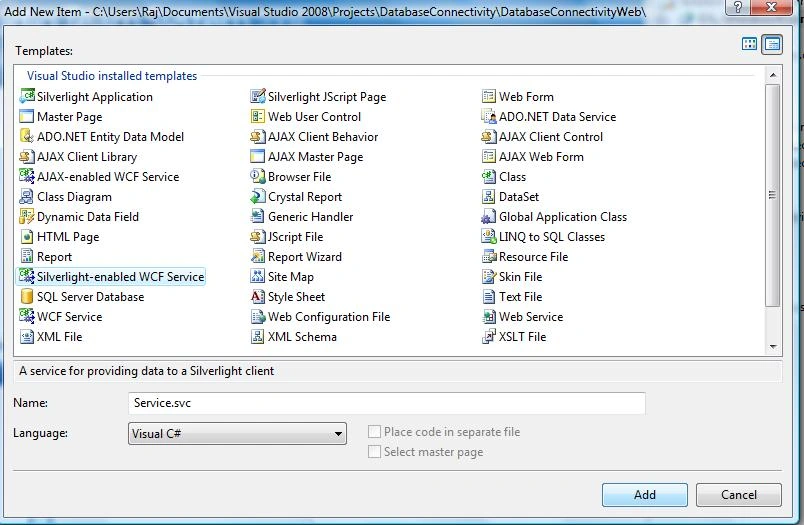
Now add a new Silverlight-enabled WCF Service in Web Project.
Now let's write some code on Service.cs. I am wriring all code here
using System;
using System.Linq;
using System.Runtime.Serialization;
using System.ServiceModel;
using System.ServiceModel.Activation;
using System.Collections.Generic;
using System.Text;
[ServiceContract(Namespace = "")]
[AspNetCompatibilityRequirements(RequirementsMode = AspNetCompatibilityRequirementsMode.Allowed)]
public class Service
{
[OperationContract]
public List<Vendor> GetVendors()
{
DataClassesDataContext db = new DataClassesDataContext();
var mVendors = from vendor in db.Vendors
select vendor;
return mVendors.ToList();
}
}
I am fetching all data from my Vendor table. You can put your condition according to your requirment.
NOTE - I am putting my database file in APP_Data folder. If you want use my Vendot data.
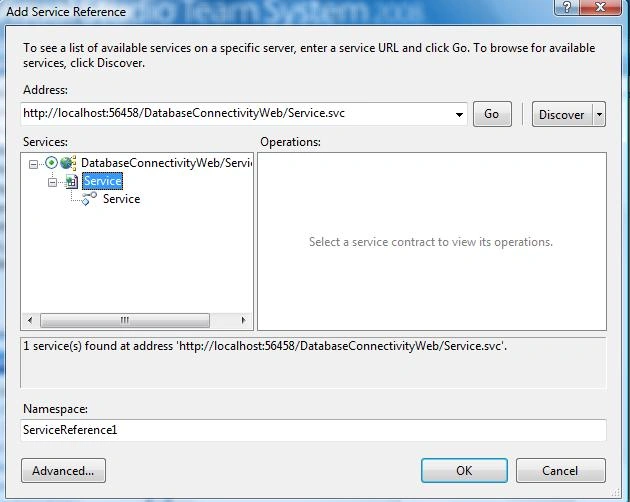
Now add service reference in References folder.
Now let's drag and drop DataGrid on Page.xaml, and bind data using DisplayMemberBinding property.
<UserControl xmlns:my="clr-namespace:System.Windows.Controls;assembly=System.Windows.Controls.Data" x:Class="DatabaseConnectivity.Page"
xmlns="http://schemas.microsoft.com/winfx/2006/xaml/presentation"
xmlns:x="http://schemas.microsoft.com/winfx/2006/xaml"
Width="800" Height="300" Loaded="UserControl_Loaded">
<Grid x:Name="LayoutRoot" Background="White" ShowGridLines="True">
<Grid.RowDefinitions>
<RowDefinition Height="*" />
</Grid.RowDefinitions>
<Grid.ColumnDefinitions>
<ColumnDefinition Width="*" />
</Grid.ColumnDefinitions>
<my:DataGrid x:Name="VendorDataGrid" AlternatingRowBackground="Beige"
AutoGenerateColumns="False"
Width="800" Height="300"
Grid.Row="1" Grid.Column="1"
CanUserResizeColumns="True">
<my:DataGrid.Columns>
<my:DataGridTextColumn Header="VendorId" Width="50" DisplayMemberBinding="{Binding VendorId}" FontSize="11" />
<my:DataGridTextColumn Header="First Name" Width="120" DisplayMemberBinding="{Binding VendorFName}" FontSize="11" />
<my:DataGridTextColumn Header="Last Name" Width="120" DisplayMemberBinding="{Binding VendorLName}" FontSize="11" />
<my:DataGridTextColumn Header="City" Width="120" DisplayMemberBinding="{Binding VendorCity}" FontSize="11" />
<my:DataGridTextColumn Header="State" Width="120" DisplayMemberBinding="{Binding VendorState}" FontSize="11" />
<my:DataGridTextColumn Header="Country" Width="120" DisplayMemberBinding="{Binding VendorCountry}" FontSize="11" />
<my:DataGridTextColumn Header="Join Date" Width="120" DisplayMemberBinding="{Binding PostedDate}" FontSize="11" />
</my:DataGrid.Columns>
</my:DataGrid>
</Grid>
</UserControl>
And this code on Page.xaml.cs
private void UserControl_Loaded(object sender, RoutedEventArgs e)
{
ServiceReference1.ServiceClient webService = new ServiceReference1.ServiceClient();
webService.GetVendorsCompleted += new EventHandler<DatabaseConnectivity.ServiceReference1.GetVendorsCompletedEventArgs>(webService_GetVendorsCompleted);
webService.GetVendorsAsync();
}
void webService_GetVendorsCompleted(Object sender, ServiceReference1.GetVendorsCompletedEventArgs e)
{
VendorDataGrid.ItemsSource = e.Result; }
Now debug your project and you will get this error message.
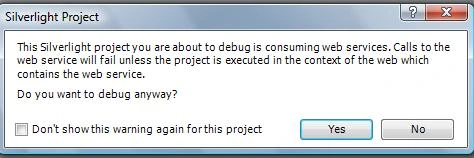
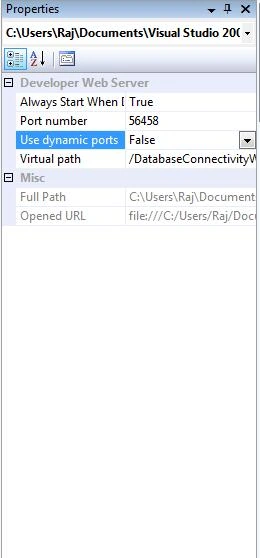
For remove this error message you need to go in propery of Web Project and Do "Use Dyanamic Ports = False".
And now set Web Project as startup project and TestPage as set as start page. And debug now. Result will look like this.
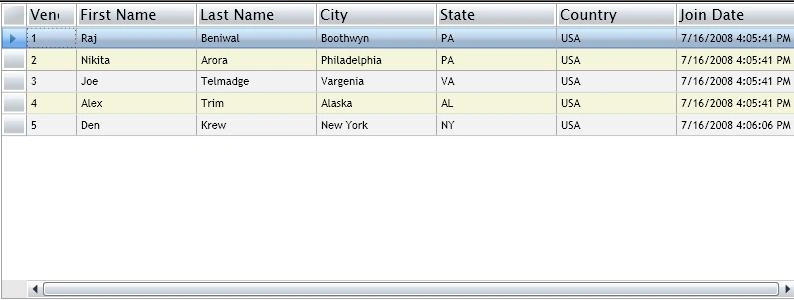
For more information I am attaching my project with database. Database is in App_Data folder. If you have any question or queries then mail me or comment me using c-sharcorner comment section.
Lalit ThawranieditedPosted Nov 24, 2010, 9:02 AMEdited Nov 24, 2010, 9:21 AM
I want to validate username & password in my 'login form' from the database.i am using SQL server 2008 and silverlight 4.Please tell me how to do that... i am getting an error while adding a service reference: "System.InvalidOperationException: The type 'Scragil.Web.Service1', provided as the Service attribute value in the ServiceHost directive, or provided in the configuration element system.serviceModel/serviceHostingEnvironment/serviceActivations could not be found"
Apurv SamantPosted Jul 29, 2010, 9:32 AM
Hi, I am getting errors in my code. Please help. namespace ApurvHSamantPlanktonprogf500 { public partial class Page : UserControl { public Page() { InitializeComponent(); } private void UserControl_Loaded(object sender, RoutedEventArgs e) { ServiceReference1.ServiceClient webService = new ServiceReference1.ServiceClient(); webService.GetaaSpeciesListsCompleted += new EventHandler<ApurvHSamantPlanktonprogf500.ServiceReference1.GetaaSpeciesListsCompletedEventArgs>(webService_GetaaSpeciesListsCompleted); webService.GetaaSpeciesListsAsync(); } void webService_GetaaSpeciesListsCompleted(Object sender, ServiceReference1.GetaaSpeciesListsCompletedEventArgs e) { grdData.ItemsSource = e.Result; } } The places in bold are the once wherein I am getting errors. Thanking you.
Chris JonesPosted Apr 17, 2010, 11:16 AM
Nice example Raj - really useful and easy to follow. I'm using VWD 2010 Beta so had to change DisplayMemberBinding -> Binding I also got sa is not a trusted user when trying to access the Vendor database. I eventually got round this by using the MS Web Platform Installer to install MS SQL Server 2008 along with its Management tool, attached your DB, added myself as a user, created the ConnectionString using a Test.udl on my Desktop and replacing the one in the WebConfig file with that.
sree vaniPosted Jul 2, 2009, 8:36 AM
how to edit and save in the datagrid to the service
Milind GokhalePosted Feb 24, 2009, 12:42 PM
Hey i tried the given solution in this article. But this is only ofr database retirieval. I would like to know how to do add delete and modify operations in database and also commit the changes. I got many solutions on internet. But htey're very complex. I expect something much simple like this one for retireval is... Please help....