

Introduction
Data Validation, in an ASP.NET site you can easily implement the Data Validation using the Validation options like Required Field Validator, Range Validator so and so forth. So the basic question that comes to our mind is that can we achieve that in Silverlight 3. The answer is yes. In this article you will se how we can validate the user input.
Creating Silverlight Project
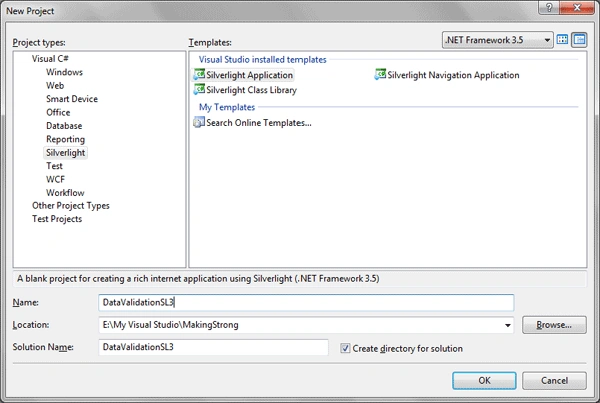
Fire up Visual Studio 2008 and create a Silverlight Application. Name it as DataValidationSL3.
To make the application look good I am going to design it in Blend 3, don't worry this will be a simple design.
- Open the Solution in Blend 3.
- Add few TextBlocks, TextBoxes.
The MainPage.xaml will look like as follows: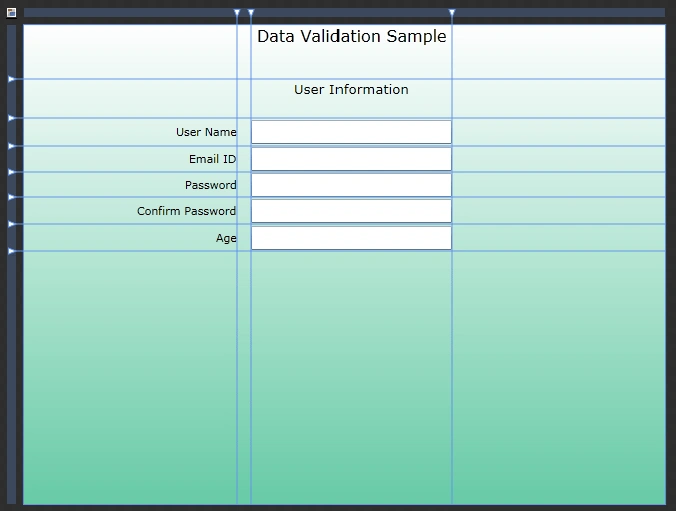
As you see from the above figure, I have 3 text boxes for User Name, Email ID, and Age. I have 2 Password Boxes for Password and confirm Password. All arefor User Input.
Now design part is done open the solution in Visual Studio Again. Here is the Xaml Code after designing.
<Grid x:Name="LayoutRoot"><Grid.RowDefinitions>
<RowDefinition Height="0.112*"/>
<RowDefinition Height="0.081*"/>
<RowDefinition Height="0.058*"/>
<RowDefinition Height="0.054*"/>
<RowDefinition Height="0.052*"/>
<RowDefinition Height="0.056*"/>
<RowDefinition Height="0.056*"/>
<RowDefinition Height="0.529*"/>
</Grid.RowDefinitions>
<Grid.ColumnDefinitions>
<ColumnDefinition Width="0.333*"/>
<ColumnDefinition Width="0.022*"/>
<ColumnDefinition Width="0.312*"/>
<ColumnDefinition Width="0.333*"/>
</Grid.ColumnDefinitions>
<Grid.Background>
<LinearGradientBrush EndPoint="0.5,1" StartPoint="0.5,0">
<GradientStop Color="#FF67CBA7" Offset="1"/>
<GradientStop Color="White"/>
</LinearGradientBrush>
</Grid.Background>
<TextBlock Text="User Name" TextWrapping="Wrap" Margin="0" Grid.Row="2" HorizontalAlignment="Right" VerticalAlignment="Center"/>
<TextBlock HorizontalAlignment="Right" Margin="0" VerticalAlignment="Center" Grid.Row="3" Text="Email ID" TextWrapping="Wrap"/>
<TextBlock HorizontalAlignment="Right" Margin="0" VerticalAlignment="Center" Grid.Row="4" Text="Password" TextWrapping="Wrap"/>
<TextBlock HorizontalAlignment="Right" Margin="0" VerticalAlignment="Center" Grid.Row="5" Text="Confirm Password" TextWrapping="Wrap"/>
<TextBlock HorizontalAlignment="Right" Margin="0" VerticalAlignment="Center" Grid.Row="6" Text="Age" TextWrapping="Wrap"/>
<TextBox x:Name="txtUserName" TextWrapping="Wrap" Margin="0" Grid.Column="2" Grid.Row="2" d:LayoutOverrides="Height" VerticalAlignment="Center"/>
<TextBox x:Name="txtEmailID" Margin="0" VerticalAlignment="Center" Grid.Column="2" Grid.Row="3" TextWrapping="Wrap"/>
<TextBox x:Name="txtAge" Margin="0" VerticalAlignment="Center" Grid.Column="2" Grid.Row="6" TextWrapping="Wrap"/>
<PasswordBox x:Name="txtPass" Margin="0" Grid.Column="2" Grid.Row="4" d:LayoutOverrides="Height" VerticalAlignment="Center"/>
<PasswordBox x:Name="txtPassConf" Margin="0" VerticalAlignment="Center" Grid.Column="2" Grid.Row="5"/>
<TextBlock HorizontalAlignment="Center" VerticalAlignment="Top" Text="Data Validation Sample" TextWrapping="Wrap" Grid.Column="2" FontSize="16"/>
<TextBlock HorizontalAlignment="Center" VerticalAlignment="Top" Grid.Column="2" FontSize="13.333" Text="User Information" TextWrapping="Wrap" Grid.Row="1"/>
</Grid> - Now we will add a class to the Silverlight Project and Name is UserInfo.cs
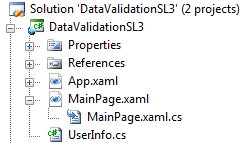
- We will implement INotifyPropertyChanged interface to view the notifications.
- Add a method that can notify when there is a property change.
private void RaisePropertyChanged(string propertyName)
{
if (this.PropertyChanged != null)
{
this.PropertyChanged(this, new PropertyChangedEventArgs(propertyName));
}
}
- Add properties and required logic to validate the user input.
#region UserName
private string _UserName;
public string UserName
{
get { return _UserName; }
set
{
if (value.Length < 6)
{
throw new ArgumentException("User Name should contain atleast 6 chars");
}
_UserName = value;
RaisePropertyChanged("UserName");
}
}
#endregion
#region EmailID
private string _EmailID;
public string EmailID
{
get { return _EmailID; }
set
{
string emailId = value.ToString();
if (!emailId.Contains("@") && !emailId.Contains("."))
{
throw new ArgumentException("Email ID is Invalid");
}
_EmailID = value;
RaisePropertyChanged("EmailID");
}
}
#endregion
#region Password
private string _Password;
public string Password
{
get { return _Password; }
set { _Password = value; }
}
#endregion
#region PasswordCon
private string _PasswordCon;
public string PasswordCon
{
get { return _PasswordCon; }
set
{
if (value!=PasswordCon)
{
throw new ArgumentException("Type Same Password");
}
_PasswordCon = value;
RaisePropertyChanged("PasswordCon");
}
}
#endregion
#region Age
private string _Age;
public string Age
{
get { return _Age; }
set
{
if (Convert.ToInt32(value) < 18 || Convert.ToInt32(value)>40)
{
throw new ArgumentException("Your Age must be in the Range 18 ~ 40");
}
_Age = value;
RaisePropertyChanged("Age");
}
}
#endregion
- Now time to bind these properties with the Xaml controls we have. Do as following.
<TextBox x:Name="txtUserName" TextWrapping="Wrap" Margin="0" Grid.Column="2" Grid.Row="2" d:LayoutOverrides="Height" VerticalAlignment="Center">
<TextBox.Text>
<Binding Mode="TwoWay" Path="UserName" NotifyOnValidationError="True" ValidatesOnExceptions="True"/>
</TextBox.Text>
</TextBox>
<TextBox x:Name="txtEmailID" Margin="0" VerticalAlignment="Center" Grid.Column="2" Grid.Row="3" TextWrapping="Wrap">
<TextBox.Text>
<Binding Mode="TwoWay" Path="EmailID" NotifyOnValidationError="True" ValidatesOnExceptions="True"/>
</TextBox.Text>
</TextBox>
<TextBox x:Name="txtAge" Margin="0" VerticalAlignment="Center" Grid.Column="2" Grid.Row="6" TextWrapping="Wrap">
<TextBox.Text>
<Binding Mode="TwoWay" Path="Age" NotifyOnValidationError="True" ValidatesOnExceptions="True"/>
</TextBox.Text>
</TextBox>
<PasswordBox x:Name="txtPassConf" Margin="0" VerticalAlignment="Center" Grid.Column="2" Grid.Row="5">
<PasswordBox.Password>
<Binding Mode="TwoWay" Path="PasswordCon" NotifyOnValidationError="True" ValidatesOnExceptions="True"/>
</PasswordBox.Password>
</PasswordBox>
- Now add the instance of the UserInfo class to the DataContext of the LayoutRoot Grid in MainPage.xaml.cs.
UserInfo info = new UserInfo();
LayoutRoot.DataContext = info;
You will see the error messages that you have provided in the properties in a red box which can be shown when you mouse hover onto it.
The following error messages will be thrown when there is an error with the user input.
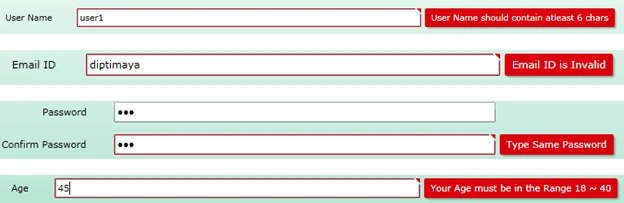
These are the error messages when you mouse over the red flag on the top right corner of the input.
The following figure displays when nothing is hovered.
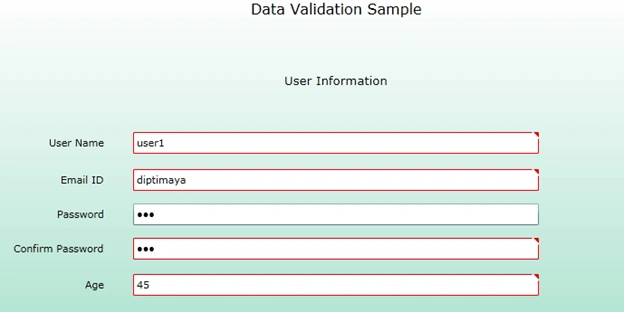
That's it. We have successfully imlemented input validation in Silverlight 3.
Enjoy Coding!
Riddhi ValechaPosted Nov 24, 2012, 3:54 AM
HI...Thanks a lot for this validation example.... It really helped me out!! Please help me in my Silverlight and LINQ-To-SQL Class requirement: I have to execute the following: 1)select Max(ID) from Tbl_Mgmt where Username='abc' 2)THe id must be stored in the variable(say int id); 3)update Tbl_mgtm set outtime=Datetime.now.tostring() where ID=id && Username='abc' --- I have the update and max(ID) queries in LINQ. But, how to implement this using events and listeners in silverlight ?? Thanks in advance !!
NITIN KUMAR BASWANPosted Jun 14, 2012, 5:03 AM
for mail id validation it not working. for eg. if user even enter mailID: "@", it accepts that as well. So, acc to me for mailID code should be : public string EmailID { get {return _emailID;} set { System.Text.RegularExpressions.Regex r = new System.Text.RegularExpressions.Regex(@"[a-z0-9!#$%&'*+/=?^_`{|}~-]+(?:\.[a-z0-9!#$%&'*+/=?^_`{|}~-]+)*@(?:[a-z0-9](?:[a-z0-9-]*[a-z0-9])?\.)+[a-z0-9](?:[a-z0-9-]*[a-z0-9])?"); if (!r.IsMatch(value)) { throw new ArgumentException("A valid EmailID is required"); } _emailID = value; } }
sreelakshmi polavarapuPosted Nov 4, 2011, 2:27 AM
My Requirement is Create Silverligtapplication which is connected to a database.When the user logs in it should checked with the database whether the user ix existing r not and if not give error.New user registers into the site The data should be stored in the database. I have refered many sites but I did not get the exact way.Please help me.Kindly mention the steps.Please Thankyou
archana rajendranPosted Feb 7, 2011, 12:59 AM
There is a problem in running the code u have given ,it runs successfully sometimes and at sometimes it gives a run time error as exception unhandled by usercode just below the line where validation condition is checked . wats the solution for this problem
Thirmal ReddyPosted Dec 14, 2010, 1:46 AM
Thanks Posting Article. In this i have one issue. when i run the application with F5 and then entered wrong data in name text box and loosing the focus from that text box then it is throughing an error. But when i run application with Ctrl+F5 it working fine what could be the reason can you explain?
sai sarathPosted Nov 8, 2010, 7:15 AM
Dear Diptimaya, firstly thank you,your example is healped a lot for me. and in my app i haveto work with iccomand from my viewmodel. now i can able to do with button click,but my req is work with icommands. can you please suggest me any idea to do this.
ali asgarPosted Dec 28, 2009, 8:50 AM
when i add the validation class i get this error Error 1 'demotestsilverlight.Class1' does not implement interface member 'System.ComponentModel.INotifyPropertyChanged.PropertyChanged' D:\demotestsilverlight\demotestsilverlight\Class1.cs 15 18 demotestsilverlight can u help me wuth this
Navin KumarPosted Jul 28, 2009, 5:43 AM
hellow friend i have to do these validation when the datagrid is assigned to the same layoutroot or static panel where ever the textboxes are located in my application i have two static panels namely gridstaticpanel and exitstaticpanel in geidstaticpanel i have datagrid and in editstaticpanel i have the textboxes for the corresponding fields when i select a record in datagrid it will appear in the corresponding textboxes these thing are as usual in project what i need is when i suppose to edit those records in textboxes it should show the validation error or warning same as that you have described Data Validation in Silverlight 3 ok please teel me how can i do so
Navin KumarPosted Jul 27, 2009, 1:28 AM
hello friend i cant use the userinfo.cs class i have followed the step that u have described but this thing doesn't works weather i have to update my silverlight version what is the version name that you are using please send me the details everything i did what you have did but for me this doesn't works what will be the mistake