

Automation often needs more than just nodes and triggers; it needs a place to store and manage data across workflows. That’s exactly why n8n introduced Data Tables 🗂️, a lightweight database built right into the platform.
In this article, let’s break down What, Where, When, Why, and How to use Data Tables, along with their pros, cons, examples, limitations, and prerequisites.
What are Data Tables in n8n?
Data Tables are built-in structured storage inside n8n.
Think of them as a mini-database where you can:
Save records across workflows
Query and update data easily
Avoid the hassle of managing an external DB
Where can you use them?
In workflows, as a shared state
For lead management across automations
In AI workflows, to store conversation history or embeddings
As a mini CRM or log tracker inside n8n
When should you use Data Tables?
When you need data persistence beyond a single execution
When you want a lookup table (e.g., product SKUs, promo codes)
When prototyping fast without setting up SQL/Mongo
When you want to log results centrally for reports
Examples
Lead management → Store scraped leads and update their status as workflows progress.
Temporary state tracking → Keep intermediate results like tokens, logs, or workflow checkpoints.
Configuration management → Save API keys, mapping rules, or campaign metadata.
Batch processing → Store records to process later in smaller chunks.
Why use Data Tables?
Zero setup – no extra infra
Accessible across multiple workflows
Lightweight but powerful for small to medium use cases
Perfect for rapid prototyping & internal tools
Avoid dependency on external databases for small to medium data.
Simplify state management (no more storing values in Google Sheets just to pass data around).
How to use Data Tables in n8n?
Navigate to Resources → Data Tables
Create a new table with schema (e.g.,
id, name, email)Use the Data Table node in workflows:
Insert, Update, and Delete records
Query & filter data
Connect to Gmail, Slack, Twilio, or AI nodes
Pros
Native feature (no DB required)
Easy to manage & share across workflows
Good for prototyping & automation logs
Reduces dependency on external services
Cons
Limited compared to SQL/Mongo (no joins, no complex queries)
Not ideal for very large datasets
Still evolving (new feature in n8n)
Examples
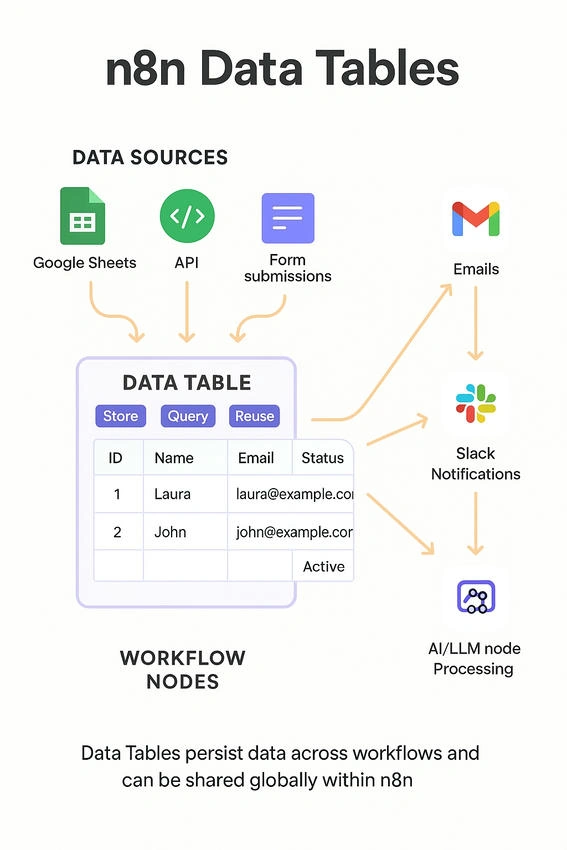
CRM Lite → Collect leads from Google Sheets → Store in Data Table → Send follow-up emails.
AI Context Storage → Save chat history → Feed into AI node → Continue conversation seamlessly.
Notification Tracker → Store all email/SMS sent logs → Use later for reports.
Limitations
Not built for heavy transactional apps
No advanced features like triggers/indexes
Suitable mostly for small to medium workflow data
Setup & Access
Available in the n8n UI (left sidebar).
Works both in n8n Cloud and self-hosted setups.
Multiple workflows can use the same table.
Data persists across executions until explicitly deleted.
Prerequisites
The latest version of n8n is installed
Basic knowledge of nodes & JSON mapping
An automation use case needing shared data
Security & Access Control
In n8n Cloud, only your workspace/team can access Data Tables.
In self-hosted setups, access is limited to your instance.
Use environment variables or secrets for sensitive configs instead of storing in Data Tables.
Join the conversation! Your thoughts help the community grow.