

To understand a data table, you must first understand data rows and data columns. The DataColumnCollection type returns a collection of columns that can be accessed through the Columns property of the DataTable. The DataColumnCollection object represents a collection of columns attached to a data table. You add a data column to the DataColumnCollection using its Add method. The DataColumn object represents a column of a DataTable. For example, say you want to create a customer table that consists of three columns: ID, Address, and Name. You create three DataColumn objects and these columns to the DataColumnCollection using the DataTable.Column.Add method.
|
PROPERTY
|
DESCRIPTION
|
|
AllowDBNull
|
Both read and write, represent if the column can store null values or not
|
|
AutoIncrement
|
Represent if the column's value is auto increment or not
|
|
AutoIncrementSeed
|
Starting value of auto increment, applicable when AutoIncrement is true
|
|
AutoIncrementStep
|
Indicates the increment value
|
|
Caption
|
Caption of the column
|
|
ColumnMapping
|
Represent the MappingType of the column
|
|
ColumnName
|
Name of the column
|
|
DataType
|
Data type stored by the column
|
|
DefaultValue
|
Default value of the column
|
|
Expression
|
Represents the expression used to filter rows, calculate values, and so on
|
|
MaxLength
|
Represents maximum length of a text column
|
|
ReadOnly
|
Represents if a column is read-only or not
|
|
Unique
|
Indicates whether the values in a column must be unique or not
|
- public DataColumn();
- DataColumn dtColumn = new DataColumn();
- public DataColumn(string);
- // Create a quality column
- DataColumn qtCol= new DataColumn("Quantity);
- public DataColumn(string, Type, string);
- public DataColumn (string, Type);
- System.Type myDataType;
- myDataType = System.Type.GetType("System.String");
- DataColumn dtColumn = new DataColumn("Name", myDataType);
- Public DataColumn(string,Type, string, MappingType);
- // Creating an expression
- string strExpr = "price * Quantity";
- // Create a Total column, which is the result of Price*Quantity
- DataColumn totCol = new DataColumn("Total", myDataType, strExpr, MappingType.Attribute);
- private void dcConstructorsTest() {
- // Create customers table
- DataTable custTable = new DataTable("Customers");
- DataSet dtSet = new DataSet();
- // Create Price column
- System.Type myDataType;
- myDataType = System.Type.GetType("System.Int32");
- DataColumn priceCol = new DataColumn("price", myDataType);
- priceCol.Caption = "Price";
- custTable.Columns.Add(priceCol);
- // Create Quantity column
- DataColumn qtCol = new DataColumn();
- qtCol.ColumnName = "Quantity";
- qtCol.DataType = System.Type.GetType("System.Int32");
- qtCol.Caption = "Quantity";
- custTable.Columns.Add(qtCol);
- // Creating an expression
- string strExpr = "Price * Quantity";
- // Create Total Column, which is result of Price*Quantity
- DataColumn totCol = new DataColumn("Total", myDataType, strExpr, MappingType.Attribute);
- totCol.Caption = "Total";
- // Add Name column to the table.
- custTable.Columns.Add(totCol);
- // Add cust table to Dataset
- dtSet.Tables.Add(custTable);
- // Bind dataset to the data grid
- dataGrid1.SetDataBinding(dtSet, "Customers");
- }
- //Create ID Column
- DataColumn IdCol = new DataColumn();
- IdCol.ColumnName = "ID";
- IDCol.DataType = Type.GetType("System.Int32");
- IdCol.ReadOnly = true;
- IdCol.AllowDBNull = false;
- IdCol.Unique = true;
- IdCol.AutoIncrement = true;
- IdCol.AutoIncrementSeed = 1;
- IdCol.AutoIncrementStep = 1;
- // Make the ID column the primary key column.
- DataColumn[] PrimaryKeyColumns= new DataColumn[1];
- PrimaryKeyColumn [0] = custTable.Columns["ID"];
- custTable.PrimaryKey = PrimarykeyColumns;
- // Create a new DataTable
- DataTable custTable = new DataTable("Customers");
- // Create ID column
- DataColumn IdCol = new DataColumn();
- // Set column properties
- custTable.Columns.Add(IdCol);
- // Create Name column
- DataColumn nameCol = new DataColumn();
- // Set column properties
- custTable.Columns.Add(nameCol);
- private void CreateCustTable() {
- // Create a new DataTable
- DataTable custTable = new DataTable("customers");
- // Create ID column
- DataColumn IdCol = new DataColumn();
- IdCol.ColumnName = "ID";
- IdCol.DataType = Type.GetType("System.Int32");
- IdCol.ReadOnly = true;
- IdCol.AllowDBNull = false;
- IdCol.Unique = true;
- IdCol.AutoIncrement = true;
- IdCol.AutoIncrementSeed = 1;
- IdCol.AutoIncrementStep = 1;
- custTable.Columns.Add(IdCol);
- // Create Name column
- DataColumn nameCol = new DataColumn();
- nameCol.ColumnName = "Name";
- nameCol.DataType = Type.GetType("System.String");
- custTable.Columns.Add(nameCol);
- // Create Address column
- DataColumn addCol = new DataColumn();
- addCol.ColumnName = " Address";
- addCol.DataType = Type.GetType("System.String");
- custTable.Columns.Add(addCol);
- // Create DOB column
- DataColumn dobCol = new DataColumn();
- dobCol.ColumnName = "DOB";
- dobCol.DataType = Type.GetType("System.DateTime");
- custTable.Columns.Add(dobCol);
- // VAR column
- DataColumn fullTimeCol = new DataColumn();
- fullTimeCol.ColumnName = "VAR";
- fullTimeCol.DataType = Type.GetType("System.Boolean");
- custTable.Columns.Add(fullTimeCol);
- // Make the Id column the primary key column.
- DataColumn[] PrimaryKeyColumns = new DataColumn[1];
- PrimaryKeyColumns[0] = custTable.Columns["ID"];
- custTable.PrimaryKey = PrimaryKeyColumns;
- // Create a dataset
- DataSet ds = new DataSet("Customers");
- // Add Customers table to the dataset
- ds.Tables.Add(custTable);
- // Attach the Dataset to a DataGrid
- dataGrid1.DataSource = ds.DefaultViewManager;
- }
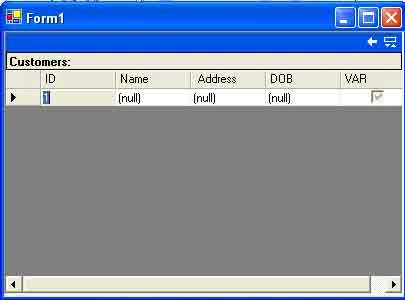
Figure: The output of the listing above
Roy LathamPosted Nov 25, 2015, 5:57 AM
This is the format for creating a DataColumn with the column name and its type:You have: public DataColumn(string, Type, string); Where string is the column name and type is the column data type. This is the format for creating a DataColumn with the column name, its type, and expression: public DataColumn (string, Type); Where the first string is the column name, Type is the data type, and the second string is an expression.
Roy LathamPosted Nov 25, 2015, 5:56 AM
You have: