

Understanding dbt(Data Build Tool) and its Role in ELT Workflows
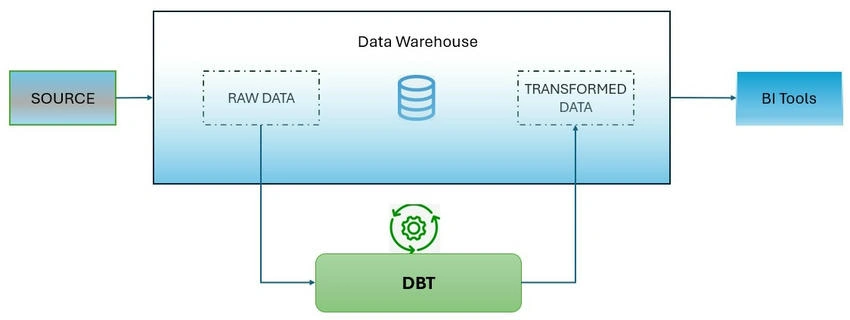
In the ever-evolving world of data engineering, dbt (Data Build Tool) has emerged as a crucial tool for transforming data within data warehouses. Often considered the "T" in the ELT (Extract, Load, Transform) process, dbt empowers data analysts and engineers to effectively manage their data transformation processes. This article delves into dbt's architecture, core functionalities, and the steps involved in setting up and using dbt in a typical data pipeline.
What is dbt?
dbt is a command-line tool that enables data analysts and engineers to transform data within data warehouses using SQL. By running transformations directly in the database, dbt automates the process of turning raw data into analysis-ready datasets. dbt's core function is to compile SQL code and run it against your database, which makes it a highly efficient tool for data transformations.
Key Components of dbt
- Models: SQL queries that define data transformations.
- Tests: Ensure data quality by validating models.
- Snapshots: Track historical changes in data.
- Documentation: Auto-generates documentation for clarity on data processes.
Common materializations include
- View (default): The model is built as a view.
- Table: The model is built as a table.
- Ephemeral: The model is used as a common table expression.
- Incremental: The model is initially built as a table, with incremental updates in subsequent runs.
dbt's Workflow: Command-Line and IDE Support
- Command-Line Interface (CLI): dbt allows users to interact with their data pipeline using the command line. Popular commands include dbt run, dbt test, dbt docs generate, and dbt seed.
- Integrated Development Environment (IDE): dbt Cloud provides a web-based IDE that simplifies orchestrating analytics workflows. The IDE allows users to build, run, test, and version control dbt projects directly in the browser, offering a seamless experience.
Date engineer vs Analytics Engineer vs Data Analyst
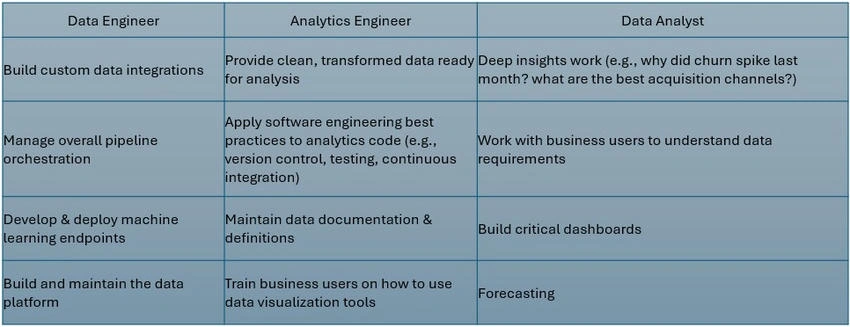
DBT helps Analytics Engineers create models by writing simple SELECT statements without relying on Data Engineers to create views, tables, or stored procedures.
DBT, in turn, generates the necessary SQL code and materializes it as a table or view based on the applied materialization strategy.
Transforming Data with dbt
Once the setup is complete, you can begin transforming data using dbt. Common dbt commands include.
- dbt seed: Loads data from CSV files into the database.
- dbt run: Executes the transformations defined in your models.
- dbt test: Run tests on your models to ensure data quality.
- dbt docs generate: Generates documentation for your dbt project, which can be served to visualize dependencies and data models.
Environment Management with dbt
Managing multiple environments (e.g., development and production) is crucial for maintaining consistency and preventing accidental data corruption. dbt allows users to define targets within a profile, making it easy to separate the development and production environments.
A typical dbt setup includes
- Dev Environment: The target for making changes and testing transformations without affecting production data.
- Prod Environment: The target used for deploying tested changes to the production environment.
Getting Started with dbt: Installation and Setup
Setting up dbt involves installing the necessary software, setting up a virtual environment, and configuring the connection to your data warehouse. Below are the basic steps.
- Install Required Tools
- Anaconda
- Microsoft ODBC Driver 17
- VSCode (with necessary extensions)
- Azure CLI
- Azure Data Studio or SQL Server Management Studio
- Set Up Conda Environment:
- Create and activate a new conda environment (conda create -n <envname> python=3.7.9).
- Install dbt dependencies (pip install dbt-sqlserver, pip install dbt-core).
- Clone the Repository: Clone the relevant repository to your workspace and set up the project structure.
- Configure Profiles: Create a .dbt folder under your user directory and set up the profiles.yml file to connect to the database.
- Run dbt Commands: Use commands like dbt run to execute transformations and dbt test to validate the results.
- Execute the "dbt deps" command to install dependencies, which will be fetched from the "Package" file.
- Run dbt debug & az login.
- Create file 'filename.sql'.
- Once the model is created, execute the below code.
- Sqlfluff lint <paste the relative path of the created entity>()
- Sqlfluff fix <paste the relative path of the created entity>
- Resolve the errors if any occur
- Execute the dbt run once
- Execute dbt build
- If any entity is created/modified - kindly update model-specific schema.yml & docs.
- Undo the SQLfluff changes >> commit those changes >> go to source control in vscode (3rd icon) >> click + to stage those changes >> type message >> click tick to commit. >> sync those changes >> then check in DevOps.
Working with dbt Models
One of the most powerful features of dbt is its use of the ref() function within SQL models. This function references other models, creating a Directed Acyclic Graph (DAG) that automatically manages dependencies between models. By using ref(), dbt ensures that the execution order of models is maintained, simplifying the transformation pipeline.
For example
SELECT *
FROM {{ ref('other_model') }}
This tells dbt to automatically link the dependent models and ensure they are executed in the correct order.
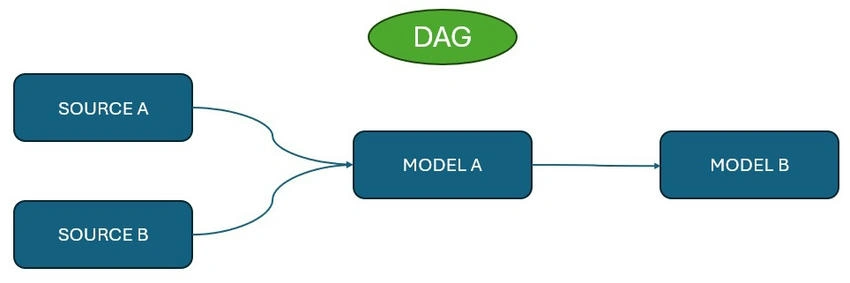
Below are some essential commands to navigate and run models based on dependencies.
| Command | Description |
|---|---|
| +filename | Selects the specified model (filename) along with all upstream (parent) dependencies. |
| +filename+ | Select the specified model (filename) along with both upstream (parent) and downstream (child) dependencies. |
| @filename | Selects the model (filename) and all dependencies connected to it, both upstream and downstream. |
| dbt run --select +filename+ | Executes the dbt run command while selecting the model (filename) and all its dependencies (upstream and downstream). |
Debugging and Version Control
- Debugging: Use the dbt debug command to verify that your dbt project is connected to the database correctly.
- Version Control: dbt integrates with Git for version control. You can create new branches, commit changes, and push them to a repository, ensuring collaboration and tracking of transformations.
Best Practices for Using dbt
- Incremental Models: When dealing with large datasets, use incremental models to load only the new or modified data.
- Testing: Use dbt tests to ensure data quality and catch potential issues early.
- Documentation: Generate and maintain documentation for your dbt models using dbt docs generated to improve collaboration and maintainability.
Conclusion
dbt is a powerful tool for transforming data within your warehouse, simplifying the data pipeline process, and making it more efficient. By automating and versioning data transformations, dbt enables teams to scale their data workflows while maintaining consistency and accuracy. With its support for incremental processing, model dependencies, and easy integration into existing workflows, dbt is an essential tool for modern data engineering teams.
Join the conversation! Your thoughts help the community grow.